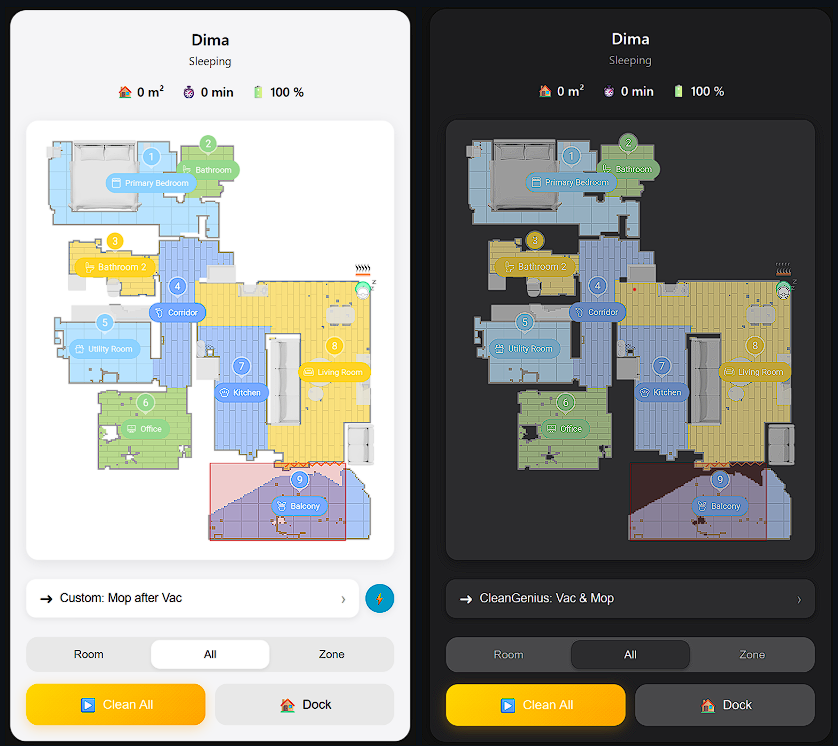
I’ve been working on a custom Lovelace card for Dreame vacuum cleaners, and I’m excited to share the first version with you all.
While existing map cards are great, I wanted something that felt closer to the native Dreame app experience—smoother animations, better visuals, and easier control directly from the dashboard.
Features
Native Look & Feel: Designed to mimic the official Dreame app UI.
Live Map Updates: Real-time position tracking with smooth rendering.
Room Cleaning: Easily select specific rooms to clean.
Zone Cleaning: Support for zone selection (coming/in-progress).
Custom Theming: Supports both Light and Dark modes.
Performance: Built with React & TypeScript for a snappy experience.
Nice job. - But how do i get the colored mad ?
i only see the option to get the greyd map that keeps updating.
its not looking like the images you show, and its without room names.
Well done! Finally a dreame card that resembles all the features in a neat ui.
Would it be possible for you to also add the cleaning cycles button that opens in the oem app when in room cleaning mode? Or is it there but I haven’t found it, yet? I’m using this quite a lot in the original app.
Thank you so much for a great card!. The battery indicator is not working as expected. It shows 0% no matter what. I am not a coder but do you know how I can fix this?
Excellent work! I have an L50 Ultra and for some reason i'm unable to select any rooms from the map. I can select them from the "List" option and it recognizes the correct rooms. Do i need to manually add some parameters to the card yaml-file, or is there a bug that is preventing the room selection via the map to work?
Is there a bug in the card? Every time if I select a room and click “Clean” if defaults back and does not start a clean at all. I now only have a nice view but cannot start a clean! Other settings do work though.