[Custom Component] Aquatlantis Ori Integration

Hi everyone!

I’ve built a custom Home Assistant integration for the Aquatlantis Ori smart controller.
The Ori controller can manage lighting for aquariums or terrariums and can connect to various sensors.

With this integration, you can control supported lights directly from Home Assistant and (if available) monitor sensor readings.
:bulb: What It Does

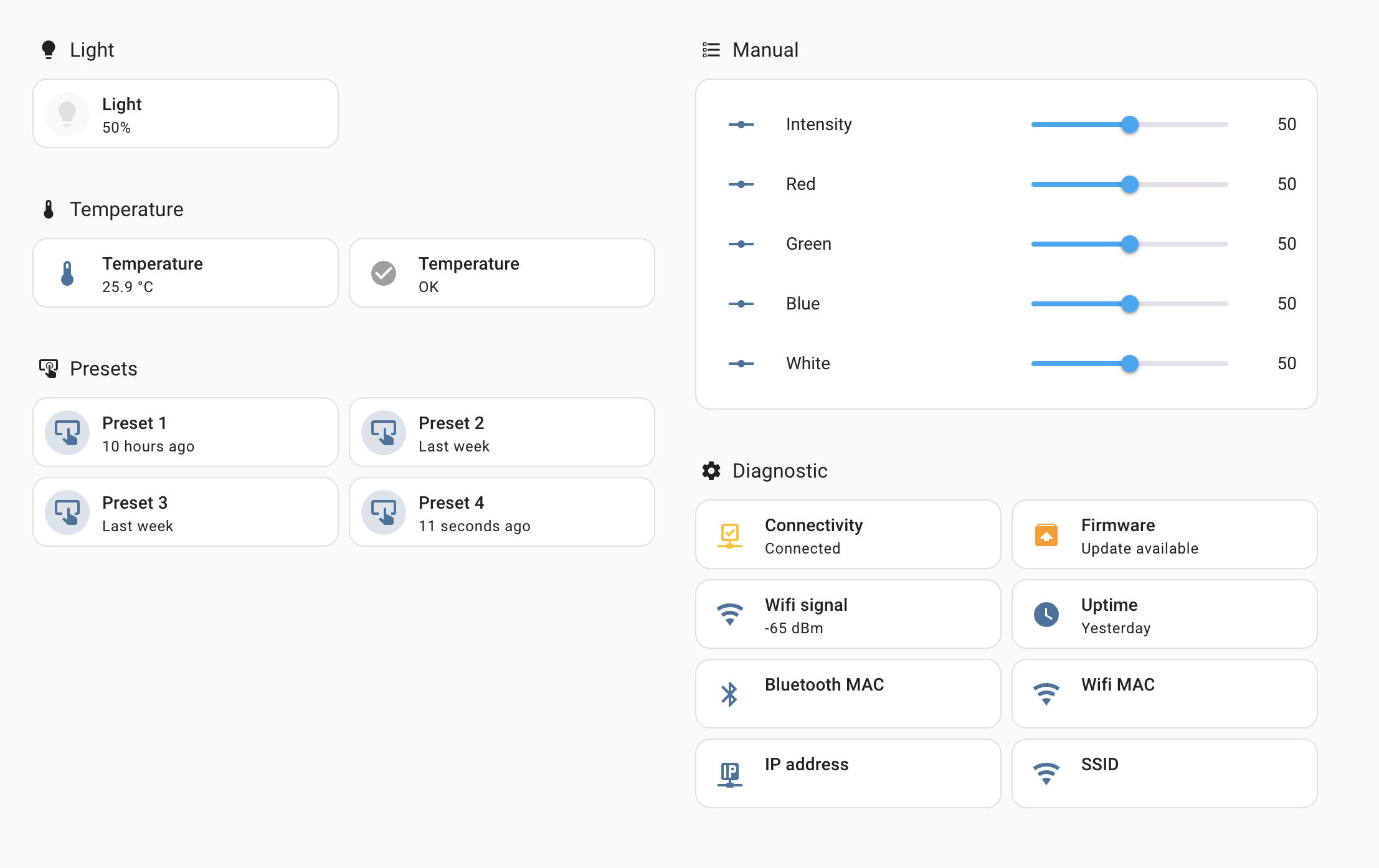
  • Manual light control: Adjust overall Intensity, as well as Red, Green, Blue, and White channels individually.
  • Sensor monitoring: When supported, see readings like water temperature and device connectivity status.
  • Diagnostics: View Wi-Fi signal, firmware version, uptime, MAC/IP address, SSID, and more.

:bulb: Light Compatibility

Light Type Status Notes
RGBW Ultra :white_check_mark: Fully Supported Complete RGBW control
Easy LED :warning: Likely Supported Should work, but not fully tested
UV Ultra :x: Not Supported Not compatible at the moment

:thermometer: Sensor Compatibility

Sensor Type Status Notes
No sensor :white_check_mark: Supported Basic light control
Temperature sensor :white_check_mark: Supported Water temperature monitoring
Air temperature/humidity :x: Not Supported Not compatible right now

:inbox_tray: Installation via HACS

This integration can be easily installed using HACS

:speech_balloon: Feedback & Feature Requests

If your device or sensor isn’t supported yet, reach out — I can likely add support with your help in testing.
If you encounter bugs or want to request features, please open an issue there.
All feedback is welcome to make the integration better!

Repository: github.com/golles/ha-aquatlantis-ori
2 Likes

Great integration. Not a moment to soon. Just bought a Splendid 120x50. Now I have all my aquarium devices in Home Assistant and I can use Home Assistant to control the licht instead of the aquatlantis app. Thanks!

1 Like

@golles
I’m still using the integration. It works really nice. I have only one question which I just posted on github: ’ Switch between manual and auto’. It would really be nice if it’s possible to switch between the manual mode and the auto mode. My aquarium normally runs on its own program in the auto-mode. But once in a while (mainly in the weekends) it’s nice to have the lights on a little longer. I do this with the manual mode and the presets.

I don´t know if you are still working on the project, but it would really be nice if this is possible.

Hi @eleemr, let me answer that question here.

It’s actually quite easy to switch between these modes, either manually in the UI or with an automation. Let me share both ways.

Manual:
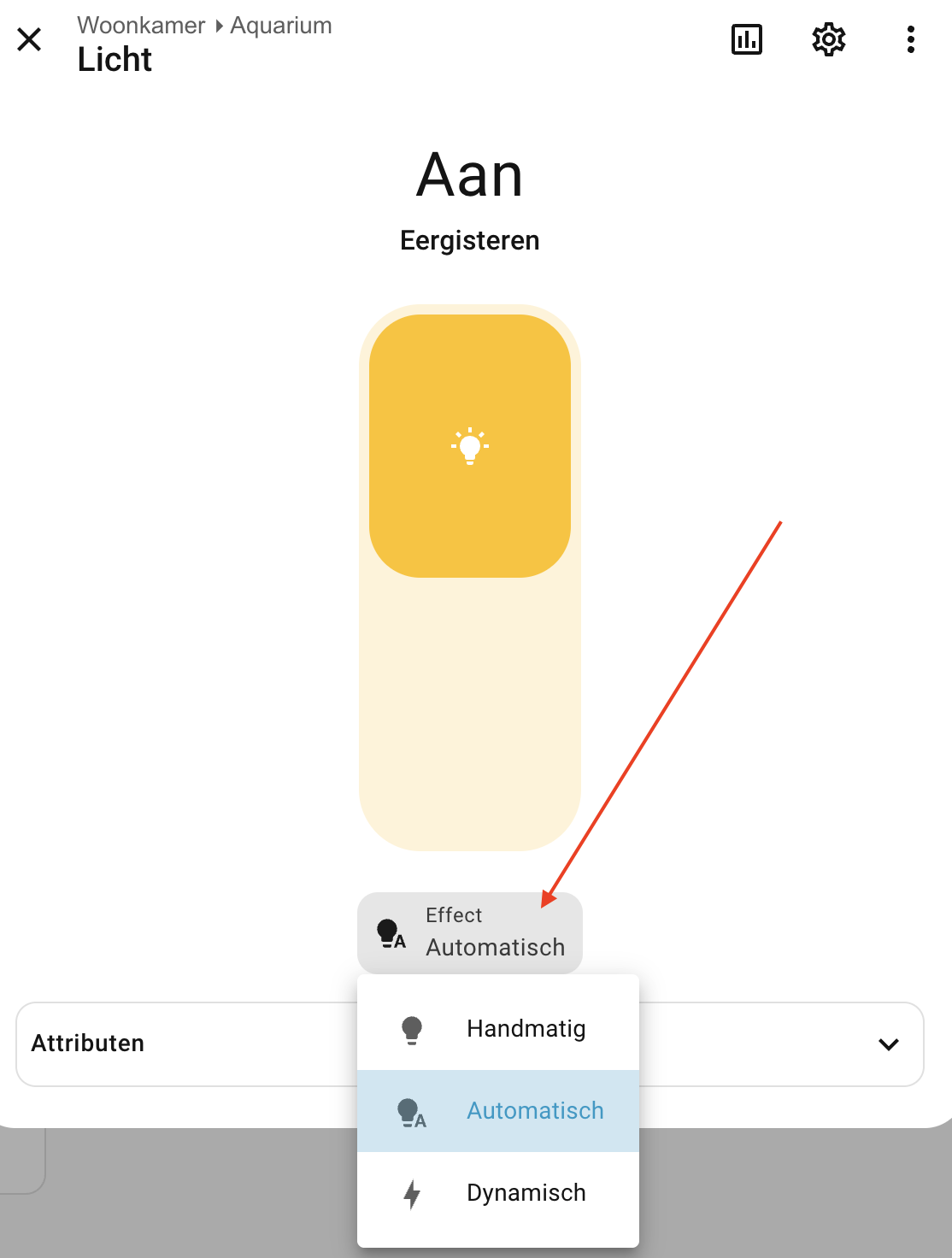
In the more info dialog of the light, there is an effect button. This button allows you to switch manually between the 3 effects (the 3rd is the lightning effect)

Automation:

action: light.turn_on
target:
  entity_id: light.aquarium_licht
data:
  effect: automatic

The effect can be either automatic, manual, or dynamic.

If you want to go really fancy, you can also change your schedule on the weekends (and back on Monday). I’ve made 2 buttons to switch between my normal mode and a normal mode with moonlight:

template:
  - button:
      - name: Aquarium schema
        press:
          action: ori.set_schedule
          data:
            device_id: 753a24aab6441d1d21381fa051beb10e
            schedule:
              - 8,59,0,0,0,0,0 # Nacht: alles uit
              - 9,0,15,15,15,20,20 # Zachte zonsopkomst
              - 10,0,40,30,30,35,50 # Rustige opbouw
              - 12,0,70,40,40,45,70 # Piek
              - 15,0,70,40,40,45,70 # Kortere piekperiode
              - 16,0,60,35,35,40,60 # Begin van afbouw
              - 17,0,45,25,25,30,45 # Gouden uur / avondlicht
              - 18,0,25,15,15,20,25 # Schemer
              - 19,0,0,0,0,0,0 # Nacht

      - name: Aquarium schema met maanlicht
        press:
          action: ori.set_schedule
          data:
            device_id: 753a24aab6441d1d21381fa051beb10e
            schedule:
              - 8,59,0,0,0,0,0 # Nacht: alles uit
              - 9,0,15,15,15,20,20 # Zachte zonsopkomst
              - 10,0,40,30,30,35,50 # Rustige opbouw
              - 12,0,70,40,40,45,70 # Piek
              - 15,0,70,40,40,45,70 # Kortere piekperiode
              - 16,0,60,35,35,40,60 # Begin van afbouw
              - 17,0,45,25,25,30,45 # Gouden uur / avondlicht
              - 18,0,25,15,15,20,25 # Schemer
              - 19,0,0,0,0,0,0 # Nacht
              - 20,0,10,0,0,10,0 # Maanlicht
              - 22,0,0,0,0,0,0 # Nacht

You can find your current schedule in the light attributes:

{{ state_attr("light.aquarium_licht", "schedule") }}

Note my HA is in Dutch, so entity names will be different

I hadn’t seen that yet. Just took a look and it works good and very easily. Now I just need to figure out how to link two of them together in HA. I’ve got two rgbw lights above my aquarium, so I also have two ori controllers.

The dutch is no problem. I’m also dutch.

You could try to create a light group helper and put both lights in there. If that works, that would be the easiest solution to control both.

Otherwise, you might want to only control 1 light and use an automation to keep the other light in sync.

Let me know what works, I’m curious.

Sorry for the slightly delayed response, but it’s been a bit busy the past few weeks. I only got around to trying it out today.

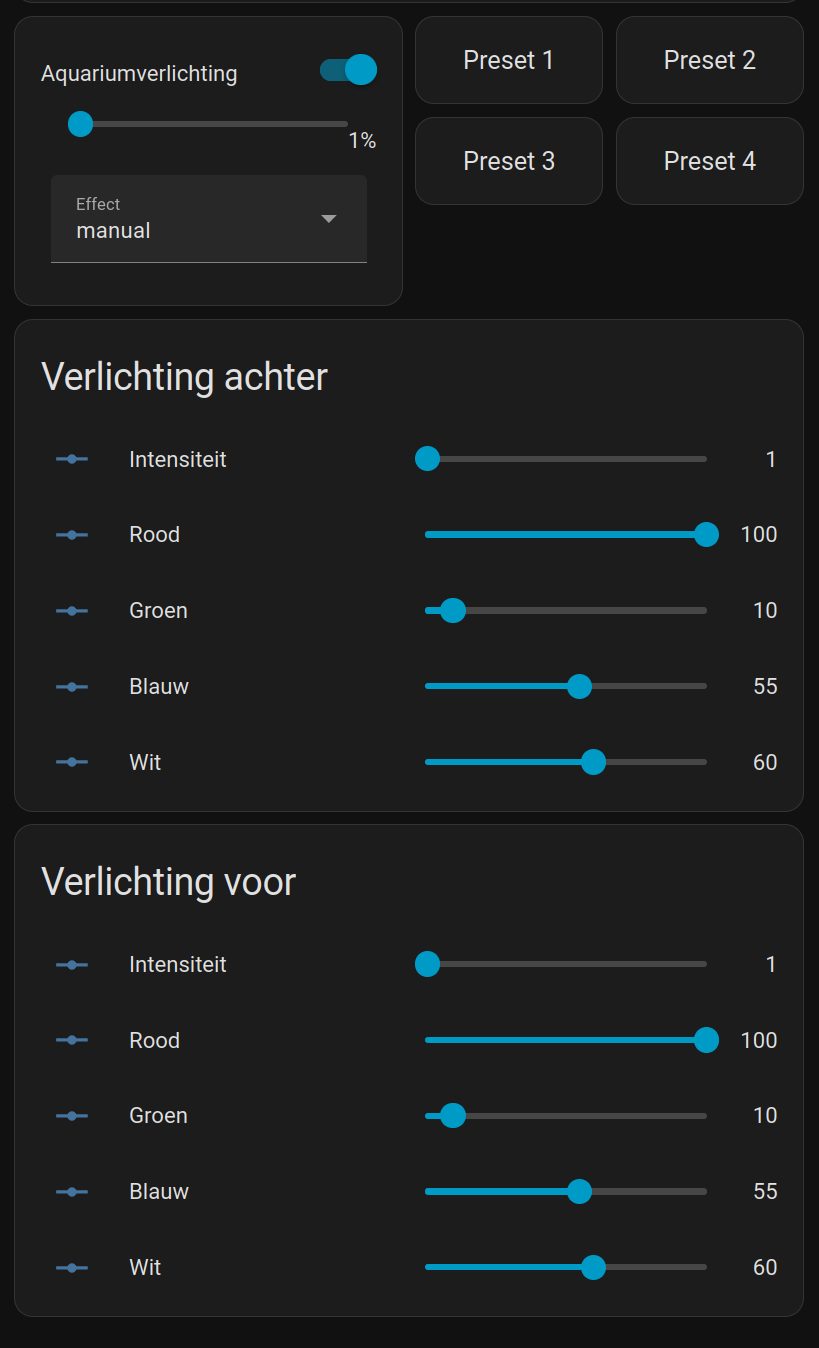
The idea with the Group Helper was indeed a good solution. I first grouped the lighting. That worked, but I always had to tap the card first before I could select the effect. That was solved by using the Light Entity Card via HACS.

After that, I also grouped the preset buttons. That worked perfectly right away. So the same can be done for all the other buttons within this integration as well. Now I just need to come up with something to group the Reds, Greens, Blues and Whites. In Home Assistant, that is a number entity. As far as I have been able to find, there is no Group Helper for that.

Happy to hear that this seems to work.

Do you think the RGBW and intensity sliders are useful? I copied them from the ORI app, but they aren’t really the HA way. As we’re able to control the light color directly on the light entity eg:

action: light.turn_on
target:
  entity_id: light.aquarium_light
data:
  brightness_pct: 80
  rgbw_color: [0, 0, 0, 255]  # Pure white

Also the values become unavailable when the automatic schedule is active.
(This would also allow to make a lot more presets in HA, eg. with a template button).

I do find the sliders quite convenient. Now I can manually adjust the individual colors from Home Assistant. You can also create an unlimited number of presets that way. Of course, for an aquarium that’s not really necessary, because you want a stable situation there. I mainly use the manual setting now to occasionally keep the light on a bit longer in the evening. And that works very nicely via Home Assistant.

Now I just need to find the time to link the color sliders of the two lamps together so I have one set of sliders to control both lights at once.