The bug with device tracker was fixed
Yes, after integration reload or Home Assistant restart - The airport field clears
2 Likes
Any reason we don’t keep it like the additional tracked? That means if I want to track a home airport I need to automate that on every HA restart?
Thank You for the fix!
1 Like
It would require more time to develop this new airport tracking feature. It is in my plan for next releases
v1.31.0 Released
Changelog
- Added airline_icao and airline_iata to flights for tracked airport as requested Feature Request: Add airline_icao attribute to flight data · Issue #181 · AlexandrErohin/home-assistant-flightradar24 · GitHub
- Added saving airport tracking after restart/reload HA. After this update - the next HA restarts will not clear the airport tracking
3 Likes
v1.31.1 Released
Changelog
- Fixed error with Clear Additional Tracked Button Clear Additional Tracked Button · Issue #190 · AlexandrErohin/home-assistant-flightradar24 · GitHub
- Fixed time_real_departure and time_estimated_departure in airport flights
This is a great custom component. I have an automation that provides an alert when a airplane enters the area which works fine. I would like to modify this for certain conditions e.g. low altitude, particular flights. I have added the following as a condition in the automation:
condition: template
value_template: '{{ trigger.event.data.altitude < 10000 }}'
or:
condition: template
value_template: '{{ trigger.event.data.aircraft_registration == ''G-ABCD'' }}'
…but when they are triggered, I get the following error message:
Error: In 'template' condition: UndefinedError: 'dict object' has no attribute 'event'
Grateful for any pointers on what I’m doing wrong. Thanks.
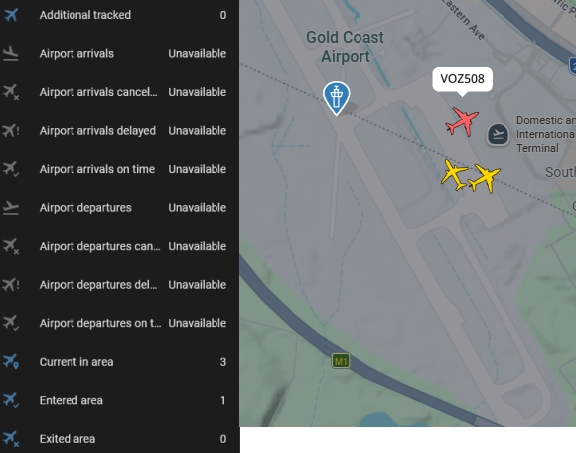
Hi everyone, I’m excited to try to get this working but I’m not having a lot of luck with the airport I am trying to monitor - It might be me!
The airport is ‘OOL - Gold Coast Airport, Australia’
Only 4 sensors are available and they are working ok.
Is it a local config issue that I am not seeing the arrivals and departures information in HA? (Which is showing ok on Flightradar24).
Thanks.
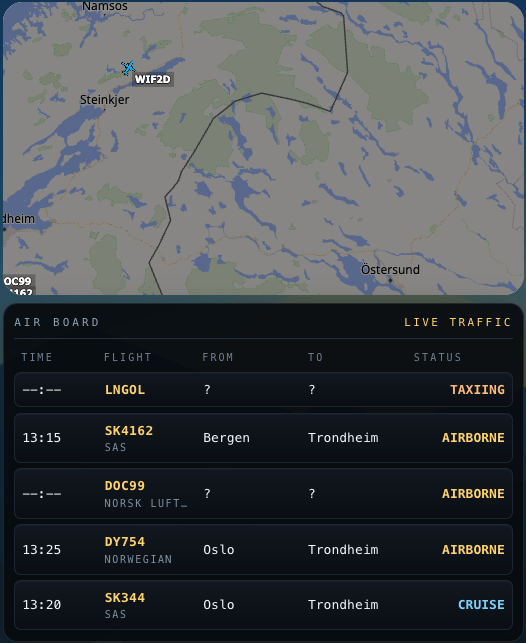
I didn’t really like the simple markdown output for the flight information, it felt a bit messy and hard to read.
So instead I used a conditional card together with tailwindcss-template-card to render a small airport-style board. The conditional card hides the board when there are no flights, and the template card makes it possible to build a cleaner layout with columns (time, flight, from, to, status).
This way the card stays compact and looks a bit more like a real arrival/departure display.
type: vertical-stack
cards:
  - type: iframe
    url: >-
      https://globe.adsb.fi/?enableLabels&trackLabels&zoom=7&hideSideBar&lat=63.26674861441635&lon=13.243913920819967&hideButtons
    aspect_ratio: 100%
    hide_background: true
    card_mod:
      style: |
        ha-card {
          aspect-ratio: 16 / 9;
        }
  - type: conditional
    conditions:
      - condition: numeric_state
        entity: sensor.flightradar24_current_in_area
        above: 0
    card:
      type: custom:tailwindcss-template-card
      entity: sensor.flightradar24_current_in_area
      content: >
        {% set flights =
        state_attr('sensor.flightradar24_current_in_area','flights') |
        default([], true) %}

        <div class="rounded-2xl border border-white/10 bg-[rgba(6,10,14,0.92)]
        p-3 font-mono shadow-[0_10px_30px_rgba(0,0,0,0.35)]">

          <div class="mb-3 flex items-center justify-between border-b border-[#24303d] pb-2">
            <div class="text-[11px] uppercase tracking-[0.28em] text-[#8ea0b3]">
              Air Board
            </div>
            <div class="text-[11px] uppercase tracking-[0.22em] text-[#ffd36a]">
              Live traffic
            </div>
          </div>

          <div class="grid grid-cols-[72px_88px_minmax(0,1fr)_minmax(0,1fr)_92px] gap-x-3 px-2 pb-2 text-[10px] uppercase tracking-[0.22em] text-[#6f8092]">
            <div>Time</div>
            <div>Flight</div>
            <div>From</div>
            <div>To</div>
            <div>Status</div>
          </div>

          <div class="flex flex-col gap-1.5">

            {% for f in flights[:5] %}
              {% set dep = f.time_scheduled_departure | timestamp_custom('%H:%M') if f.time_scheduled_departure else '--:--' %}
              {% set alt = f.altitude | int(0) %}
              {% set spd = f.ground_speed | int(0) %}

              {% if alt > 30000 %}
                {% set status = 'CRUISE' %}
              {% elif alt > 0 %}
                {% set status = 'AIRBORNE' %}
              {% elif spd > 30 %}
                {% set status = 'TAXIING' %}
              {% else %}
                {% set status = 'SCHEDULED' %}
              {% endif %}

              <div class="grid grid-cols-[72px_88px_minmax(0,1fr)_minmax(0,1fr)_92px] items-center gap-x-3 rounded-lg border border-[#1d2630] bg-[linear-gradient(180deg,rgba(18,24,32,0.98),rgba(10,14,20,0.98))] px-2 py-2 text-[13px] shadow-[inset_0_1px_0_rgba(255,255,255,0.03)]">

                <div class="truncate text-[#f2f5f7]">
                  {{ dep }}
                </div>

                <div class="min-w-0">
                  <div class="truncate font-semibold tracking-wide text-[#ffd36a]">
                    {{ f.flight_number or f.callsign or 'UNKNOWN' }}
                  </div>
                  {% if f.airline_short %}
                    <div class="truncate text-[10px] uppercase tracking-[0.16em] text-[#7f90a1]">
                      {{ f.airline_short }}
                    </div>
                  {% endif %}
                </div>

                <div class="truncate text-[#f2f5f7]">
                  {{ f.airport_origin_city or '?' }}
                </div>

                <div class="truncate text-[#f2f5f7]">
                  {{ f.airport_destination_city or '?' }}
                </div>

                <div class="truncate text-right font-semibold
                  {% if status == 'CRUISE' %}
                    text-sky-300
                  {% elif status == 'AIRBORNE' %}
                    text-[#ffd36a]
                  {% elif status == 'TAXIING' %}
                    text-orange-300
                  {% else %}
                    text-[#8ea0b3]
                  {% endif %}
                ">
                  {{ status }}
                </div>

              </div>
            {% endfor %}

          </div>
        </div>
grid_options:
  columns: 15
  rows: auto
1 Like