Is this custom component down atm, I haven’t had a flight alert from automation since 23rd july
Try changing
{{ flight.airport_origin_city }}{%if flight.airport_origin_city %}<img src="[https://flagsapi.com/](https://flagsapi.com/){{ flight.airport_origin_country_code }}/shiny/16.png" title='{{ flight.airport_origin_country_name }}'/>{% endif %} -> {{ flight.airport_destination_city }}{%
for
{{ flight.airport_origin_city }}{%if flight.airport_origin_city %}<img src="https://flagsapi.com/{{ flight.airport_origin_country_code }}/shiny/16.png" title='{{ flight.airport_origin_country_name }}'/>{% endif %} -> {{ flight.airport_destination_city }}{%
1 Like
Please try the latest version of the integration
v1.34.4 Released
Changelog
- Added requests limiting to FR24
After integration installation or reload and after every HA restart sensors from this integration may stay Unknown or Unavailable for some minutes. It is because of downloading information from FR24
Actually it is forever.
No data at all.
I even changed my location to heathrow Airport and no data after24 hours
This all used to work very well and I use ut against my own input from my ABS receiver.
State stays at unknown
Changing location to area where there are more flights - leads to the fact that the sensors will be in Unknown or Unavailable state longer, since it takes more time to load all the information from FR24. FR24 now have limits for requests - so now it takes more time to download all info. If you want to track an airport - it is better to use Track Airport - tracking an airport by creating area - would leads a lot of blocks from FR24
The state was shown as unavailable along with every sensor and there were errors in the log that that showed no http connection, which led me to suppose the update had somehow become corrupted. So I deleted the integration and uninstalled FR24.
Updated the Core and OS system of HA as there was an update ready to install.
Installed FR24 latest version, loaded the integration and all is working now.
v2.0.0 Released
New feature
- Built-in Lovelace card with an OpenStreetMap of your monitored area, aircraft markers, optional flight tracks, and a list of flights currently in the area.
GitHub - AlexandrErohin/home-assistant-flightradar24: Flightradar24 integration for Home Assistant · GitHub

Breaking change
- Most tracked is no longer a config-flow option or dedicated sensor. Use the Most tracked switch entity; flight list lives in that switch’s flights attribute. If Most tracked was enabled via options before: turn on the Most tracked switch.
Changelog
- Search flight fixes
- Config unload cleans hass.data[DOMAIN][entry_id]
- Faster integration startap with partial info
1 Like
v2.1.0 Released
What’s Changed
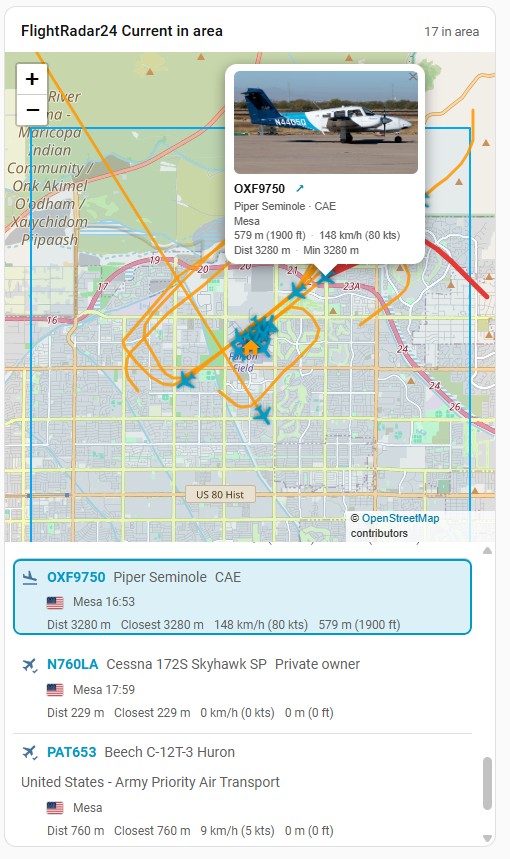
Flightradar24 Map Card
- List ↔ map selection — Click a flight in the list to highlight it, open the marker popup, and draw its track. Click a map marker to highlight and scroll to the matching list row.
- Flightradar24 links — Flight numbers in the list and an icon in the popup open the flight on Flightradar24.
- Richer flight list — Each row shows flight number, aircraft type, airline, origin → destination with times, plus distance / speed / altitude.
- Popup layout fix — Compact photo-on-top layout with consistent padding so content no longer overflows the popup.
zoom— Optional fixed zoom level (1–19). If omitted, the map auto-fits the monitored area (useful for static and e-ink dashboards).icon_size— Aircraft marker size in pixels (12–64, default28).show_area_center— Marks the center of the monitored area — the latitude/longitude configured for this Flightradar24 integration entry (the middle of your radius)- Mouse wheel zoom — Enabled on the map; dragging remains disabled.
Options / login handling
Saving Flightradar24 credentials in the options flow is more resilient:
- HTTP 429 (rate limit) — Credentials are still saved; a warning is logged and login is retried later.
- HTTP 401/403 — Clear invalid-auth error; save is blocked.
- Incomplete username/password → clear error message.
- Other login failures → clear error message.
- Error strings added for all supported languages.
2 Likes
Thank you very much! That worked 
v2.1.1 Released
Break change
- Removed the custom
last_updatedattribute from sensors / most-tracked switch. Templates or automations that readstate_attr(..., 'last_updated')need to use Home Assistant’s built-inlast_updated/last_changedinstead.
Fixed
- Recorder no longer grows on every poll when area counts stay unchanged (e.g.
0) — state is written only when the value or recorded attributes actually change (#308, #312) - Map card flight list no longer rebuilds via
innerHTMLon each update — flags and rows update in place, fixing flag flicker (#306) - Map card popup text is readable again on dark / glass themes (forced light popup surface) (#310)
- Session recreate pauses between attempts and keeps the current session if login fails, reducing HTTP 429 during bot-mitigation recovery (#254)