ou came just at the right time!!! I’m actually looking into getting a system these days, and now I know I can also consider EP Cube. Thanks a lot! I don’t have a system yet, so unfortunately I can’t help with testing right now, but I definitely will if I end up installing it. (I’m Italian too)
Hi,
I am currently in the middle of my home solar project, but as i work away from home, I can only work on it during my holidays, to date i have installed my EP Cube and I am just using it on TOU mode to charge my battery in Off-peak and to provide so back-up, I also installed Home assistant Green which i am just learning, so i was pleased when i saw you intergration for the EP Cube and as a beginner I found it surprisingly easy following you setup instructions to download your intergration. Which just worked with no issues. So thanks again for your time developing this intergration. Just one scaling that you might check is “sensor.ep_cube_home_flow_power” could be out by 2 decimal places.
Thanks again
Hugh
what version of the integration do you have?
attach original photo of the epcube screen (circling the sensor) and also screen of the integration with the sensor…
not all of us have all the sensors working.
These sensors do not come directly from EPCUBE but are sensors created by me, based on the battery kwh sensor (its capacity), I tried to calculate how much ENERGY comes out and how much comes in, this calculation does not take into account the home consumption, because the overall battery capacity data already tells us if energy is coming out or coming in
energy is cumulative, it doesn’t return to 0 every day, I don’t know how other systems work.
Thanks for creating this EP Cube custom HA integration! I came across this integration last month and I am try to generate bearer token. I’ve tried many times and over the course of the month on & off, but have had no success in generating the token. I get a json error msg below. I’m in the US and have tried Safari, Brave and Firefox browsers (to eliminate browser related issues). Any suggestions on how to move forward? Thx.
JSONDecodeError: Expecting value: line 1 column 1 (char 0)
Traceback:
File “/mount/src/epcube-token/app.py”, line 74, in
rep_data = r.json()[“data”][“repData”]
^^^^^^^^
File “/home/adminuser/venv/lib/python3.12/site-packages/requests/models.py”, line 980, in json raise RequestsJSONDecodeError(e.msg, e.doc, e.pos)
unfortunately I can’t sniff the right site that contains the APIs that the original app uses in US because I’m in EU, I tried with the link similar to the one in EU, but it’s not right
I just got this and it’s been working great so far. I can use it to automate load shedding if battery SOC is low along with smart plugs or that sort of thing.
Question - does anybody have mapped out the possible states of the:
General State - seems to just be 1 normally? I assume this goes to some other number if the system is in Fault or providing backup power?
System Status - seems to be 4 if running from the grid and 6 if solar inverter is providing power?
Work Status - I’ve never seen this as anything other than 2
It would be helpful to have text states for these to display states such as when the grid is down or whatever.
Unfortunately, there’s no official documentation.
The integration is based on APIs dedicated to iOS/Android apps. What you see is only what I’ve been able to understand; some sensor translations may also be incorrect.
I did see a grid outage earlier today and the General State went to 0, so I believe this is being used by the EP Cube App to determine the “Normal” or “Fault” text in the upper left with 1 being “Normal”.
For the System Status all I’ve seen so far is that it seems to be 4 when the inverter is active in some form either charging or discharging, and 6 when the inverter is inactive (i.e. the battery is 100% and just running from the grid). The Work Status I’ve never seen change from a 2.
One issue I did run into is that the States seem to go unknown every hour or two for about 30 seconds. I had to create a helper that basically keeps the last known value persistent for up to 2 minutes to deal with this or it tends to jack with automations.
template:
  - sensor:
      - name: "EPCube General State Persistent"
        unique_id: epcube_status_persistent
        state: >
          {% set val = states('sensor.epcube_status') %}
          {% set invalid = val in ['unknown', 'unavailable', ''] %}
          {% set last_valid_state = states('sensor.epcube_status_persistent') %}
          {% set last_update = as_timestamp(states.sensor.epcube_status.last_changed, 0) %}
          {% set age = now().timestamp() - last_update %}
          {% if not invalid %}
            {{ val }}
          {% elif age < 120 %}
            {{ last_valid_state }}
          {% else %}
            unknown
          {% endif %}
        attributes:
          raw_state: "{{ val }}"
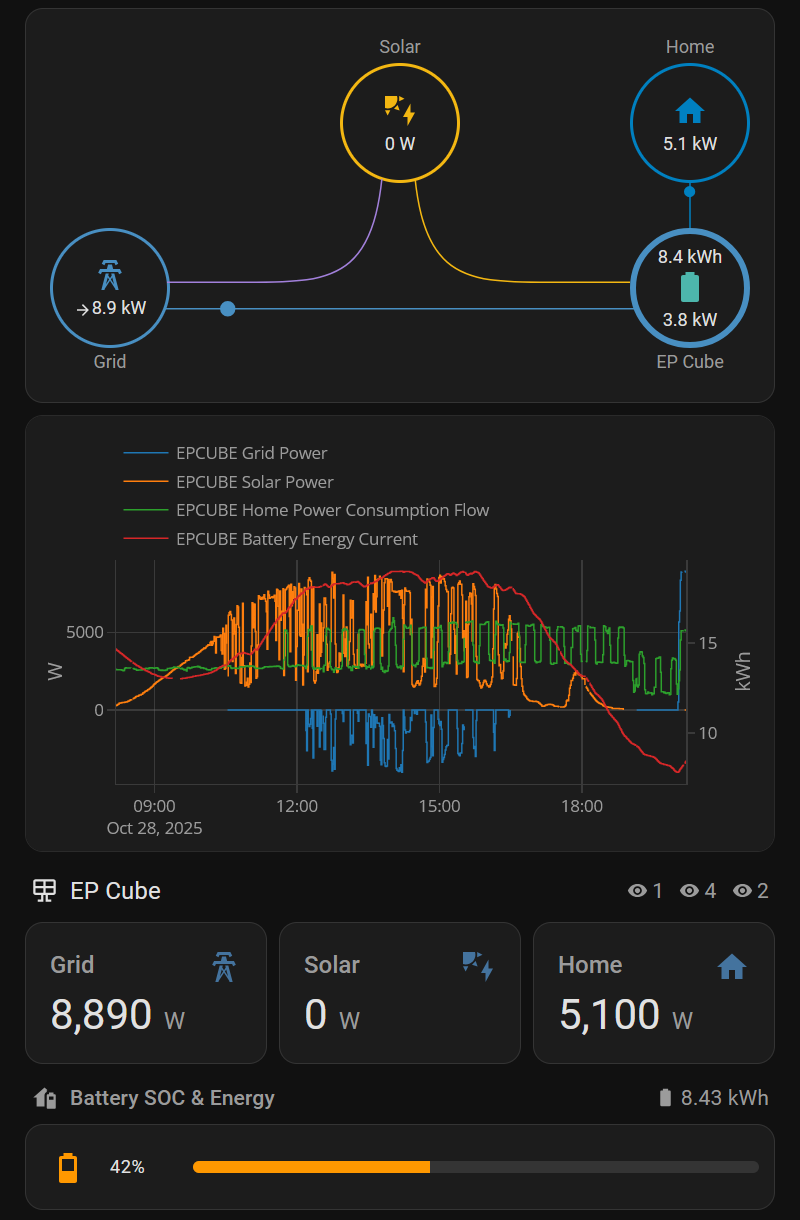
Your dashboard for the EP Cube is very impressive is it possible to share how you created this? I have the official Canadian Solar integration installed.
 [CUSTOM INTEGRATION] EP Cube – Home Assistant Integration
 Features
 Real-time monitoring: solar production, consumption, battery, grid, backup, EV, and more
 English &
  Italian
 Required: Bearer Token
 Use this tool to generate the token:
 GitHub - Bobsilvio/epcube-token: Create Token for API
 GitHub - Bobsilvio/epcube: Custom Home Assistant integration for monitoring the EP Cube energy storage system.
 Feedback and testing are very welcome if you own an EP Cube system!