I have a house with a central heating unit (heat pump) and 9 distinct areas. But the whole system is controlled via a room reference thermometer and outside temperature sensor with a heatpump.
If I were to configure this per room, should I break down the nominal heating power according to the design specs of the underfloor heating, or should I put the nominal heating power to the value of the heatpump for every room? Does the integration recognize a shared heat source if all are set to use the same energy meter?
And a feature request: Thermal Balancing: With central heating control (no / fully open TRVs, temperature fully controlled by outside temp/heatcurve and optionally reference room), it would be great to get an overview which rooms overheat (exceed the temperature of the reference room / set by central thermostat), and which rooms underheat (do not reach target temperature). For the latter this is an indication the heatcurve needs to be adjusted (or flow raised if possible); for the former it means flow would need to be reduced (via topmeter / flow adjustment).
Thanks for the kind words and the detailed question!
Home Performance was originally designed for individual electric heaters where you can measure when each room is heating and how much power it uses. Central heating with a shared heat pump is a more complex scenario that the integration wasn’t built for initially.
That said, you can still try it:
Use the design specs of your underfloor heating per room as the heater power (not the total heat pump power)
The K coefficient will be approximate because:
All zones will share the same heating entity (your heat pump), so they’ll all show the same heating time
We can’t know exactly when each specific room receives heat
For the energy meter: if you use the same meter for all 9 zones, each zone will display the total consumption of the heat pump (misleading). I’d recommend leaving it empty - the integration will estimate energy based on declared power × heating time, which gives a reasonable per-room approximation.
About Thermal Balancing: That’s a really interesting idea! Detecting rooms that overheat vs underheat compared to a reference would be super useful for central heating optimization. I’ve created a feature request for this - it could become a dedicated module in a future version.
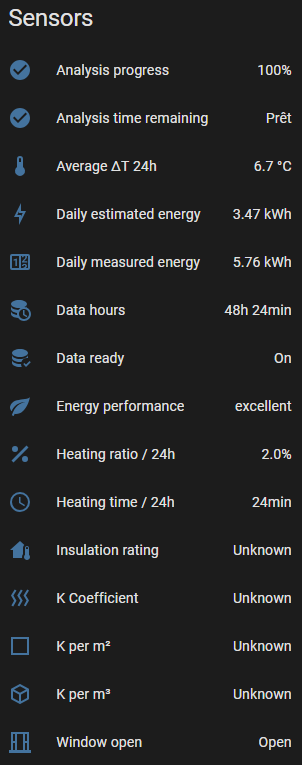
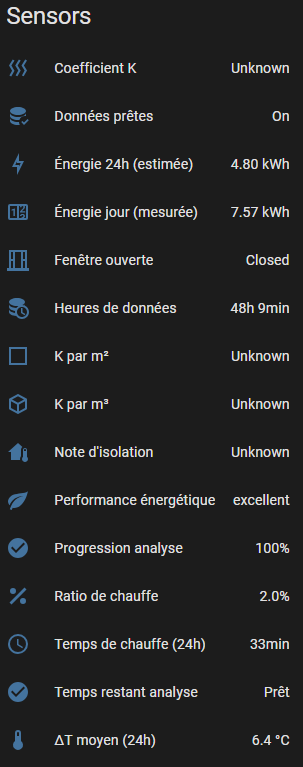
Other than ‘Performance énergétique - excellent’ what does it tell me?
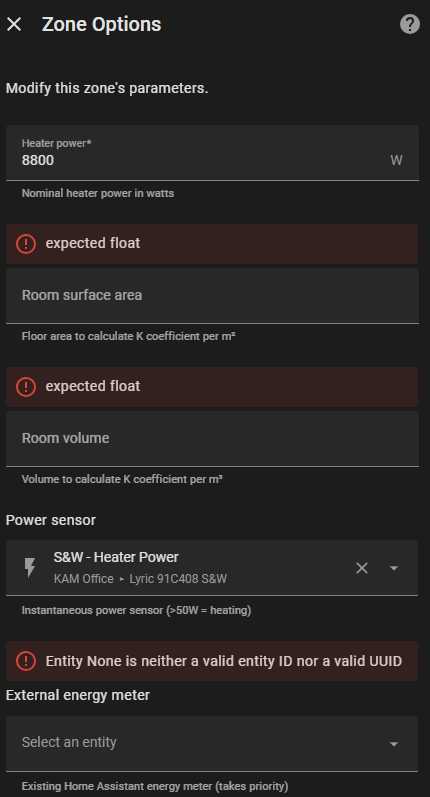
Do I need to enter the zone area (I can convert it from square feet to square meters, np) into the mix in order to get more meaningful results?
I definitely don’t have the zone volume (neither in cubic feet nor in cubic meters), but it looks like I can’t add one without adding the other as well:
Apologies for all these questions - I’d just like to see, if I can get it to work for one zone before I dive into adding the 2nd zone or split it up - as I mentioned above - into several sub-zones.
Thanks for the detailed feedback! I see several issues:
Why K coefficient is Unknown:
Your average ΔT is 4.3°C, which is below our 5°C minimum threshold. The integration needs at least 5°C difference between indoor and outdoor temperatures to calculate reliable K values. This is common in mild weather or well-heated homes.
Surface/Volume:
These are optional - you don’t need them for basic analysis
Surface gives you K/m² (useful for comparing rooms)
Volume gives you K/m³ (used for insulation rating)
You can estimate volume as: surface × ceiling_height (typically 2.5m or 8ft)
The “expected float” errors:
This looks like a bug in the options form. Can you try:
Delete the zone
Re-add it with surface/volume filled in during initial setup (not in options)
Card stuck on loading:
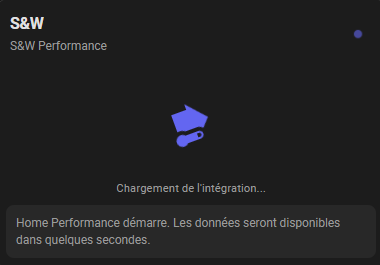
This happens because K is not calculated yet (ΔT too low). The card should show a “waiting” message instead of spinning forever - I’ll fix this.
Questions:
What are your typical indoor/outdoor temperatures?
When you have a cold day (ΔT > 5°C), the K should calculate automatically.
Can’t really comment on the ΔT values - as you might have guessed from previous comments, I live in the country of strange units, so I’m not 100% sure that this is actually a °C value or if its a °F value because the input values come in as °F (had this issue with another integration a little while ago).
Volumes are hard to estimate because the ceilings are between 8ft and 15ft - and too far off a regular kind of shape to even make an educated guess without a huge manual measuring exercise. (Maybe it’s time for a fancy laser measuring tool that will automagically calculate this - XMas is coming up after all).
Re. the temperature difference between in- and outdoors:
It’s currently 80.5°F (27°C) outside and 76.5°F (25°C) inside, so not even enough of a spread for the delta to be in F.
I’ll keep an eye on it.
I’ll keep an eye on the updates of the integration - and on the weather
@chairstacker For volume estimation with irregular ceilings:
Don’t stress too much about precision! Here are a few practical tips:
Use an average ceiling height - If your ceilings vary between 8ft and 15ft, use something like 10-11ft as an average. The K/m³ is meant for rough comparison, not scientific precision.
Rough room area × average height - For complex shapes, break the room into rectangles, sum the areas, then multiply by your average height estimate.
Quick conversion: 1 ft = 0.3048 m, so 10ft ceiling ≈ 3m
Volume is optional - If it’s too complex, you can skip it entirely! The main K coefficient (W/°C) works perfectly without volume. The K/m³ just helps compare rooms of different sizes.
Laser measurers - Yes, a good laser distance meter makes this much easier! Some even have area/volume calculation modes. Great Christmas gift idea
Quick update: I’m currently testing some fixes on my own installation, including better support for US users (Fahrenheit conversion, higher power limits, binary_sensor support). A new release should be coming soon! Stay tuned
Just a hint:
You might want to look into the delta-T calculation.
It shows ΔT > 5°C, but if this should result in the calculation of a K-Coefficient, it might actually display a Fahrenheit number here.
Also:
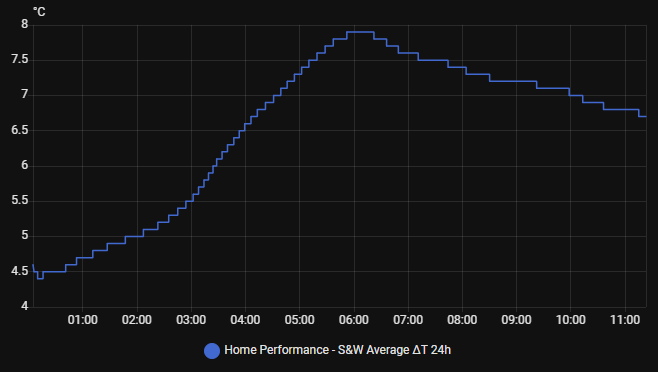
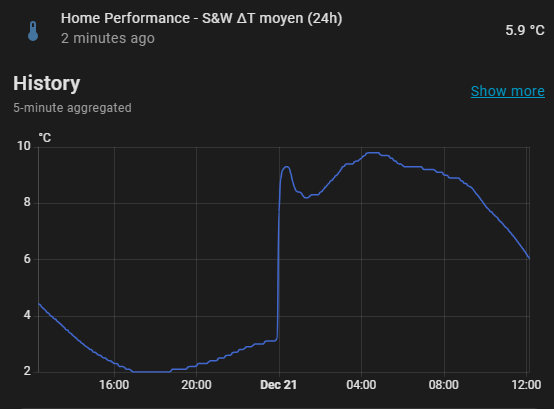
Nut sure where that jump at midnight is supposed to come from and what it means:
Thanks for the detailed feedback! I’ve created 3 issues based on your observations:
#16 - Entity names always in French (i18n not working)
#17 - ΔT sensor missing device_class (no °C to °F conversion)
#18 - Midnight jump in ΔT graph (reset vs rolling average)
I’m currently working on #16 and #17 - these fixes are almost ready and will be included in the next release. The translations will display properly in English, and ΔT will automatically convert to °F for fahrenheit users.
For #18 (the midnight jump), it’s a visual quirk but doesn’t affect calculations. It’s lower priority and planned for a future update.
Could you please advise on how I should set up your integration for my environment.
I have an multisplit air-to-air heating system in my house.
The heat pump itself is rated at 5400W output.
Inside the house I have 2 head units one in the Living Room and one in the hall. These are both rated at 2.5Kw each.
I have a sensor attached to the circuit which gives me the current power and accumulated energy used by the complete system. (Heat pump and head units combined).
I am really not sure how I should be configuring each zone.
I have also beer unable to reset of the history data as when I try and use the home_performance.reset_history service call I get the following error:-
‘Action home_performance.reset_history not found.’
3 card layouts to choose from: full, badge, or pill
Automatic Fahrenheit support
7-day rolling history + reset button
binary_sensor support for heating + 100kW limit
Various bug fixes (form validation, °F conversion)
A huge thank you to all the early testers for your valuable feedback, bug reports, and suggestions — this release wouldn’t have been possible without you!
Since you have a single power sensor for the whole system, here’s my recommendation:
Zone
Heater Power
Energy Sensor
Living Room
2500W
Leave empty
Hall
2500W
Leave empty
Without individual power sensors per zone, the integration will use estimated energy (declared power × heating time), which works fine for K coefficient calculation. Your global energy sensor can’t be split between zones unfortunately.
For the reset_history error:
The service home_performance.reset_history should exist. Please try:
Restart Home Assistant completely (not just reload)
Check in Developer Tools → Services and search for “home_performance”
Make sure you’re on the latest version (v1.2.0)
If still not working, can you share which version you have installed? (Check in Settings → Devices & Services → Home Performance)
I uninstalled the integration and re-installed and the reset history service is now there.
Instead of splitting my configuration into multiple zones how would I go about things if I just wanted one zone for the whole house?
Also, being a heat pump, the system varies the amount of power it uses. Sometimes it is using 1750 watts and other times only 500 watts. If I use estimated energy will it not just assume I am using the declared power for the full duration that the heating is on. So in the case of your answer to my original question 2500W x 12 hours = 30kwh. When in fact the whole system rarely uses more that 10kwh per day.
Absolutely, you can configure a single zone for your entire house! Just:
Zone name: “House” or “Whole House”
Indoor temperature sensor: Choose the most representative temperature sensor (living room, or an average if you have one)
Outdoor temperature sensor: Your outdoor sensor
Heating entity: Your heat pump climate entity
Heater power: See point 2 below!
This will give you one unified view of your home’s thermal performance.
2. Variable Power Heat Pumps - You’re Absolutely Right!
You’ve identified the key limitation of Estimated Energy. When you declare a fixed power (e.g., 2500W), the estimated energy calculation is:
Declared Power × Heating Time = Estimated Energy
For inverter heat pumps that modulate between 500W and 1750W, this would be very inaccurate!
The solution: Use a Power Sensor or Energy Sensor (optional fields in the configuration):
Option
What it does
Power Sensor
Real-time power measurement (W). The integration integrates this over time to calculate measured_energy_daily_kwh - the actual energy consumed
Energy Sensor
Direct energy counter (kWh) from your electricity monitoring (Shelly, Emporia, etc.)
If you have a power/energy monitoring device for your heat pump (which you should for variable-speed systems!), add it in Configure → select your power or energy sensor.
The integration will then show:
measured_energy_daily_kwh = Real consumption from power sensor
external_energy_daily_kwh = From energy sensor (if configured)
These will be much more accurate than the estimated energy for your inverter heat pump.
About the declared power: It’s still useful for calculating the K coefficient (thermal loss coefficient) even with variable power systems, as the K calculation uses actual heating time and temperature differentials rather than energy directly.
I am having some issues. I updated to 1.2, but using the reset history servie call doesn’t do anything , the card is still in Frence, and I do not get the three card options. Any suggestions?
OK, I managed to fix the card to get three options by removing and then re-adding the .js resource to the dashboard. But it is still in Frence (my interface is get to English).
Hey there! (A little “hello” is always appreciated, but no worries!)
Let me help you with those issues:
1. Card still in French
This is a known limitation - the card UI texts are currently hardcoded in French. I’m working on adding i18n support in v1.3. For now, apologies for the “immersive French experience”
2. Three card layouts not appearing
Try these steps:
Clear browser cache (Ctrl+Shift+R or Cmd+Shift+R)
Remove and re-add the resource:
Settings → Dashboards → ⋮ → Resources
Delete /home_performance/home-performance-card.js
Re-add it (or restart HA)
In your card config, add layout: badge or layout: pill to test
3. Reset history not working
Can you check your Home Assistant logs after calling the service?
Developer Tools → Logs
Look for [home_performance] entries
Also make sure you’re using the exact zone name:
service: home_performance.reset_history
  data:
    zone_name: "Your Zone Name" # Must match exactly
Also, not sure why the ΔT 24h entity still shows °C - shouldn’t that be °F by now?
If so, I assume the ΔT needs to be above 9°F instead of 5°C, correct?
And there’s not a single window open either in the whole house
Thanks for that. No problem about the card, I will wait patiently. I just assumed as the entities all we now in english. Thanks for the awesome integration.
Hey! Thanks for the detailed feedback. I’ve identified and fixed two bugs:
ΔT displaying in °C instead of °F
This was a bug! The sensor incorrectly used device_class=TEMPERATURE, which made HA apply the absolute temperature conversion formula (including +32). For temperature differences, the offset shouldn’t apply. Fixed in next release.
Window Open false positive
The detection algorithm was too sensitive for fast-cycling systems like US furnaces. I’ve improved it:
Increased thresholds (0.7°C/min while heating, 1.2°C/min otherwise)
Now requires 2 consecutive readings to confirm
Auto-closes after 5 min of stable temperature
K Coefficient = Unknown
This is not a bug - it’s working as designed. The integration requires at least 30 minutes of heating time per 24h period to calculate K reliably. Your furnace ran only 24 minutes (2%), which is below the threshold.
Fast-cycling US furnaces are very powerful and often heat in short bursts, which can be below our threshold. We’re considering making this configurable in a future release.
For now, you should see K values when:
It gets colder outside (more heating needed)
Or during extended cold spells
To help me better understand your heating system and potentially adjust the thresholds, could you share some info?
Furnace specs: What’s your furnace’s heating capacity? (usually in BTU/h, like 60,000 BTU/h or 80,000 BTU/h)
Cycle behavior:
How long does a typical heating cycle last? (e.g., 5-10 min?)
How many cycles per hour when it’s cold outside?
Temperature swing: What’s the typical temperature variation in your home between thermostat on/off? (e.g., 68°F → 72°F → 68°F?)
Thermostat settings: Do you use a fixed setpoint or a schedule with setbacks?
Understanding your setup will help me:
Determine if I should lower the minimum heating threshold for high-capacity systems
Validate if the “Excellent (inferred)” rating should apply to your case
Potentially add a configuration option for furnace-type systems



 3 card layouts to choose from: full, badge, or pill
 Automatic Fahrenheit support
 7-day rolling history + reset button
 binary_sensor support for heating + 100kW limit
 Various bug fixes (form validation, °F conversion)
 Release: