[Custom Integration] TMT Chow / ChowHUB gate controllers – v1.0.1 Stable

Hi everyone,

I’ve released the first stable version of a new custom Home Assistant integration for TMT Automation / TMT Chow (ChowHUB) gate controllers.

The integration exposes the gate as native Home Assistant entities and allows both normal gate control and configuration of supported ChowHUB controller parameters directly from Home Assistant.

Current stable version: v1.0.1

Features

  • Open, close and stop the gate
  • Live gate state and position
  • Battery monitoring
  • Native Home Assistant cover entity
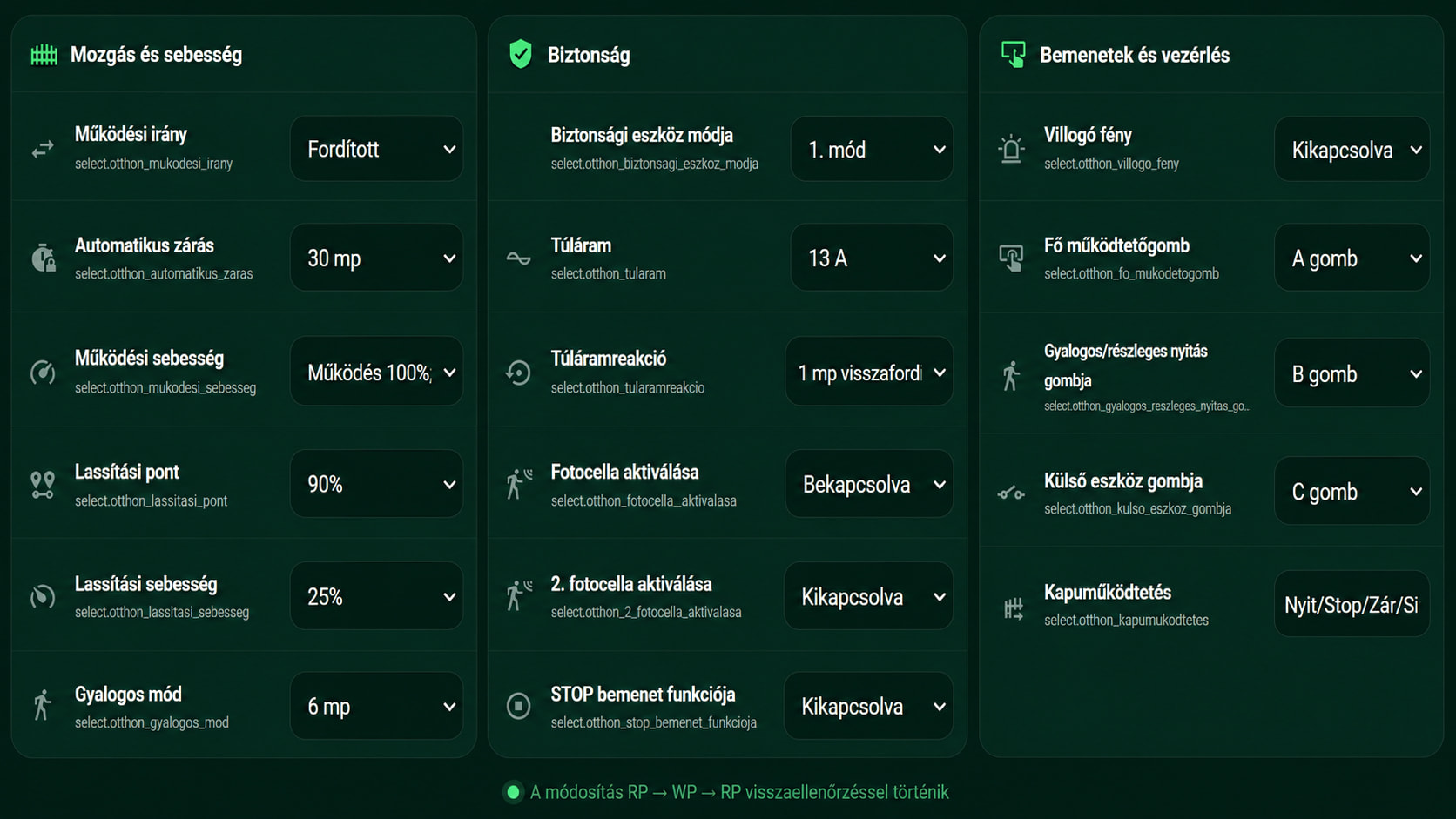
  • Supported ChowHUB controller settings exposed as select entities
  • Read and modify controller parameters from Home Assistant
  • Home Assistant Config Flow setup
  • Diagnostics support
  • Cloud push / MQTT runtime connection
  • Usable in automations, scripts and dashboards
  • 23 interface translations

The currently supported controller parameters include operation direction, automatic closing, safety device mode, operation speed, deceleration point and speed, overcurrent settings, pedestrian mode, flashing light, photocell settings, control button assignments, STOP input function and gate operation sequence.

Parameter changes are written to the controller and then read back again so Home Assistant reflects the confirmed controller state.

Installation

The integration can currently be installed through HACS as a Custom Repository.

Repository:

Latest release:

After installation and a Home Assistant restart:

Settings → Devices & services → Add integration → TMT Chow

Sign in with your TMT Chow account and select the gate you want to add.

Languages

The integration currently includes 23 translations: Bulgarian, Croatian, Czech, Danish, Dutch, English, Finnish, French, German, Greek, Hungarian, Italian, Norwegian Bokmål, Polish, Portuguese, Romanian, Russian, Slovak, Slovenian, Spanish, Swedish, Turkish and Ukrainian.

v1.0.1

v1.0.1 is a small maintenance release that fixes the integration brand/icon files in the installable package. There are no functional changes to gate control, MQTT communication, controller parameters, diagnostics or translations compared with v1.0.0.

Disclaimer

This is an unofficial community integration and is not an official TMT Automation product.

Since a gate is a moving physical system, all physical safety devices such as photocells, obstacle detection and safety inputs should remain correctly installed, enabled and tested.

Testing and feedback from owners of other TMT Chow / ChowHUB controller models would be very welcome, especially regarding device compatibility and controller parameter support.


1 Like

Having troubles logging in with correct credentials, is there a workaround?
Thanks

UPDATE: TMT Chow v1.0.2 Stable is now available

TMT Chow v1.0.2 – Multi-controller & model-specific parameter support

v1.0.2 is now available.

This is a major compatibility update for the TMT Chow Home Assistant integration.

The integration is no longer limited to the controller model originally used during development. Controller definitions and parameter handling have been expanded using information extracted from the official TMT Chow 3.1.4 and gatePRO Smart! 1.0.0 Android applications.

What’s new in v1.0.2

  • Support for multiple TMT controller families and models
  • 217 concrete gate controller models now have model-specific parameter definitions
  • Automatic controller model detection from the device information
  • Model-specific controller capabilities
  • Model-specific parameter lists and ordering
  • Model-specific UART parameter encoding and decoding
  • Support for the different parameter packing/bitfield variants used by the controllers
  • Discrete configuration parameters are exposed as Home Assistant select entities
  • Numeric configuration parameters are exposed as number entities
  • Parameter writes are followed by a mandatory read-back verification
  • Existing PS21053 / PS21053C behaviour and entity compatibility are retained
  • product_type is handled independently from the actual controller model
  • Unknown controllers are handled conservatively — the integration does not guess parameter layouts or unsupported capabilities

Parameter write safety

When a parameter is changed from Home Assistant, the integration:

  1. Reads the complete current parameter set from the controller
  2. Changes only the requested parameter
  3. Encodes the complete parameter set using the detected controller model’s protocol
  4. Writes it to the controller
  5. Reads the parameters back from the controller
  6. Confirms the change only when the returned value matches

This is particularly important because different TMT controller models use different parameter layouts and encoding methods.

Hardware validation

PS21053 / PS21053C has been tested on real hardware.

Parameter changes made from Home Assistant have been confirmed to appear correctly in the official TMT Chow app as well.

The other mapped controller models are implemented from the controller and protocol definitions found in the vendor APK/XAPK files. They should therefore be considered APK-derived support until tested on the corresponding real hardware.

If you have a different TMT Chow controller, testing and feedback would be very welcome. In particular, please report your controller model and whether parameter reading/writing works correctly.

Updating

The new stable version is:

v1.0.2

It is available from HACS for users who have added the repository as a custom integration, or directly from GitHub Releases:

TMT Chow v1.0.2 GitHub Release

After updating, restart Home Assistant.

If HACS still displays an older version immediately after the release, refresh the repository information in HACS and reload the page.


Thanks to everyone testing the integration and reporting controller differences. The feedback is especially useful now that support has been expanded beyond the original PS21053/PS21053C hardware.

Hi, although I have a gate paired with the TMT Chow! mobile app V3.2.0 and am able to control it, I have got this errror message:“No compatible ChowHUB gate was found”. Is there a list of compatible gates? How can I find which controller type my gate uses? Thx

Hi, thanks for the report.

The current stable version of the integration is now v1.0.3, and controller detection/support has been expanded significantly since v1.0.1. Please update to the latest version first, restart Home Assistant, and try adding the gate again:

The message “No compatible ChowHUB gate was found” means that the integration could log in, but it could not match one of the returned devices to a supported gate/controller profile.

The controller type is usually something like PS21053C, PS21050, PS21050D, etc. If v1.0.3 still shows the same error, let me know and I can help identify your controller from the device data/logs without you having to guess it manually.

If possible, also tell me the exact gate/controller model shown in the TMT Chow app, if any.

Thanks!