[Placeholder post to move posts from card-mod thread and other topics concerning modifying the Frontend in a custom JS resource]
as briefly discussed in 🔹 Card-mod - Add css styles to any lovelace card - #9202 by Mariusthvdb
Inspired on another post by Ildar who suggested me the approach of using a JS file to avoid screen refreshes, I’ve been trying to modify the slider-entity-row in a JS file and which is used alone, not inside an entities card. The goal is to change the colors and thickness of the slider through the variables which have changed after the latest HASS update and this is my working code in Windows:
customElements.whenDefined('ha-card').then(() => {
  const UIElement = customElements.get('ha-card');
  const { html, css } = UIElement.prototype;

  const newStyle = css`
    :host {
      --ha-slider-track-size: 2px;
      --primary-color: rgb(0,100,255);
      --disabled-color: Silver;
    }
  `;

  const newStyles = [].concat(UIElement.styles, newStyle);
  Object.defineProperty(UIElement, 'styles',        {value: newStyles, configurable: true, enumerable: false});
  Object.defineProperty(UIElement, 'elementStyles', {value: newStyles, configurable: true, enumerable: false});
});
The problem for the slider-entity-row is that it works in Windows, but not in Android? Does anybody knows why and how to fix this?
Many thanks
Out of curiosity, I also tried with a slider-entity-row inside an entities card and the JS file works in Windows but not in Android. This is the newStyle part of the code:
    :host(.type-entities) {
      --ha-slider-track-size: 2px;
      --primary-color: rgb(0,100,255);
      --disabled-color: Silver;
    }
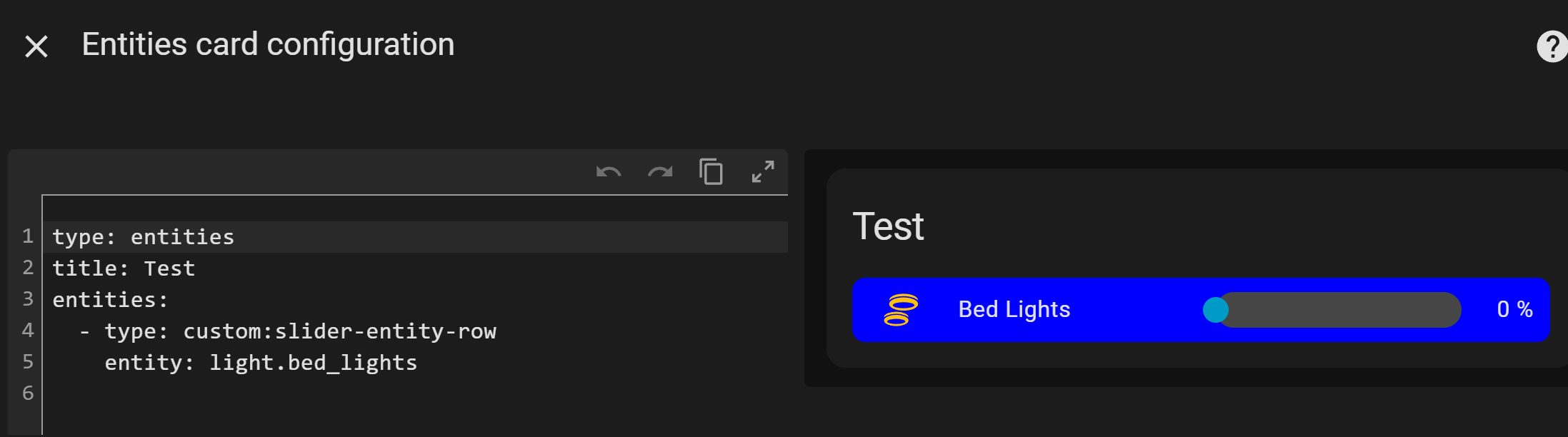
What a beginner’s mistake! No I didn’t clear the cache, and now it works! Many thanks.
And, no, I didn’t see the JS info you are refering to? I saw the others though…
Is there a way to change the global padding of the slider-entity-row when used alone, not inside an entities card? I tried several options without success… The following is the card_mod code:
  card_mod:
    style:
      slider-entity-row $: |
        .wrapper {
          padding-right: 15px;
          padding-left: 15px;
        }
But the card is not for standalone use… it is a slider Row…
I might use the wrong word, sorry. I mean I’m not using inside an entities card. My template is the following:
  custom_fields:
    sld:
      card:
        type: "custom:slider-entity-row"
        entity: "[[[ return variables.var_sw_entity.entity_id ]]]"
        full_row: true
        hide_state: true
        step: 1
Be sure to post in the right topic then. This one was specifically made for the JS resource, not for generic card_mod support 
Maybe I wasn’t clear enough, I need to change the padding left and right in a JS file, because the slider gets all the way to the limits, and I posted one way to do it through card_mod, just in case it helps to find out how to do it through a JS file…
It possible via a custom JS (no card-mod installed, but will still work if installed) This just an example and not a simple copy and paste.

type: custom:slider-entity-row
entity: light.night_stand
full_row: false
hide_state: false
step: 1
name: Night Stand
This is still a work in progress
let backupCSSFn;
function modifyElementStyles(elementName, newStylesFn) {
  return customElements
    .whenDefined(elementName)
    .then(() => {
      const UIElement = customElements.get(elementName);
      if (!UIElement) {
        console.error(`Custom element ${elementName} not found`);
        return;
      }
      const css = UIElement.prototype.css || backupCSSFn;
      if (!backupCSSFn && UIElement.prototype.css) {
        backupCSSFn = UIElement.prototype.css
      }
      if (!css) {
        throw "No CSS function";
      }
      const newStyle = newStylesFn(css);
      const combinedStyles = UIElement.styles
        ? [].concat(UIElement.styles, newStyle)
        : [newStyle];

      Object.defineProperties(UIElement, {
        styles: {
          value: combinedStyles,
          configurable: true,
          enumerable: false,
        },
        elementStyles: {
          value: combinedStyles,
          configurable: true,
          enumerable: false,
        },
      });
      console.log(`Styles applied successfully to ${elementName}`);
    })
    .catch((err) =>
      console.error(`Failed to modify styles for ${elementName}:`, err)
    );
 }
const styleDefinitions = [
  {
    name: "hui-generic-entity-row",
    styles: (css) => css`
     :host {
       border: 2px solid lime;
       border-radius: 12px;
       padding: 5px 5px;
     }
      `,
  },
  {
    name: "slider-entity-row",
    styles: (css) => css`
     ha-slider::part(indicator) {
      background: orange;
     }
     .wrapper {
       --ha-slider-track-size: 12px;
       background: blue;
       border-radius: 12px;
       padding: 0 15px;
       border: 2px solid yellow;
     }
    `,
  }
];
Promise.all(
  styleDefinitions.map(({ name, styles }) => modifyElementStyles(name, styles))
)
  .then(() => console.log("All custom styles applied successfully"))
  .catch((err) => console.error("Error applying custom styles:", err));
It doesn’t work for me?.. The following are the changes I made to your code:
let backupCSSFn;
function modifyElementStyles(elementName, newStylesFn) {
  return customElements
    .whenDefined(elementName)
    .then(() => {
      const UIElement = customElements.get(elementName);
      if (!UIElement) {
        console.error(`Custom element ${elementName} not found`);
        return;
      }
      const css = UIElement.prototype.css || backupCSSFn;
      if (!backupCSSFn && UIElement.prototype.css) {
        backupCSSFn = UIElement.prototype.css
      }
      if (!css) {
        throw "No CSS function";
      }
      const newStyle = newStylesFn(css);
      const combinedStyles = UIElement.styles
        ? [].concat(UIElement.styles, newStyle)
        : [newStyle];

      Object.defineProperties(UIElement, {
        styles: {
          value: combinedStyles,
          configurable: true,
          enumerable: false,
        },
        elementStyles: {
          value: combinedStyles,
          configurable: true,
          enumerable: false,
        },
      });
      console.log(`Styles applied successfully to ${elementName}`);
    })
    .catch((err) =>
      console.error(`Failed to modify styles for ${elementName}:`, err)
    );
 }
const styleDefinitions = [
  {
    name: "slider-entity-row",
    styles: (css) => css`
      .wrapper {
        --ha-slider-track-size: 2px;
        --primary-color: rgb(0,100,255);
        --disabled-color: Silver;
        padding-left: 15px;
        padding-right: 15px;
      }
    `,
  }
];
Promise.all(
  styleDefinitions.map(({ name, styles }) => modifyElementStyles(name, styles))
)
  .then(() => console.log("All custom styles applied successfully"))
  .catch((err) => console.error("Error applying custom styles:", err));
Do you put the file in frontend > extra_module_url ?
Many thanks!
Yes and any changes made to the file need a your browser cache cleared for the changes to appear.
This name: "slider-entity-row", will not work as a stand alone CSS style from my experience. You can use this until I research why it does that for this specific card type…
let backupCSSFn;
function modifyElementStyles(elementName, newStylesFn) {
  return customElements
    .whenDefined(elementName)
    .then(() => {
      const UIElement = customElements.get(elementName);
      if (!UIElement) {
        console.error(`Custom element ${elementName} not found`);
        return;
      }
      const css = UIElement.prototype.css || backupCSSFn;
      if (!backupCSSFn && UIElement.prototype.css) {
        backupCSSFn = UIElement.prototype.css
      }
      if (!css) {
        throw "No CSS function";
      }
      const newStyle = newStylesFn(css);
      const combinedStyles = UIElement.styles
        ? [].concat(UIElement.styles, newStyle)
        : [newStyle];

      Object.defineProperties(UIElement, {
        styles: {
          value: combinedStyles,
          configurable: true,
          enumerable: false,
        },
        elementStyles: {
          value: combinedStyles,
          configurable: true,
          enumerable: false,
        },
      });
      console.log(`Styles applied successfully to ${elementName}`);
    })
    .catch((err) =>
      console.error(`Failed to modify styles for ${elementName}:`, err)
    );
 }
const styleDefinitions = [
{
    name: "hui-generic-entity-row",
    styles: (css) => css`
     :host {
        }
      `,
  },

  {
    name: "slider-entity-row",
    styles: (css) => css`
      .wrapper {
        --ha-slider-track-size: 2px;
        --primary-color: rgb(0,100,255);
        --disabled-color: Silver;
        padding-left: 15px;
        padding-right: 15px;
        border: 1px solid red;
      }
    `,
  }
];
Promise.all(
  styleDefinitions.map(({ name, styles }) => modifyElementStyles(name, styles))
)
  .then(() => console.log("All custom styles applied successfully"))
  .catch((err) => console.error("Error applying custom styles:", err));
This is the results inside a custom:button-card

UPDATE
The latest version. There still may be newer/better methods?
const css = (strings, ...values) => {
  try {
    const cssText = String.raw({ raw: strings }, ...values);
    const styleSheet = new CSSStyleSheet();
    styleSheet.replaceSync(cssText);
    return styleSheet;
  } catch (err) {
    console.warn('CSS template failed:', err);
    return {
      _$cssResult$: true,
      cssText: String.raw({ raw: strings }, ...values),
      styleSheet: null
    };
  }
};
const toCSSStyleSheet = (style, depth = 0) => {
  try {
    if (style instanceof CSSStyleSheet) {
      return style;
    }
    if (style && typeof style === 'object' && style._$cssResult$ === true) {
      if (style.styleSheet) return style.styleSheet;
      const styleSheet = new CSSStyleSheet();
      styleSheet.replaceSync(style.cssText);
      return styleSheet;
    }
    if (typeof style === 'string' && style.trim()) {
      const styleSheet = new CSSStyleSheet();
      styleSheet.replaceSync(style);
      return styleSheet;
    }
    if (Array.isArray(style)) {
      if (depth > 1) {
        console.warn('Excessive array nesting:', style);
        return null;
      }
      return style
        .flat()
        .map(item => toCSSStyleSheet(item, depth + 1))
        .filter(Boolean);
    }
    console.warn('Unsupported style format:', style, typeof style);
    return null;
  } catch (err) {
    console.warn('Failed to convert to CSSStyleSheet:', err, style);
    return null;
  }
};

function modifyElementStyles(elementName, newStylesFn) {
  return customElements.whenDefined(elementName)
    .then(() => {
      const UIElement = customElements.get(elementName);
      if (!UIElement) {
        console.error(`Custom element ${elementName} not found`);
        return;
      }

      let newStyle;
      try {
        newStyle = newStylesFn(css);
        if (!newStyle) {
          console.warn(`No styles for ${elementName} by newStylesFn`);
          return;
        }
      } catch (err) {
        console.error(`Error with styles for ${elementName}:`, err);
        return;
      }

      const processedStyle = toCSSStyleSheet(newStyle);
      if (!processedStyle) {
        console.warn(`Invalid CSSStyleSheet for ${elementName}:`, newStyle);
        return;
      }

      let existingStyles = [];
      if (UIElement.styles) {
        const styles = Array.isArray(UIElement.styles) ? UIElement.styles : [UIElement.styles];
        existingStyles = toCSSStyleSheet(styles);
        existingStyles = Array.isArray(existingStyles) ? existingStyles : (existingStyles ? [existingStyles] : []);
      }

      const combinedStyles = [...existingStyles, ...(Array.isArray(processedStyle) ? processedStyle : [processedStyle])];

      try {
        Object.defineProperties(UIElement, {
          styles: {
            value: combinedStyles,
            configurable: true,
            enumerable: false,
            writable: true
          },
          elementStyles: {
            value: combinedStyles,
            configurable: true,
            enumerable: false,
            writable: true
          },
        });
        console.log(`Styles applied to ${elementName} (${combinedStyles.length} total sheets)`);
      } catch (err) {
        console.error(`Failed to apply styles to ${elementName}:`, err);
      }
    })
    .catch(err => console.error(`Failed to modify ${elementName}:`, err));
}
const styleDefinitions = [
{
    name: "slider-entity-row",
    styles: (css) => css`
      .wrapper {
        --ha-slider-track-size: 2px;
        --primary-color: rgb(0,100,255);
        --disabled-color: Silver;
        padding-left: 15px;
        padding-right: 15px;
        border: 1px solid red;
      }
    `,
  }
];

if (document.readyState === 'loading') {
  window.addEventListener('load', applyStyles);
} else {
  applyStyles();
}

function applyStyles() {
  console.log('Starting custom styles application...');

  const expectedElements = styleDefinitions.map(({ name }) => name);
  const registeredElements = expectedElements.map(name => ({
    name,
    isRegistered: !!customElements.get(name)
  }));
  console.table(registeredElements);
  Promise.all(styleDefinitions.map(({ name, styles }) =>
    modifyElementStyles(name, styles)
  ))
    .then(() => {
      console.log('Custom styles applied successfully!');
    })
    .catch(err => {
      console.error('Error applying custom styles:', err);
    });
}
Wow, quite a long code, but the style works!!
BUT, in case it controls a cover which is not calibrated, it should show a disabled color and block the slider… I do this through card_mod, but now the style there doesn’t work, although blocking the pointer still works… I wonder if it could be added to your JS file code? That would be amazing…
I’m attaching the card_mod code to see if it can help for the JS file:
  card_mod:
    style:
      slider-entity-row $: |
        .wrapper {
          {# set active_color, inactive_color = config.variables['var_blue_color'], config.variables['var_sensorOFF'] #}
          {% if config.entity.split('.')[0] == 'cover' and
              (state_attr(config.entity, "current_position") < 0 or state_attr(config.entity, "current_position") > 100) %}
            {# set active_color, inactive_color = 'var(--disabled-text-color)', 'var(--disabled-text-color)' #}
            --primary-color: var(--disabled-text-color);
            --disabled-color: var(--disabled-text-color);
          {% endif %}
        }
      slider-entity-row $ ha-slider $: |
        div {
          {% if config.entity.split('.')[0] == 'cover' and
              (state_attr(config.entity, "current_position") < 0 or state_attr(config.entity, "current_position") > 100) %}
            {# disables the pointer if covers are not calibrated #}
            pointer-events: none;
          {% endif %}
Many thanks !!
The code is lengthy to cover all coding styles(old and new) used for standard and 3rd party cards.
Most likely, yes. I’ll provide an example.
This code is very device/entity specific, but you want the results global? I assume you want the config entity as a variable.
You appear to be trying to combine JS with Jinga logic and it is not clear to me what your end goal is.
As I metioned, the code is for card_mod, so it’s jinja to show what needs to be done for entities, such as covers, which percentage is below 0 and over 100, so yes it should be global for,at least, cover entities (BUT not for a refrigerator, for example, which temperature is negative!!). So this is why I check for the “domain” to make sure it’s a cover. Many thanks