ibcm123
June 26, 2024, 7:23am
1
Hello everyone,
I have a general question about the custom:layout-card. I am currently using this card to create a tidy layout. I only use this card on the dashboard occasionally to achieve certain alignments of the elements.
I most often use the custom:layout-card in conjunction with the Vertical-Stack or Horizontal-Stack card. I have noticed that the card on the dashboard gets smaller when it is created with the custom:layout-card. It seems to add a frame that slightly compresses the inner elements. This creates larger gaps between the cards, but only where the custom:layout-card is used. This looks very unsightly as it appears unevenly distributed.
Is there a command or a workaround that can help with this problem?
If no one understands my concern, I will create a screenshot later and show you the code. However, I can imagine that you might have already noticed this too.
I hope you can help me.
Best regards
It depends on the layout card type you are referencing. There are options though, for example the grid layout allows you to set the layout card margins with margin: 0px 0px 0px 0px. Padding may be in play as well.
  - type: custom:layout-card
    layout_type: custom:grid-layout
    layout:
      grid-template-columns: 1fr 1fr 1fr
      margin: 0px 0px 0px 0px
    cards:
Can you provide a card example?
For the dashboard, I added width and max_cols and it is nicely distributing horizontally. I cannto confirm/recall reduced vertical size
ibcm123
June 26, 2024, 8:45am
4
Thank you! The margin command helped a bit, but it is not completely OK.
Here is the code, sorry because its rather long, but I deleted as much as I could.
type: vertical-stack
cards:
  - type: custom:layout-card
    fill_container: true
    layout_type: grid
    layout_options:
      grid-template-columns: auto 12% 12% 10%
      grid-template-rows: auto
      margin: 0px 0px 0px 0px
      grid-template-areas: |
        "a1 b1 c1 d1"
    cards:
      - type: custom:mushroom-entity-card
        entity: sensor.gesamt_verbrauch
        name: Einstellungen
        view_layout:
          grid-area: d1
        icon: mdi:cog
        icon_color: grey
        icon_type: icon
        fill_container: false
        primary_info: none
        secondary_info: none
        layout: vertical
      - type: custom:mushroom-entity-card
        entity: sensor.gesamt_verbrauch
        name: Überschrift
        view-layout:
          grid_area: a1
        fill_container: false
        secondary_info: false
        primary_info: name
        icon_type: icon
        icon: mdi:led-strip-variant
        icon_color: yellow
        layout: horizontal
      - type: custom:mushroom-entity-card
        entity: sensor.gesamt_verbrauch
        name: Auto
        view_layout:
          grid_area: c1
        icon_type: none
        fill_container: true
        secondary_info: none
        layout: vertical
      - type: custom:mushroom-entity-card
        entity: sensor.gesamt_verbrauch
        name: Hand
        view_layout:
          grid_area: b1
        layout: vertical
        fill_container: true
        secondary_info: none
        icon_type: none
  - type: horizontal-stack
    cards:
      - type: custom:mushroom-entity-card
        entity: sensor.gesamt_verbrauch
        name: Test
        view-layout:
          grid_area: b3
        fill_container: false
        secondary_info: state
        primary_info: name
        icon_type: none
        layout: vertical
      - type: custom:mushroom-entity-card
        entity: sensor.gesamt_verbrauch
        name: Test
        view-layout:
          grid_area: c3
        fill_container: false
        secondary_info: state
        primary_info: name
        icon_type: none
        layout: vertical
      - type: custom:mushroom-entity-card
        entity: sensor.gesamt_verbrauch
        name: Test
        view-layout:
          grid_area: d3
        fill_container: false
        secondary_info: state
        primary_info: name
        icon_type: none
        layout: vertical
  - type: custom:layout-card
    layout_type: grid
    layout_options:
      grid-template-columns: 25% 75%
      grid-template-rows: auto
      margin: 0px 0px 0px 0px
      grid-template-areas: |
        "meter karte"
    cards:
      - type: gauge
        entity: sensor.steuerspannung_mean_well
        name: Steuerspannung
        unit: V
        min: 0
        max: 10
        needle: true
        severity:
          green: 0
          yellow: 0
          red: 8
        view_layout:
          grid-area: meter
      - type: vertical-stack
        view_layout:
          grid-area: karte
        cards:
          - type: custom:layout-card
            layout_type: grid
            layout_options:
              grid-template-columns: 34% 33% 33%
              grid-template-rows: auto
              margin: 0px 0px 0px 0px
              grid-template-areas: |
                "b1 c1 d1"
                "b2 c2 d2"
                "b3 c3 d3"
            cards:
              - type: custom:mushroom-entity-card
                entity: switch.modbus_switch
                name: Status 1
                view-layout:
                  grid_area: b1
                fill_container: false
                secondary_info: state
                primary_info: name
                icon_type: none
                layout: vertical
              - type: custom:mushroom-entity-card
                entity: switch.modbus_switch
                name: Test
                view_layout:
                  grid_area: c1
                icon_type: none
                fill_container: true
                secondary_info: none
                layout: vertical
              - type: custom:mushroom-entity-card
                entity: switch.modbus_switch
                name: Test
                view_layout:
                  grid_area: d1
                layout: vertical
                fill_container: true
                secondary_info: none
                icon_type: none
              - type: custom:mushroom-entity-card
                entity: switch.modbus_switch
                name: Status 2
                view-layout:
                  grid_area: b2
                fill_container: false
                secondary_info: state
                primary_info: name
                icon_type: none
                layout: vertical
              - type: custom:mushroom-entity-card
                entity: switch.modbus_switch
                name: Test
                view_layout:
                  grid_area: c2
                icon_type: none
                fill_container: true
                secondary_info: none
                layout: vertical
              - type: custom:mushroom-entity-card
                entity: switch.modbus_switch
                name: Test
                view_layout:
                  grid_area: d2
                layout: vertical
                fill_container: true
                secondary_info: none
                icon_type: none
  - type: custom:mushroom-number-card
    entity: input_number.temperature_value
    name: Testwert
    icon_type: none
    fill_container: false
    secondary_info: none
    layout: horizontal
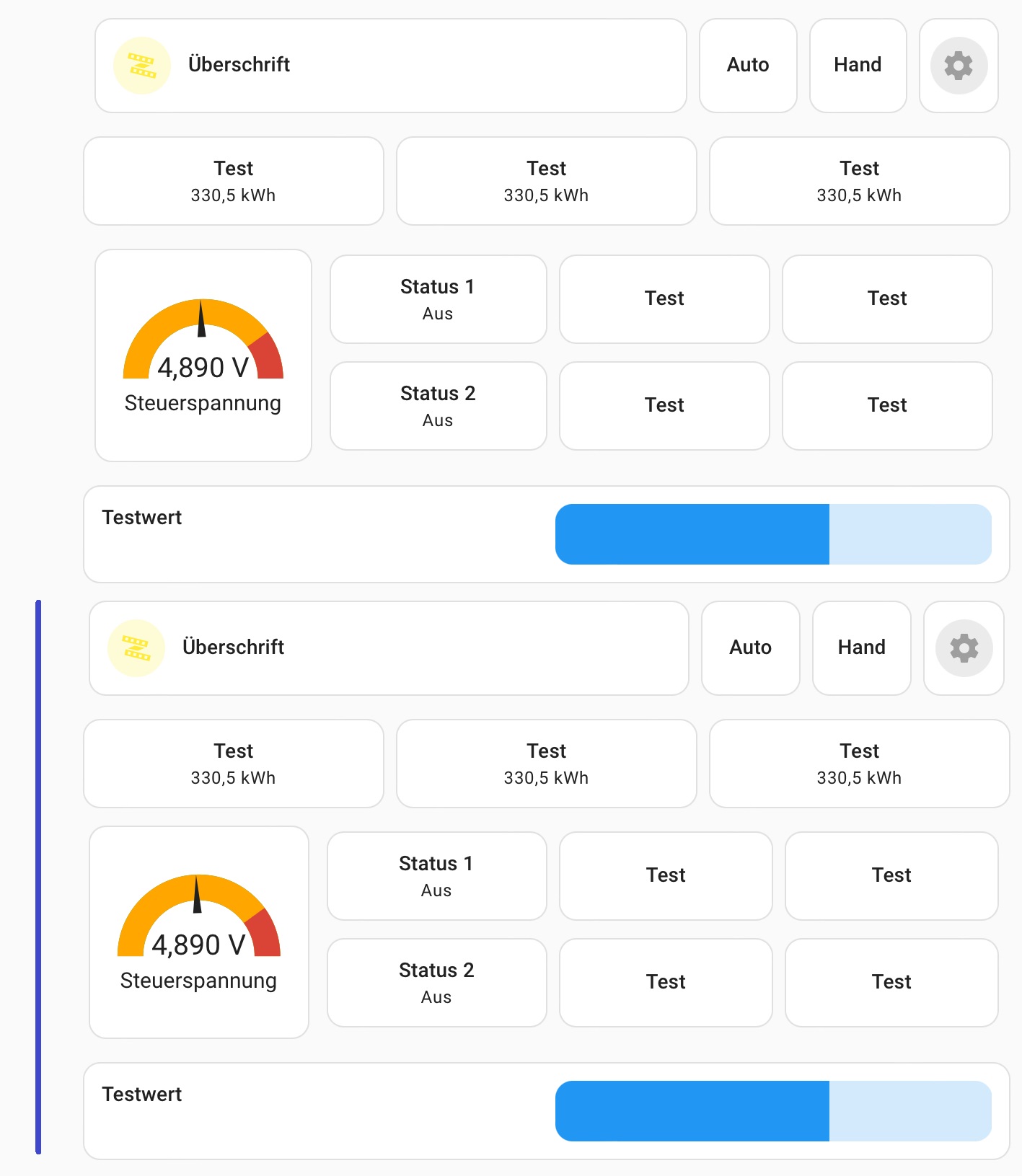
And here I have a screenshot for you, it is 2x the card from the code above. The upper variant is without the margin-command, the second (blue marked) ist with the margin command.
It is better, but I still have problems with the “border” of the custom:layout-card.
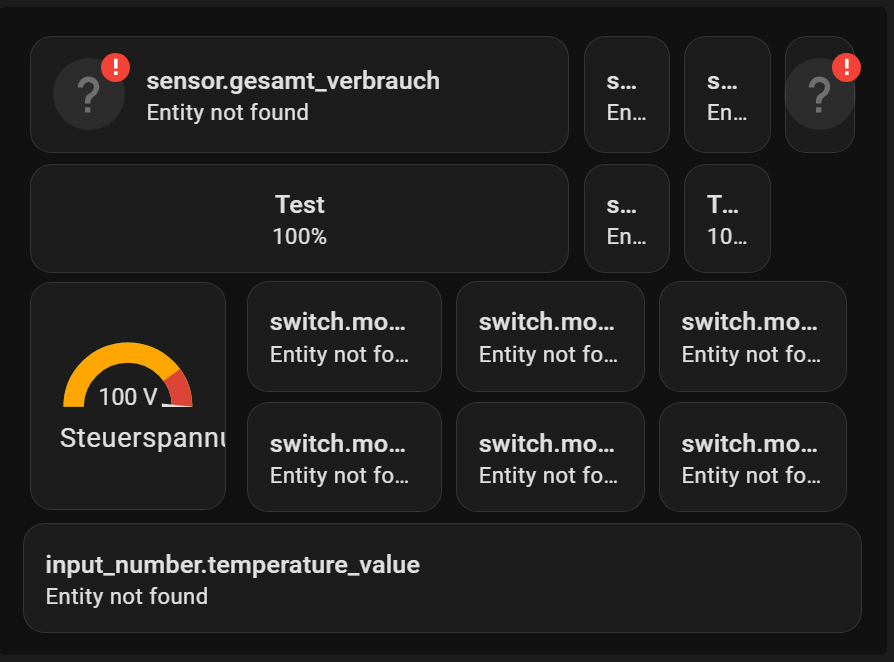
I’ll mess with a few options but it’s possible to get it tighter
type: vertical-stack
cards:
  - type: custom:layout-card
    fill_container: true
    layout_type: grid
    layout_options:
      grid-template-columns: auto 12% 12% 10%
      grid-template-rows: auto
      margin: 0px 0px 0px 0px
      grid-template-areas: |
        "a1 b1 c1 d1"
    cards:
      - type: custom:mushroom-entity-card
        entity: sensor.gesamt_verbrauch
        name: Einstellungen
        view_layout:
          grid-area: d1
        icon: mdi:cog
        icon_color: grey
        icon_type: icon
        fill_container: false
        primary_info: none
        secondary_info: none
        layout: vertical
      - type: custom:mushroom-entity-card
        entity: sensor.gesamt_verbrauch
        name: Überschrift
        view-layout:
          grid_area: a1
        fill_container: false
        secondary_info: false
        primary_info: name
        icon_type: icon
        icon: mdi:led-strip-variant
        icon_color: yellow
        layout: horizontal
      - type: custom:mushroom-entity-card
        entity: sensor.gesamt_verbrauch
        name: Auto
        view_layout:
          grid_area: c1
        icon_type: none
        fill_container: true
        secondary_info: none
        layout: vertical
      - type: custom:mushroom-entity-card
        entity: sensor.gesamt_verbrauch
        name: Hand
        view_layout:
          grid_area: b1
        layout: vertical
        fill_container: true
        secondary_info: none
        icon_type: none
  - type: custom:layout-card
    fill_container: true
    layout_type: grid
    layout_options:
      grid-template-columns: auto 12% 12% 10%
      grid-template-rows: auto
      margin: -14px 0px 0px 0px
    cards:
      - type: custom:mushroom-entity-card
        entity: sensor.basement_door_sensor_battery
        name: Test
        view-layout:
          grid_area: b3
        fill_container: false
        secondary_info: state
        primary_info: name
        icon_type: none
        layout: vertical
      - type: custom:mushroom-entity-card
        entity: sensor.gesamt_verbrauch
        name: Test
        view-layout:
          grid_area: c3
        fill_container: false
        secondary_info: state
        primary_info: name
        icon_type: none
        layout: vertical
      - type: custom:mushroom-entity-card
        entity: sensor.basement_door_sensor_battery
        name: Test
        view-layout:
          grid_area: d3
        fill_container: false
        secondary_info: state
        primary_info: name
        icon_type: none
        layout: vertical
  - type: custom:layout-card
    layout_type: grid
    layout_options:
      grid-template-columns: 25% 75%
      grid-template-rows: auto
      margin: -10px 0px 0px 0px
      grid-template-areas: |
        "meter karte"
    cards:
      - type: gauge
        card_mod:
         style: |
          ha-card {
           height: 126px !important;
           margin-top: -5px
            }
        entity: sensor.basement_door_sensor_battery
        name: Steuerspannung
        unit: V
        min: 0
        max: 10
        needle: true
        severity:
          green: 0
          yellow: 0
          red: 8
        view_layout:
          grid-area: meter
      - type: vertical-stack
        view_layout:
          grid-area: karte

        cards:
          - type: custom:layout-card
            layout_type: grid
            layout_options:
              grid-template-columns: 34% 33% 33%
              grid-template-rows: auto
              margin: -10px 0px 0px 0px

            cards:
              - type: custom:mushroom-entity-card
                entity: switch.modbus_switch
                name: Status 1
                view-layout:
                  grid_area: b1
                fill_container: false
                secondary_info: state
                primary_info: name
                icon_type: none
                layout: vertical
              - type: custom:mushroom-entity-card
                entity: switch.modbus_switch
                name: Test
                view_layout:
                  grid_area: c1
                icon_type: none
                fill_container: true
                secondary_info: none
                layout: vertical
              - type: custom:mushroom-entity-card
                entity: switch.modbus_switch
                name: Test
                view_layout:
                  grid_area: d1
                layout: vertical
                fill_container: true
                secondary_info: none
                icon_type: none
          - type: custom:layout-card
            layout_type: grid
            layout_options:
              grid-template-columns: 34% 33% 33%
              grid-template-rows: auto
              margin: -14px 0px 0px 0px

            cards:

              - type: custom:mushroom-entity-card
                entity: switch.modbus_switch
                name: Status 2
                view-layout:
                  grid_area: b2
                fill_container: false
                secondary_info: state
                primary_info: name
                icon_type: none
                layout: vertical
              - type: custom:mushroom-entity-card
                entity: switch.modbus_switch
                name: Test
                view_layout:
                  grid_area: c2
                icon_type: none
                fill_container: true
                secondary_info: none
                layout: vertical
              - type: custom:mushroom-entity-card
                entity: switch.modbus_switch
                name: Test
                view_layout:
                  grid_area: d2
                layout: vertical
                fill_container: true
                secondary_info: none
                icon_type: none
  - type: custom:mushroom-number-card
    entity: input_number.temperature_value
    name: Testwert
    icon_type: none
    fill_container: false
    secondary_info: none
    layout: horizontal
    card_mod:
     style: |
       ha-card {
         margin-top: -18px;
         }
needs work…
ibcm123
June 26, 2024, 9:24am
6
Thank you very much for this!
But when I use pixel-values for the margin command, then it will look different at different Monitors, right?
Do you know the reason, why the cards get smaller? For me, this looks like a bug…
Not a bug, each card has padding and margins that come into play
When stacking cards the margin an padding add up
1 Like