Hi!
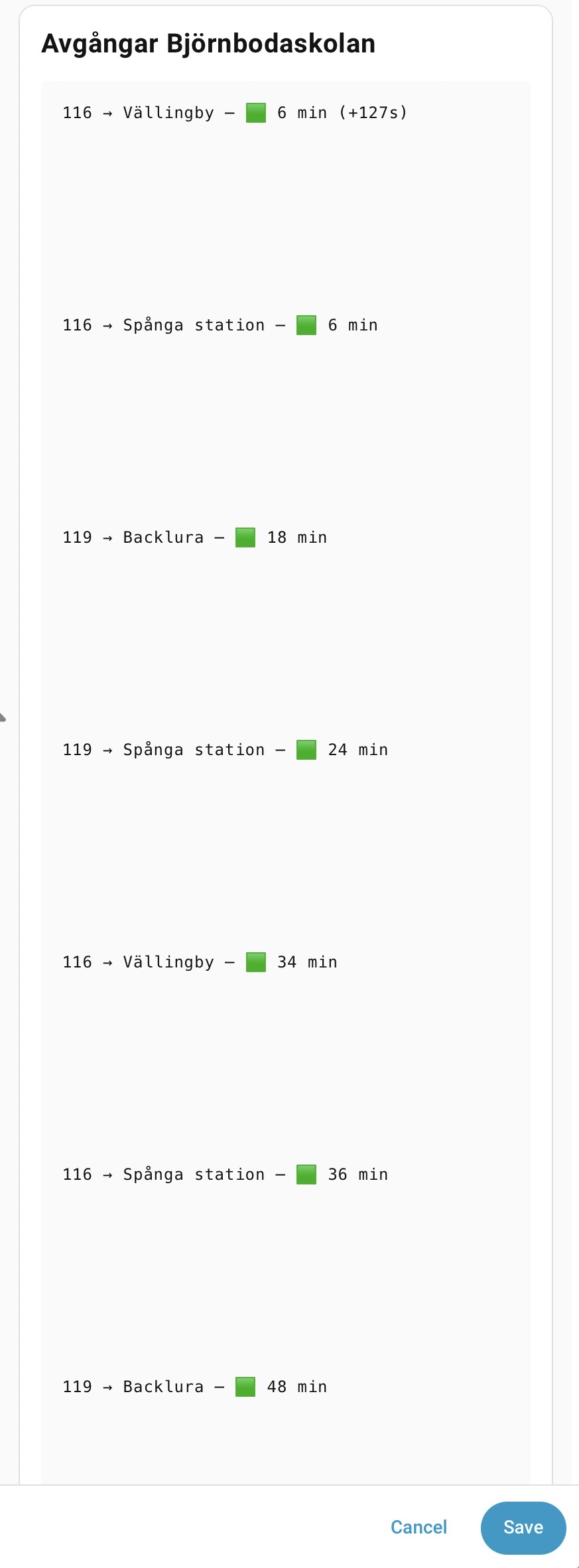
I’m new to this and have tried to solve it with Copilot but can’t come any further. I want to make a dashboard component that shows the next busses on my stop. It’s almost done, but somehow there are lots of ”air” between the rows (each buss). How do I fix this?
type: markdown
content: >
  ## Avgångar Björnbodaskolan
  {% set deps = state_attr('sensor.bjornbodaskolan_avgangar_radata', 'departures') %}
  {% if deps %}
    {% for d in deps %}
      {% set rt = as_datetime(d.realtime) %}
      {% if rt.tzinfo == none %}
        {% set rt = rt.replace(tzinfo=now().tzinfo) %}
      {% endif %}
      {% set now_aware = now().astimezone() %}
      {% set mins = ((rt - now_aware).total_seconds() / 60) | int %}
      {% set färg = '🟥' if mins < 2 else '🟧' if mins < 5 else '🟩' %}

      {{ d.route.designation }} → {{ d.route.direction }} — {{ färg }} {{ mins }} min{% if d.delay > 0 %} (+{{ d.delay }}s){% endif %}
    {% endfor %}
  {% else %}
    Inga avgångar just nu
  {% endif %}