
Yes this was vibe coded if it triggers your HA controlled pyrotechnics unexpectedly, that’s a you problem, you’ve been appropriately informed.
It’s beta because it’s AI code and it so far only works in exactly one house — mine. Good luck!
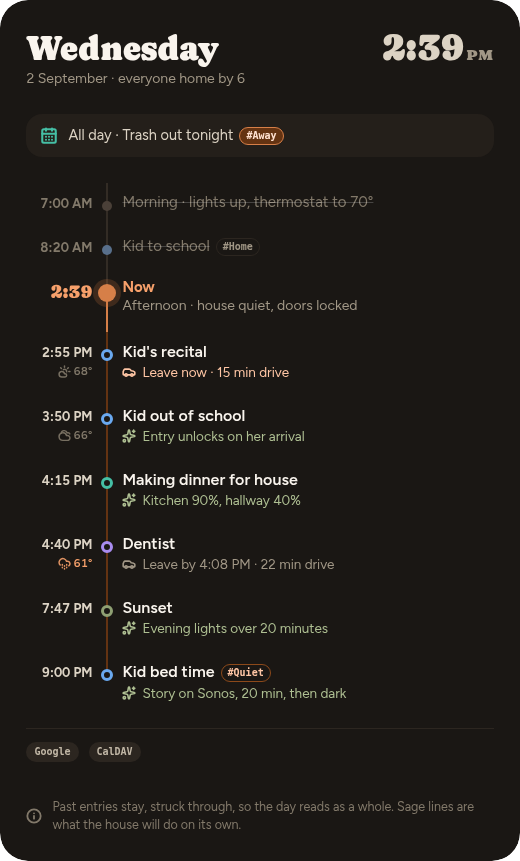
I got tired of reading my calendar card, my to-do card, my weather card, sunrise & sunset, and my “did the house do the thing” card taking up so much of my dashboard. I’m on a quest to go hardcore minimalist on my dashboards. Designed as a full-height sidebar, Dayline puts today on a single vertical timeline: calendar events (with hourly forecast icon), sunrise and sunset, to-dos, and what my automations are going to do or did on their own, all in time order with a marker for now.
#tag items can fire automations direct from your calendar. If you have a shared calendar, caution. 2 layers: First you have to tag the calendar you wish to offer control permissions to with “#Dayline Control”, second you have to create the automation with Dayline #tag as a trigger. I rather like the idea combined with a mode selector. #Away sets my master house mode to away. Additional caution, if someone sends you a calendar invite with a #tag in it that just so happens to match an autometion, which you haven’t even accepted yet, I don’t know what will happen.
I live by my calendar and its on a private server local to my lan anyway, so just adding a #tag to my normal daily events is a sick way to automate. if I just move my “wake up” calendar event, with the #wake tag, it sets my alarm automation for me.
Therefore, if you like a little more security: the concept of a house control calendar as a local ha calendar to which no one will send invites, is included. Instead of time helpers or raw time triggers in your automations, you can simply make local calendar entries with tags in them corresponding to when you’d like various automations to fire. Then you can have a single calendar gui for modifying when your house makes automatic changes.
If a calendar event has a location, it asks Waze what the drive time is from a configurable start location (defaults to zone.home) at the start time of the event. It then tells me when to walk out the door. No API key or account attached (so far?). You could also insert person.name and if there’s a companion app associated with that person it’ll work from wherever their device is. There’s also a ‘buffer time’ - it seems to take me 15 minutes to actually get out the door for anything, so I build that in.
There’s a second glance card in the same bundle for wall tablets (View Assist): a big clock, whatever’s next, and anything currently wrong, and the clock quietly goes amber and then red as a leave-by time approaches. I chose to replace the entire clock card on my View Assist config with this glance card, though I intentionally did not include all the view assist magic. Its about 8 lines of yaml as opposed to VA’s rather complicated page, I accept the loss of functionality because my card replaces most of it for me (I’m not interested in touch controls on my glance devices, voice and eyeballs only).
Cards are driven by the integration, which is gathering all the data and pushing it to the cards, read the docs, its kinda cool?
There are several cross-paradigm inconsistencies, (do we use a #tag here or a direct automation or is it a config option in the settings?) There might even be a couple items in the integration settings dialog that flat don’t work, I’ll probably fix those eventually
Claude did rather well though it made some interesting visual design choices, I ended up just using the HA theme (dark glass lite) in my production instance.
Install via HACS, add both custom repos.
Integration: GitHub - bitmux/Dayline: Dayline — one day as a single spine: calendars, sun, to-dos and what the house will do, merged into one Home Assistant card. · GitHub
Cards: GitHub - bitmux/Dayline-card: The Lovelace card half of Dayline — today as one vertical spine. HACS category: Dashboard. · GitHub
I do not promise to implement feature requests myself for now unless they serve my direct needs, I already waste a disproportionate amount of my life on fiddling with HA. I share what worked for me, you can point your own clanker at it and bash away on it as you like, feel free to share back with a PR.