Yes, I replaced the Zooz LR 800 with the Connect ZWA-2.
For the devices I’m getting the Failed to perform the action switch/turn_on. Unable to set value 34-37-0-targetValue: zwave_error: Z-Wave error 1405 - The node failed to decode the message. (ZW1405) error on, do you suggest I remove and re-add them? I’ve only got 19.
Please create a new troubleshooting post. I would add debug logs because no one can help with just that single message.
All good now, I had a problem with the Keys I was adding. My mistake.
Thanks again @freshcoast for the EXCELLENT Guide.
1 Like
Amazing guide, thank you! Just wanted to say it worked for me today.
1 Like
this is a great guide. It worked flawlessly.
This guide saved me a lot of time recreating my z-wave network. It is much detailed then the standard guide. Good job.
2 Likes
I would like to raise this question again.
After an update of ZWAVE JS UI I it seems that some devices go back to “unknown manufacturer” although they have been known.
How can this happen? Isn’t the config file properly copied over?
When I look at two devices (both window sensor Gen 2 from Ring) the config for both looks like this (46 unknown / 47 ok):
{"k":"node.46.hasSUCReturnRoute","v":true}
{"k":"node.46.securityClasses.S2_AccessControl","v":false}
{"k":"node.46.securityClasses.S2_Authenticated","v":true}
{"k":"node.46.securityClasses.S2_Unauthenticated","v":false}
{"k":"node.46.securityClasses.S0_Legacy","v":false}
{"k":"node.46.dsk","v":"xxxx"}
{"k":"node.46.interviewStage","v":"Complete"}
{"k":"node.47.deviceClass","v":{"basic":4,"generic":7,"specific":1}}
{"k":"node.47.endpoint.0.commandClass.0x5e","v":{"isSupported":true,"isControlled":false,"secure":false,"version":2}}
{"k":"node.47.endpoint.0.commandClass.0x59","v":{"isSupported":true,"isControlled":false,"secure":true,"version":3}}
{"k":"node.47.endpoint.0.commandClass.0x85","v":{"isSupported":true,"isControlled":false,"secure":true,"version":2}}
{"k":"node.47.endpoint.0.commandClass.0x80","v":{"isSupported":true,"isControlled":false,"secure":true,"version":2}}
{"k":"node.47.endpoint.0.commandClass.0x70","v":{"isSupported":true,"isControlled":false,"secure":true,"version":4}}
{"k":"node.47.endpoint.0.commandClass.0x5a","v":{"isSupported":true,"isControlled":false,"secure":true,"version":0}}
{"k":"node.47.endpoint.0.commandClass.0x7a","v":{"isSupported":true,"isControlled":false,"secure":true,"version":5}}
{"k":"node.47.endpoint.0.commandClass.0x87","v":{"isSupported":true,"isControlled":false,"secure":true,"version":3}}
{"k":"node.47.endpoint.0.commandClass.0x72","v":{"isSupported":true,"isControlled":false,"secure":true,"version":2}}
{"k":"node.47.endpoint.0.commandClass.0x8e","v":{"isSupported":true,"isControlled":false,"secure":true,"version":3}}
{"k":"node.47.endpoint.0.commandClass.0x71","v":{"isSupported":true,"isControlled":false,"secure":true,"version":8}}
{"k":"node.47.endpoint.0.commandClass.0x73","v":{"isSupported":true,"isControlled":false,"secure":true,"version":0}}
{"k":"node.47.endpoint.0.commandClass.0x9f","v":{"isSupported":true,"isControlled":false,"secure":true,"version":1}}
{"k":"node.47.endpoint.0.commandClass.0x6c","v":{"isSupported":true,"isControlled":false,"secure":false,"version":1}}
{"k":"node.47.endpoint.0.commandClass.0x55","v":{"isSupported":true,"isControlled":false,"secure":false,"version":2}}
{"k":"node.47.endpoint.0.commandClass.0x86","v":{"isSupported":true,"isControlled":false,"secure":true,"version":3}}
{"k":"node.47.endpoint.0.commandClass.0x84","v":{"isSupported":true,"isControlled":false,"secure":true,"version":1}}
{"k":"node.47.hasSUCReturnRoute","v":false}
{"k":"node.47.securityClasses.S2_AccessControl","v":false}
{"k":"node.47.securityClasses.S2_Authenticated","v":true}
{"k":"node.47.securityClasses.S2_Unauthenticated","v":false}
{"k":"node.47.securityClasses.S0_Legacy","v":false}
{"k":"node.47.dsk","v":"yyyy"}
{"k":"node.47.isListening","v":false}
{"k":"node.47.isFrequentListening","v":false}
{"k":"node.47.isRouting","v":true}
{"k":"node.47.supportedDataRates","v":[40000,100000]}
{"k":"node.47.protocolVersion","v":3}
{"k":"node.47.nodeType","v":"End Node"}
{"k":"node.47.supportsSecurity","v":false}
{"k":"node.47.supportsBeaming","v":true}
{"k":"node.47.interviewStage","v":"Complete"}
Is there any other way then re-inclusion?
I never had these kind of issues on the ZWAVE JS, so I wonder what I might be doing wrong?
Fabulous guide. Awesome job. Amazing. A marvel - a paragon - of clear exposition. Instructions and illustrations went beyond clarity, right up to extrasensory-level handholding. Procedure went exactly, precisely as you described and anticipated. Zero hitches. Fifteen minutes skin-to-skin. You must have put hours into it… Again, thank you, thank you, thank you!
1 Like
I am getting hung up at this part. When I enter “ws://a0d7b954-zwavejs2mqtt:3000”, it says it cannot connect to it. I have the WS server running in ZUI…
Then the add-on is not running/started, or you changed a setting that wasn’t part of the instructions, like the WS Server Host.
thanks for the quick response. I was going through the logs and says “Failed to start zwave-js server: getaddrinfo ENOTFOUND core-zwave-js”
Before I found this guide I was trying to get it started and could have inadvertantly changed something. How does this look?
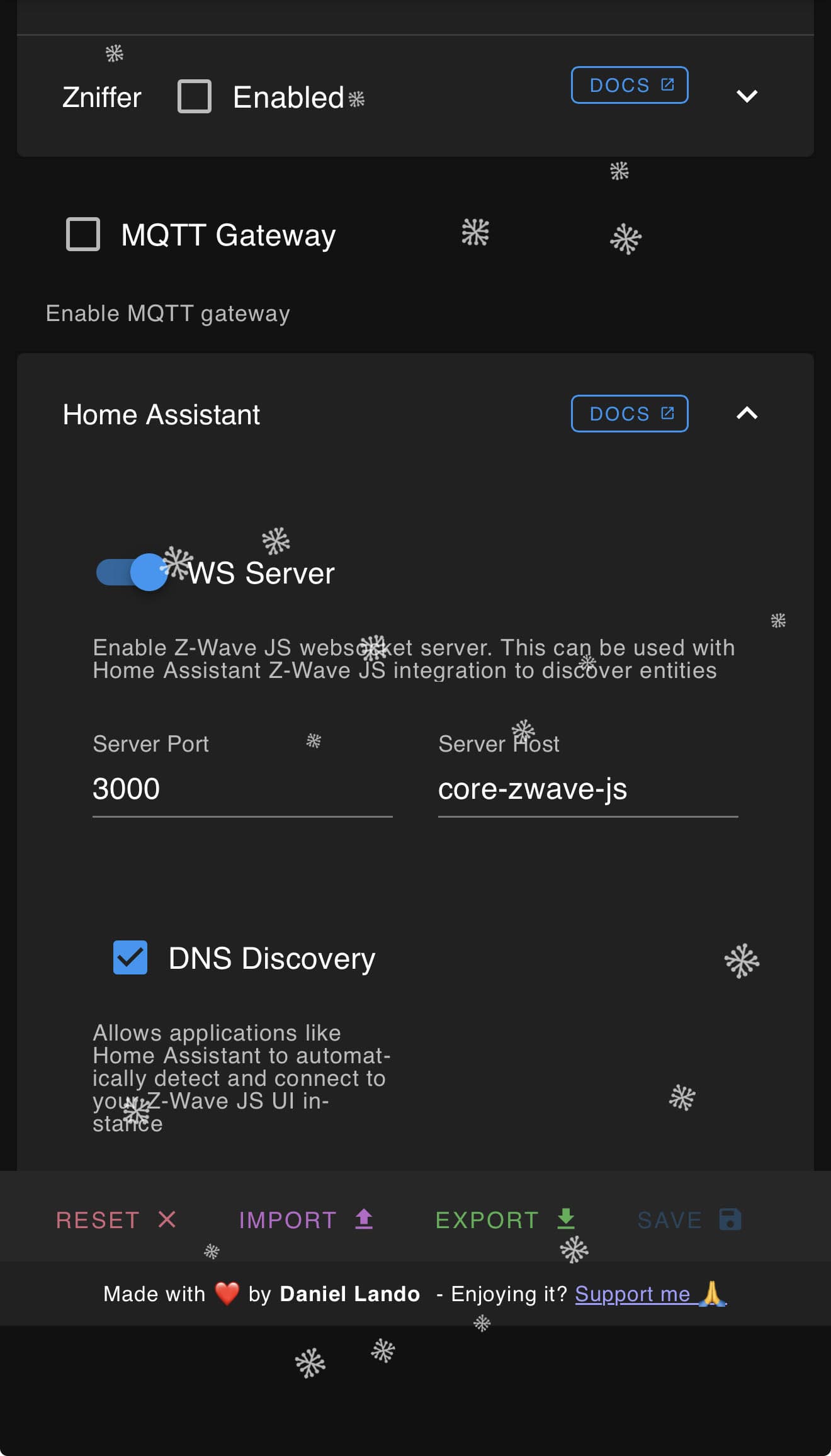
That’s wrong. Follow the guide step by step without deviations and you won’t have a problem. Especially the note:

i think i changed them awhile back before i found the guide. Do you know the setting should be so I can change them back?
Leave the port at 3000, Server Host should be empty, DNS Discovery can be turned off although it’s not critical (you may see a discovery option in HA if it’s enabled, just don’t enable it in HA). Server host is your problem.
thank you, i appreciate the guide and the help. Def my bad
1 Like
Let me just add my voice to the chorus that this guide is BRILLIANT! Follow the directions word-for-word and you should be fine. Thank you @freshcoast for this!
1 Like
Thanks a lot - perfect handbook / manual. It worked for me  Amazing!
Do you have a similar manual for migration from an usb 500 to an usb 800 series stick? That would be the next for me before installing lots of more zwave devices (it seems the old 500 makes problems and some plastic ist broken meanwhile)
EDIT: Meanwhile I managed to migrate the stick (from 500 zwave+ series to 800 series) - was quite simpel:
1.) Install newest firmware on old stick (via zui + correct file from manufacturer for your region)
2.) NVM Backup from old stick with zui
3.) connect new stick and fill hin its adress in zui zwave config
4.) Install newest firmware on new stick (like 1.)
5.) Restore NVM Backup from Step 2 to new stick
6.) disconnect old stick (if you havent after step 2)Finished
BTW: If you use proxmox like I do you need to add the usb-stick via proxmox for your VM (use ID not port). Then restart HA and you should find it within zui (for Step 3)
Amazing write up! Seamlessly migrated over to Z-Wave JS UI!
1 Like
Thanks! This worked perfectly. I appreciate it!
1 Like
I am having the same issues with my Schlage ZW Deadbolt (BE469ZP) showing as unknown.
Any help would be greatly appreciated. I also followed the instructions to a T and everything else was perfect.

Actually, I did not find a solution.
From my rookie POV it’s not clear to me, why the known information (like manufacturer and device type / name) just disappear from the config.
Once it’s recognized it should be known forever (I guess).