312 repairs for me… 
Breaking changes is really taking the fun out of Home Automation…
Would very much like to have a legacy track in the future to avoid only using time to keep things up to date with breaking changes.
That or autogenerated conversion of code.
It’s soon Xmas 
1 Like
1 Like
Thanks @petro, skimmed through the post…my wish come true
I felt the same, I used chatgpt to solve my 200+ templates for 5-6 hours… not very fun at all… but after learning the ai for a while I could copy/paste bigger chunks and it just gave me those back in the new format ready to past in… But even with that I broke the code a few times thus making all my sensor fail (with even a single template being wrong sometimes)
I learned that friendly_name is long gone the hard way for example
But yea, AI is another working road for some of you if you like
Then I also understand that sometimes you have to make tough decisions like petro wrote. You cant always plan everything and have to make the right decision for the final product… But still, it would be nice to know about this deprecation coming, If I knew then I wouldnt have made my life easy by continuing with my old sensors…
yeah, why read the documentation when you have AI…
I mean, we have 2 weeks, 1000+ posts, and people keep asking the same questions.
where the answers are also the same. Continuously circling circles…:
read the documentation
follow the repair
done
It’s such a straightforward rewrite, the fact people are not getting it is a huge red flag on their general understanding of things in their configs.
also: leave AI at the door, why is this ‘rule’ no longer upheld?
We see more people get into trouble with it than being helped. Especially when they (AI) are trained on the ‘former’ documentation…
4 Likes
Well for some who are more interested in templating/coding it may be “straight forward” and for some others it just aint… Maybe they copied a few working templates from this forum that broke. I dont think that s hard to understand.
I solved my problems BECAUSE of AI  it made my life a lot easier and I puzzled out the parts I didnt understand by myself. As long as you understand that it totally lies sometimes. But still you need a degree of understanding ofc. When I have 200+ of templates it feels way easier (for me personally) to start with the AI at least. But then I didnt ask any questions about it in the forums either. Either way it wasnt very fun
Unfortunately, when you have this big of a deprecation you cant expect anything else than a shitstorm like this imo
it would be nice to know about this deprecation coming,
You have 6 months to make these changes!
2 Likes
And I wrote a custom integration linked in this post that converts all issues at once for you.

5 Likes
And that’s awesome, Im sure many will find it useful. It was my plan B if it makes you happier
It won’t lie if you box it in, tools work best when configured optimally. @petro has created a tool that will make it easier for many.
Works great! To avoid posible issues just remember to download all the yaml files and follow the steps people, perfect solution for me
Migrated all my templates fine, thanks to Petro.
Only template from derivated (i don’t know if this is the right name) sensor like this one doesn’t work
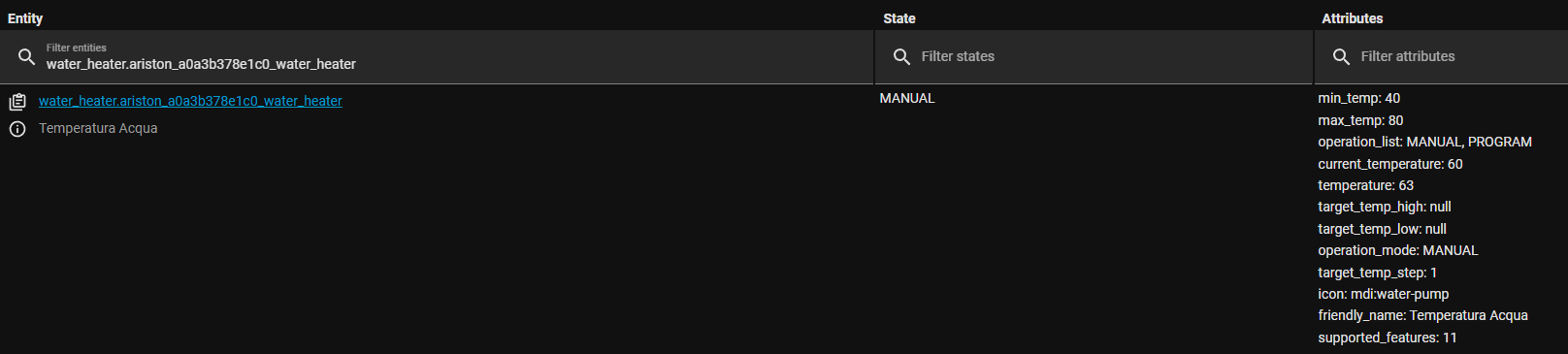
before working template, in sensor section:
      actual_bolier_temp:
        friendly_name: "Actual Water Temperature"
        unit_of_measurement: "°C"
        device_class: temperature
#        state_class: measurement
        value_template: >
            state: {{ state_attr('water_heater.ariston_a0a3b378e1_water_heater', 'current_temperature') | float(0)}}
migrated yaml, suggested from HA:
  - unit_of_measurement: °C
    device_class: temperature
    default_entity_id: sensor.actual_bolier_temp
    name: Actual Water Temperature
    state: 'state: {{ state_attr(''water_heater.ariston_a0a3b378e1_water_heater'',
      ''current_temperature'') | float(0)}}'
this show unavailable as state
You have state twice… that leads to the state value being non-numeric, which isn’t allowed for entities with a defined unit of measurement.
corrected as follow:
  - unit_of_measurement: °C
    device_class: temperature
    default_entity_id: sensor.actual_bolier_temp
    name: Actual Water Temperature
    state: "{{ \n state_attr('water_heater.ariston_a0a3b378e1_water_heater',
      'current_temperature') | float(0)}}"
doesn’t works anyway…
Why did you add a new line mark inside the expression?
Also, the float isn’t doing anything, so there’s no reason to keep it:
  - unit_of_measurement: °C
    device_class: temperature
    default_entity_id: sensor.actual_bolier_temp
    name: Actual Water Temperature
    state: |
      {{ state_attr('water_heater.ariston_a0a3b378e1_water_heater', 'current_temperature') }}
You took the hard, unreliable route. You could’ve saved yourself hours. Petro’s efforts to assist with the migration is possibly as well as it could’ve been done.
As Marius has pointed out, there’s a rule against this on the forum: You can help yourself with AI, but not others. Please do not suggest this, as this constitutes helping, especially when there are much more reliable avenues.
Yes, deprecation means just this: you shouldn’t use this (use is discouraged and unsupported), until the time it will be removed. You received notice with this release. Removal is in 6 months.
3 Likes
Works!
thanks a lot.
I already saved myself hours by letting it do it for me, but fair enough. The AI should be left at the door as some said. And I sure belive that petro’s custom integration would do the job better. My bad for suggesting the AI
2 Likes
I am correct in seeing that the suggested repairs are wrong if you have a multiline readable value_template?
No, they are correct. Just not formatted. Use the custom integration and they will be formatted.