TLDR: Legacy template entities (alarm_control_panel, binary_sensor, cover, fan, light, lock, sensor, switch, vacuum, weather) are being deprecated in 2025.12. Legacy template entities will no longer work after 2026.6. I wanted to avoid the deprecation, however it’s apparent that it’s not possible due to future plans.
Do not use AI to migrate. AI will screw up the yaml. Use the tools provided in this post, if you use AI you are on your own.
The Deprecation
Please use this thread to ask questions and address concerns about the upcoming deprecation of legacy template entities.
The Future
You may have noticed an increased number of template integration changes over the past 12 months. That’s because I took over the integration and have been updating it. These updates have a few main objectives:
- Consistent entity behavior across domains within the template integration
- Future plans for template blueprints in the UI
- New (planned) template domains. E.g. climate, media_player, etc.
- Future plans to allow
yamlbased template entities to be assigned to devices
The Reasoning
Unfortunately, I’ve ran into many issues related to supporting legacy yaml syntax. Deprecating legacy template entities was not my first choice. After spending months trying to work around the issues, it’s clear that they need to be deprecated in order to move the integration into the future.
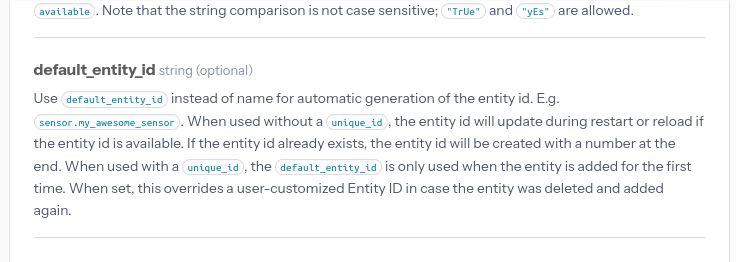
A few versions ago modern template syntax gained the ability to assign a default_entity_id through yaml. Modern syntax can now provide a full configuration that is equivalent to the legacy syntax, meaning the feature parity is 1 to 1.
The Migration
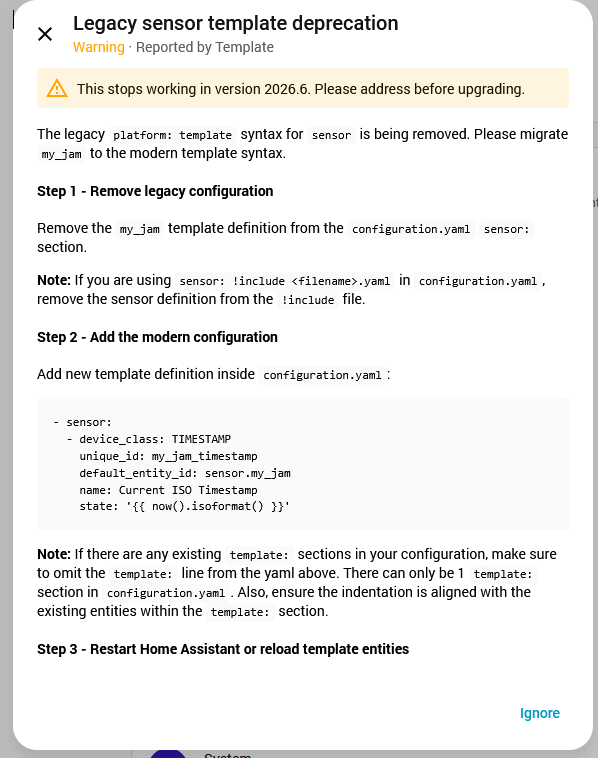
A repair will appear if you are using legacy template entities in 2025.12. The repair will offer a migration guide.
If you’re having trouble with the repair migration guide, please check out the migration guides in the documentation.
This custom integration is a migration helper if you have 100s of legacy templates. Please understand that this will generate the bare minimum migration path and it requires minor edits to configuration.yaml. The custom integration will traverse current legacy template issues and generate a series of files inside config\migrated_templates folder.

E.g. This legacy template definition:
sensor:
  - platform: template
    sensors:
      my_jam:
        friendly_name: Current ISO Timestamp
        device_class: timestamp
        unique_id: my_jam_timestamp
        value_template: "{{ now().isoformat() }}"
Will produce this repair
COMMON ISSUES
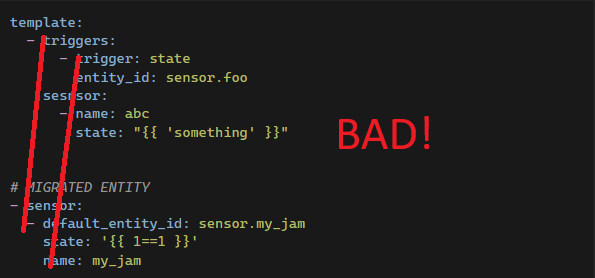
Bad migration example1: Too many template sections
Please keep in mind, I can only account for so many situations in the repair. If you have multiple templates, make sure you match the indentation of your existing template: field and do not include more than 1 template: field.
I.e. if you already have this in configuraiton.yaml
template:
- triggers:
  - trigger: state
    entity_id: sensor.foo
  sensor:
  - name: abc
    state: "{{ 'something' }}"
Good merge
template:
- triggers:
  - trigger: state
    entity_id: sensor.foo
  sensor:
  - name: abc
    state: "{{ 'something' }}"

# MIGRATED ENTITY
- sensor:
  - default_entity_id: sensor.my_jam
    state: '{{ 1==1 }}'
    name: my_jam
Bad merge
template:
- triggers:
  - trigger: state
    entity_id: sensor.foo
  sensor:
  - name: abc
    state: "{{ 'something' }}"

template: # <--- THIS IS WRONG DO NOT HAVE MORE THAN 1 template:
# MIGRATED ENTITY
- sensor:
  - default_entity_id: sensor.my_jam
    state: '{{ 1==1 }}'
    name: my_jam
Bad migration example 2: Incorrect indentation
Also, make sure your indentation is correct.
I.e. if you have:
template:
  - triggers:
      - trigger: state
        entity_id: sensor.foo
    sensor:
      - name: abc
        state: "{{ 'something' }}"
You’d line up the migrated template entity with your current indents.
Good merge
template:
  - triggers:
      - trigger: state
        entity_id: sensor.foo
    sensor:
      - name: abc
        state: "{{ 'something' }}"
# MIGRATED ENTITY
  - sensor:
      - default_entity_id: sensor.my_jam
        state: '{{ 1==1 }}'
        name: my_jam
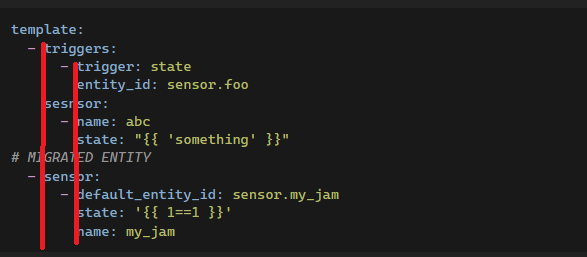
Bad merge
template:
  - triggers:
      - trigger: state
        entity_id: sensor.foo
    sensor:
      - name: abc
        state: "{{ 'something' }}"


# MIGRATED ENTITY
- sensor:
  - default_entity_id: sensor.my_jam
    state: '{{ 1==1 }}'
    name: my_jam