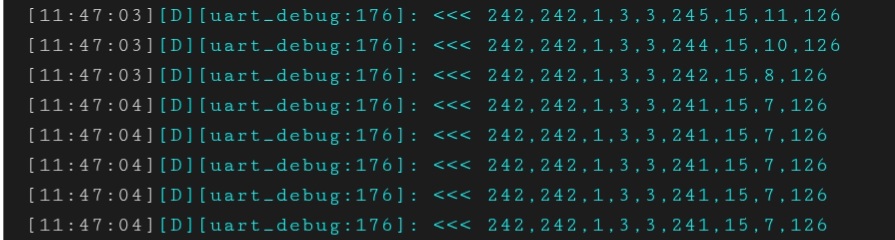
Looks like data is being received but the normal format would be as in the attached image so appears these desks do use a different protocol or at least do now since @pereira98’s attempt.
Hi @Mahko_Mahko,
To confirm your photo, I think you have
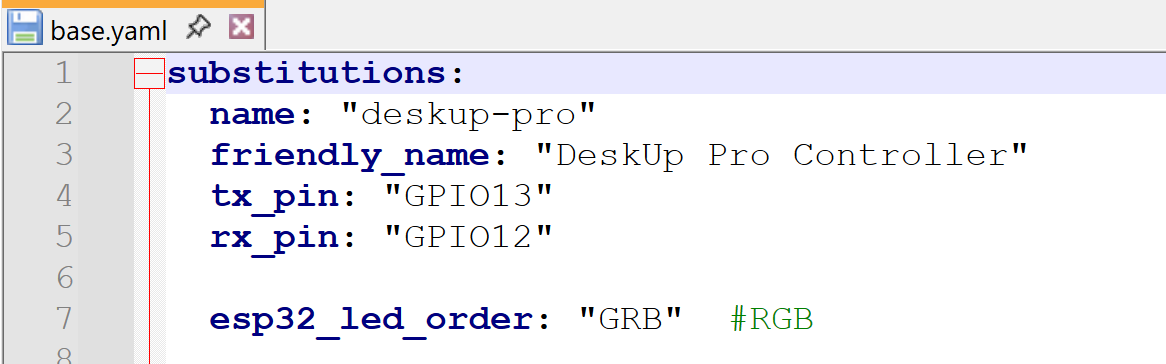
rx_pin:configured to gpio12 and you were wired to that pin with the above tests?
Yes I have configured 'rx_pin" to gpio12:
You could try doing the same but with both the tx and tx wires (1 & 3) hooked up and configured, and try swapping them too. I think sometimes you need both hooked up for some devices. But I’m starting to take wild stabs now.
Assuming pin 4 is the GND (connected to esp GND), I followed your recommendation and tried to connect both pins (1+3) to esp at the same time:
-
first attempt:
a) RJ12 pin 1 to esp gpio12
b) RJ12 pin 3 to esp gpio13 -
second attempt:
a) RJ12 pin 3 to esp gpio12
b) RJ12 pin 1 to esp gpio13
Both did not work.
Maybe @jonlanceley is right:
appears these desks do use a different protocol
PS: Would it make sense to try on RJ45 port? Having such a module which I could use to connect. Is there any instruction / esphome coding I could use to try? Here I measure 5.5V between pin 1 and 8.

Does the desk still function as expected when you have it hooked up to the module like that? If so then it should be easy to try to inspect a few wires for signals.
If you start with a multi-meter you can probably confirm which wires are the gnd and 5V:
- when you have the multi-meter on those two wires you should get a slightly higher voltage of say 5.5V.
- Then when you have the probes on the gnd + other “signal wires”, you’ll probably see the voltage is a bit lower (say 5v).
Then once you have candidate signal wires and a pretty sure of the GND, you can repeat the same as what you did earlier:
- Hook up the ground wire between your breakout and the ESP.
- Try one wire at a time on GPIO12 and see if you get clean UART messages
You could also try momentarily bridging a wire between the GND and different signal wires (NOT the power wire) and see if the desk moves.
Alternativley you can get a cheap signal analyser like this and explore in more depth:
https://www.aliexpress.com/item/1005003812410259.html?spm=a2g0o.order_list.order_list_main.15.248a1802leoJba
Hi! who can help with connect esp to controller with rj-50 port only? like this Sit Stand Desk Control Box from China manufacturer - JS Technology
aaaaaaaaaaaaaaaaand now it’s broken again.
No idea why this has to be so flaky. 
Has anyone been able to get Rocka’s solution working with RJ45? It doesn’t do anything for me. Logging shows the ESP32 recognizes the button presses, but the desk does nothing.
I just ordered some RJ12 ends, I’ll have a go at that tomorrow, I suppose.
Ok, so… My RJ12 ends showed up and I wired one up and flashed it.
Very weird.
So, first off - how do I make this thing report in freedom units? Nobody uses cm in the USA!! I suspect that my issues are due to the fact that this code appears to have been written expecting the desk to output cm, but in the USA it outputs inches…
But beyond that - it actually isn’t reporting at all. Here is what works and what doesn’t:
Working controls:
Position 1
Position 2
Position 3
Position 4
Step down
Step up
Stop
Not working:
Move down
Move up
Height
Height Percentage
ALL the sensors (height, height max, height min, height percent, position 1, position 2, position 3, position 4)
Here is my code:
esphome:
  name: big-desk-uart
  friendly_name: Big Desk UART
  on_boot:
    # This script is required to initialize the following sensors:
    #    height_pct, height_min, height_max, position1 - position4
    # You can skip this if you don't use those.
    priority: -100.0 # when mostly everything else is done
    then:
      - delay: 5s
      - lambda: "id(my_desk).request_physical_limits();"
      - delay: 1s
      - lambda: "id(my_desk).request_limits();"
      - delay: 1s
      - lambda: "id(my_desk).request_settings();"

external_components:
  - source:
      type: git
      url: https://github.com/Rocka84/esphome_components/
    components: [ jiecang_desk_controller ]

esp32:
  board: esp32dev
  framework:
    type: esp-idf

# Enable Home Assistant API
api:
  encryption:
    key: <key>

ota:
  - platform: esphome
    password: <pwd>

wifi:
  ssid: !secret wifi_ssid
  password: !secret wifi_password
  manual_ip:
    static_ip: 10.1.6.209
    gateway: 10.1.6.1
    subnet: 255.255.254.0
    dns1: 10.1.6.2

  # Enable fallback hotspot (captive portal) in case wifi connection fails

captive_portal:

uart:
  - id: uart_bus
    tx_pin: TX
    rx_pin: RX
    baud_rate: 9600
    debug:
      direction: BOTH
      dummy_receiver: true
      sequence:
        - lambda: UARTDebug::log_int(direction, bytes, ',');

logger:
  baud_rate: 0 # disable logging over uart, required when using the RX/TX pins for the controller
  level: VERBOSE

jiecang_desk_controller:
  id: my_desk
  sensors:
    height:
      name: "Height"
      unit_of_measurement: "in"
    height_min:
      name: "Height Min"
      unit_of_measurement: "in"
    height_max:
      name: "Height Max"
      unit_of_measurement: "in"
    height_pct:
      name: "Height Percent"
    position1:
      name: "Position 1"
    position2:
      name: "Position 2"
    position3:
      name: "Position 3"
    position4:
      name: "Position 4"
  buttons:
    move_up:
      name: "Move up"
    move_down:
      name: "Move down"
    stop:
      name: "Stop"
    step_up:
      name: "Step up"
    step_down:
      name: "Step down"
    position1:
      name: "Position 1"
    position2:
      name: "Position 2"
    position3:
      name: "Position 3"
    position4:
      name: "Position 4"
    save_position:
      name: "Save Position"
  numbers:
    height:
      name: "Height"
      unit_of_measurement: "in"
    height_pct:
      name: "Height Percent"

## lambda usage
#button:
#   - platform: template
#     name: "Step up"
#     on_press:
#       lambda: "id(my_desk).step_up();"
#   - platform: template
#     name: "Step down"
#     on_press:
#       lambda: "id(my_desk).step_down();"
#   - platform: template
#     name: "Stop"
#     on_press:
#       lambda: "id(my_desk).stop();"
#  - platform: template
#    name: "Position 2"
#    on_press:
#      lambda: "id(my_desk).goto_position(2);"
#   - platform: template
#     name: "Save Position 4"
#     on_press:
#       lambda: "id(my_desk).save_position(4);"
#   - platform: template
#     name: "Go to 100cm"
#     on_press:
#       lambda: "id(my_desk).goto_height(100);"```


If it makes any difference, I added "debug:" to the uart config, and when I change the height using the keypad, nothing shows up in the debug log.  If I use one of the few working buttons in the integration, I get a length colon-delimited hex string of what looks to be 12 characters.

Example from logs:

```[22:12:52.463][D][button:023]: 'Step down' Pressed.
[22:12:52.463][V][JiecangDeskController:241]: button_press_action 1
[22:12:52.464][V][jiecang_desk_controller:148]: Sending wake-up signal.
[22:12:52.827][D][uart_debug:114]: >>> F1:F1:2B:00:2B:7E:F1:F1:02:00:02:7E
[22:12:55.675][D][button:023]: 'Step up' Pressed.
[22:12:55.675][V][JiecangDeskController:241]: button_press_action 0
[22:12:55.676][V][jiecang_desk_controller:148]: Sending wake-up signal.
[22:12:55.942][D][uart_debug:114]: >>> F1:F1:2B:00:2B:7E:F1:F1:01:00:01:7E
[22:13:02.041][D][button:023]: 'Step up' Pressed.
[22:13:02.042][V][JiecangDeskController:241]: button_press_action 0
[22:13:02.042][V][jiecang_desk_controller:148]: Sending wake-up signal.
[22:13:02.228][D][uart_debug:114]: >>> F1:F1:2B:00:2B:7E:F1:F1:01:00:01:7E
[22:13:05.057][D][button:023]: 'Step up' Pressed.
[22:13:05.061][V][JiecangDeskController:241]: button_press_action 0
[22:13:05.090][V][jiecang_desk_controller:148]: Sending wake-up signal.
[22:13:05.310][D][uart_debug:114]: >>> F1:F1:2B:00:2B:7E:F1:F1:01:00:01:7E
[22:13:13.247][D][button:023]: 'Step up' Pressed.
[22:13:13.248][V][JiecangDeskController:241]: button_press_action 0
[22:13:13.256][V][jiecang_desk_controller:148]: Sending wake-up signal.
[22:13:13.456][D][uart_debug:114]: >>> F1:F1:2B:00:2B:7E:F1:F1:01:00:01:7E
[22:13:18.171][D][button:023]: 'Step down' Pressed.
[22:13:18.173][V][JiecangDeskController:241]: button_press_action 1
[22:13:18.175][V][jiecang_desk_controller:148]: Sending wake-up signal.
[22:13:18.431][D][uart_debug:114]: >>> F1:F1:2B:00:2B:7E:F1:F1:02:00:02:7E
[22:14:13.353][D][button:023]: 'Position 2' Pressed.
[22:14:13.365][V][JiecangDeskController:241]: button_press_action 4
[22:14:13.365][V][jiecang_desk_controller:148]: Sending wake-up signal.
[22:14:13.566][D][uart_debug:114]: >>> F1:F1:2B:00:2B:7E:F1:F1:06:00:06:7E
I also noticed this:
[23:09:01.836][D][button:023]: 'Step down' Pressed.
[23:09:01.837][V][JiecangDeskController:241]: button_press_action 1
[23:09:01.837][V][jiecang_desk_controller:148]: Sending wake-up signal.
[23:09:02.043][D][uart_debug:114]: >>> F1:F1:2B:00:2B:7E:F1:F1:02:00:02:7E
[23:09:07.773][D][button:023]: 'Move down' Pressed.
[23:09:07.773][V][JiecangDeskController:241]: button_press_action 9
[23:09:07.878][D][uart_debug:114]: >>> F1:F1:1B:02:00:00:1D:7E
Note the difference in length of the message? Seems odd to me. All the messages that work are all the same length. Maybe related? IDK.
Yep, the problem is definitely there. Look at the commands being sent, they are identical for both move up and move down:
[23:11:10.254][D][button:023]: 'Move down' Pressed.
[23:11:10.254][V][JiecangDeskController:241]: button_press_action 9
[23:11:10.364][D][uart_debug:114]: >>> F1:F1:1B:02:00:00:1D:7E
[23:11:20.186][D][button:023]: 'Move up' Pressed.
[23:11:20.192][V][JiecangDeskController:241]: button_press_action 8
[23:11:20.296][D][uart_debug:114]: >>> F1:F1:1B:02:00:00:1D:7E
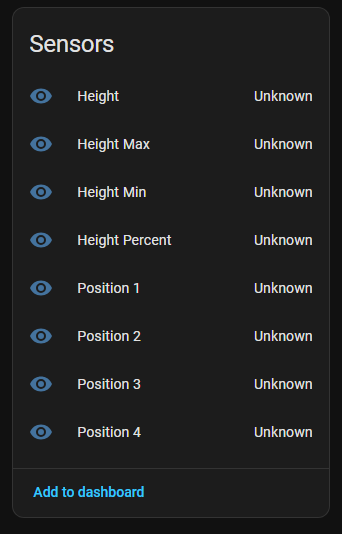
I also don’t see any UART communication coming FROM the desk. I tested all 4 wires with a DVOM and they were all good. Not sure what to check next?
One more bit of output, after I made the debugging changes:
[00:15:23.644][D][button:023]: 'Step up' Pressed.
[00:15:23.645][V][JiecangDeskController:241]: button_press_action 0
[00:15:23.645][V][jiecang_desk_controller:148]: Sending wake-up signal.
[00:15:23.918][D][uart_debug:176]: >>> 241,241,43,0,43,126,241,241,1,0,1,126
[00:15:25.226][D][button:023]: 'Step up' Pressed.
[00:15:25.226][V][JiecangDeskController:241]: button_press_action 0
[00:15:25.226][V][jiecang_desk_controller:148]: Sending wake-up signal.
[00:15:25.531][D][uart_debug:176]: >>> 241,241,43,0,43,126,241,241,1,0,1,126
[00:15:27.333][D][button:023]: 'Step up' Pressed.
[00:15:27.336][V][JiecangDeskController:241]: button_press_action 0
[00:15:27.339][V][jiecang_desk_controller:148]: Sending wake-up signal.
[00:15:27.548][D][uart_debug:176]: >>> 241,241,43,0,43,126,241,241,1,0,1,126
[00:15:37.944][D][button:023]: 'Step down' Pressed.
[00:15:37.944][V][JiecangDeskController:241]: button_press_action 1
[00:15:37.944][V][jiecang_desk_controller:148]: Sending wake-up signal.
[00:15:38.145][D][uart_debug:176]: >>> 241,241,43,0,43,126,241,241,2,0,2,126
[00:15:41.109][D][button:023]: 'Step down' Pressed.
[00:15:41.110][V][JiecangDeskController:241]: button_press_action 1
[00:15:41.112][V][jiecang_desk_controller:148]: Sending wake-up signal.
[00:15:41.316][D][uart_debug:176]: >>> 241,241,43,0,43,126,241,241,2,0,2,126
[00:15:43.991][D][button:023]: 'Step down' Pressed.
[00:15:43.996][V][JiecangDeskController:241]: button_press_action 1
[00:15:44.029][V][jiecang_desk_controller:148]: Sending wake-up signal.
[00:15:44.181][D][uart_debug:176]: >>> 241,241,43,0,43,126,241,241,2,0,2,126
[00:15:49.445][D][button:023]: 'Stop' Pressed.
[00:15:49.446][V][JiecangDeskController:241]: button_press_action 2
[00:15:49.446][V][jiecang_desk_controller:148]: Sending wake-up signal.
[00:15:49.657][D][uart_debug:176]: >>> 241,241,43,0,43,126,241,241,43,0,43,126
[00:15:52.253][D][button:023]: 'Move up' Pressed.
[00:15:52.263][V][JiecangDeskController:241]: button_press_action 8
[00:15:52.337][D][uart_debug:176]: >>> 241,241,27,2,0,0,29,126
[00:15:56.017][D][button:023]: 'Move down' Pressed.
[00:15:56.017][V][JiecangDeskController:241]: button_press_action 9
[00:15:56.114][D][uart_debug:176]: >>> 241,241,27,2,0,0,29,126
Lastly, I think I’ve ruled out a bad desk controller since I have two desks here and neither one of them sends back any UART. I looped the tx to the rx and I can see my commands echo back to me, so I’m pretty sure the ESP is good.
HELP!! LOL
Any help would be GREATLY appreciated!
What I would suggest doing as a next step is actually changing your desk to cm rather than caveperson units.
If it works ok like that then you know it’s not config or hardware, and you can move to resolving conversion.
I can offer some further thoughts if that isn’t fruitful.
I don’t know that is possible? I didn’t set it to inches, that’s how it was out of the box.
Do you know how to do change that?
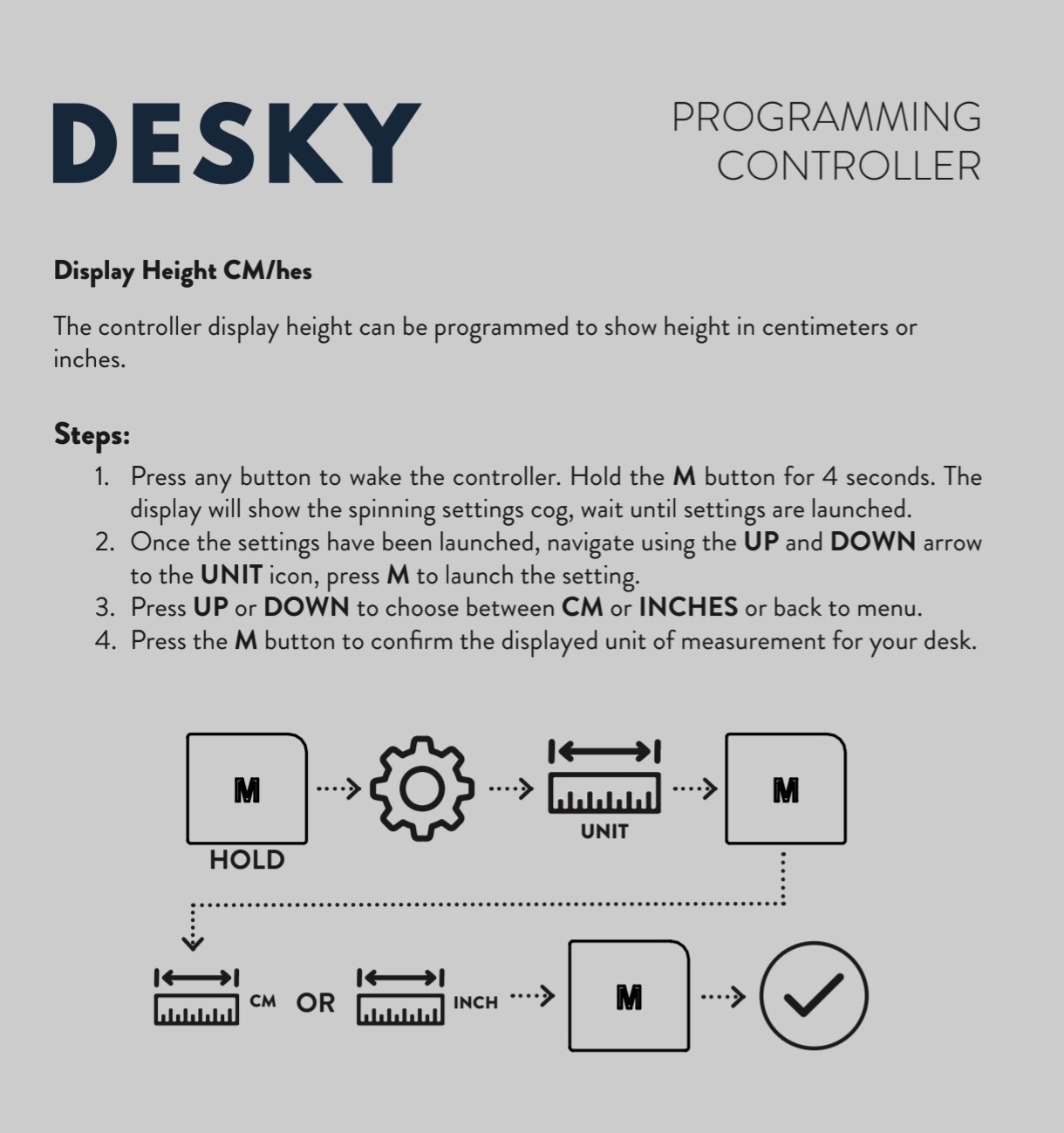
Hrmm… My display isn’t that fancy. I’ll have to see what I can find. I’ll report back after I figure it out.
Thanks!
Hello @froidl i’ve the same desk controler with a JCB35M15c, did you find something about that ? Thnks
Hi, can you check the issue for esphome so your great module continues to compile with latest esphome version. Thanks for your contribution, I really enjoy it *.*_SCHEMA deprecations · Issue #9 · Rocka84/esphome_components · GitHub
Hi if you had some luck with Rocka’s Repo you could see if this one works any better. It was built for Maidesite desks but uses the same desk hex codes as Rocka’s repo does. It’s all yaml with no extra files and internally it uses mm and cm’s. But if you get anymore functionality working should be possible to switch to inches.
If you find it does or doesn’t work please report back so I can add it to the list of compatible desks.
I am sure this was already figured out, but i figured best not to assume. I found how the wires connect, it’s not just a 1:1. I used the same colors (mostly) for the passthrough.
I was able to get the ESP to program heights and also recall height presets.
Button pressed Color wire involved GPIO Pins
Up green 4
Down yellow 5
Preset 1 yellow, green 5,4
Preset 2 purple 25
Preset 3 yellow, purple 5,25
Preset 4 green, purple 4,25
Program Button (M) blue 26
Wake white 14
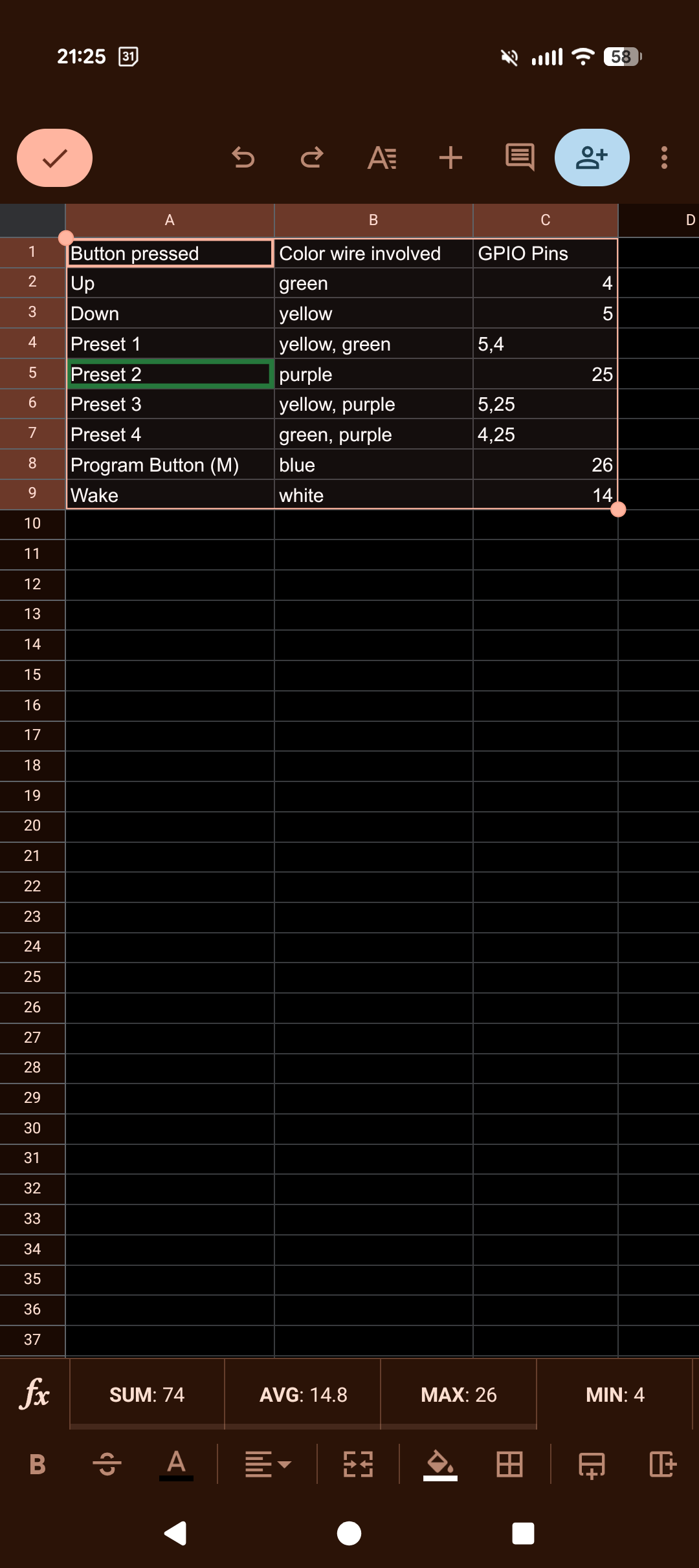
Hello. Yes there is a link in the OP.
HI… I have just installed this in my Desktronic Pro desk. And it seems to read everything from the desk correctly. However, when I run a automation to set the desk height to lets say 80 from the current set at 70, it just seems to behave as if a up button has been pressed once. It does not continue upto the desired height. Is there something I have setup wrong?
Just realised that I had to change the desk controller to be single touch and not constant touch which it ships with. Once I did this, I am able to control the desk thru the Home Assistant now.
Not sure what you installed? And was this for RJ45 or RJ12
Works absolutely flawless with an esp32dev and an Desktronic Home Pro Desk!
Thank you.