What is Device Sentinel
Home Assistant cannot tell the difference between a frozen device and one that has nothing to say. A door sensor that died hours ago will cheerfully report as “closed”, tricking your automations into running normally (Hey, who let the dogs out?). A dead freezer sensor still reads -18°C after its battery dies, which can cost you hundreds in rotting food.
Device Sentinel is a custom HACS integration built to fix those blind spots. It watches for frozen devices, dying batteries, and failing radio links before your automations break and your smart home stops working. DS respects your privacy and sends nothing to the Internet except the notifications you set up yourself.
Smart Freeze Detection
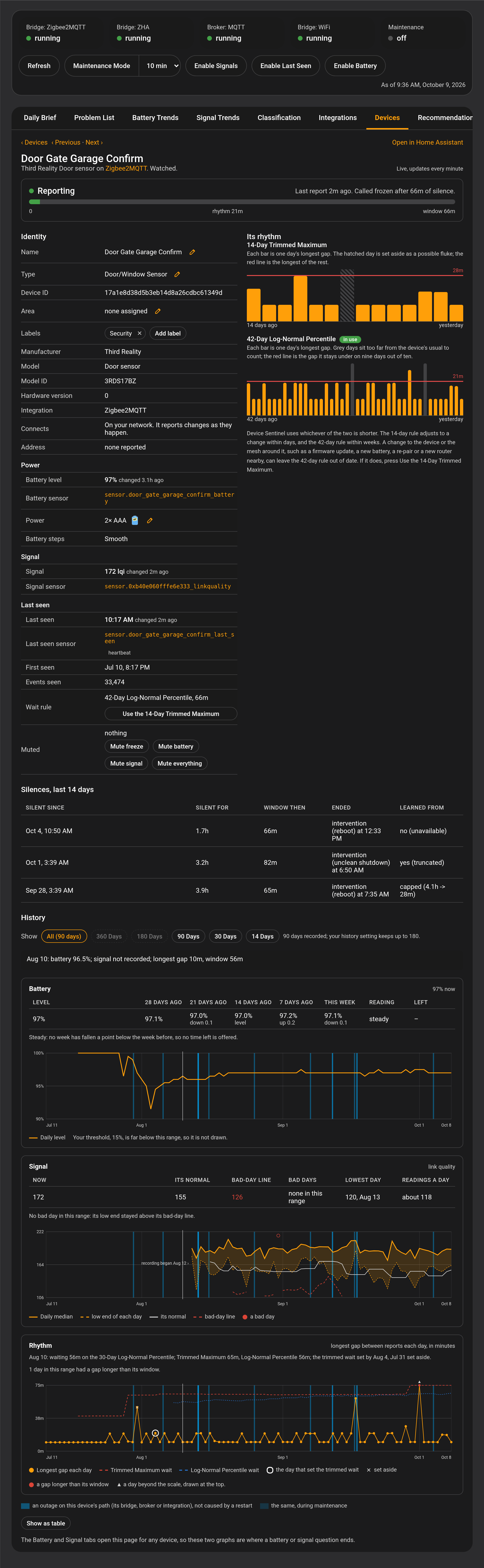
Device Learning replaces manually set timeouts. DS monitors the rhythms that each device reports, learns from that, and enables the integration to spot a frozen device Home Assistant itself can’t see. If a chatty motion sensor suddenly stops reporting, DS flags it in minutes. If a rain gauge speaks only when it sees rain, it is left alone.
Predictive Battery Timelines
Watching for a battery level to fall below a threshold is not the metric to rely on. A 15% charge means two months of life on one sensor and total failure this week on another. This is because different battery chemistries decay at different rates.
While an alkaline battery decays at a relatively uniform rate, a lithium cell (like a common CR2032 coin cell) will hold almost full charge for its entire life. When a lithium battery is near its end, its decay rate begins to accelerate. That CR2032 can last for 2 years above 80% and then die a week later. Relying on a threshold gives you a false sense of security.
Device Sentinel not only reports when a battery crosses a threshold, but it also watches for the telltale acceleration marking a battery’s coming end. For that dying lithium cell, DS can give a 30-day warning, even if it still claims an 80% charge.
The Interface
-
Zero-Config Monitoring From Day One: Device Sentinel watches the devices in Home Assistant from the moment you install it.
-
After Watching Your System, DS Helps with Settings Recommendations: These are meant to guide setup in the first week of learning so you don’t have to study the manual.
-
One Unified Problem List: Every fault is added to a Home Assistant to-do list.
-
One Alert When a Coordinator, Broker or Wi-Fi Network Goes Down: DS reports the failure you can fix, rather than giving you sixty separate alerts for every device that has become frozen or unavailable.
-
A Dashboard for Your Sidebar: The daily brief, problem list, battery and signal trends reports, and each device’s detail page gives you all the information necessary to improve your home.
-
Alerts That Respect Your Evening: Faults are sent to your phone as they happen, but quiet hours respect your sleeptime.
Join the Beta
The core freeze detection, battery math, and storage engines are stable. Device Sentinel has been running in hundreds of people’s homes and informing them of frozen devices and dead batteries they didn’t even know they had. Feedback has been positive and reported issues are repaired quickly.
Installing

Device Sentinel is in the HACS default store.
- Open HACS, search for Device Sentinel, and open it.
- Click Download, then Restart Home Assistant.
You need Home Assistant 2026.5 or newer. The README has more about what it does, and the Installation and Setup page in the wiki walks you through installing and configuring it.
If the engine falsely reports a fault or misses a dead device, open a GitHub issue and attach your diagnostics file. I am specifically hunting for data from systems running Z-Wave, Matter, Lutron, Philips Hue, SmartThings, or routers from UniFi, FRITZ!Box, ASUS, NETGEAR, and MikroTik. I cannot test those locally, and I need your diagnostics files to build the math.