a couple off devices are suddenly unavailable, devices which are autmomated and i do not look in HA everyday so i do not know how long they are not available. First i thought it where only ZHA devices but als the devices with Tp-link add on and HP printer integration are offline. Maybe a update off HA is the course of this but i do not know, several devices are online but several are not. How can i troubleshoot this or is it faster to remove the integration and add the intergration again and attach the devices again?
By the way: the automations do work, so they are only offline in HA not in reality the work then.
I have some “maintenance” dashboards that let me view state of such things, such as battery monitoring (I can see the pbattery status of everything on one dashboard, so it’s easy peasy to see which devices I should sometime put new batteries into). One of these are the sensors that are offline or unavailable that should be available. It sorts the list of sensors by the time they became unavailable. There are some sensors that you would expect to be unavailable sometimes, like your phone when it is turned off, battery status of your car when it is not at home is another example, etc. etc. I have an older smartwatch that does not reports some of the stats that re shown in one mof my integrations, so those are shown in my card below that I have not gotten around to rectifying (because I am getting a new smartwatch soon). So, some of those that you don’t want to monitor at all you can exlude in the settings for this card (currently also I have disabled the back door lisght switch relay in HA as I am replacing the fixture right now)… I also wanted a card that takes up as little space as possible (so in that case I don’t want an auto-entity card as each line takes up alot of space, but use a markdown card instead) -
So, here is what mine looks like (dynamically populated realtime with only the sensors that are unavailable or offline):
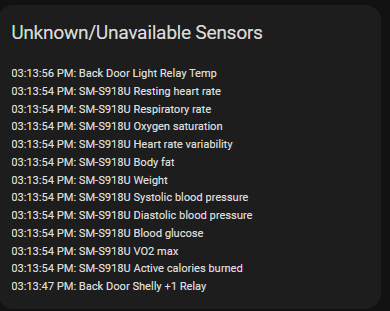
And here is the ralated code:
type: markdown
title: Unknown/Unavailable Sensors
content: >
  {% set sensor_issues = states
     | selectattr('state', 'in', ['unknown','unavailable'])
     | rejectattr('entity_id', 'match', 'device_tracker.')
     | rejectattr('name', 'search', 'S23|current|Amarmfob|Reconnect|Reboot|Repairs|Reload|Restart|Alexa|holding|Estate|Room|Vibration|Backup|WS2812B|BasementWaterMeter|WAN|Identify|AlarmFob|Home Assistant Cloud|Master_Controller|Activity status|Clear hold|AirNow|Take Snapshot|Ding Dong|Last Ding|Last Pressed')
     | sort(attribute='last_changed', reverse=true)
     | list %}
  {% if sensor_issues | length > 0 %} {% for s in sensor_issues %} {{
  as_local(s.last_changed).strftime('%I:%M:%S %p') }}: {{ s.name }}

  {% endfor %} {% else %} None  - All Good! {% endif %}
You could also create automations that will do something or alerts that will send you notifications/emails/etc… if one of them becomes unavailable or unknown…
Hi, i also do see battery status in one Dashboard of all devices but that doesn’t give me an answer why the devices are offline, it cannot be that out of a sudden all batteries are empty and poweradapters do not run on battery, HP inkt status also not…
Maybe the last updates is the reason why those devies are offline
the HP inkt status has come back but several others still are not available. The strange thing here is that the devices are available in a sepereate app like devices off Tapo, they are online in the Tapo app but not in HA Tp-link. Another thing is that all those offline devices in HA are still starting automations but the do not give battery status or other statusses, what can i do attach all those offline devices in HA again?
The Tp-link devices are back, issue was that the app on the phone from Tapo had compatibility with third partys off, something set it to off thats why HA could not reach the devices anymore. However i have several other sensors which are offline, Aqara (i do not have a app for Aquara devices) and other sensors which are offline must i reconnect reset the devices, why are they all sudeenly offline and not back online?