Differential Sensor Template?

Hello everyone,
i’ve got a Weishaupt heat pump for which i use the Modus integration. Unfortunately, Weishaupt is hiding the most interesting information from the Modbus registers (this would be current elektrical input power, current thermal output). To be able to calculate those, I planned to use the provided statistics register which integrate the consumed electrical power for day, month and year. My aim is to create a template sensor which provides the used electrical energy for heating, hot water, defrosting and others. While masking the corresponding machine states, was easy, I do not succeed in calculating the differential sensor values.
The masking from the heatpump states works, looks like this:
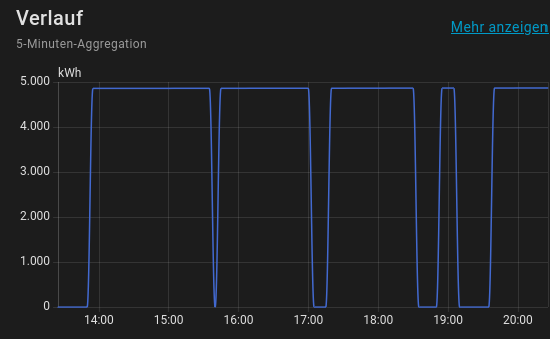
Now, i want to calculate the delta values.

My state code looks like this (example for masked “Heating Energy”):

{% if states('sensor.wh_warmepumpe_betrieb') == 'heatpump_operationmode_heating' %}
  {% if last == 0 %}
    {% set last = states('sensor.wh_statistik_elektr_energie_jahr') | int %}
    {{ 0 }}
  {% else %}
    {% set result = ((states('sensor.wh_statistik_elektr_energie_jahr') | int) - last) %}
    {% set last = states('sensor.wh_statistik_elektr_energie_jahr') | int %}
    {{ result  }}
  {% endif %}
{% else %}
  {{ 0 }}
{% endif %}

This leads to an error since ‘last’ is not available before declaration. I basically need a method to pass a value to the next trigger run of the template. I think I miss a basic concept of the sensor data. How can I differentiate a sensor value which was integrated by the manufacturer?
I dived into some existing topics but found no solution. (Like Calculating delta (change since last value) or others)
My goal is to feed this data to a VictoriaMetrics DB to visualize with grafana.
I created this template sensors via the GUI.

Edit: This is the entry from core.config_entries:

{
    "created_at":"2025-12-28T12:25:58.467470+00:00",
    "data":{},
    "disabled_by":null,
    "discovery_keys"{},
    "domain":"template",
    "entry_id":"01KDJERBE303APSWE1DAM4N2R3",
    "minor_version":1,
    "modified_at":"2025-12-28T18:43:55.763781+00:00",
    "options":
    {
        "device_class":"energy",
        "device_id":"6eb9cc13298a8e82d2800ed706e340f9",
        "name":"Elektrische Energie Heizen",
        "state":
            "{%- if states('sensor.wh_warmepumpe_betrieb') == 'heatpump_operationmode_heating' %}\n        {{ states('sensor.wh_statistik_elektr_energie_jahr') }}\n      {%- else %}\n        {{ 0 }}\n      {%- endif %}","state_class":"total","template_type":"sensor","unit_of_measurement":"kWh"
    },
    "pref_disable_new_entities":false,
    "pref_disable_polling":false,
    "source":"user",
    "subentries":[],
    "title":"Elektrische Energie Heizen",
    "unique_id":null,
    "version":1
},
Post the full config for the template sensor…

Full config from core.config_entries added to original Post.

You could just use the derivative sensor helper so that you don’t need to do that math yourself.

In a template, you can’t access historical data. Your options include:

  1. Use trigger-based template sensor (must be done in YAML, not available from the UI) and use a state trigger with the entity whose previous value you want to access. When the trigger is fired it will create a trigger variable that contains both the previous state and the new state, so you can reference either one. Docs are here.
  2. Store the previous value of your sensor in another sensor or in the attribute of a template sensor so that it is available to reference.
  3. Wait until this PR is submitted and approved, at which point you can use an action (either in a trigger-based template sensor or in an automation) to get the previous state of an entity.

Thank you very much. Option number 1 lead to the solution I had in mind. I did the following:

  1. Created one template sensor for each operation mode of the heat pump I wanted to track the electric consumption (Heating, water, defrost, everything else)
  2. Trigger them by the increase of the yearly electric power consumption register
  3. Determine the current operation state and create assign the increase (to_state - from_state) to the corresponding sensor. Or to be more specific: only assign value if operation mode matches, 0 otherwise.
  4. Trigger them every minute an reset the value to 0.

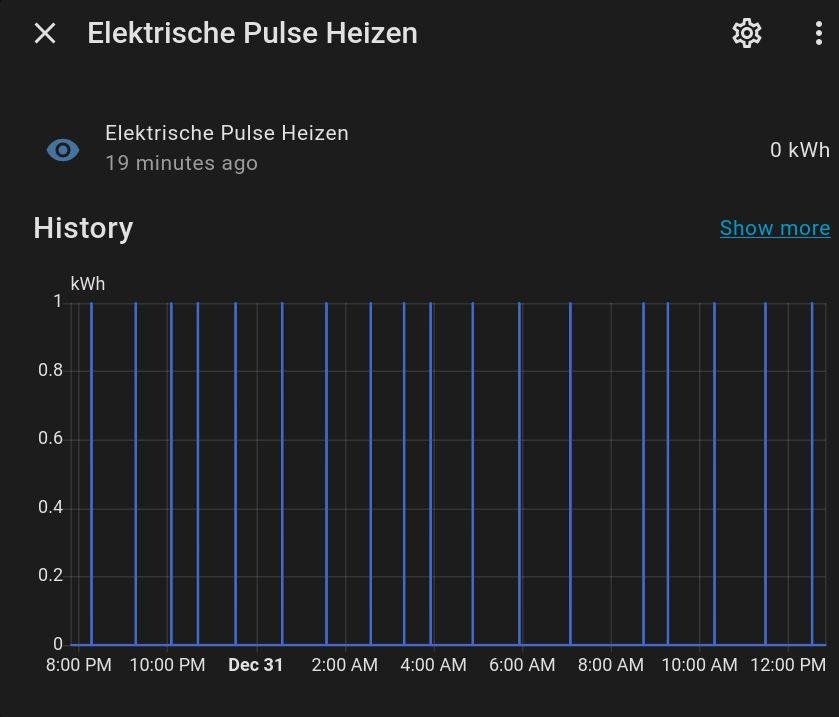
This will create 4 Sensors which create a spike (usually of value 1) each time 1 kWh in consumed in the corresponding mode. This looks like this:

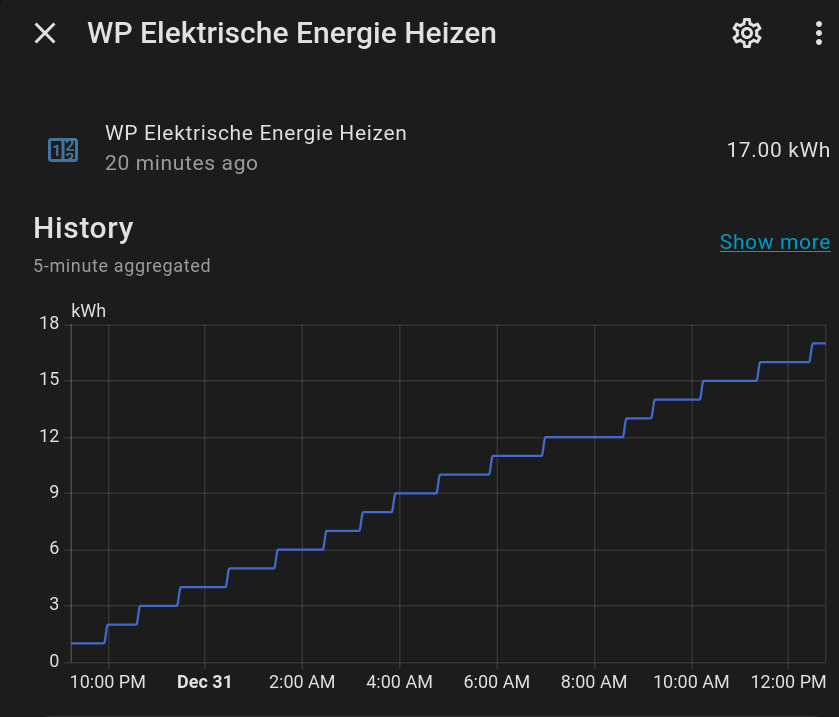
Now, I can create a Utility Meter for each sensor and configure it as “Delta Value”. This meter will then increase on every pulse and show the total consumption of electrical power for the corresponding operation mode.
I also included to ignore a negative slope on the template sensor. This will filter the reset of the electrical meter on first of January:

Code for the template sensors:

template:
  - trigger:
      - trigger: state
        id: "wh_increase"
        entity_id: sensor.wh_statistik_elektr_energie_jahr
        to: ~ # trigger on all state changes, ignore attribute changes
      - trigger: time_pattern
        id: "wh_reset"
        minutes: "/1"
    sensor:
       - name: "Elektrische Pulse Heizen"
         unique_id: "sensor.wh_elektrisch_pulse_heizen"
         unit_of_measurement: kWh
         state: >
            {% if (trigger.id | string == 'wh_increase') and
                  (trigger.to_state.state | int > trigger.from_state.state | int) and
                 ((states('sensor.wh_warmepumpe_betrieb') == 'heatpump_operationmode_heating') or
                  (states('sensor.wh_warmepumpe_betrieb') == 'heatpump_operationmode_frosprotection')) %}
              {{ trigger.to_state.state | int - trigger.from_state.state | int }}
            {% else %}
              {{ 0 }}
            {% endif %}
       - name: "Elektrische Pulse Warmwasser"
         unique_id: "sensor.wh_elektrisch_pulse_warmwasser"
         unit_of_measurement: kWh
         state: >
            {% if (trigger.id | string == 'wh_increase') and
                  (trigger.to_state.state | int > trigger.from_state.state | int) and
                  (states('sensor.wh_warmepumpe_betrieb') == 'heatpump_operationmode_hotwater') %}
              {{ trigger.to_state.state | int - trigger.from_state.state | int }}
            {% else %}
              {{ 0 }}
            {% endif %}
       - name: "Elektrische Pulse Abtauen"
         unique_id: "sensor.wh_elektrisch_pulse_abtauen"
         unit_of_measurement: kWh
         state: >
            {% if (trigger.id | string== 'wh_increase') and
                  (trigger.to_state.state | int > trigger.from_state.state | int) and
                  (states('sensor.wh_warmepumpe_betrieb') == 'heatpump_operationmode_defrost') %}
              {{ trigger.to_state.state | int - trigger.from_state.state | int }}
            {% else %}
              {{ 0 }}
            {% endif %}
       - name: "Elektrische Pulse Andere"
         unique_id: "sensor.wh_elektrisch_pulse_andere"
         unit_of_measurement: kWh
         state: >
            {%- if (trigger.id | string == 'wh_increase') and
                   (trigger.to_state.state | int > trigger.from_state.state | int) and
                   (states('sensor.wh_warmepumpe_betrieb') != 'heatpump_operationmode_defrost') and
                   (states('sensor.wh_warmepumpe_betrieb') != 'heatpump_operationmode_heating') and
                   (states('sensor.wh_warmepumpe_betrieb') != 'heatpump_operationmode_hotwater') and
                   (states('sensor.wh_warmepumpe_betrieb') != 'heatpump_operationmode_frosprotection') %}
              {{ trigger.to_state.state | int - trigger.from_state.state | int }}
            {% else %}
              {{ 0 }}
            {% endif %}