This will dim the lights when files from a given Plex folder are being played. This was my first foray into a template sensor, this is also a great way to turn an entity’s attribute into an entity of its own.
I am now aware there is a media_content_type attribute, but I did not know how accurate it was when I started, turns out its very accurate as it is set on the folder in plex, derp! I will likely re-write this to use that field, look for an update soon.
I ran into one stumbling block on my way, the media information is not present at the time plex starts playing, so I had to set the automation trigger on the content type change along with the fact that plex is “playing”. Hope this helps!
configuration.yaml:

sensor:
  - platform: template
    sensors:
      plex_family_room_playing:
        friendly_name: 'Currently Playing on Plex - Family Room'
        value_template: >-
          {%if is_state_attr('media_player.plex_plex_75d7915b_0270_455b_ad93_619a028ca027', 'media_library_name', 'Movies') %}
          Movie
          {% elif  is_state_attr('media_player.plex_plex_75d7915b_0270_455b_ad93_619a028ca027', 'media_library_name', 'Kids Movies') %}
          Movie
          {% elif  is_state_attr('media_player.plex_plex_75d7915b_0270_455b_ad93_619a028ca027', 'media_library_name', 'TV Shows') %}
          TV
          {% else %}
          None
          {% endif %}

scene:
  - name: dim
    entities:
      light.family_room_floor_lamp:
        state: on
        brightness_pct: 20
      light.family_room_table_lamp:
        state: on
        brightness_pct: 20
      light.dining_room_sconces:
        state: on
        brightness_pct: 25
      light.living_room_fireplace:
        state: on
        brightness_pct: 12
      light.kitchen_table:
        state: on
        brightness_pct: 25

automation.yaml:

- alias: "Movie Playing in Family Room"
  trigger:
    platform: state
    entity_id: sensor.plex_family_room_playing
    to: 'Movie'
  condition:
    condition: and
    conditions:
      - condition: state
        entity_id: sun.sun
        state: 'below_horizon'
      - condition: state
        entity_id: media_player.plex_plex_75d7915b_0270_455b_ad93_619a028ca027
        state: 'playing'
  action:
     service: scene.turn_on
     entity_id: scene.dim
Here is the sensor template using “media_content_type”.
  - platform: template
    sensors:
      plex_family_room_playing:
        friendly_name: 'Currently Playing on Plex - Family Room'
        value_template: "{{ state_attr('media_player.plex_family_room', 'media_content_type') }}"
Sadly, it looks like Plex has some sort of integration issue, this all works fine when HA is freshly restarted, but let Plex go idle/unavailable (let it sit un-used overnight) and when Plex is turned back on I see this message in the log:
homeassistant.exceptions.HomeAssistantError: Entity id already exists: media_player.plex_family_room. Platform plex does not generate unique IDs
I tried toggling “use_custom_entity_ids”, same result.
Moved this to “configuration”, as I want to see if others are having this same issue. I am running Plex PMS on Ubuntu 18.04 with the fronted running on an AppleTV 4.
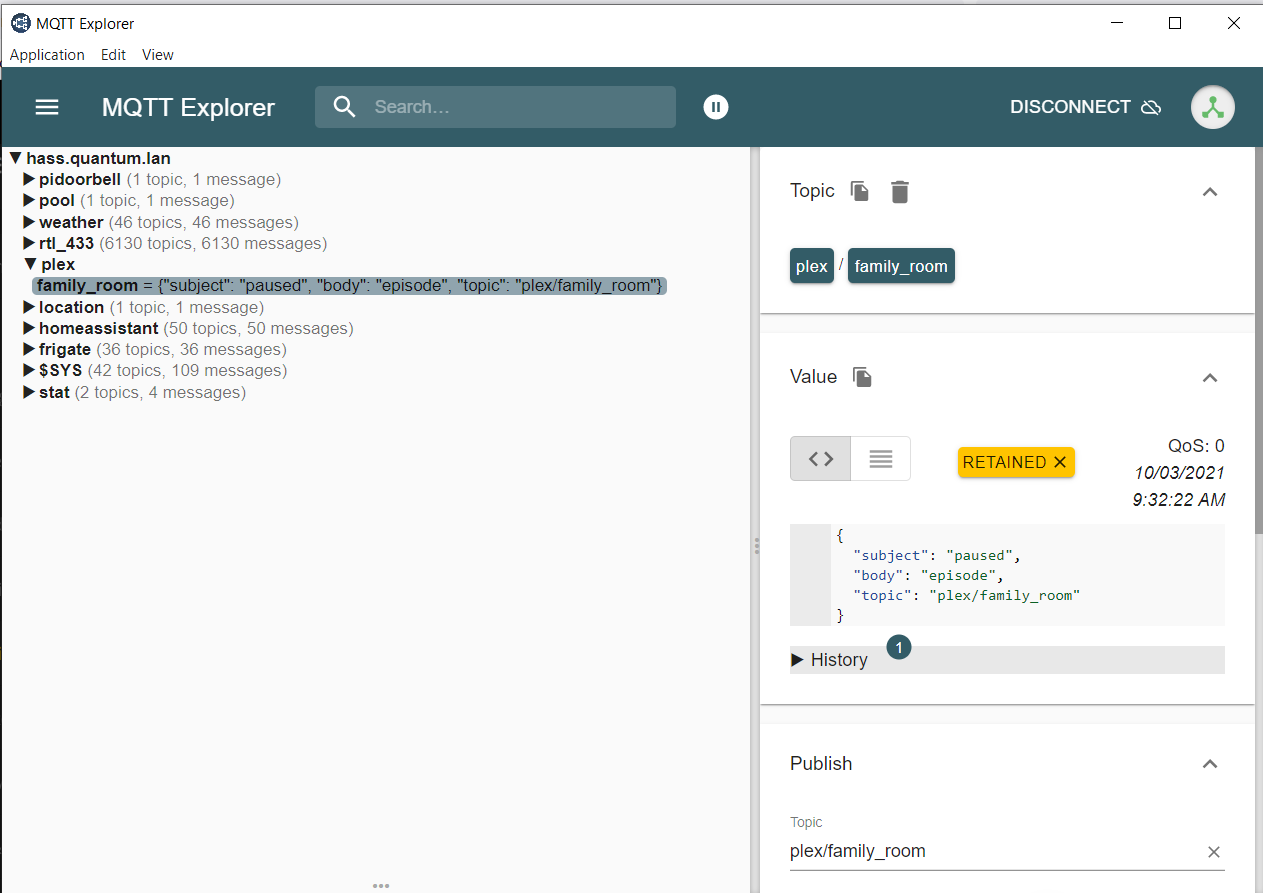
I setup Tautulli for Plex (which is cool in its own right), then I setup MQTT within Tautulli to send messages on play/pause/resume. Here is what my MQTT messages look like as received by Mosquito:
- alias: "Movie Playing in Family Room"
  trigger:
    platform: state
    entity_id: sensor.plex_family_room_status
    to: 'playing'
  condition:
    condition: and
    conditions:
      - condition: state
        entity_id: sun.sun
        state: 'below_horizon'
      - condition: state
        entity_id: sensor.plex_family_room_type
        state: 'movie'
  action:
     service: scene.turn_on
     entity_id: scene.dim
I am also trying to dim the lights when watching a movie or series in the living room. Depending on the persons habits this can be done either using the TVs natives apps (Samsung Q85), or attached set-top box (Shield TV).
This thread was already of great help to identify if something is reported playing on the media_players reported by the Plex integration. So I have started with the following automations:
  ##########################################################
  ## Plex Stopped - Lights On
  ##########################################################
- alias: Media - Plex Stopped Lights On
  id: 'media_plex_stopped_lights_on'
  trigger:
    - platform: state
      entity_id:
        - media_player.plex_plex_for_samsung_tv_gq65q85rgtxzg
        - media_player.plex_plex_for_android_tv_shield_android_tv
      to: 'idle'
      for:
        seconds: 3
    - platform: state
      entity_id:
        - media_player.plex_plex_for_samsung_tv_gq65q85rgtxzg
        - media_player.plex_plex_for_android_tv_shield_android_tv
      to: 'paused'
      for:
        seconds: 3

  condition:
    - condition: state
      entity_id: sun.sun
      state: 'below_horizon'
    - condition: state
      entity_id: input_boolean.disable_media_lights
      state: 'off'
    - condition: state
      entity_id: input_boolean.watching_plex
      state: 'on'

  action:
    - service: scene.turn_on
      entity_id: scene.livingroom_normal

  ##########################################################
  ## Plex Started - Dim Lights
  ##########################################################
- alias: Media - Plex Started Dim Lights
  id: 'media_plex_started_dim_lights'
  trigger:
    - platform: state
      entity_id:
        - media_player.plex_plex_for_samsung_tv_gq65q85rgtxzg
        - media_player.plex_plex_for_android_tv_shield_android_tv
      to: 'playing'

  condition:
    - condition: state
      entity_id: sun.sun
      state: 'below_horizon'
    - condition: state
      entity_id: input_boolean.disable_media_lights
      state: 'off'

  action:
    - service: input_boolean.turn_on
      entity_id: input_boolean.watching_plex
    - service: scene.turn_on
      entity_id: scene.livingroom_dim

  ##########################################################
  ## Turn Off Watching Plex Boolean
  ##########################################################
- alias: Media - Turn Off Watching Plex Boolean
  id: 'media_turn_off_watching_plex_boolean'
  trigger:
    - platform: state
      entity_id:
        - media_player.plex_plex_for_samsung_tv_gq65q85rgtxzg
        - media_player.plex_plex_for_android_tv_shield_android_tv
      to: 'idle'
      for:
        minutes: 3
    - platform: state
      entity_id:
        - media_player.plex_plex_for_samsung_tv_gq65q85rgtxzg
        - media_player.plex_plex_for_android_tv_shield_android_tv
      to: 'paused'
      for:
        minutes: 3
    - platform: state
      entity_id:
        - media_player.plex_plex_for_samsung_tv_gq65q85rgtxzg
        - media_player.plex_plex_for_android_tv_shield_android_tv
      to: 'unavailable'
      for:
        minutes: 3

  action:
    - service: input_boolean.turn_off
      entity_id: input_boolean.watching_plex
However these media_players are retstricted to Plex and the players reported by Plext do not seem to be too reliable. They are often unavailable and only become available when the movie is already running. Plus they do not cover any other app.
For my Shield TV I have now added the Android TV Integration (media_player.shield_tv), which gives a pretty solid feedback on playing/pause/idle not only for Plex, but also for Apps like Netflix and co. For my Samsung I have found a better Samsung TV Integration on HACS (media_player.samsung_q85_tv), which does also give feedback, if a specific app is selected, but no further details about playing/pause/idle, as the overall status of the media_player is only on or off.
So I was thinking about using the media_player.shield_tv plus the media_player.plex_plex_for_samsung_tv_gq65q85rgtxzg together with media_player.shield_tv. I do not want to dim the lights, if e.g. YouTube is playing. Therefore I would need to adapt the automation by adding a condition, that would be only evaluated if the trigger of the automation was media_player.shield_tv. Is this possible? I would like to avoid doubling up the full logic for another player.
Something like this:
{{ states('media_player.shield_tv') == 'playing' and
  ( states.media_player.shield_tv.attributes.source == 'Plex' or
    states.media_player.shield_tv.attributes.source == 'Netflix' ) }}
In case there is a solution available also to find out if Netflix on the Samsung native app is playing/paused/idle, that would be lit, but currently I do not see a solution.
I found out that the various Plex players often become unavailable. When one starts playing the non-used players sometimes enter idle. This led to the unstable behavior, that lights were set back to normal/bright unintentionally. I worked around this at the moment by setting up a universal media player with all TV connected Plex players (i.e. native app and via Shield).
This gave me a solid feedback for now.
Next step will be to try and include the Android TV integration to get the same feedback for other apps like Netflix. I will report on it.
Due to this I no longer have one plex media player transition from 'unavailable' to 'idle', when the other starts playing. However the universal media player seems to transition to ‘off’ once all players are 'idle', 'off' or 'unavailable' (i.e. as soon as I stop a video and return to the plex main menu, the universal media player transitions to 'off'). Due to this observed behaviour I adapted my automation to brighten the lights on pause/end of the movie.
  ##########################################################
  ## Plex Stopped - Lights On
  ##########################################################
- alias: Media - Plex Stopped Lights On
  id: 'media_plex_stopped_lights_on'
  trigger:
    - platform: state
      entity_id: media_player.plex_tv
      to: 'idle'
      for:
        seconds: 1
    - platform: state
      entity_id: media_player.plex_tv
      to: 'paused'
      for:
        seconds: 1
    - platform: state
      entity_id: media_player.plex_tv
      to: 'off'
      for:
        seconds 1

  condition:
    - condition: state
      entity_id: input_boolean.disable_media_lights
      state: 'off'
    - condition: state
      entity_id: input_boolean.watching_plex
      state: 'on'

  action:
    - service: scene.turn_on
      entity_id: scene.livingroom_normal
However due to some reason the automation does not seem to fire. Is there anybody that understands what is going on?