Hello all
I’m running HA on a Raspberry Pi and am using a USB Matter adapter. Matter is working fine, including Thread.
In my internal network I am not using IPv6, as my ISP doesn’t yet offer that.
Since enabling Matter/Thread on my HA, it seems this has also enabled IPv6 on the LAN side. I guess this is required for normal Matter functionality.
What is weird though, HA seems to spread its own IPv6 ULA address now as a DNS server entry to my other LAN clients in my network. So if I do an ipconfig /all on my Windows 11 client, I receive as a DNS IPv6 server the IP address of my HA server. Sadly Windows (and other systems) will first try to use IPv6 instead of IPv4, but sadly HA isn’t able to actually resolve the DNS requests.
So why is HA spreading its own IPv6 address as a DNS server and more importantly, how can I disable this?
Thanks
pato
IPv6 comes from your router. Not the ISP.
Why? Any overhead penalty is microscopic and if I recall matter/thread requires IPv6.
Because the ISP isn’t yet offering IPv6, I’ve disabled it on my router.
The problem is, my clients now try to ask HA for (internal) hostnames, which fail, as HA doesn’t seem to reply on IPv6 DNS queries.
Ipv6 is required for Matter. Full stop.
You can edit the response priorities on the windows pcs to resolve ipv4first but the real answer… Your router can handle ipv6 on an. Isolated subnet.
I can absolutely accept and live with that. What I have a problem with, is that HA now offers to all my clients it’s own IPv6 address as a DNS server, but doesn’t reply to DNS queries from my clients. This is what I’d like to disable/change.
It is not offering a DNS server the segment is resolving link local ipv6 and something is quite wrong with yojr DNS setup it sounds like.
I am not looking at your client device so I can’t answer what exactly is wrong but DNS resolution is up to them (clients) you should use ipconfig /all on a windows box on that segment to find out what it thinks it’s ipv6 stack thinks is going on. What did happen onthe wire is matter setup a link-local ipv6 network and yojr clients are having a hard time.
Thanks for confirming this. I have now sniffed the packets and it seems it’s my openWRT access point (running on a TP-Link device with disabled routing) sending IPv6 DHCP offers with (for reasons yet unknown to me) the HA server as the DNS server.
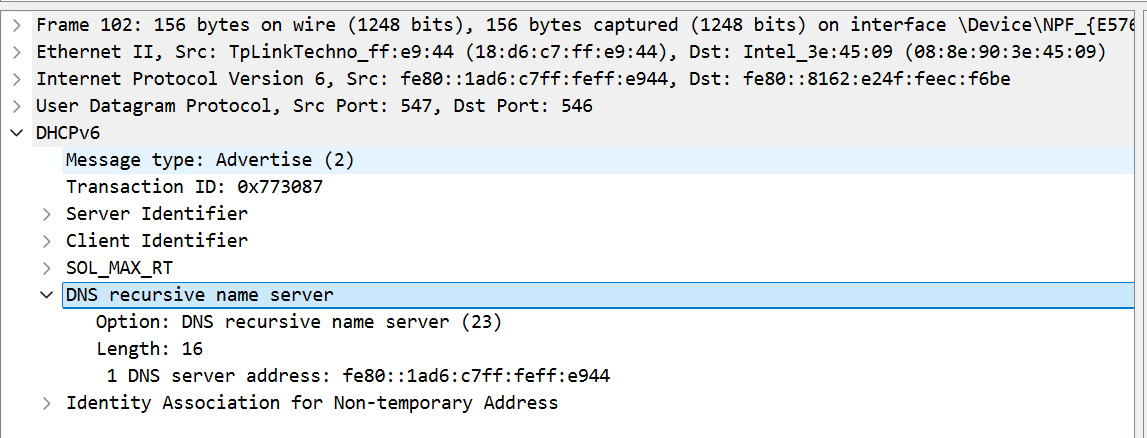
Sorry for the disturbance and thanks for the help!
No worries… Ugh tplink… Deco? (I bet money it’s a deco…)
No way older, it’s a power line kit which I recently upgraded with/to OpenWRT, as it hadn’t any (security) updates in 5+ years. Still 802.11ac though.
No time to figure out how to disable this, as DHCP and every single routing option is disabled on OpenWRT… ugh.
Please never expose that device to the internet or upgrade it first. It’ll get Pwned in seconds.
I know, that’s why it’s now running current OpenWRT firmware.
Anyway, found the culprit setting. Under Network → Interfaces → edit the LAN adapter → DHCP Server → IPv6 settings → set both RA-service and DHCPv6-Service from the default “hybrid mode” to “relay mode”.
As I just learned, in hybrid mode it will play authoritative DHCPv6 server automatically, if there isn’t an other one in the network.