i everyone,
I’d like to introduce Drive Storage Card, a custom Lovelace card for Home Assistant dashboards.
It is designed as a companion card for the UniFi Drive / UNAS Home Assistant integration and provides a compact dashboard view for storage-related entities. The card discovers compatible unifi_unas entities from Home Assistant and groups them into a more useful dashboard layout.
The goal is to avoid having dozens of separate storage, drive, pool, snapshot and system entities spread across the dashboard, and instead provide one focused card for monitoring and basic control.
Screenshots
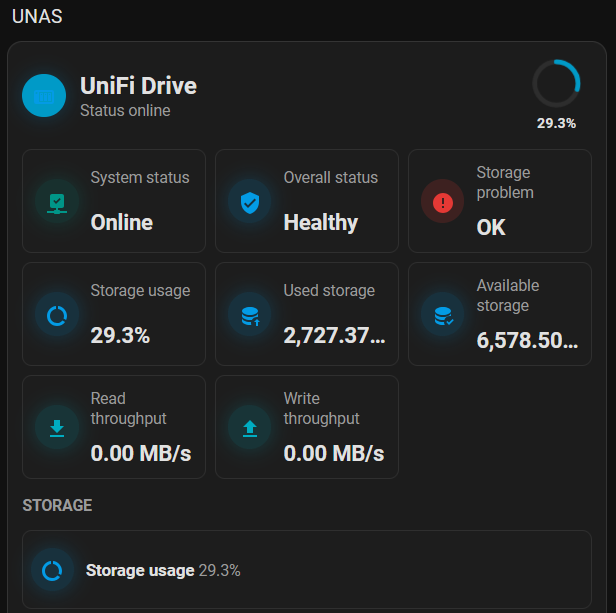
Compact overview
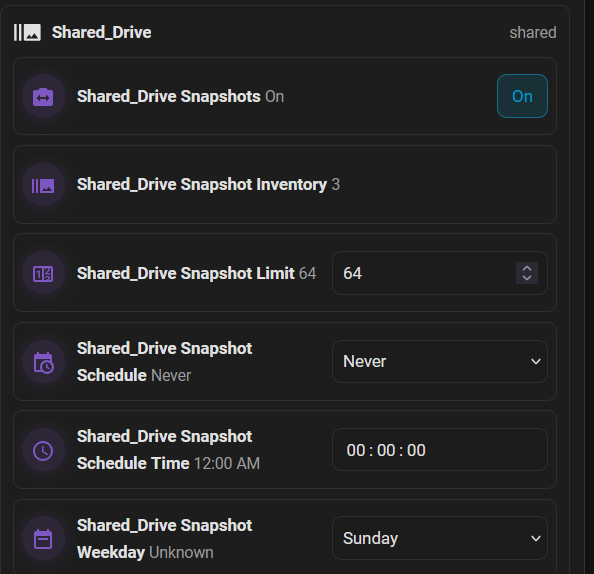
Snapshot controls
What it can show
The card can display and organize, depending on the available integration entities:
- storage overview
- pools
- drives
- snapshot targets
- backup tasks
- system state
- update entities
- diagnostics
- optional system controls
Dangerous actions such as restart or shutdown are hidden by default and only shown when explicitly enabled.
Setup
The card is intended to be used together with the UniFi Drive / UNAS integration.
Recommended setup path:
- Install and configure the integration first.
- Install the card through HACS as a custom dashboard repository.
- Add a new dashboard card with:
type: custom:unifi-drive-card
For multiple devices, the card can be restricted to a specific Home Assistant device using device_id.
Links
- UniFi Drive / UNAS integration: GitHub - memphi2/ha-unifi-drive: Home Assistant custom integration for UniFi Drive / UNAS (Unofficial) · GitHub
- Drive Storage Card: GitHub - memphi2/ha-unifi-drive-card: Lovelace card for the UniFi Drive / UNAS Home Assistant integration · GitHub
- Installation guide: ha-unifi-drive-card/docs/installation.md at main · memphi2/ha-unifi-drive-card · GitHub
- Configuration reference: ha-unifi-drive-card/docs/configuration.md at main · memphi2/ha-unifi-drive-card · GitHub
- Issues / feedback: Issues · memphi2/ha-unifi-drive-card · GitHub
Feedback, bug reports and real-world testing are welcome.