my home assistant used to work perfectly while using an duckdns domain to acces my instance remotely via data and via wifi. Both internal and external addresses were using duckdns.
after i had to reflash my home assistant blue, i cant for the life of me get it to work again. If i port forward in my router, acces via data works, but not wifi. If i disable port forward, my acces via wifi works but data stops working.
nothing has changed in my setup regarding hardware, modems etc.
does anyone know whats going on, or has a setup with duckdns that works?
i know there is a way as i have been using it for 3 years with 0 problems.
thank you!
Did you login to duckdns and confirm the ddns is using the correct external IP address?
Were you using SSL via Let’s Encrypt? If yes, did you make sure to renew the certificate?
Sometimes it can take awhile for SSL to render/populate. Best case scenario, a few minutes to an hour. Worst case scenario, it can take up to 48 hours if using a wildcard. As far as DNS propagation is concerned, usually a few hours, but with previously cached resolvers, can also take up to a couple of days.
SSL certificates takes the same time to renew, whether they are normal or wildcards, and that is calculated in minutes, unless the CA (Let’s Encrypt) have issues.
The installation takes seconds and the activation is just a service reload or system restart. This part is all local processes.
Did you login to duckdns and confirm the ddns is using the correct external IP address? Yes it’s confirmed using the same external IP, verified by power shell.
Were you using SSL via Let’s Encrypt? If yes, did you make sure to renew the certificate? I ran a fresh install, and set up duckdns logs aaid all done. Any other way to renew?
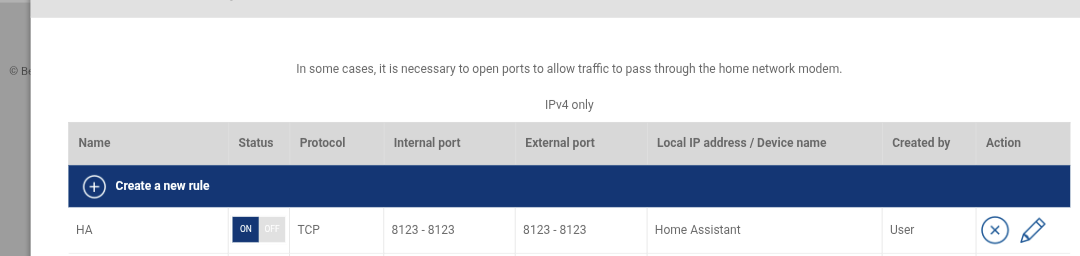
Other than that I port forwarded 8123 in my router (bell giga hub2.0) to use the internal IP of home assistant (Ethernet)
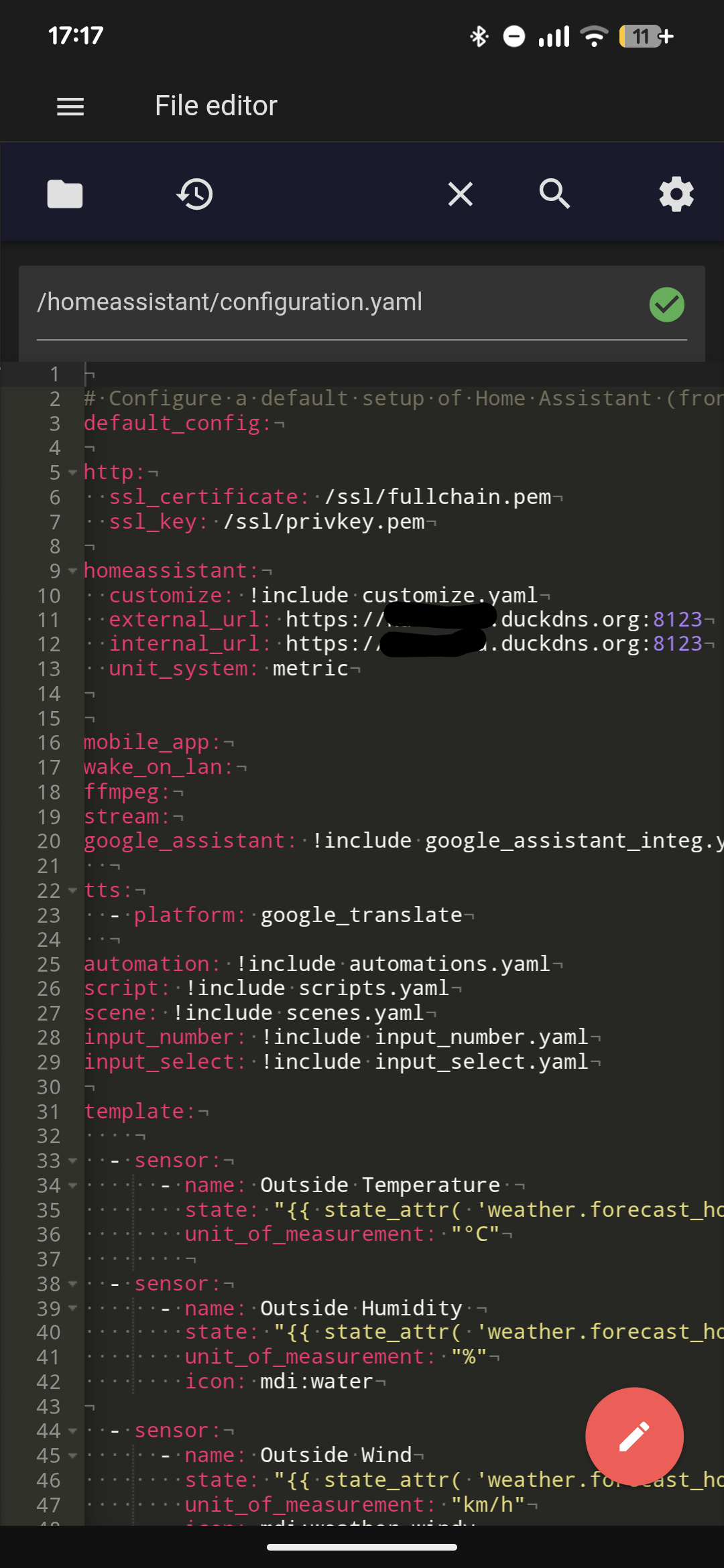
In yaml internal and external IP are set to https://“my name”.duckdns.org:8123/
Currently disabled port forward, now the companion app works on wifi, and myname.duckdns.org works as well. When I go to data both don’t work
It’s been a while since I set mine up, but I had a look at my settings & compared them to yours. These are the differences I see:
My ExternalUrl is set to https://my name.duckdns.org, not https://“my name”.duckdns.org:8123/
My Port forward rule is from 443 external to 8123 internal. This lets me access HA without having to specify :8123 in the browser url.
I think your issue is that you explicitly set port 8123 in the externalUrl but you’re not specifying it when accessing via browser.
If you want to keep the 8123 port in the ExternalUrl, I believe you need to remove that trailing / from there & use https://myname.duckdns.org:8123 to connect.
I’ll give it a try once I’m home later today.
I have another instance of home assistant that is at my parents home and they both use the same duckdns for internal and external.
I’m pretty sure the only port i forwarded was 8123 external to 8123 internal
If that’s the case, then the only way you should be able to reach your parents HA install is if you explicitly append :8123 in the duckdns address in your browser.
I can reach my parents by wifi/ app/ data all fine, with the same settings.
I can not reach my own duckdns here via WiFi just data still with the settings included in the picture
I did 8123 and also 8123-8123 if that made a difference, so far both options don’t work
Yaml config for external_url & internal_url was removed years ago & migrated entirely to the UI. Those lines you’re showing are literally not doing anything. In fact, you should be getting a log warning on each restart to remove those lines (unless you’re running an extremely old version of HA).
One hint might be, casting messages through Google home, or playing local files through Google home doesn’t work either, just the connection sound plays but no file
What happens if you try to connect (on both wifi & data) when you use https://myname.duckdns.org:8123 in the browser, instead of https://myname.duckdns.org?
Change the internal_url to your local IP using http (not https). Eg. internal_url: http://192.168.1.10:8123. Then, try to access HA over wifi using the below addresses & let me know if you get a connection:
https://192.168.1.x:8123 (yes, you need to use httpS in your browser. You’ll get a certificate warning in chrome about the site not being secure. Click Advanced > Proceed)
While switching back and forth between data and wifi a notification popped up that there was an unauthorized login attempt from my wifi.
I haven’t been able to recreate it yet
You can try to resolve your duckdns domain back to your local ha ip adress when you are at home using your own netowrk.
Or just don’t use duckdns at all. There are better options but you know… learning takes time time is money. Use nabu casa cloud.
I hope you used your actual internal HA IP and not 192.168.1.10, which was just an example.
This part is interesting, since your internal IP could have been blocked due to too many incorrectly logins. If that’s the case, then you will find your internal IP listed in the ip_bans yaml file.
What exactly do you see in your browser when you try to connect via wifi? So far all you’ve told us is that it’s “not working” - do you see any specific errors?
I did indeed use my own IP address and not the one you have as an example .
I do not have a file called ip_bans.yaml. isn’t this something you have to activate yourself?
I was seeing either this page can not be loaded, or endless spinning.
Anyhow surprise surprise, it looks like it’s working over wifi now.
I changed everything back to what I had originally, port forward 8123 to 8123 on my home assistant ip in my modem. Set internal and external IP to the https://myserver.duckdna.org:8123
Which now make me wonder as the first comment on this thread said it might take some time for duckdns to update? As I have no explanation why it would now just work with the exact same settings I started of with.
I only have to verify if Google is now playing local files correctly.
Well spoke to soon, it stopped working again. Log saying this:
Logger: homeassistant.components.websocket_api.http.connection
Source: components/websocket_api/http.py:562
integration: Home Assistant WebSocket API (documentation, issues)
First occurred: 14:38:01 (2 occurrences)
Last logged: 14:38:23
[281472187318976] Kevin from xxx7.1xxx.xxx(Home Assistant/2026.4.4-xxxxx (Android 16; Pixel 7 Pro)): Disconnected: Received error message during command phase: No PONG received after 27.5 seconds
[281472346997760] Kevin from xxx.xxx.xx.xx (Mozilla/5.0 (Linux; Android 10; K) AppleWebKit/537.36 (KHTML, like Gecko) Chrome/1xx.0.0.0 Mobile Safari/537.36): Disconnected: Received error message during command phase: No PONG received after 27.5 seconds
 .
. DNS propagation is a real thing. I’ve setup my fair share of hosting servers, domains, and wordpress pages to know.