I have this mostly working and it was an extremely important piece to get my Energy tracker working so that my delta units can report their portion of electrical usage and solar gains during the day.
I have hadded several devices, but one of them is being picky. A Delta 3 Plus (and I have several of them working) it adds fine but then has no sensors.
It had a few disabled sensors at first, I enabled those and saw some data flowing so I knew it was not a range/signal issue, and then they vanished too.
I have deleted and re-added and done all I can think of, even just added a ESP32 BT Proxy nearby just incase, and still seeing the same issue.
I just bought a RIVER 3 PLUS and it’s working fine here - via ESPHome bluetooth proxies. If you’re trying to use a BT dongle on your host I can’t be of much help, unfortunately.
Nice integration, happy to get control over my new Ultra X in HA.
Is there any write up about how the the control should be used. With the ecoflow cloud integration, the only control was to set the Battery Reserve% to 100% to force charging and down to 3% to stop charging. Discharging was only something you could set up in the app.
Now I have to figure out how the workflow should go.
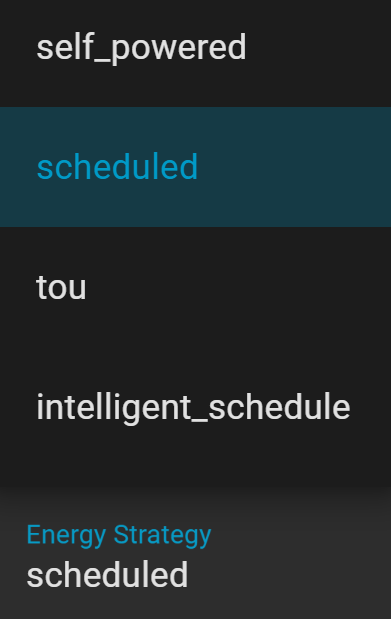
What Energy Strategy should I be using? TOU doesn’t seem to be an option to choose in the app, but if set in HA, the app shows TOU mode, but what does this mode do?
Self-powered discharges if not solar charging so you have to carefully set up a baseload schedule (if you don’t have a meter) otherwise the default discharge is regional maximum (1200W)
What is Feed Grid? and Feed Grid Power Level? Is this different to discharge level?
Anybody got a good setup? I made some automations but had the odd random discharge and charging in the middle of expensive rate periods, I haven’t been able to work out what triggered this to happen, it wasn’t my automations, but was it maybe one of the other (app) based functions fighting against my HA config?
This message is followed by a long alphanumeric string. Frequently the same string will be repeated but not always. I don’t have debug logging enabled - is there any way to determine what is causing these or suppress them?
Hi, I’m running 0.5.7. 0.5.8 hasn’t popped up as available for installation for me yet, but I will install it when it shows up and will report back. Thanks
Is there a possobility to add more settings to it? I would love to have the mode “TOU” to be activated and deactivated with Homeassistant. It allows me to charge the battery when Solar exceeds my needs from the house. Instead of feeding to grid I would deactivate TOU and so charge the battery until max level reached and then activate it in the evening to use battery power during night.
Can you add a control switch for mode selects? Or just a switch for TOU?
Thank you.
Best regards
Roger
Update: I saw this is already covered in the repo tickets. I added my comments there as well.
I’ve only installed this today but wondered if this might work for you. I have Custom slots defined to provide a rough background level. However, it would be useful to force charging if Intelligent Octopus Go offers a cheap electricity slot during the day. I thought I’d need to do something complex involving a switch from “Custom”. However, I see that simply setting the “Backup reserve” to a level above current state of charge forces charging. Perhaps you could adjust based on Solar and SOC. I don’t have solar so can’t check for you. However, I can start and stop charging bay simply altering “Backup reserve” vs. SOC.
EDIT: Just spotted someone mentioning the same method with “ecoflow cloud integration” in this thread about 3 weeks ago.
Hello. This forum is fantastic. Is anyone working on the Smart Home Panel 3? Basically the same as SHP2 which works great. Would hope this new integration includes controls/switches for backup reserve, operating mode, toggling circuits, etc.
Hi @MatthewJB2022 , unfortunately have no info about anyone working on SHP3. Have no such device, so if someone has it and want to add to the integration - you are welcome!)
You need to add new device: pick the ecoflow and see if any of the devices are available. If not - make sure the device is disconnected from any bluetooth connection and your ESPHome BLEProxy is nearby the device. Hopefully this helps, otherwise please check the wiki: Home · rabits/ha-ef-ble Wiki · GitHub
I have the SHP3 installed but I just don’t know how to do the engineering piece of what you all do. So if anyone wants to work with me in figuring this out I’d be happy to collaborate. Thanks.
Thanks for you help.
I do not have Solar connected to the Ecoflow. So I can not use all Modes to control the EF. Also it is used as an UPS/USV. It is not allowed to shutdown or disconnect AC outlets.
But depending on settings it will shut down. So I have to be really careful to not choose wrong. The State of charge Setting sadly is connected to the Self powered mode, which I can not use because it is used in combination with solar Input. It says that if SOC is below setting of Backup reserve, it will not provide power to outlets. that is useless for me.
The description of this mode in the app lets me to belief you can use this mode to control charging but it affects the AC power output.
Hi, I’m only 2 weeks into my HA journey but am amazed at all the work you and others do creating these integrations. All worked first time for me I’ve had very few issues overall.
I’m not sure if it comes under a different name or isn’t available because it’s a newer feature but do you know if it’s possible to control the ‘Disable grid bypass’ function on the delta 3 plus.
It is the one thing that I’m using daily to switch from mains to battery and squeeze a bit more juice from my night rate into the day during the winter months but it can’t be scheduled or automated in the EF app.
Ok that was fast! Not sure if my comment was any motivation for the addition but to my delight I see the grid bypass feature has arrived in todays update. And as if by magic I also manage to forget to turn grid bypass back off again last night so my battery didn’t charge. I’m straight off to automate away some more of my incompetence.
I’m looking for some insight. For my Bluetooth adapters in HA, I enabled passive scanning… just to see if it changed anything. From what I can tell, it looks like the adapters are less busy managing fewer connections at a time and as I am close the connection limits this might be a good thing.
Is there anything I’m missing by not actively scanning? Everything seams to be working fine including automated changes, so I just wanted to double check I wasn’t breaking something that was working perfectly.
It looks like I’m having the same issue trying to manage two Stream AC Pro units. I’ve written simple automation that is trying to offset my electric usage and setting it as watts to be fed into the grid, but it seems to have no effect on both units
I’ve set it to self_powered with reserve limit set to 3%, and still couldn’t see any electrons flowing. Then I came up with another idea to ban those units from accessing the internet over WiFi, but this didn’t changed anything
It would be awesome to find a solution for that, to make those units independent from cloud servers abroad