First of all, thank you for this great integration!
I have been using the integration successfully for several months.
Since I changed my email address, I transferred my River 3p to a new EF account.
Unfortunately, authentication in the integration is not working.
The device is visible in the EF app.
I have a feeling that the EF user ID generated by the integration is incorrect (possibly still the old one).
Unfortunately, I have also been unable to find out the user ID via https://api-a.ecoflow.com/auth/login. I am doing everything exactly as described in the instructions (Home · rabits/ha-ef-ble Wiki · GitHub), but I cannot find the corresponding API under Network.
I’d love to get this working for the Ecoflow-Pro (original pro) but I can’t get far enough to collect the required diagnostics to open a Github issue.
When installing the integration it does find the device on my bluetooth network and properly lists its model as [unsupported] along with the Wike reference for requesiting support. After entering my ecoflow account data and continuing it appears to work - but the device just loops with “initializing” and then “failed - will retry”.
@sidjohn1 For this integration, it does not matter as it does not use advertisements for communication. You would generally enable active scanning when you want to request more data from non-connectable devices as it actively sends requests to them.
@NairolF What error are you getting? Does the integrated login screen not work for you? I did also create web based tool to find it, but it does the same thing as the integrated one.
@PARitter You can still create an issue on github, you’ll get different instructions from us in this case. We don’t support any gen 1 devices yet though, that does need some reverse engineering that is not easy for us to do. But someone with skills might show up and give some more info - this did happen for v2 devices.
Hello. Need an advice. I have River 3 Plus. If i want to add it as battery storage to Energy panel, which sensors should i use for input/output energy? First i added integral sensors calculating from battery input/output power, but i’m not sure if it was a right decision. Looking at statistics when working from battery, output power from battery is 18-25 W, constantly changing, while Output power (total one) is 14-15 W stable. And on the contrary, when charging and bypassing power to consumers it looks like 315W input, 15W to consumers, 282W to battery, so another 18W lost due energy conversion as i understand. So, should i create a templates for energy panel with difference between total input and output power and use it for incoming to battery power/energy when input>output and vice versa for outcoming? Seems more accurate than using the battery sensors themselves, am i right? Thanks in advance for help.
There is also some energy loss i see, when battery shows 1w of output which after some time leads to slow discharge, but it’s such a low value.
Not sure about the solution, just want to say that those battery sensors are not super accurate and only have accuracy 1W, but I it seems it does display parasitic draw of the device itself and inverter. I found that the inverter can cause it to jump anywhere between 2-20W, but averages to around 3-8W. I do use it for my energy storage though because I don’t really care that much about accuracy of power going in/out of the battery, I do have external sensors for the grid power anyways.
I have been automating the UltraX with ble for a few months now. You have to work around some built in behaviour of the App but essentially set baseload to match demand to discharge by that amount. Set backup reserve to higher than current SOC to force charge.
I use Target Timeframes add-on to choose when to charge and discharge based on the half-hourly changing unit price
Added EB600 to my R3 Plus today and found an answer. When charging external battery, Battery Input sensor shows 0 watts. So, it won’t be tracked at all. It doesn’t matter in your case, but maybe someone will look for the same answer as myself later.
It already works with Ecoflow Steam Microinverters, Full list of supported devices and what features/metrics are currently supported is available here.
@GnoX and @Rabit,
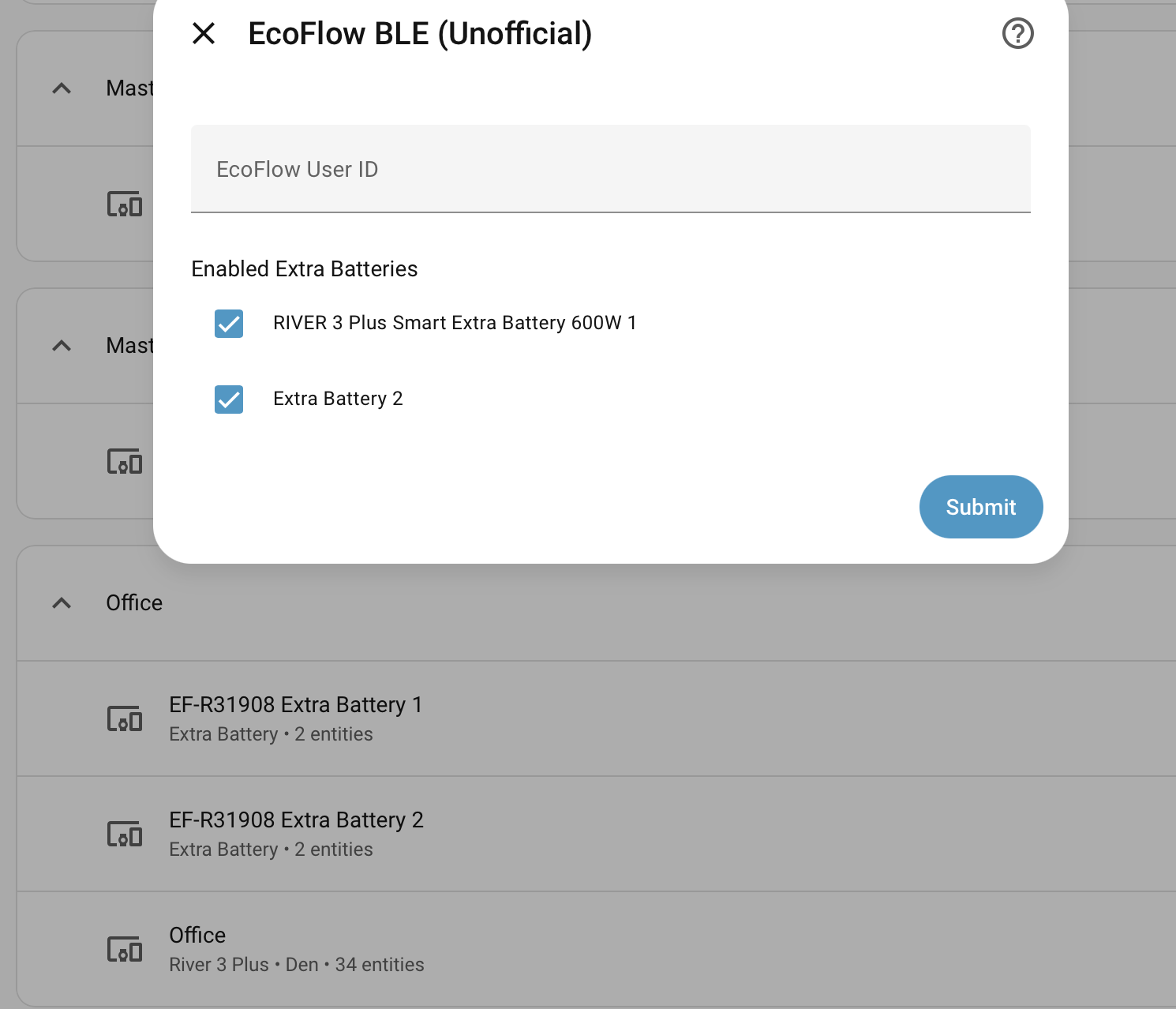
I wanted to check with you first, but I don’t think this is expected behavior in 0.8.0, as the R3+ doesn’t have a third battery. If I uncheck extra battery 2, the 3rd battery does disappear and the data for the extra battery 1 is correct.
Right, I should’ve looked at the product page first - thought that it supports up to 2 batteries so I implemented two slots but that’s clearly wrong. We’ll remove it in the next version.
Hello, thanks very much for this integration,
I had little problem to install (my uid was too short) , correction and proposition for a solution was made in 2 minutes (yess two !)
I just add my ecoflow devices… in HA … and… no problem, all is very reactive, and I can now modify my powerstream’s loads ! and of course my other delta batteries… )
Thanks !
I’m new here and been running my home assistant setup for just a week. I’ve managed to get my Powerstream up en running with this integration and finally adapt my house load on the fly from my HomeWizard p1 meter. Thanks for the great work!
I did ran into one problem that I can’t seems to solve. I tried everything in my powers to integrate my delta pro, but I am unable to connect to it. It never shows up when I want to add it. I already bought a second esp32 since the one for the powerstream is at max capacity. I pushed the iot and pairing button a dozen times. Unplugged and shutoff everything, trying to force a handshake but no succes. Is there a specific solution or thing I have to do to make the Ecoflow ble talk to the delta pro? (not ultra btw)
I can only spot some unsupported ecoflow smart plugs. Nowhere can I find any trace of the delta pro. Under Bluetooth i can only find the esp32 proxies.
Out of range isn’t an issue, the esp32 proxy is placed on top of the screen where the delta pro houses its Bluetooth module.
Turned off Bluetooth on all devices in the area.
It does however not show up on my phone either when i scan for the device. Even when pressing iot or pairing button. Ecoflow app seems to find it regardless…
Are you absolutely sure that you can’t see it in HA advertisements? It’s name would be something like EF-DC..., Ecoflow-dev.
Are you also sure that you’re connecting over bluetooth to the app - your phone wifi and data have to be disabled, otherwise it will connect to cloud. Also make sure you disable your bluetooth before you connect it to HA just to be sure.
Just a sanity check - did you not accidentally ignore it in HA? Check if its not in ignored devices.
If None of these apply, there’s nothing else we can do.
@charlieBarker how are you automating with DPU X if this integration has not yet been made compatible for it? i see they only have the DPU working here, not DPUX.