Quick Start
Option 1: Home Assistant Add-on
- Add repository to HA Add-ons:
https://github.com/supernova1963/eedc-homeassistant
- Install and start the “EEDC” add-on
- Open via the sidebar
What is eedc?
eedc (Energy Efficiency Data Center) is a local application for the comprehensive evaluation and economic analysis of photovoltaic systems. The software runs standalone or as a Home Assistant add-on and stores all data locally.
Why eedc?
- No cloud dependency – all data remains on your server.
- Standalone capable – Works without Home Assistant
- Comprehensive analysis – from energy balance to ROI calculation
- Flexible data import – CSV import with dynamic columns
- Multi-component system – PV system, storage, electric car, heat pump, wallbox, balcony power plant
Features
Cockpit & Dashboards
- Aggregated overview with 7 sections (Energy, Efficiency, Storage, Electric Car, Heat Pump, Finance, CO2)
- 8 specialized dashboards for each component
- Formula tooltips display calculation principles on hover.
- Year filter for multi-year analyses
Evaluations & Reporting
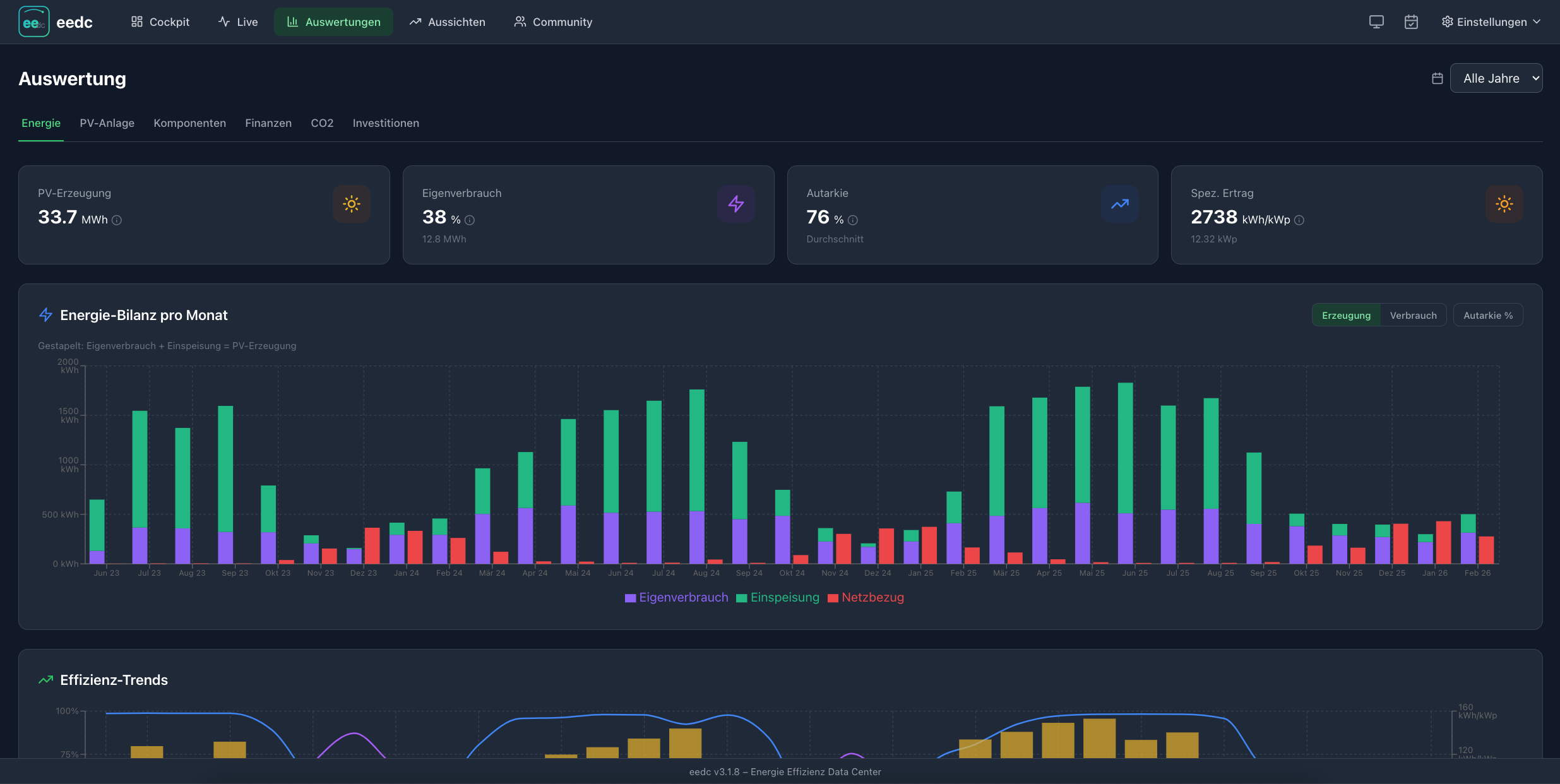
- 6 analysis tabs : Energy, PV system, components, finance, CO2, investments
- ROI dashboard with amortization curve and parent-child aggregation
- Target-actual comparison against PVGIS forecasts
- CSV/JSON export for external processing
- Full JSON export for support and backup (NEW)
Outlook (forecasts)
- 4 Forecast Tabs : Short-term (7 days), Long-term (12 months), Trend Analysis, Finance
- Short-term forecast using weather data (Open-Meteo)
- Long-term forecast using PVGIS data and performance ratio
- Trend analysis with degradation calculation and seasonal patterns
- Financial forecast including amortization progress and additional cost approach
Data collection
- Manual form with dynamic component fields
- CSV import with personalized columns and plausibility check (NEW)
- Weather auto-fill via OpenMeteo / PVGIS TMY
- Demo data for testing
Investment Management
- Parent-child relationships : PV modules → inverters, DC storage → hybrid inverters
- Type-specific parameters : V2H, arbitrage, kWp, orientation, tilt
- ROI calculation per component and aggregated
- Extended master data : Device data, contact persons, maintenance contracts
Asset Management
- MaStR ID with direct link to the market master data register
- Utility providers & meters : Electricity, gas, water with any number of meters
- Foldable sections for clear forms
Optionale Home Assistant Integration
- MQTT Discovery for native HA sensors
- REST API for configuration.yaml
- Export calculated KPIs back to HA

Mit der aktuellen v2.0.3 noch interessanter für Home Assistant Benutzer, da Schnittstellen umgesetzt und ein Community Vergleich möglich sind:
Features
Cockpit & Dashboards
- Aggregierte Übersicht mit 7 Sektionen (Energie, Effizienz, Speicher, E-Auto, Wärmepumpe, Finanzen, CO2)
- 8 spezialisierte Dashboards für jede Komponente
- Formel-Tooltips zeigen Berechnungsgrundlagen per Hover
- Jahr-Filter für mehrjährige Auswertungen
Auswertungen & Reporting
- 7 Analyse-Tabs: Energie, PV-Anlage, Komponenten, Finanzen, CO2, Investitionen, Community (NEU v2.0.3)
- ROI-Dashboard mit Amortisationskurve und Parent-Child Aggregation
- SOLL-IST Vergleich gegen PVGIS-Prognosen
- CSV/JSON Export für externe Weiterverarbeitung
- Vollständiger JSON-Export für Support und Backup (NEU)
Aussichten (Prognosen)
- 4 Prognose-Tabs: Kurzfristig (7 Tage), Langfristig (12 Monate), Trend-Analyse, Finanzen
- Kurzfrist-Prognose mit Wetter-Daten (Open-Meteo)
- Langfrist-Prognose mit PVGIS-Daten und Performance-Ratio
- Trend-Analyse mit Degradationsberechnung und saisonalen Mustern
- Finanz-Prognose mit Amortisations-Fortschritt und Mehrkosten-Ansatz
Datenerfassung
- Manuelles Formular mit dynamischen Komponenten-Feldern
- CSV-Import mit personalisierten Spalten und Plausibilitätsprüfung
- Wetter-Auto-Fill via Open-Meteo / PVGIS TMY
- Demo-Daten zum Ausprobieren
- Sensor-Mapping-Wizard - Home Assistant Sensoren den EEDC-Feldern zuordnen
- Monatsabschluss-Wizard - Geführte monatliche Datenerfassung mit Vorschlägen
- HA-Statistik Import (NEU v2.0.0) - Automatischer Import historischer Monatswerte aus HA
Investitions-Management
- Parent-Child Beziehungen: PV-Module → Wechselrichter, DC-Speicher → Hybrid-WR
- Typ-spezifische Parameter: V2H, Arbitrage, kWp, Ausrichtung, Neigung
- ROI-Berechnung pro Komponente und aggregiert
- Erweiterte Stammdaten: Gerätedaten, Ansprechpartner, Wartungsverträge
Anlagen-Verwaltung
- MaStR-ID mit direktem Link zum Marktstammdatenregister
- Versorger & Zähler: Strom, Gas, Wasser mit beliebig vielen Zählern
- Klappbare Sektionen für übersichtliche Formulare
Optionale Home Assistant Integration
- MQTT Discovery für native HA-Sensoren
- REST API für configuration.yaml
- Berechnete KPIs zurück an HA exportieren
- Sensor-Mapping - Flexible Zuordnung von HA-Sensoren zu EEDC-Feldern
- Automatische Vorschläge - Intelligente Werte aus Vormonat, Vorjahr, oder Berechnung
- HA-Statistik Import (NEU v2.0.0) - Bulk-Import historischer Daten aus HA-Langzeitstatistik
EEDC v3.1 — Major Update: Live Energy Flow, MQTT Inbound, Long-term Profiling
Hey everyone,
EEDC has seen a major update since the initial post. Here’s what’s new:
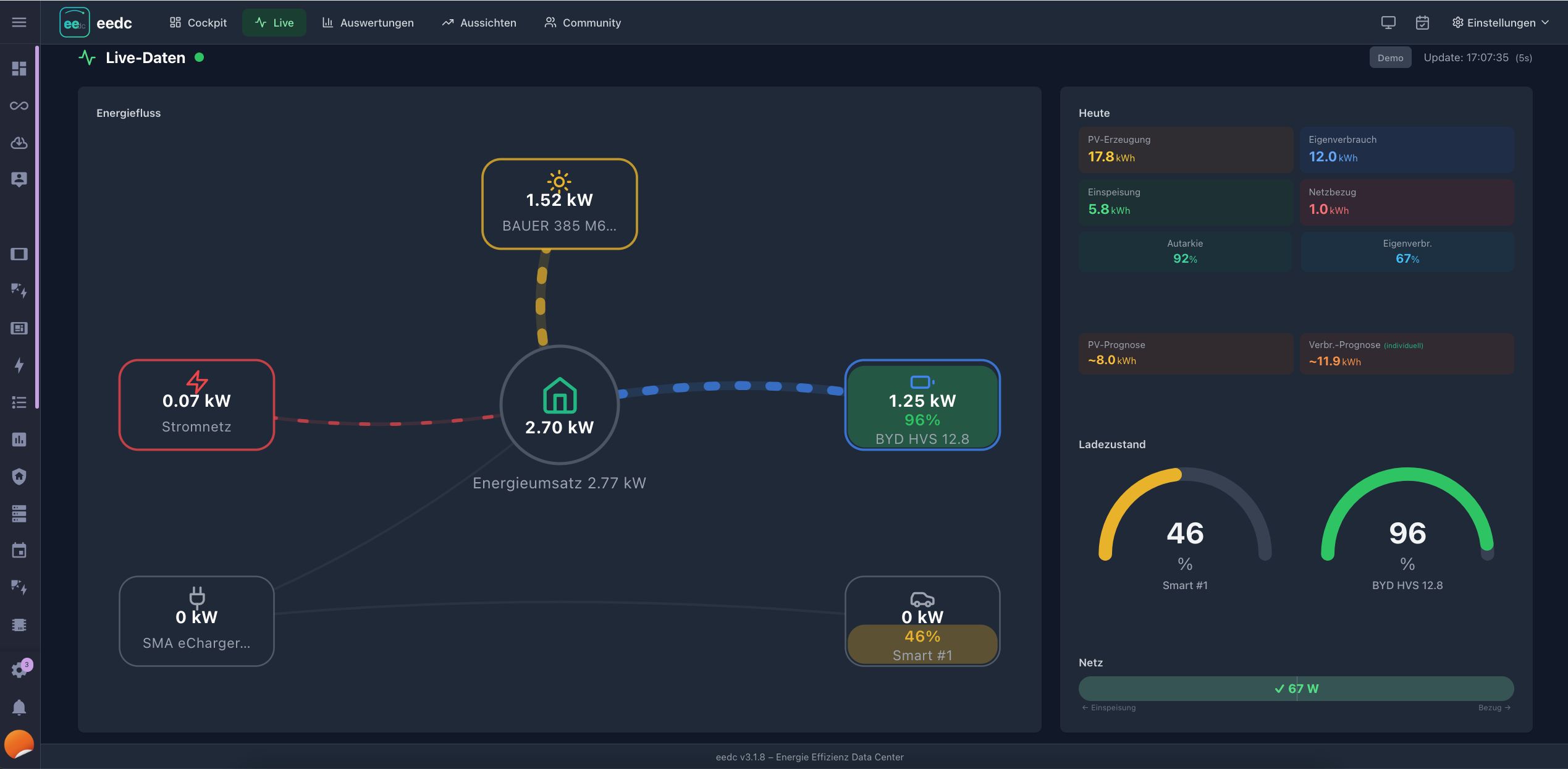
 Animated Energy Flow Diagram
Real-time visualization showing where your energy flows: PV → House, PV → Battery, Grid → House, etc. Animated lines, SoC gauges, today’s kWh per component, and a butterfly chart showing sources vs. sinks throughout the day.
 MQTT Inbound
Universal data bridge — works with any smarthome system. For HA users with MariaDB/MySQL as recorder backend (where direct SQLite access isn’t possible), EEDC now generates the automation YAML for you.
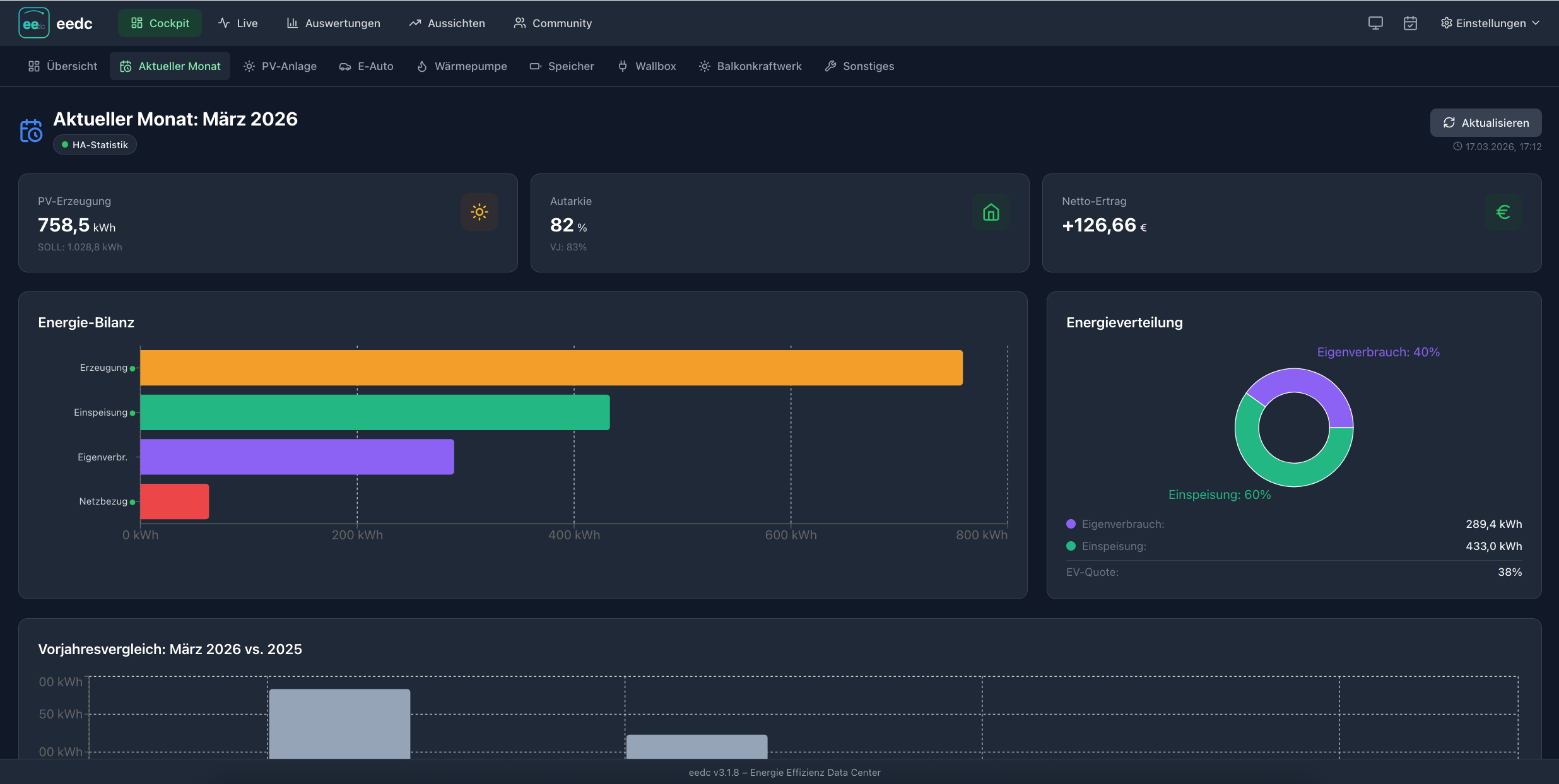
 Monthly Overview & Long-term Analysis
Energy balance, self-sufficiency rate, net revenue in €, year-over-year comparison, efficiency trends.
 Generic Inverter Support (v3.1.8)
For inverters that only provide a total PV value (e.g., E3DC): New “PV Total” power sensor. Automatically shown as a single node in the energy flow diagram.
 Energy Profile Persistence
Hourly energy data is now stored permanently (HA history only retains ~10 days). Foundation for upcoming daily analysis and battery sizing simulation.
Free, open source, 100% local — no cloud required.
Happy to answer questions!
Since there have been few to no inquiries or other contributions, I will close this topic here.
Should anyone else be interested, I would like to refer them to the topic in the simon42 forum or on GitHub.