I’d like to do an automation that disables or enables a specific device.
Use case: If Shelly actor is switched off, disable the device in HA. If Shelly is switched on enable the device.
Cannot find any lead on how to disable/enable a device “automatically”. Any leads welcome! Happy holidays 


The Spook custom integration includes actions to enable and disable devices.
1 Like
Check out Spook. Edit: @Didgeridrew beat me to it 
1 Like
Can you be more specific/give details in an actual rather than “genric” use case? Shelly does not have any product named “Shelly actor” as far as I know…?
Shelly Plug, respectively once testet a Shelly 1 Mini Gen.3 behind the power jack.
Am already on the Spook… Just a bit distracted by the family over the holidays 

EDIT: Didn’t work with me, similar to @xmbcnut. I had a Shelly Plug S to start an old TV (power consuming)screen and then wanted to enable the Chromecast with Google TV stick when switched on, disable it in HA if switched off. Unfortunately the hard switching of the (old LED-)TV fried it’s screen meanwhile. But never got it working that the stick would be enabled/disabled alongside the switch, so it kept showing red on Android TV remotes. As that doesn’t much consume, I do leave it simply on with soft-switch-off.
I keep Spook, as it also quite nicely shows errors if entities are being renamed causing dashboard errors.
I tried it with a couple of Shelly devices that are offline in the winter and it does not seem to work. Won’t enable or disable my Shelly devices and of the four I attempted the service call with, only one showed up in the device list.
The one that did show up has two entries for the same device (one with the MAC appended) and neither would disable when calling the Spook service call and no error presented in the actions panel when called.
EDIT: I take that back it just doesn’t work in GUI mode and you have to find the device ID from the URL as explained in the Spook docs. The disabled device also does not show in the disabled devices list (at least in my Shelly integration) but when selecting the device itself, it says disabled. See below.

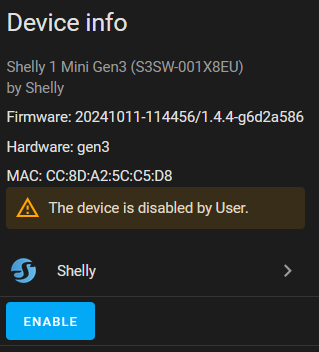
EDIT 2: Spook does not work for my scenario as my main driver was to stop the errors is the Shelly integration for devices that are offline. While disabling them with Spook does indeed disable them it seems to be at the device level and not the integration level. If you manually disable a Shelly device, it drops to the bottom of your device list and the Shelly integration is happy again but they do not appear in this list when disabled with Spook and the integration will continue to shows errors at the top.