After realizing nginx bundles OpenSSL 3.5, I went down a giant rabbit hole today trying to figure out how to enable PQC, but (I think) it’s finally working. If someone could please validate, I’d appreciate it. Hopefully this will save others interested in enabling PQC a few hours of head-scratching.
The process is fairly simple:
1: In the share folder, create a new sub folder called “nginx_proxy”
2: Create a new .conf file in that folder (in my example, pqc.conf, but can be anything with a .conf extension).
3: Enter the following lines into the file:
ssl_conf_command Curves X25519MLKEM768:secp384r1;
ssl_conf_command Ciphersuites TLS_AES_256_GCM_SHA384;
4: Under the Configuration tab of the nginx addon, expand “Customize”, and toggle “active”.
5: Restart the nginx addon.
If you using the Terminal / SSH addons, the commands would be:
mkdir share/nginx_proxy
nano share/nginx_proxy/pqc.conf
The first line changes the asymmetric Key Exchange algorithm list to first prefer an algorithm that’s resistant Shor’s algorithm, while still allowing an older (non PQC-safe algorithm) for legacy clients. The second line changes the symmetric algorithm to one that is resistant to Grover’s Algorithm. That line only affects TLS 1.3, so legacy clients can still negotiate older cipher suites using TLS 1.2.
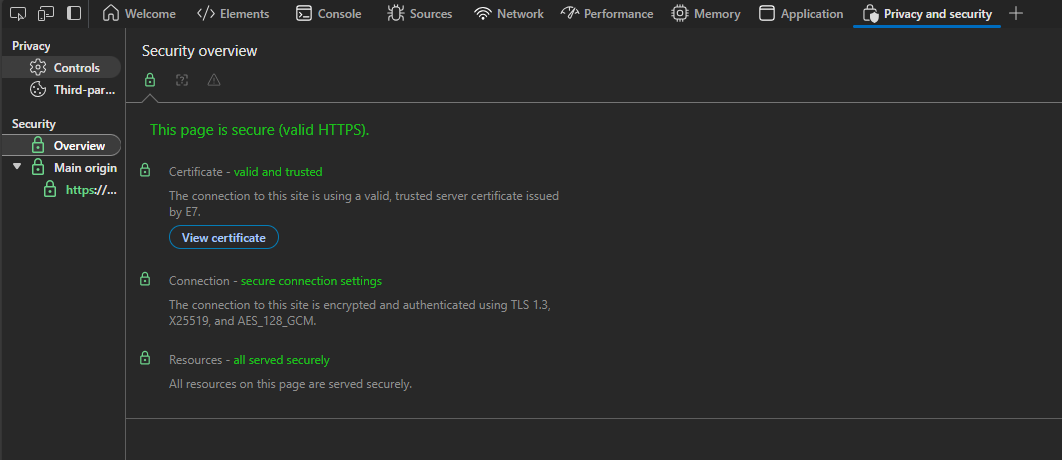
When looked at in Developer Tools (ctrl + shift + i):
Default HA nginx:
PQC HA nginx:
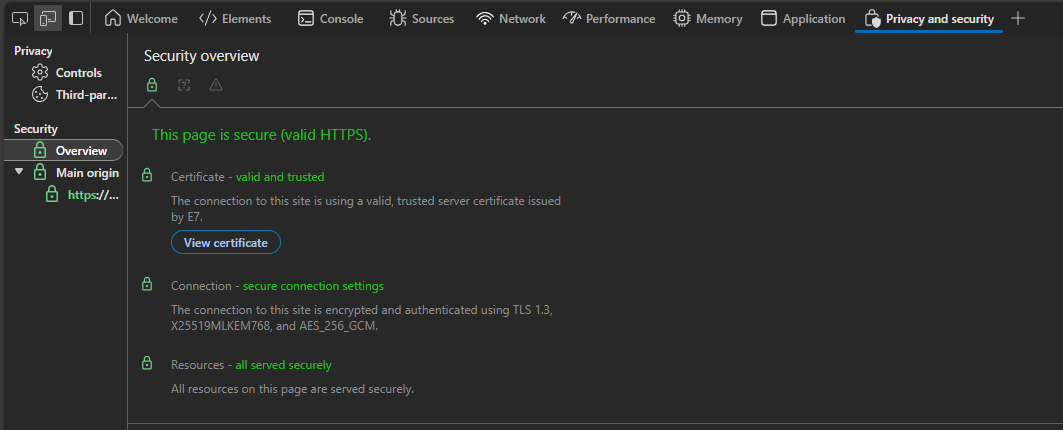
If done correctly, the “Connection” box will now show X25519MLKEM768 instead of X25519 and AES_256_GCM instead of AES_128_GCM.
I’d be curious for folks to try this out, see what does (or doesn’t) break. Long-term, I hope the nginx addon maintainers might consider integrating PQC support by default (or at least providing a more accesible setting/toggle).