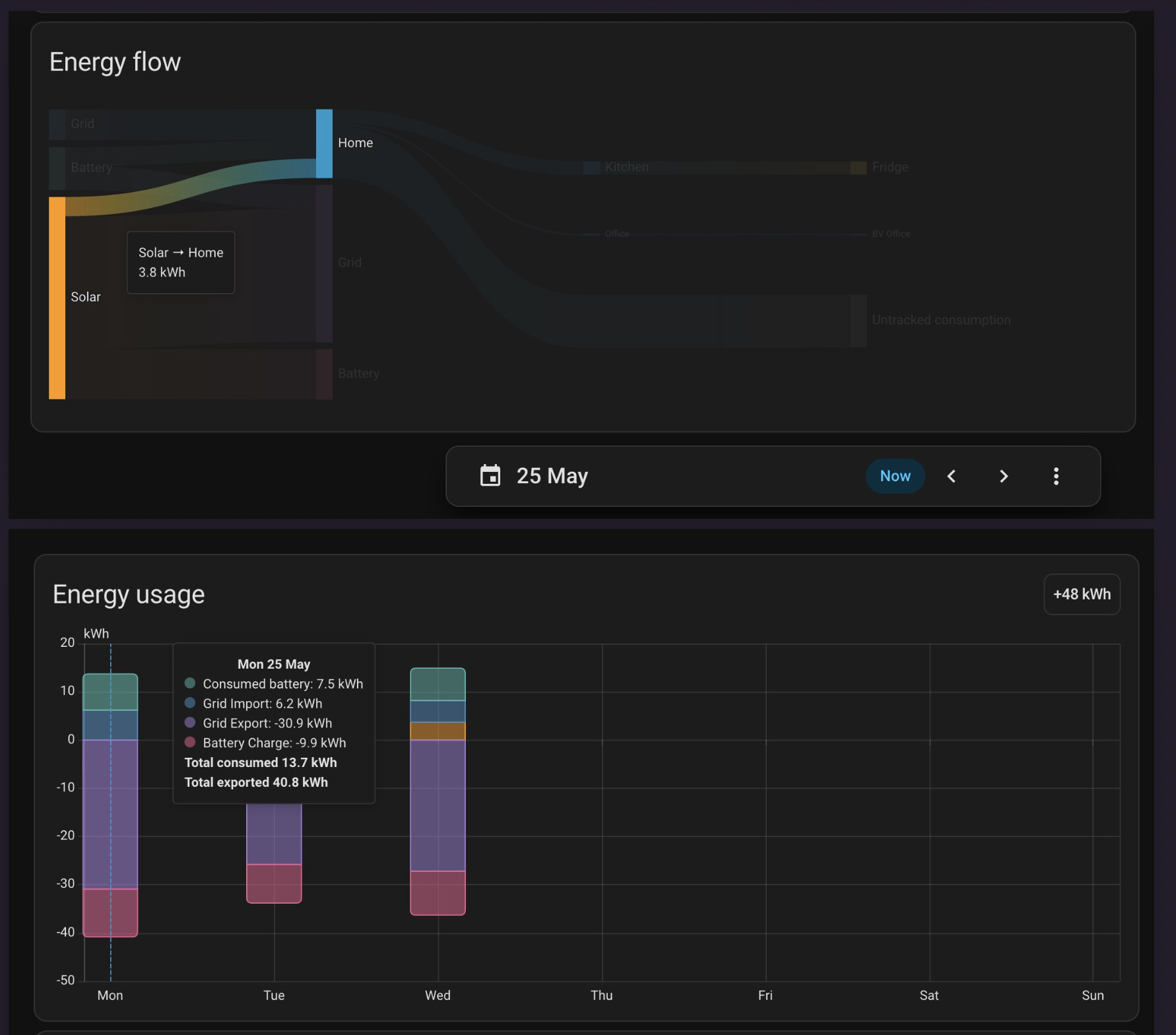
On the day (25th May) you have generated solar, most of which was exported to grid, a smaller amount to charge the battery, and just 3.8 kWh used directly as "consumed solar".
This appears to show correctly on the chart when selected for the specific day.
However, for a 'week' selection, yes the individual day for the 25th does not show any solar consumed.
Looking at the size of the bars (without the actual figures) my guess is that, on the 25th, as well as 3.8 kWh consumed solar, there was roughly the same 3.8 kWh consumed from the battery. On the day-in-week chart, the 'consumed battery' is 7.5 kWh, so the inference is that the 'consumed solar' has disappeared and is included in the 'consumed battery'.
As a guess, I am going to suggest that this is because you are using 'daily reset' sensors.
All of your sensors for solar, grid import, export and battery charge, discharge are "_today". Whilst the Energy Dashboard is quite robust, using 'self-resetting' sensors as source data can/does/may cause issues. This is because the data used in the Energy Dashboard is all from the long-term statistics, which are captured hourly by the Recorder. The values are written at about 8 seconds after the top of the hour, based on HA time. For the day-graph, the data used is the 24 hourly values over the day. And, by a strange quirk of fate, solar is generated only during the day, so the figures will go up each hour, and then plateau after dark. Where you use a 'today' figure from the inverter, the inverter itself will reset this, around midnight. And this will be midnight as the inverter sees it. My inverter gains 20 seconds every 5 days, so there is almost guaranteed to be a case where the inverter resets the daily solar to 0 either before HA midnight or after.
So, the midnight figure captured might be 20 kWh of solar and the 01:00 figure zero, or midnight might be 0 kWh of solar. This is not a problem for the day-graph, since the hourly values plotted are not reset during the day. However, for the day-in-week graph, the graph now has to summate all the day figures and roll them up into just one figure for the day. If the inverter reset has occurred at the 'wrong' time, Monday will see no solar.
Anyway, that is my theory on the cause of the issue.
I switched all my energy sensors to Reiman Sum sensors, which provide a "total-ever" value that is total-increasing, and therefore never resets, and all the graphs work correctly.
The only way to tell for certain is to dig into the data. You can download the energy dashboard data (used to create the graphs) using the download option on the date-picker side menu. This dumps the values to csv file, based on the date selected. So for a one-day (today / yesterday / 25th) graph this will be hourly values. The file generates a column for every 5 minutes, but there is only hourly data every 12 columns, and the timestamps are in UTC, so a degree of tidying is required. If you add a sum() column, you also get the today total-day figures from the sum of all 24 hours.
Using the 'week' display, the data download generates a new file. Tediously this has 288 columns at every 5 minutes for each day, but only one containing the midnight sum of the day's data, so a lot of work to compact this and remove the unwanted columns. This then gives the data for each day.
In my case you can see that the sums of 24 hourly values for the 26th May do match (almost perfectly) the day figures from the 'weekly' graph. You can, if you wish, repeat this yourself and this should pin down at what point the solar consumed is (apparently) vanishing from the figures.
The fact that my figures match, but not exactly, suggests another reason for the discrepancy when comparing one day with a day in a week. There are, with solar and a battery, seven different energy pathways, and with just hourly data to work with, there is insufficient information to determine exactly what goes where. The calculations work (I believe) in the order shown, allocating energy using a set of priority rules.
Any grid import is assumed to go first to the house as consumed grid (in priority over consumed battery or solar). Then any import not accounted for goes to any battery charge (in priority over charging the battery from solar). Then battery discharge goes to grid (in priority over solar to grid), then to the home as consumed battery. Finally the consumed-solar is solar to make up any consumption not already supported from grid or battery. Then solar to battery, and finally solar to grid as the lowest priority.
This works on an hour-by-hour basis. If the day-figures are added up first, and the calculations re-done on a day-by-day basis, they will be slightly different. I find the source code in GitHub too difficult to understand myself, so the code-author will have to confirm if there is a possibility for the figures to be computed differently for the day graph to the weekly graph. There are certainly a couple of slight rounding differences appearing in my data, which suggests that the day-in-week figures are not just the sum of the 24 hours-in-day figures.
Hope this helps!