I’ve been working on a new custom Lovelace card called Energy Horizon, and I’m excited to finally share it with the community for some early testing.
What is Energy Horizon?
Most energy cards focus on live power or daily usage. Energy Horizon is different—it’s designed specifically for long-term statistics. It helps you visualize how your cumulative energy consumption is trending compared to a historical period (e.g., this year vs. last year).
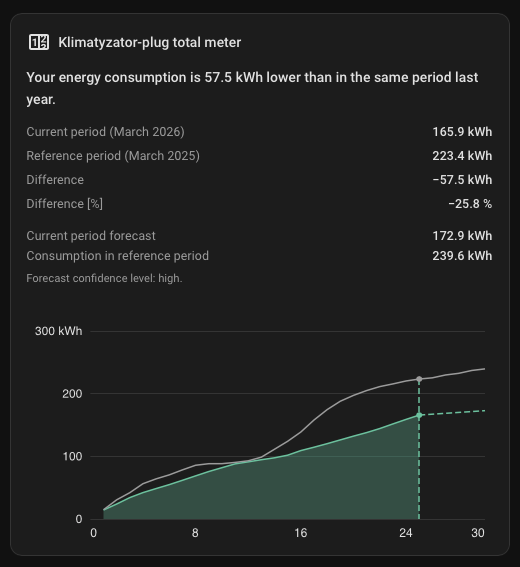
Cumulative Comparison: Compare current usage against a reference period (Year-over-Year or Month-over-Year).
Smart Forecast: Automatically estimates your total for the current period based on historical progress.
Visual Summaries: Includes numeric summaries (current, reference, difference, and percentage) and localized trend text.
Visual Editor: Full support for the UI editor—no need to dive into YAML for basic setup.
Unit Scaling: Automatically scales Wh to kWh/MWh or allows you to force a specific prefix.
Early Access / Beta Notice
Please keep in mind that this is currently an early access, raw version. While it is functional, there may be bugs, and it requires your entities to have solid long-term statistics enabled.
Note on Design: I am currently in the middle of a major visual redesign of the card to make it even cleaner and more integrated with the modern HA look. Expect the UI to evolve significantly in the coming weeks!
How to install
The card is HACS-ready! You can add it as a custom repository: https://github.com/hello-sebastian/energy-horizon
Feedback Wanted!
I would love for you to give it a spin. Does it work with your data? Is the forecast accurate for your use case? What features are missing?
Please feel free to leave feedback here or open an issue on GitHub. Your input is what will help make this card stable and useful for everyone.
It depends on the entity. If it is a helper and it’s set up to reset every month, but it collects data for longer than that, it should work. The card is based on accumulation, not the exact value, so it should work even with multiple resets and missing values. However, if it doesn’t collect data or is reset permanently (losing all data), you will only see the period that was collected.
I’m excited to share a major update for the Energy Horizon Card (v0.4.0-beta). This release is a complete “under the hood” overhaul that makes the card much more powerful while being even easier to use.
If you’re not familiar with it, this card is designed for long-term energy comparisons (cumulative usage vs. historical reference) with a built-in forecast engine.
What’s new in v0.4.0-beta?
1. Total Freedom with “Time Windows Engine”
The biggest change is the new engine. You are no longer limited to just Year-over-Year. You can now define almost any comparison using the time_window configuration.
New Preset: Added month_over_month – compare your current month to the previous one with a single line of config.
Custom Anchors: Want to compare a specific week or day? Now you can.
2. “Set and Forget” Smart Aggregation
Tired of manually setting aggregation: hour or day?
The card now intelligently picks the best resolution for you based on your window length.
If you’re looking at a day, it shows hours. If it’s a year, it shows months. It aims for that “sweet spot” of 20–100 data points so your chart always looks clean and loads fast.
3. Smarter X-Axis (Mobile First!)
I’ve implemented “Adaptive Labels” (inspired by professional tools like Grafana):
No more cluttered text: Labels stay horizontal and hide automatically if they overlap.
Contextual info: It only shows what’s necessary. Instead of repeating the year 24 times, it might show hours and only add the date where the day actually changes.
Native Formatting: It uses your Home Assistant language and time zone settings automatically.
4. Refined Tooltips & Summaries
The tooltips are now “smarter” – they hide redundant info (like the year) when comparing periods within the same year, making them much faster to read.
For custom windows, the summary now shows the exact date range, so you know exactly what “Reference Period” refers to.
5. New Documentation
I’ve completely rewritten the GitHub Wiki and added a README_advanced.md for those who want to dive deep into custom YAML configurations.
How to get it?
Since this is a beta, you’ll need to:
Go to HACS → Frontend.
Find Energy Horizon Card.
Click the three dots → Redownload.
Toggle “Show beta versions” and select 0.4.0-beta.
I’ve just released a brand new version — Energy Horizon Card v1.0.1-beta. This is the biggest update so far, significantly improving how you can analyze and visualize energy usage in Home Assistant.
If you feel like the standard HA energy panel is a bit lacking, this card is for you. It is a Lovelace card focused on visualizing and comparing Long-Term Statistics (LTS). Unlike most cards that show real-time power draw, Energy Horizon lets you see the bigger picture:
Cumulative Consumption: See how much energy you’ve used since the start of a period (e.g., this month) compared to historical data.
Past vs. Present Comparisons: Are you using more energy this year than last? The card overlays both charts to make interpretation easy.
Consumption Forecast: Intelligent prediction of the value you’ll likely reach by the end of the current period (e.g., month or year).
LTS Powered: It uses the Long-Term Statistics database, so it stays lightning-fast even when displaying data from several years ago.
Numerical Summaries: Automatically calculates differences, percentages, and trends (e.g., whether your usage is higher or lower than in the past).
Visual Editor: Full GUI support in Lovelace—you can configure most options with a few clicks without diving into YAML.
Smart Scaling: Automatically or manually selects unit prefixes (e.g., converting Wh to kWh or MWh).
What’s New in v1.0.1-beta
This version is a ground-up redesign of both the UI and the backend logic:
Time Windows Engine: This is the feature I’ve worked on the longest. You now have almost unlimited freedom in defining what you want to compare. You can create custom time ranges, shift them, and compare them in whatever way best fits your needs.
New UI Design: I’ve refreshed the card’s interface to be more consistent with the modern Home Assistant look—cleaner, more transparent, and hopefully “lighter” visually.
Smart Timeline & Tooltips: Improved how time labels are generated and displayed for better readability.
Full Localization: The card now integrates even better with your system’s language and time zone settings.
Adding the card to the official HACS default list—so you won’t have to add it as a custom repository anymore.
Further refinements and testing.
I’m really looking forward to your feedback! If you have ideas for new features or find a bug, please let me know in the comments or open an Issue on GitHub.
time window is very usefull for me as my meter reading is done once a year beguining of may
I just would like to improve the graphic with intermediate month graduation but I don’t know how to do it.
type: custom:energy-horizon-card
entity: sensor.energy_consumption_daily
comparison_preset: year_over_year
show_comparison_summary: true
show_forecast_total_panel: true
show_narrative_comment: true
force_prefix: k
aggregation: day
time_window:
anchor: start_of_year
duration: 1y
offset: +127d
step: 1y
count: 2
grid_options:
columns: full
It’s a bit tricky, so 1st May isn’t +5M but +4M because +1M is 1st February, and it’s leap year proof configuration. There will be also update for advance offset to make possible set eg. 5th May as a beginning of the windows eg: offset: “+4M +4d”