Energy Peaks Per Month Average EPPMA - electricity (eg Ellevio) consumption daily peaks per month calculations for eventual load shedding/balancing

This is a roughly right script to determine the daily average power peaks per month as used in Sweden (and other places maybe including Beligium?, Netherlands?). I used the method defined by Ellevio in Sweden here:
https://www.ellevio.se/abonnemang/ny-prismodell-baserad-pa-effekt/

After a number of months of use, it works well (as well as the input sensor is capable) and aligns well with our grid suppliers data.

I use this code today for some simpler load shedding / balancing / planning by being able to set a maximum allowed energy use each hour (based on the usage peaks and prices and monthly averages) to keep the peaks and prices lower.

output

The script provides a number of sensors to be able to support deeper understanding and debugging, they are numbered from 1 and up prefixed by EPPMA so they are easy to find and understand how they flow!
Within the script you will find more info regarding how it works, the process and the actual sensors.

Graphically, here is an early example in Apex charts, Apex is great for checking/debug:


And here is another example also quite early on without too much data as I had just cleared things after an update but including monthly comparison:

How to get it working

pre-requisites

An import power (W) sensor is the only sensor needed - IF you have a sensor already in kWh and in a good enough time period then you should be able to just put it into step 3! Mine did not run so often (like every 5-10min) so I went to import power which updates every few seconds which then required the integration (step 2)

configuration/install instructions

1. put the following line(s) in your configuration.yaml in the appropriate place (you can change the directory but you need to change it then appropriately):

homeassistant:  
    packages:
      eppma_energy_peaks_per_month_average: !include packages/eppma_energy_peaks_per_ month_average.yaml

2. put the yaml in your package directory “packages”, name as described in config.yaml (1)

find yaml here: GitHub - Patrchh/Energy_Peaks_Per_Month_Average-EPPMA: Home assistant - electricity (eg Ellevio) consumption daily peaks per month calculations for hopefully load shedding/balancing

3. Replace the import power sensor name in the code to your actual sensor name in the yaml code! (~row 245)

4. restart!

now it should be running!

5. verify it is working! Either via sensors or Apex-charts graphical interface, code I use is found in the readme.md on github

a. after 5-10min check values in eppma_1 & 2 after a few moments (so long as you are importing data you will see something)
b. after 1st hour check values in eppma_3 & _4 for values from previous hour
c. after 1st day after 00:00 check eppma_5 & _6 and even 7 for previous days values
d. after 1st of month after 00:00ish check eppma _8 for results from previous month

help, advice, tips, improvements?

I can certainly learn more when it comes to jinja/yaml so I guess there are some improvements to be made here, some things I have identified :upside_down_face: which you can find in the open issues in the TODO section of the header within the code. If you find something or have ideas, let me know!

yellow-button

changes/versions

250528 updated above to get times better in eppma_7 … still off due to change between timestamp → datetime → timestamp keeping locale correct.

250313
fixed a bug in ellevio 6 … it was using a linear average I was testing and had forgotten to switch back.

250312 - updated code above as I solved the sensor 7 initialization issue with a state_attr == none actual line:

state_attr('sensor.ellevio_7_peaks_per_month_average', 'data') == none

I have refactored the code into a package and renamed it

seems to be working well, give it a go!

oops… just made an edit to the code.(on the 1st post where I am leaving the latest version). it was on eppma_7 where I changed the name of the attribute at the last minute and missed to change it in the code.

Thanks fo rposting your code. I jus tinstalled it the other days and I am trying it out to see how it oerforms before my elctricity provider implements the new rules.

1 Like

let me know!

for me so far so good! (i made some corrections end of last month included above for the month) and it is matching very very closely my electric company!

This is what I am looking for, does it still work for you? I have hard to understand the graphs. Could you please post a picture of a graph showing a complete month?

it is working well for me - it is exactly correct over the last couple of months.

I have just corrected the code a bit as the monthly summary was not working correctly giving now closer to the correct time (still a conversion error between local and utc and back that I have not had time to fix).

I have tried to explain the graph a bit above, but I found myself that it is easier to load it and as data comes in hide everything and then step through them one by one in the beginning (1 - 7/8) to get a hang of how they are connected and the time shifts involved.

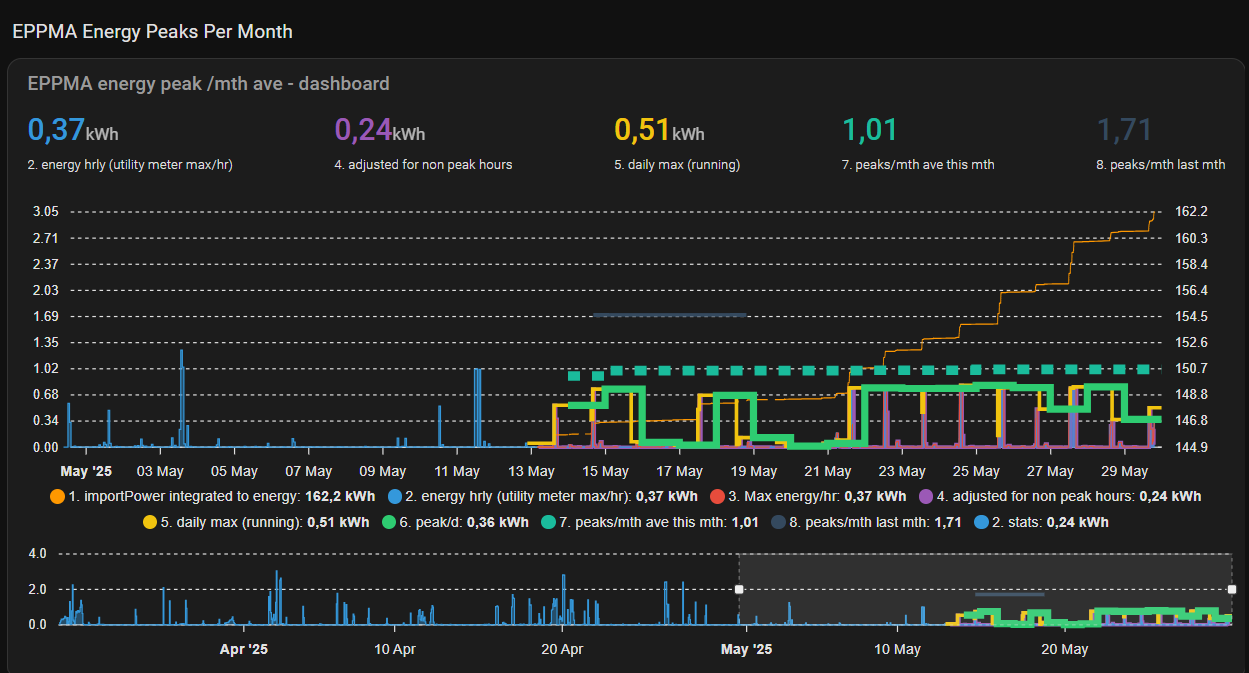
here is a picture of this month (note I have not included the statistical values so values for most sensors are not shown >10days … i could make a version with this but have not needed it so far myself)


what this tells me on the top is that just now we are using 0,37, so far the highest has been 0,24 (so it will go up shortly as right now it is at 0,37), the max of the day is 0,51 and the average of the 3 peaks this month is 1.01 … clicking that looking in attributes gives you the specific values)

Have you used these measurements & visualizations to inform automations for load shedding? We just got Effektavgift here in here Möndal, and I’m thinking I would do something like this. Eg turning off non critical devices to shed load. The EV charger and Heatpump are already controlled by Tibber, so I’ll leave those alone.

absolutely. we use it to inform and actively keep the peaks in check driving some primary load shedding (or rather the inverse, when to turn primary loads on) mainly using EPPMA 2 Energy per hour and to defer when applicable primary and other loads toward reduced price non peak hours and during the late evening/early morning 50% reductions.

Now that it has been running a while, given what we can automate and our own every changing needs, wants and priorities - I can say it has been pretty successful:

  • it matches well the data from our electric company,
  • it has informed and thereby impacted our behaviors and setups and
  • it has allowed us to automate the control of the primary loads (priorities)

:slight_smile:

This is great, looks fantastic,
need a little help though.

I assume that I need to update the:
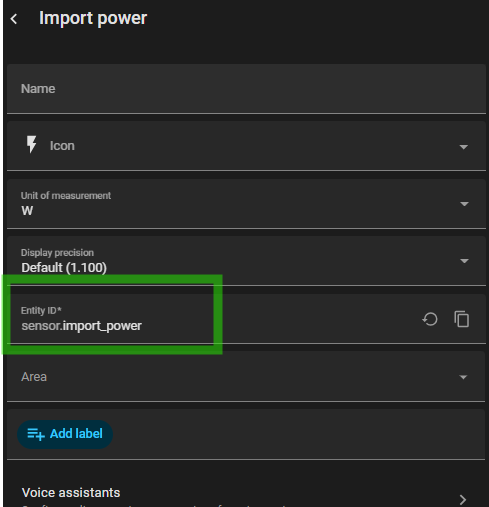
source: sensor.import_power
to get the power consumption into this. I use Tibber and have the realtime power sensor in W.
how do I convert it into kWh and how should the source sensor be configured to get everything working?
thanks

so,
in the process flow section in the code i have:

## process flow
  # 1. import power -> integrate it to kWh.. i have power in watts coming in this should give kWh
  # 2. u.... 

I believe that should be fine … so go to the EPPMA_1 (near the bottom)… and put in the entity id to your sensor that is in watts and that should be about it. you can see here is mine:

hope it goes well, let me know if you need more info/help.

Thanks a lot!
I change the source to the realtime power sensor and now the EPPMA:1 is providing data and seems to work. I will assume the rest will follow when time passes by :wink:

1 Like

I will give it a try now. You don’t have this code on github?

I do not yet have it publicly available github. Do you mean just the code, or like a hacs integration?
If helpful to more I can look into it first putting up the code… give a heart/thumbs up here!

1 Like

If you got the code on GitHub it is little bit easier see if you made some changes to it, also release versions.

To create an integration in HACS I have no idea how to do it. I think it is more job to create an integration, but it is easier for the user

good points I will put it up, hopefully this weekend. :slight_smile:

managed to get it in github now, here:

I will redo the first post a bit and a link to the github in the near future.

2 Likes

Great work – this is exactly what I have been wanting to build myself but never quite got around to doing.

The logic and sensors work perfectly for me. However, I am running into a serious frontend issue with the ApexCharts card.

When the ApexCharts view is opened in Home Assistant, the UI becomes unresponsive after loading. Chrome memory usage quickly ramps up to 100%, and the tab freezes for 1–2 minutes. I have isolated the ApexCharts card in its own HA tab, and this behaviour only occurs when that tab is open.

I have already tested disabling brush, reducing graph_span, and removing high-frequency series, but the issue persists.

Have you seen similar behaviour, or do you have any recommendations for mitigating this?

hmm, it is heavy for sure, but I have not experienced that type of unusability. Typically it takes about a 30s to load if I have not looked at it for a very long time.

I think you can reduce the data in apex to a smaller span to see if perhaps that is it? I normally keep things updated (for good and bad at times) are things updated for you? Then it may be hardware worth checking, maybe you are using a lot of processing / memory in HA? or maybe chrome? I think the latest chrome updates have taken a lot of memory in general but that has not impacted me here but I have started to try another browser, in my case duck duck go.