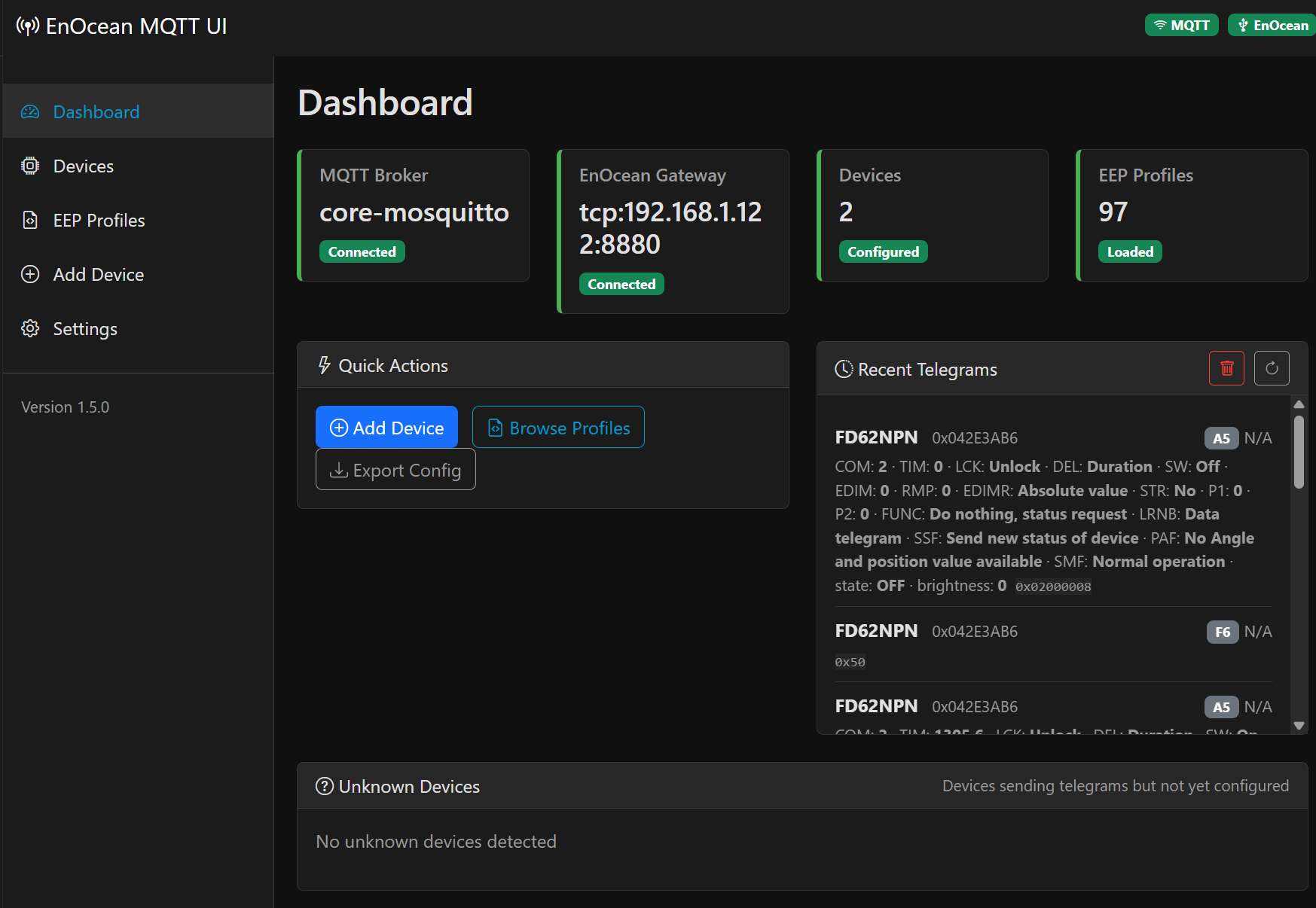
over the last months I built an EnOcean-to-MQTT App with a web UI: devices are added via teach-in (or manually), EEP profiles can be browsed and edited in the browser, and entities show up in HA via MQTT discovery. No YAML editing needed.
Background: some of my devices (e.g. a Kessel Staufix) don’t follow the official EEP spec, so the App lets you fork a standard profile and adjust fields and entity mappings in a visual editor. It also supports Eltako actuators (dimmer/switch/blinds) including teach-in, a live telegram monitor with decoded payloads, and config export/import.
If you prefer YAML-based configuration, the established enocean-mqtt add-on by ChristopheHD is still the way to go — his EEP.xml database is also the basis for my profiles.
add this repository URL to your Home Assistant Add-on Store:
…
Install the “EnOcean MQTT UI” add-on
Configure the add-on:
You refer to the term Add-on a lot. Add-on as a term was removed from the frontend and Docs and was replaced replaced with the term App, so creating new content using the removed term tends to confuse new users.
May I suggest you do a word search and fix these. Also test the install and make sure exactly what you tell people to do actually works.
The terminology: fixed. I started the project before 2026.2 and “add-on” was stuck everywhere. v1.5.1 renames it across the repo, the docs and the web UI itself (I kept one note for people on older HA versions, where the store is still called “Add-on Store”).
The install instructions: you were right that they were too thin. I reworked them into a step-by-step guide with prerequisites (MQTT broker, transceiver) and the exact click path — and while re-testing the whole flow on my own instance I actually hit a real bug: saving the config with a TCP transceiver and an empty serial port failed on the Supervisor’s device validation. Fixed in v1.5.2.
So thanks for pushing me to test it properly, that was worth it.
Hi @marcelamont63-cell — done! As of v1.6.2 the Serial Port option is a list of your connected devices, so you can just pick your EnOcean dongle from it. Reload the store, update, and select it in the Configuration tab. Thanks for the nudge!
Hi @ESDN83! An amazing “App”! I was able to get 2 standard PTM215 switches to run quite easily. I did struggle with a FSR61 actor, though: I found no way to get a Homeassistant switch that could remain synchronized with the actor through the actor self-reporting feature (especially if I mixed the use of HA and the PTM215 switch to operate the actor).
The self-reporting feature, once enabled, sends 0x70 and 0x50 for activate and deactivate, which translates to BO pressed and BI pressed in the F6-02-01 template.
After lots of fiddling with the LLM, I managed to get it working with this code in config.yaml:
You actually found exactly the right mechanism: the FSR61’s confirmation telegrams are plain F6 rocker codes, and the app simply didn’t translate them into a switch state yet.
That’s built in now: in the current Beta (“EnOcean MQTT UI (Beta)”, 1.7.0-beta5), switches driven via F6 derive their ON/OFF state directly from those reports, no YAML needed.
One thing to know: which rocker side means ON depends on how the actuator was taught in, so the device settings now have an “Invert reported state” option for switches
If your FSR61 shows ON/OFF the wrong way round, just tick it. Since you have the hardware on your desk: I’d love a quick test before this goes into the stable release. Then your YAML workaround can retire.
also, I originally tried to fix it in the value_template by creating a new EEP, but this didn’t stick, the custom value template never made it to MQTT…
On the current stable, an F6/rocker switch actuator like the FSR61 comes through as momentary button presses (the two “flashes” you’re seeing), so Home Assistant never holds a real on/off state.
In the beta (1.7.0-beta5 and later 1.7.0-beta7 is on the beta channel now), an FSR61-style actuator is a proper HA switch entity: its state is kept in sync from the actuator’s own status-confirmation telegrams, with no MQTT/YAML template needed. Since which rocker side means “on” depends on how the actuator was taught in, there’s an “Invert reported state” option (shown for the switch role) in case on/off end up reversed.
About the custom EEP / value_template you tried: when a device is given a switch (or light/cover) role, the app builds the entity itself and doesn’t use the value_template from the EEP profile which is why your custom template never showed up in MQTT. For the FSR61 that path is now unnecessary; the native switch sync above replaces it. (If you were instead using it as a plain sensor and the template still didn’t apply, let me know your profile and I’ll take a look.)
Totally fine to wait for stable, but if you’d like to try it sooner, the FSR61 status sync is one of the things I’d like confirmed on real hardware before I promote 1.7.0 to stable, so your feedback on the beta would genuinely help. Either way it’ll be in the stable release.
Ok, this does work in principle. I had to do the inversion (strange, as “BO” should be “on” by default, and that’s what the FSR61 is sending).
Also, it’s still showing the flashes, though synchronized:
Hi @salzrat you were right about BO, and the default was wrong.
An Eltako actuator confirms its state with the opposite rocker code to the one we send as a command. It reports ON as 0x70 (BO) and OFF as 0x50 (BI), while the command press for ON is 0x50. The status sync reused the command convention, so it was inverted for every Eltako actuator. Fixed in 1.7.0-beta8: BO is ON by default now.
After updating, please turn “Invert reported state” back off. The default is correct now, so the workaround would invert it again. Related: that option was hidden when you opened an existing switch for editing (it only showed for covers), which is also fixed in beta8, so you can actually reach it.
About the two flashes: that is Home Assistant drawing the entity as two buttons instead of a toggle, which it does when an entity is marked assumed_state. The switch was published as optimistic, which sets exactly that flag. It is no longer optimistic, so you get a real toggle. To keep the immediate reaction, the add-on now echoes the commanded state to the state topic, so it also works for actuators that never report back.
One thing to expect: Home Assistant also draws the two buttons while an entity’s state is still unknown. Right after a fresh start, before the first status telegram or the first command, you may see them briefly.
1.7.0 is out on the stable channel.
What changed since 1.6.2:
Two-channel actuator modules (NodOn SIN-2-2-01 and similar) work end to end.
Teach in the module once, then add one device per output with the same address.
Each output gets its own entity and its own name, under one Home Assistant device.
Switch actuators report their real state. Switching at the module itself, or
from another sender, now updates Home Assistant. The Eltako feedback (FSR61) is no
longer inverted by default, and a switch renders as a proper toggle instead of two
on/off buttons.
Devices can be renamed after creation, without deleting and re-adding them.
Dark and light theme now follow the Home Assistant theme in every panel,
including the mapping editor and the settings tables.
First of all, thank you for this app! It’s genuinely thanks to it that I finally took the plunge and migrated to Home Assistant — the web UI and how easy it made setting up EnOcean devices really made the difference for me.
I’m posting here because I’m running into some issues controlling my Eltako F4SR14 series relays, and I was wondering if others have run into the same thing.
When sending commands to several modules in a row, not all of them actually switch physically (even though Home Assistant shows the expected state on the MQTT side). I tried adding a delay between each command, which improves reliability but doesn’t fully solve it.
My current hypothesis: unlike some other solutions (Jeedom/OpenEnOcean, for instance, which repeats each telegram 3 to 6 times), the add-on only sends a single RF telegram per command, with no retry — which makes it more sensitive to the usual EnOcean RF packet loss, especially when commands are sent in quick succession.
Has anyone run into this and found a fix (a setting, a workaround), or would it be worth considering a configurable RF retry option? Thanks in advance!
Here’s a quick update regarding the actual cause of the problem: sorry for the delay, I wanted to be sure before wasting your time.
Summary: commands sent in quick succession via MQTT (either back-to-back with a short delay, or right after another script has just finished sending a batch of commands) are silently dropped by the add-on. No error is logged, no MQTT RX line appears for the missing commands, and Home Assistant still shows the optimistic target state even though nothing was transmitted on the EnOcean side.
Data points:
Attached Logs_script_only.log contains two runs of the exact same script (turning off 11 switches + 3 dimmers), 19 seconds apart. Run A (00:52:41–00:52:45, triggered right after another script had just closed several covers, with only a 500ms gap) is missing the MQTT RX for the first 5 devices in the list entirely — they simply never appear in the debug log. Run B (00:53:03–00:53:07, same script run in isolation) completes all 14 commands successfully, in order.
I confirmed this is timing-related, not RF-related: increasing the delay between my “close covers” script and my “turn off lights” script from 500ms to 2.5s fixed it completely.
I also found a lower bound independently: when sending consecutive switch.turn_off commands to different devices in a loop, anything below ~300ms between commands becomes unreliable; 300ms+ is consistently fine.
So it looks like the add-on can’t quite keep up with a burst of incoming MQTT commands — each one takes roughly 100–200ms to actually transmit + get acked by the dongle (visible in the debug log as TX EnOcean → Response packet: 00→ release → ack), and if new commands arrive faster than that, or while it’s still catching up from a previous burst (e.g. a covers script that just ran), those newer messages don’t seem to get queued — they just don’t show up in the log at all.
I don’t have visibility into whether the drop happens on the add-on’s MQTT subscriber side or somewhere upstream, but from the add-on’s perspective these commands never arrive. Would it be possible to add some form of internal queueing/backpressure for incoming commands, so bursts get processed sequentially instead of some being lost? Happy to test anything if useful.
Logs attached: Logs_script_only.log (the key one, shows both the failing and working run), plus Logs_automation_twice.log for context (same failing run, captured separately).
found it, thanks for the logs. Not MQTT, but your queue suggestion was the right fix.
The add-on started every command immediately, side by side, so a script wrote a
dozen telegrams into the USB300 at once. The dongle has one radio and a small
queue and rejects what does not fit. It says so in its response, which the
add-on ignored, counted the command as sent, and echoed the state to Home
Assistant. That is why HA looked right while the relay had heard nothing.
Fixed in 1.8.0-beta7, out now in the beta channel:
Commands are queued and sent one at a time, with a gap the dongle can follow.
The dongle’s return code is checked. A refused command gets a log line, not a
state in HA.
Press and release are now inseparable, which matters for blinds: an Eltako
actuator reads the press duration.
You can drop the delays from your scripts. A 14 device scene takes about 1.5 s.
No retry option on purpose: on a toggle-taught relay a repeat switches it back
off, so it would hurt as many setups as it helps.
One note, nothing was lost on the MQTT side. MQTT RX is logged before any
other work, so it cannot be swallowed. Both gists just start mid-run, which is
why the first five look absent.
I verified the timing on a test HA, not on real F4SR14 hardware. Please run your
original script on beta7 without delays and tell me if all of them switch. If
something still goes missing, the log now says so.