Automation Blueprint
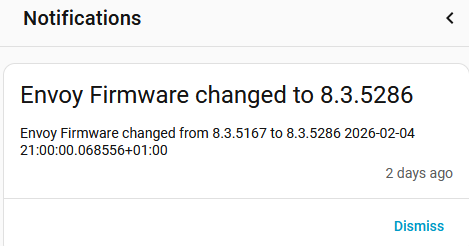
This automation blueprint will create a persistent notification when the firmware version in the Envoy changes.
Background
Enphase pushes firmware updates to the Envoy device based on internal development processes driven by bug fixes, country rules, product development and alike. These pushes happen unannounced and mostly overnight.
Installation
The blueprint can be installed using below button or using the link at the top.

Prerequisites
Enphase Envoy core integration
This blueprint is designed for use with the Enphase Envoy core integration.
It may work also work with other (custom) integrations that store a (firmware) version in the sw_version device attribute.
Inputs
firmware_track_entity
Input_text entity to cache firmware version. Used to cache the current firmware version and trigger the notifications when the actual firmware version changes. For example input_text.envoy_123456789012_firmware
envoy_entity
A sensor that belongs to the Envoy, can be any one of them. Used to identify the Envoy device. For example sensor.envoy_123456789012_lifetime_energy_production
Details
The automation using this blueprint is triggered when HA starts or every 15 minutes. When first created, it may take up to 15 minutes before the first execution and the input_text value is set to the current firmware. Optionally run the automation manually after creation to set the initial firmware version.
To test the automation, you can change input_text entity manually to some other version like 0.0.0 to simulate a firmware change. Then run the automation manually or wait up to 15 min for it to execute and create the notification.
The Enphase_envoy core integration reads the firmware version from the Envoy device at HA start, integration reload and every 4 hours. The firmware version is stored in the device attribute sw_version. It may take up to 15 minutes after these events before the persistent notification shows.
Example
UI view
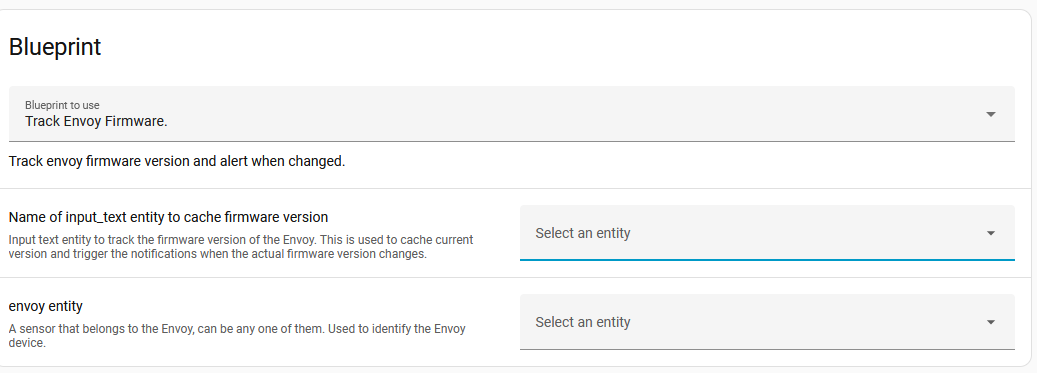
To add a new input_text entity, use the dropdown and select + create a new text helper.
Yaml view
alias: Track Envoy Firmware.
description: ""
use_blueprint:
  path: catsmanac/Track_envoy_firmware.yaml
  input:
    firmware_track_entity: input_text.envoy_123456789012_firmware
    envoy_entity: sensor.envoy_123456789012_lifetime_energy_production
When configuring the automation using yaml, make sure to create the input_text helper first.
Notification example
Version history
- 0.1.0 Feb 6, 2026 Initial creation