Enphase Envoy on 2024.4

Now that’s in interesting solution to try and overcome the issue with the installed CT Sensors not reading correctly (Or providing the proper data).

Hadn’t really wanted to try and shove more things into the main panel, but it had crossed my mind.

The more data, the better?

Interesting turn of events. I said “It might have to do with how your CT clamps are installed in relation to your interconnect.” because that’s what my installer told me. Well, this afternoon I called Enphase tech support, and they said my metering was not commissioned correctly. In 20 minutes, they had it fixed, and now my Enphase sensors are all reporting correct values! I would encourage you to have Enphase take a look at your configuration.

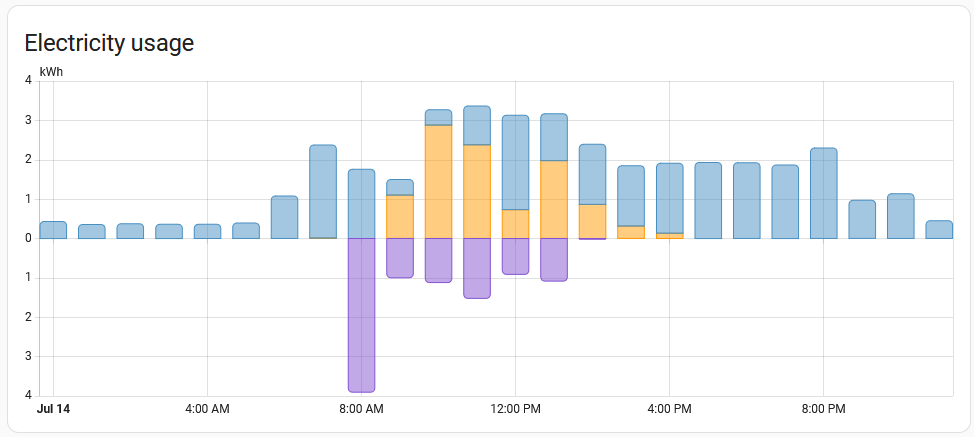
Hi all, following @del13r write up, and it works great… EXCEPT… now I’m getting an 8 AM data anomaly that doesn’t quite make sense.

The return to grid amount is far greater than what is being generated, which isn’t possible. This has happened now for several days in a row.

Here is it looking correct for the first day after setting up @del13r’s custom sensors:

And here is the last 2 days:

Any ideas? Is the Riemann sum integral sensor doing something weird at this time?

Thanks
Scott

Thanks for the feedback. I also created my own docker image for use in unraid. I’m planning to publish to dockerhub so that others could use this docker image.

1 Like

I’m getting the same thing on my instance:

Does anyone have any ideas on what might be causing it?

Looks like its got something to do with the export helper:

edit: appears that changing the integration method for the Power Export helper from Right Riemann sum to Left Riemann sum seems to sort this out

Hi it s really nice:
I need also another helper for my Enphase 5P battery and also enphase Enphase Wallbox ? what for a code should i use ?

Thx

Hi del13r , i guess dont work anymore ?
with the enphase update there only one value

{{
[ 0,
0
-
states('sensor.envoy_serialnumber_current_net_power_consumption')
| float(0) * 1000 ]
| max | int(0)
}}

Hi all,
I would love to continue being able to help, however I recently got a powerwall 2 installed and my installer removed the enphase consumption CT clamp effectively making my envoy only able to report solar production statistics.
I am now exclusively getting data from my powerwall 2 rather than the enphase envoy which means I can no longer test possible solutions for Enphase equipment.

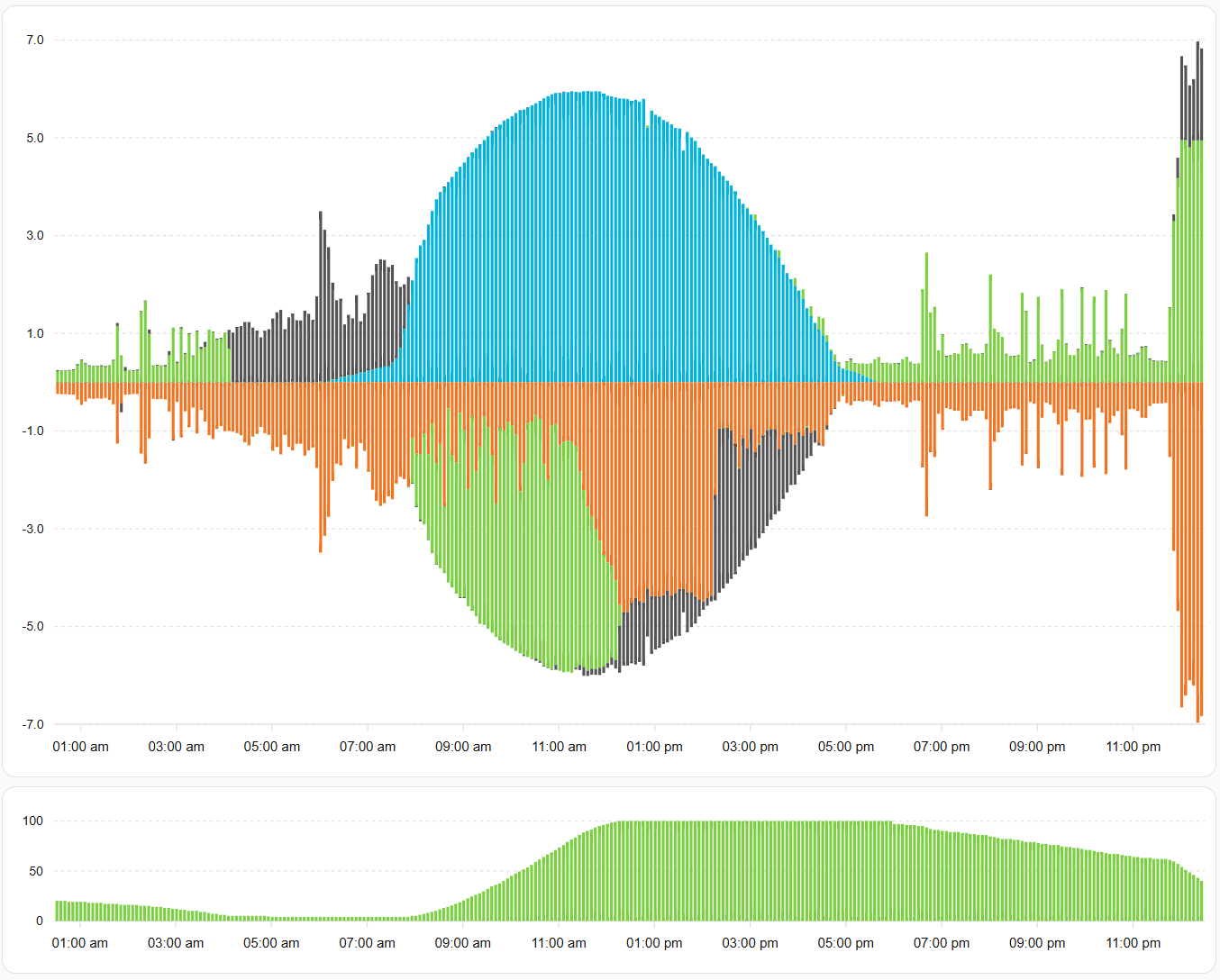
Here is what I have done with my powerwall 2 data to replicate the look and feel of the enphase graphs.

card:
  type: custom:apexcharts-card
  stacked: true
  apex_config:
    legend:
      show: false
    yaxis:
      min: -7
      max: 7
  graph_span: 1d
  span:
    offset: ${offset}
  header:
    show: false
    title: Total Power
  series:
    - entity: sensor.powerwall2_solar_power
      type: column
      name: Produced
      color: "#01B4DE"
      group_by:
        func: avg
        duration: 5min
    - entity: sensor.powerwall2_load_power
      transform: return x *-1 ;
      type: column
      name: Consumed
      color: "#F37320"
      group_by:
        func: avg
        duration: 5min
    - entity: sensor.powerwall2_battery_power
      type: column
      name: Discharged(+)/Charged(-)
      color: "#7BD042"
      group_by:
        func: avg
        duration: 5min
    - entity: sensor.powerwall2_site_power
      type: column
      name: Imported(+)/Exported(-)
      color: "#545456"
      group_by:
        func: avg
        duration: 5min
1 Like

wow nice job