Spartacus
November 21, 2025, 9:15pm
1
Hi all,
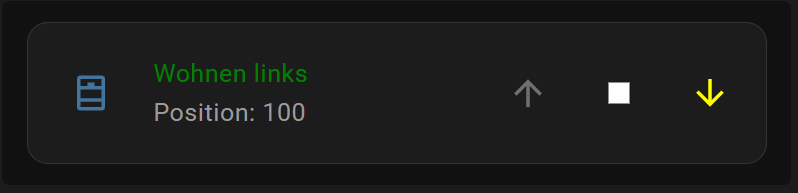
I’m struggling with a cover entity. I’m trying to change the color of the text in the second row and the first arrow (up). child(1) is being ignored. What’s my mistake?
type: entities
entities:
  - entity: cover.wohnzimmer_links
    name: Wohnen links
    secondary_info: position
    card_mod:
      style:
        hui-generic-entity-row ha-cover-controls:
          $: |
            .state ha-icon-button:nth-child(1) {
            color: blue;
            }
            .state ha-icon-button:nth-child(2) {
              color: white;
            }
            .state ha-icon-button:nth-child(3) {
              color: yellow;
            }
        .: |
          :host {
            color: green;
          }
So, I pasted your code into my test dashboard and updated to one of my covers.
Of course, mine is light instead of dark. But, I get the blue and not the yellow. Grrrr
Spartacus
November 21, 2025, 9:49pm
3
thanks you! I found the issue. If the cover is in endposition, the color of the arrow is ignored. sorry for confusion.
Don’t be sorry. Glad to help identify the issue!!!
Luckily, mine was closed and yours was open. LOL
Spartacus
November 21, 2025, 10:43pm
5
btw,
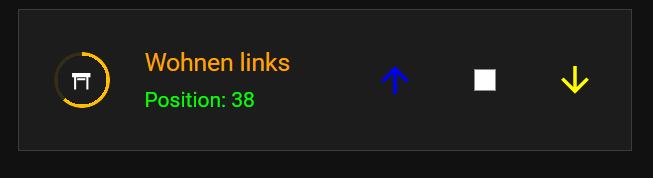
this is how it currently looks. It’s not final yet, but it’s slowly coming together… Have a nice evening!
The ring shows the position of the cover. Next, I’ll work on the buttons. I don’t have a good idea for that yet…
type: entities
state_color: false
show_header_toggle: false
card_mod:
  style:
    .: |
      ha-card {
        --ha-card-border-radius: 0px;
        --ha-card-border-color: #3c3c3c;
        --ha-card-border-width: 1px;
      }
entities:
  - entity: cover.wohnzimmer_links
    name: Wohnen links
    secondary_info: position
    icon: mdi:window-shutter-open
    card_mod:
      style:
        hui-generic-entity-row ha-cover-controls:
          $: |
            .state ha-icon-button:nth-child(1) {
              color: blue;
            }
            .state ha-icon-button:nth-child(2) {
              color: white;
            }
            .state ha-icon-button:nth-child(3) {
              color: yellow;
            }
        hui-generic-entity-row$: |
          /* Primärtext (erste Zeile) */
          .info {
            font-size: 14px;
            color: orange;
          }

          /* Sekundärtext (zweite Zeile) */
          .secondary {
            font-size: 12px;
            --secondary-text-color: lime;
          }

          /* Badge/Icon selbst – Farbe bleibt orange */
          state-badge {
            position: relative;
            z-index: 2;
            color: white;
            --mdc-icon-size: 14px;
          }

          /* Dynamischer Ring mit Transparenzlogik */
          state-badge::after {
            content: "";
            position: absolute;
            top: 50%;
            left: 50%;
            width: var(--ring-size, 32px);
            height: var(--ring-size, 32px);
            transform: translate(-50%, -50%);
            border-radius: 50%;
            pointer-events: none;
            z-index: 1;

            /* Ringdicke über Mask */
            mask: radial-gradient(
              closest-side,
              transparent calc(100% - var(--ring-thickness, 2px)),
              #000 0
            );

            /* Winkel:
               100% (offen) => 0°, 0% (geschlossen) => 360° */
            {% set pos = state_attr(config.entity, 'current_position') | float(0) %}
            {% set angle = ((100 - pos) / 100 * 360) | int %}

            /* Zwei Transparenzphasen in einem conic-gradient:
               - 0..angle: opak (Transparenz 0%)
               - angle..360: sehr transparent (90% Transparenz) */
            background: conic-gradient(
              rgba(255,191,0,1) 0deg,
              rgba(255,191,0,1) {{ angle }}deg,
              rgba(255,191,0,0.1) {{ angle }}deg,
              rgba(255,191,0,0.1) 360deg
            );
          }
        .: |
          :host {
            /* allgemeine Zeilen-Styles */
          }
VietNgoc
November 22, 2025, 9:10pm
6
Because when the cover is fully open or fully closed, the up or down controls are inactive. Therefore, the icon will have a disabled class, which has a gray color. In your case, the cover is in position 100, so the up button is disabled.
I understand that clicking at 0%/100% should be disabled. But, color change should be changeable in my opinion.
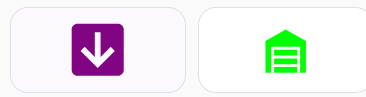
I prefer these buttons I am using:
      - type: custom:button-card
        entity: cover.big_garage_door
        tap_action:
          action: call-service
          service: script.garage_doors
          data:
            which_garage: cover.big_garage_door
        state:
          - value: open
            icon: mdi:garage-open-variant
            styles:
              icon:
                - color: red
          - value: opening
            icon: mdi:arrow-up-box
            styles:
              icon:
                - color: purple
          - value: closing
            icon: mdi:arrow-down-box
            styles:
              icon:
                - color: purple
          - value: closed
            icon: mdi:garage-variant
            styles:
              icon:
                - color: lime
        show_name: false
        show_state: false
      - type: custom:button-card
        entity: cover.small_garage_door
        tap_action:
          action: call-service
          service: script.garage_doors
          data:
            which_garage: cover.small_garage_door
        state:
          - value: open
            icon: mdi:garage-open
            styles:
              icon:
                - color: red
          - value: opening
            icon: mdi:arrow-up-box
            styles:
              icon:
                - color: purple
          - value: closing
            icon: mdi:arrow-down-box
            styles:
              icon:
                - color: purple
          - value: closed
            icon: mdi:garage
            styles:
              icon:
                - color: lime
        show_name: false
        show_state: false
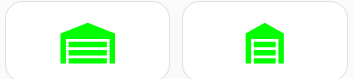
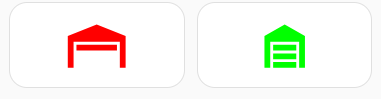
And, the wife just yelled at me. ARE YOU OPENING AND CLOSING THE GARAGE??? LOL. Yup, taking screenshots!!!
I have dark background tablets where the purple is yellow.
And, the script is …
alias: Garage Doors
sequence:
  - choose:
      - conditions:
          - condition: template
            value_template: "{{ states(which_garage, 'state') in ('open','opening','on') }}"
        sequence:
          - action: cover.close_cover
            metadata: {}
            data_template:
              entity_id: "{{ which_garage }}"
      - conditions:
          - condition: template
            value_template: "{{ states(which_garage, 'state') in ('closed','closing','off') }}"
        sequence:
          - action: cover.open_cover
            metadata: {}
            data_template:
              entity_id: "{{ which_garage }}"
description: ""
It allows for tapping to make it go the ‘other’ direction at any time.
ETA: If I have a need to stop the door at a specific spot, i am not using the app. I am at the controller. So i don’t account for it.
Spartacus
November 23, 2025, 7:11pm
8
Hi,
thank you for your reply and for sharing the code! I will test it !
Have a nice evening!