How do I config a sensor to show as an diagnostic in home assistant?
{
  "entity_category": "diagnostic",
  "expire_after": "180",
  "name": "IP",
  "state_topic": "homeassistant/sensor/lavan/ip/state",
  "unique_id": "s6l",
  "device": {
    "identifiers": [
      "1la"
    ],
    "name": "Lavanderia"
  }
}
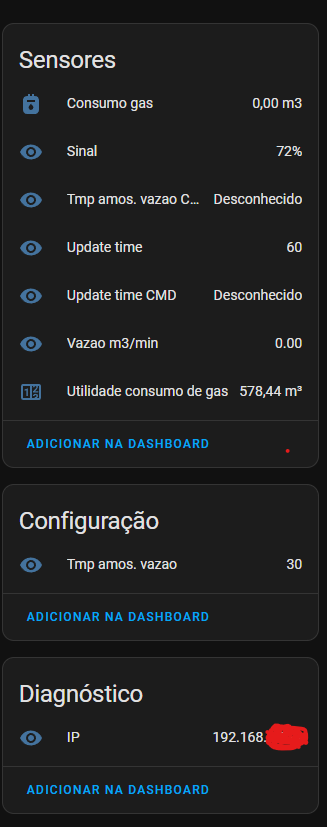
I tried entity_category but it still shows the entity as a sensor:
Code to auto config (arduino):
ConexaoMQTT.publish("homeassistant/sensor/lavan/ip/config","{\"entity_category\": \"diagnostic\",\"expire_after\": \"180\",\"name\": \"IP\",\"state_topic\": \"homeassistant/sensor/lavan/ip/state\",\"unique_id\": \"s6l\",\"device\": {\"identifiers\": [\"1la\"],\"name\": \"Lavanderia\"}}", true);
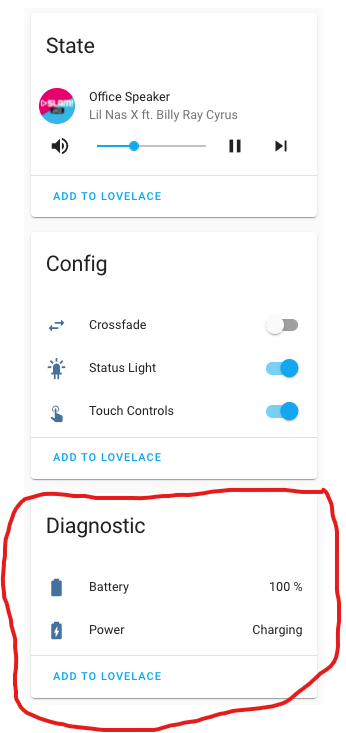
I was expecting the IP to be shown like this (sorry for 2 posts in a row, I’m a new user):
francisp
September 2, 2023, 11:32am
3
If I look at an existing diagnostic sensor, it is “entity_category”:“diagnostic”
{
   "availability":[
      {
         "topic":"zigbee2mqtt/bridge/state"
      }
   ],
   "device":{
      "identifiers":[
         "zigbee2mqtt_0x000d6ffffefd3b79"
      ],
      "manufacturer":"IKEA",
      "model":"TRADFRI control outlet (E1603/E1702/E1708)",
      "name":"ikeaoutlet1",
      "sw_version":"2.3.089"
   },
   "enabled_by_default":false,
   "entity_category":"diagnostic",
   "icon":"mdi:clock",
   "json_attributes_topic":"zigbee2mqtt/ikeaoutlet1",
   "name":"Last seen",
   "object_id":"ikeaoutlet1_last_seen",
   "origin":{
      "name":"Zigbee2MQTT",
      "sw":"1.33.0",
      "url":"https://www.zigbee2mqtt.io"
   },
   "state_topic":"zigbee2mqtt/ikeaoutlet1",
   "unique_id":"0x000d6ffffefd3b79_last_seen_zigbee2mqtt",
   "value_template":"{{ value_json.last_seen }}"
}
Thanks I deleted the retained config message and reset the device, now it works as I wanted it to.@francisp for the configuration values how do I add the slide/button?