I’ve changed my entity ID format to be ‘floor, area, parent device, device, entity’, but when I ask to recreate an entity by selecting the option from the three dots, it is not following my format. Is this by design or maybe something that will be addressed in future releases?
Thanks
Don’t manually change your entity_ids other than the entity part. Then set up the pattern in Settings > System > Entity ID format. Then use the three dot menu and it’ll use that format to create your new entity_ids.
If I go to the Device Info page and select ‘recreate entity ID’ from the top right, it does not recreate the entity ID as I have specified in image one, which should now be the default!
What integration is creating the device and entity? There is only one thing that will override the recreate entity IDs, and that’s default_entity_id. That can only be provided by 2 integrations that allow it, MQTT and Template entities.
The other possibility is that you have a misbehaving custom integration sets an entity_id for you.
Hello. You may be correct here as I’ve just tried renaming one of my matter devices and that works. But when I attempt to rename my ZigBee devices it’s not working.
You can control how Zigbee2MQTT defines a device for use in Home Assistant. It’s done by altering a device’s homeassistant configuration in Zigbee2MQTT’s configuration.yaml file.
Long version
Zigbee2MQTT shares its devices with Home Assistant via Home Assistant’s MQTT Discovery feature.
MQTT Discovery defines dozens of properties that can be shared. default_entity_id is one of those properties.
Zigbee2MQTT allows you to override any of the properties it defines for sharing a device with Home Assistant. In Zigbee2MQTT’s configuration.yaml file there is a list of all devices it manages. For each device, you can define which properties, and their values, Zigbee2MQTT should share with Home Assistant.
There’s an example at the top of this page. Notice the device named 0x00158d0001d82999 has a homeassistant key containing sub-keys named expire_after and temperature. These are properties, with specific values, that the user has defined (and will be shared with Home Assistant via MQTT Discovery).
If you do not want Zigbee2MQTT to include the default_entity_id property, you can set its value to null. For example:
After modifying Zigbee2MQTT’s configuration.yaml file, you will need to restart Zigbee2MQTT to load the modified file. Upon restart, Home Assistant will immediately receive the modified device configuration via MQTT Discovery. Afterwards, in Home Assistant, you can use Recreate entity IDs for the device and it should offer to recreate the entity’s entity_id.
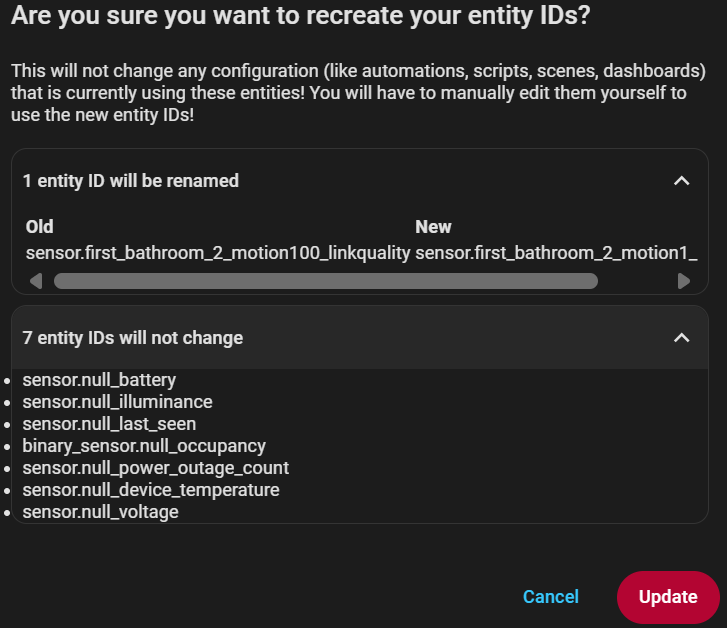
Thank you for the suggestion; however, after changing the Home Assistant friendly name to null and restarting zigbee2MQTT, I am able to recreate my entity as I have set it, but only one of them – please see this image for what is happening to the others!
Please ignore the old name – it was null originally, but after I changing it the first time I forgot to take an image of it, so I recreated the error to show you what is happening!
I don’t know anything about Z2M but it sure looks like you have set default_entity_id to "null" the string (i.e. including the quotes) rather than null the value (without the quotes).