Am I the only one with this issue?
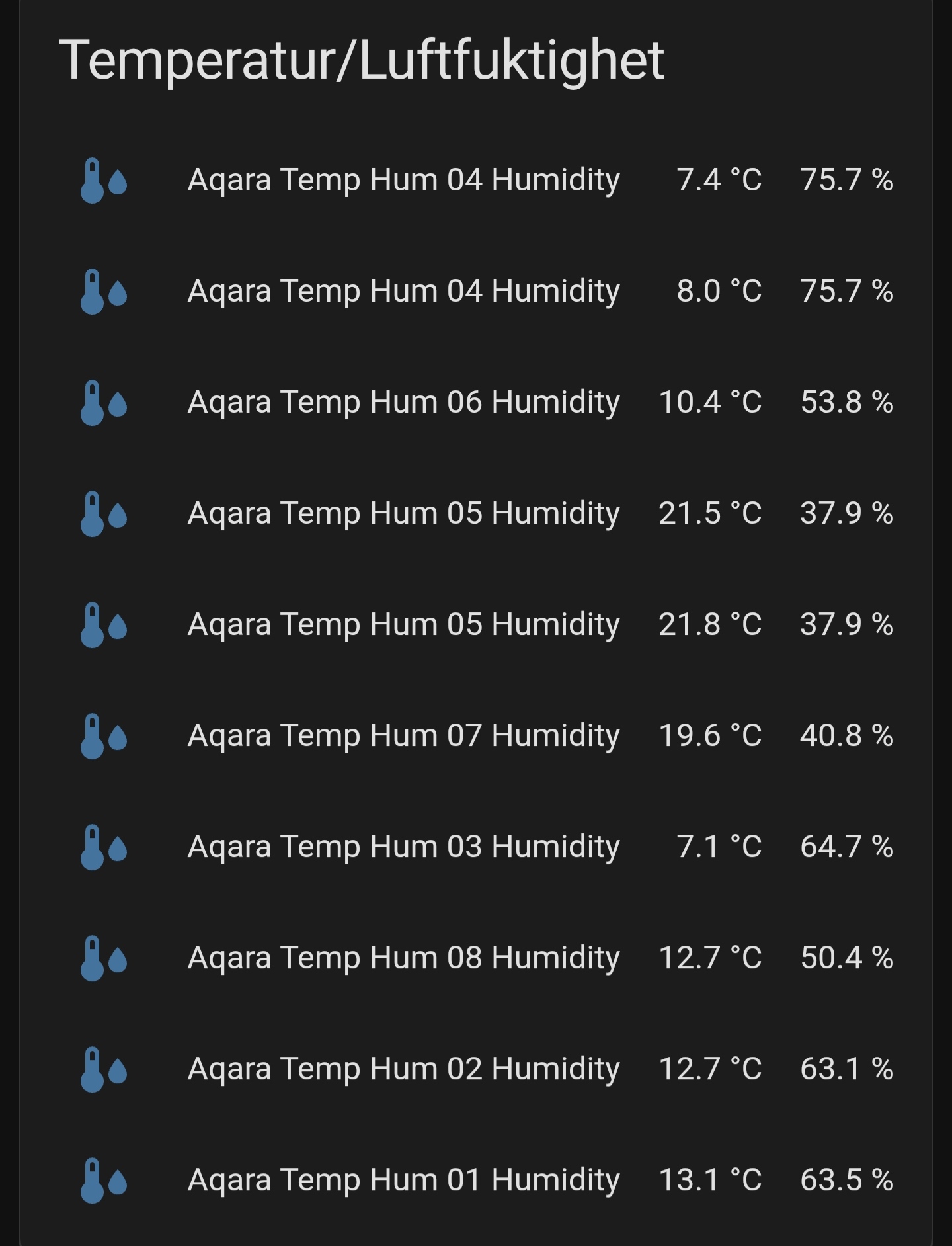
It only happens in the app and is usually fixed by restarting the app. A bit annoying though.
Am I the only one with this issue?
It only happens in the app and is usually fixed by restarting the app. A bit annoying though.
You're not the only one, and the good news is it's not your config or your sensors. The tell is what you said: app-only, and fixed by restarting the app. A real data/registry problem (genuine duplicate entities, wrong sensor mapping) would show up everywhere including a desktop browser, and wouldn't clear on an app restart. App-only and transient = a rendering glitch in the Companion app's WebView, not bad data.
What you're seeing is classic virtual-list row recycling: long entity lists are drawn with a recycled set of row elements, and when scrolling/refresh goes wrong the labels and values get mismatched and rows duplicate. That's why rows named "…Humidity" show a temperature as the primary value, and why 04 and 05 appear twice. The underlying states in HA are correct, only the on-screen pairing is scrambled. Quick proof: open the same dashboard in a normal browser and it'll be fine.
Alright, can something be done about it? They are actually not duliicated though, I use the same value for some because irs different sensors, not all hsve a humidity.
Right, if these are genuinely separate sensors and not registry duplicates, then nothing's wrong with your data, this is purely the name/label not rendering in the app. That's a Companion app (WebView) display glitch rather than a Home Assistant problem, which is why a restart clears it.
A few things that help:
Update the Companion app and Android System WebView, and clear the app's frontend cache (Settings → Companion App → Troubleshooting → Reset frontend cache). An out-of-date WebView is the usual cause of labels/values not drawing.
Give each entity a unique friendly name. This is the big one for your setup: when several rows share the same display name, a label that fails to render leaves you unable to tell them apart, which is exactly why it looks duplicated even though it isn't. Naming each one distinctly (by room, say) makes the card unambiguous and a lot more resilient to the glitch.
For the sensors that don't report humidity, rename them so they aren't labelled "Humidity," and consider a card that handles the missing value cleanly (or split the temp-only and temp+humidity sensors into separate cards). The name/value mismatch just adds to the confusion when the render hiccups.
If you want it on record as an app bug, report it on the Home Assistant Android Companion GitHub with your app + Android System WebView versions and a screenshot.
Is there any shortcut to clesr the app frontend cache? Quite tedious to navigate to it in the settings all the time.
In a browser you can skip the settings entirely and just hard-refresh: Ctrl+Shift+R (Windows/Linux) or Cmd+Shift+R (Mac). That throws away the cached frontend in one keystroke, no menu diving.
In the Companion apps there's unfortunately no one-tap shortcut for it. The "Reset frontend cache" button lives in the app settings (roughly Companion App → Debugging on iOS, Companion App → Troubleshooting on Android). What I usually do instead is just hard-refresh in a browser tab after a change, since the cache is per-client anyway.