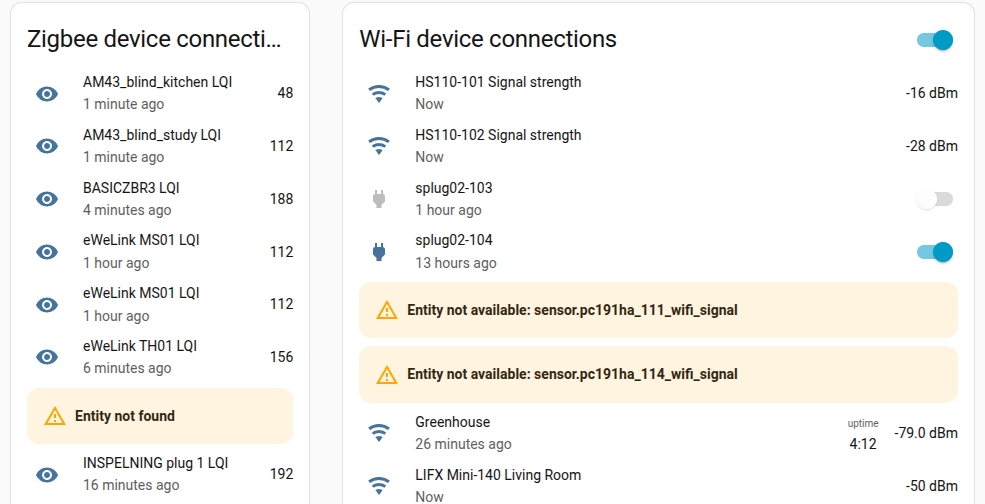
Am i the only one who finds “Entity not found” in my Entities cards to be … less than helpful. Often it is simply caused by a light having been switched off at the wall, or a device having been deliberately temporarily removed - easily fixed or ignored if I know which entity.
When clicked on, the other entities (which were found) pop up windows with relevant info - but there is no pop-up for “Entity not found”. I guess it should be fairly easy to add a popup window containing the name of the entity which was not found. In this example a simple message:
Entity not found:
sensor.ewelink_th01_02_lqi
Curiously, when the custom:multiple-entity-row is used (on the right in the above screen image), the error message does display the name of the missing entity … though it tends to make for a long error message disrupting the panel layout.
I assume that the developer never considered this issue - and hence it is not a bug, but an enhancement. The feature request is here if you want to vote for it.
Yeah, I’ve run into the same thing, it’s especially annoying when you’re troubleshooting multiple entities at once. Even just showing the entity_id in the error would make it way easier to track down what’s missing without digging through configs.