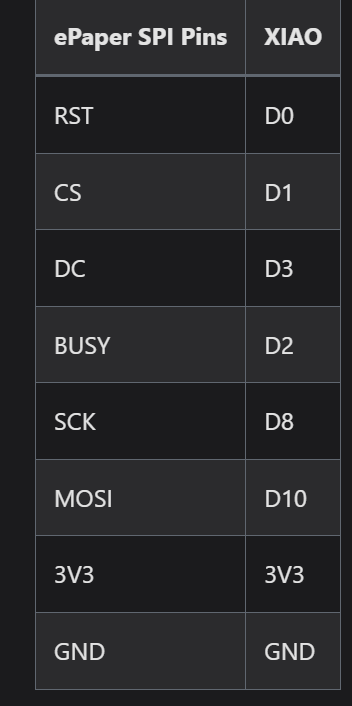
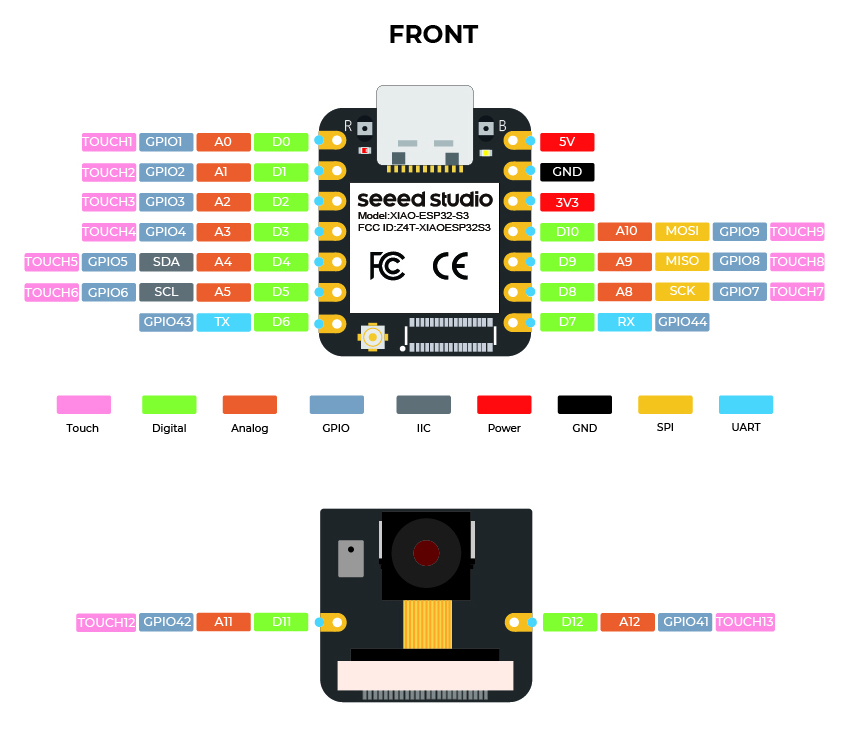
I’m trying to use a 4.26" monochrome ePaper display with an ePaper Driver Board from SeeedStudio and a controller XIAO-ESP32-S3.
I can see the screen go black then white each time the screen make a full refresh. But nothing is displayed on the screen. I’ve no error on the logs. I’m not sure this configuration is possible, I would like to help to add this feature if it is not. SeeedStudio has a library wich is working correctly : Seeed_GFX but I have to adapt it to esphome.
Yaml
esphome:
  name: X
  friendly_name: X
  min_version: 2026.01.0
  name_add_mac_suffix: false

esp32:
  variant: esp32s3
  framework:
    type: esp-idf

logger:

api:

ota:
- platform: esphome

wifi:
  ssid: !secret wifi_ssid
  password: !secret wifi_password

spi:
  clk_pin: 7
  mosi_pin: 9

display:
  - platform: epaper_spi
    model: SSD1677
    reset_pin: 1
    cs_pin: 2
    busy_pin: { number: 3, inverted: false, mode: { input: True, pulldown: True } }
    dc_pin: 4
    update_interval: 10s
    full_update_every: 50
    dimensions:
      width: 800
      height: 480
    transform:
      mirror_x: true
      mirror_y: false
    lambda: |-
      it.filled_rectangle(150, 80, 50, 50);
Logs
INFO Upload took 4.03 seconds, waiting for result…
INFO OTA successful
INFO Successfully uploaded program.
INFO Starting log output from 192.168.X using esphome API
INFO Successfully resolved ecran-salon @ 192.168.X in 0.000s
INFO Successfully connected to ecran-salon @ 192.168.X in 3.185s
INFO Successful handshake with ecran-salon @ 192.168.X in 0.021s
[17:01:21.078][I][app:206]: ESPHome version 2026.1.1 compiled on 2026-01-25 17:00:43 +0100
[17:01:21.085][I][app:213]: ESP32 Chip: ESP32-S3 r0.2, 2 core(s)
[17:01:21.086][C][logger:316]: Logger:
[17:01:21.086][C][logger:316]: Max Level: DEBUG
[17:01:21.086][C][logger:316]: Initial Level: DEBUG
[17:01:21.093][C][logger:322]: Log Baud Rate: 115200
[17:01:21.093][C][logger:322]: Hardware UART: USB_SERIAL_JTAG
[17:01:21.094][C][logger:332]: Task Log Buffer Size: 768 bytes
[17:01:21.102][C][spi:066]: SPI bus:
[17:01:21.103][C][spi:152]: CLK Pin: GPIO7
[17:01:21.103][C][spi:152]: SDI Pin:
[17:01:21.103][C][spi:152]: SDO Pin: GPIO10
[17:01:21.113][C][spi:074]: Using HW SPI: SPI2_HOST
[17:01:21.113][C][epaper_spi:314]: E-Paper SPI
[17:01:21.113][C][epaper_spi:314]: Rotations: 0 °
[17:01:21.113][C][epaper_spi:314]: Dimensions: 800px x 480px
[17:01:21.113][C][epaper_spi:315]: Model: SSD1677
[17:01:21.113][C][epaper_spi:315]: SPI Data Rate: 20MHz
[17:01:21.113][C][epaper_spi:315]: Full update every: 50
[17:01:21.113][C][epaper_spi:315]: Swap X/Y: NO
[17:01:21.113][C][epaper_spi:315]: Mirror X: YES
[17:01:21.113][C][epaper_spi:315]: Mirror Y: NO
[17:01:21.140][C][epaper_spi:152]: Reset Pin: GPIO1
[17:01:21.141][C][epaper_spi:152]: DC Pin: GPIO4
[17:01:21.141][C][epaper_spi:152]: Busy Pin: GPIO3
[17:01:21.141][C][epaper_spi:152]: CS Pin: GPIO2
[17:01:21.141][C][epaper_spi:452]: Update Interval: 10.0s
[17:01:21.141][C][wifi:1304]: WiFi:
[17:01:21.141][C][wifi:1304]: Local MAC: X
[17:01:21.141][C][wifi:1304]: Connected: YES
[17:01:21.153][C][wifi:1037]: IP Address: 192.168.X
[17:01:21.153][C][wifi:1048]: SSID: [redacted]
[17:01:21.153][C][wifi:1048]: BSSID: [redacted]
[17:01:21.153][C][wifi:1048]: Hostname: ‘X’
[17:01:21.153][C][wifi:1048]: Signal strength: -59 dB ▂▄▆█
[17:01:21.153][C][wifi:1048]: Channel: 6
[17:01:21.153][C][wifi:1048]: Subnet: 255.255.255.0
[17:01:21.153][C][wifi:1048]: Gateway: 192.168.X
[17:01:21.153][C][wifi:1048]: DNS1: 0.0.0.0
[17:01:21.153][C][wifi:1048]: DNS2: 0.0.0.0
[17:01:21.154][C][esphome.ota:075]: Over-The-Air updates:
[17:01:21.154][C][esphome.ota:075]: Address: 192.168.X
[17:01:21.154][C][esphome.ota:075]: Version: 2
[17:01:21.161][C][safe_mode:021]: Safe Mode:
[17:01:21.161][C][safe_mode:021]: Successful after: 60s
[17:01:21.161][C][safe_mode:021]: Invoke after: 10 attempts
[17:01:21.161][C][safe_mode:021]: Duration: 300s
[17:01:21.171][C][safe_mode:038]: Bootloader rollback: not supported
[17:01:21.172][C][api:221]: Server:
[17:01:21.172][C][api:221]: Address: 192.168.X
[17:01:21.172][C][api:221]: Listen backlog: 4
[17:01:21.172][C][api:221]: Max connections: 8
[17:01:21.182][C][api:233]: Noise encryption: NO
[17:01:21.230][C][mdns:177]: mDNS:
[17:01:21.230][C][mdns:177]: Hostname: XX
[17:01:22.013][D][api:139]: Accept 192.168.X
[17:01:22.022][D][api.connection:2221]: Home Assistant 2026.1.3 (192.168.1.41): connected
[17:01:23.227][D][epaper_spi:214]: Display update took 1910 ms
[17:01:32.073][D][epaper_spi:214]: Display update took 762 ms