Error in template, I am missing something

I have the following template:


Which throws this error:

Log Details (ERROR)

Invalid config for [sensor.template]: invalid template (TemplateSyntaxError: expected token ‘end of print statement’, got ‘d_drucker’) for dictionary value @ data[‘sensors’][‘power_usage_3ddrucker’][‘value_template’]. Got ‘{{ states.switch.3d_drucker.attributes.current_power_w }}’. (See ?, line ?). Please check the docs at https://home-assistant.io/components/sensor.template/

I can not find the error, any hints?

use the proper formatting (code block) so we can see your yaml. Its kinda hard to troubleshoot the way it is

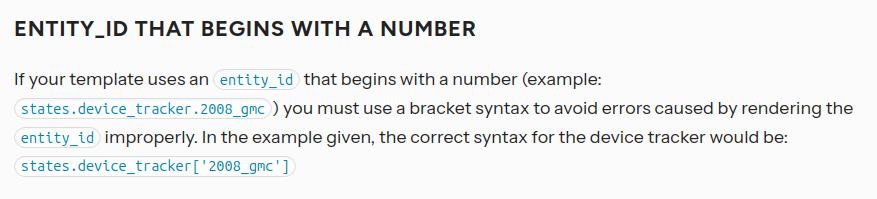
its likely because the entity_id starts with a number. here are the docs that explain what to do to make it work. see the note about half way down:

be aware tho that i was just trying to help someone else with one of their templates with an entity_id that started with a number following the rules in the referenced docs and i wasn’t successful. eventually i decided the easiest thing to do was change the entity_id to not start with a number and that solved their problem.

@finity is correct. It is because your object_id starts with a number.

To work around this use the following template.

- platform: template
  sensors:
    power_usage_3d_drucker:
      value_template: "{{ states.swtich['3d_drucker'].attributes.current_power_w }}"
      friendly_name: '3D Drucker'
      unit_of_measurement: 'W'

But I highly suggest changing your object_id from 3d_drucker to something else.

1 Like

just to correct a mis-spelling in the template above (“switch” instead of “swtich”) use this:

value_template: "{{ states.switch['3d_drucker'].attributes.current_power_w }}"

but @petro I’m honestly not sure that will work. I was working on trying to help another user last week or so with the same situation and I could never get the template to work.

here is the thread I started to see if anyone else had any better insight why it wouldn’t work but I never got any replies:

1 Like

They may have made changes to make all numbers fail as an object_id. I’ve seen it work for some configurations. I personally avoid it so I’ve never had to deal with it.

Best place to play around would be inside the template editor.

Yeah, and that’s the strange part about it.

It worked fine in the template editor but as soon as I moved the same template into an automation it would fail.

Yeah, I just saw that in your other post. Take a look at my response there

I could fixt it by chaning the entity name to something which doesn’t start with a number, but I don’t get the point. I can name entities starting with a number,but the template doesn’t work…

did you look at the link in my post #3 above?

it tells you why in that link.

The point is that code does not allow variables to start with a number. So when you try to access the state object, it screws up because a number is first.

This is not allowed in any code langauge:

variable.or.method.name.that.starts.with.number.like.this.3d
                                                          ^
                                                          |

So while you can make a object_id start with a number, as soon as you try to access that state object, it’s going to break because code doesn’t allow it.

Templates are code, the language is Jinja2. Jinja2 runs on python. Python does not allow numbers to start method or variable names. So this code will error in the template:

states.swtich.3d_drucker.attributes.current_power_w
              ^
              |
        Because this is wrong

So in order to get around these types of issues you have 1 of a few options:

  1. Don’t name any object_id starting with a number. entity_id = domian.object_id. For example light.livingroom where light is the domain and livingroom is the object_id.
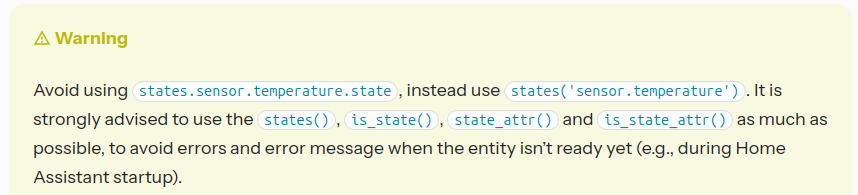
  2. Use other ways to access state. Example: states('domain.object_id') or states('light.livingroom'). This may not work all the time because again, numbers starting object_id’s are a no-no.

hopefully that clears this up.

So, in summery: The template doesn’t work because you are using a number first as the object_id.

And just to drive this point home… read your error. It specifically tells you what it doesn’t understand:

What preceeds d_drucker? The number 3, which is the cause of your error and problem.

Here’s some quick light reading explaining.

I know I am late to the party, but just wanted to put it here so anyone else struggling with this issue may find a solution.

Similar to the OP, I was trying to create sensors based on the Ping integration, which requires IP addresses to be configured (unless you mess with hosts file or DNS records, I guess) and creates sensors based on them. So, I was trying to get the last updated time and hit a wall when ı tried to get the last updated time of the sensor with numbers in the name:

updated {{ relative_time(states.sensor.ookla_speedtest_download.last_changed) }} ago

yields

updated 41 minutes ago

But

updated {{ relative_time(states.sensor.192_168_6_1_jitter.last_changed) }} ago

gives an ugly “TemplateSyntaxError: expected token ‘,’, got ‘_jitter’” error message.

After swimming through murky waters of unhelpful documentation (seriously, the authors of the documentation need to keep in mind that not everyone who deals with such systems are developers), and wasting many hours, through trial-and-error, I found out that

updated {{relative_time(states[“sensor.192_168_6_1_jitter”].last_changed)}} ago

gives me the output I needed:

updated 4 seconds ago.

Long story short, if your sensor name contains any numbers, and if there’s no simple way to change it, you need to enclose it between [" and "]

Weirdly, if you are NOT going to do any funky formatting on the result, such as trying to extract the last changed time of the sensor value

{{(states(‘sensor.192_168_6_1_jitter’))}}

also works, giving you the sensor values, like 0.249, etc. I don’t know why it works and why it does not work when some extra stuff is added, and I don’t care. All I’m saying is that the existing documentation leaves much to be desired.

Apologies if my formatting offends anyone, but this is my first post here, and I have no intention to fight with weird formatting rules anymore for the day.

Hope this helps.

EDIT:

Even more weirdly, the above working example only works in Template Editor. However, if you copy/paste it to a template sensor state field, you get “invalid template (TemplateSyntaxError: unexpected char '”’ at 23)" error message. Apparently, people who develop different parts of the software had different standards. Luckily, the solution is simple: replace " with ’ to obtain:

{{relative_time(states[‘sensor.192_168_6_1_round_trip_time_average’].last_changed)}} ago

which works.

Note to self: What seems to work in Template Editor is not guaranteed to work somewhere else.

Wow 7 years later! Anyway, you got it wrong but don’t worry, it’s hard to grasp at first. In short:

  1. states is both an object and a function
  2. states an object → contains many smaller state objects for entities → each such state object contains propertes: state, attributes, last_changed.
    The [] syntax (or .) is to access properties of an object. That’s why states.sensor.192_168_6_1_jitter and states['sensor.192_168_6_1_jitter'] should both return the same state object but the 1st variant fails if any part of the “path” starts with a number. Once you have the state object, you can read it’s properties using the same syntax.
  3. states() a function → full form: states(entity_id, rounded=False, with_unit=False) → used to access the property state of a state object. To get the same result from the states-object, you’d type states['entity_id'].state.
  4. state_attr() is another function to access an attribute from the property attributes of a state object
1 Like

From the Templating documentation:

From the same documentation:

Other important template rules.

1 Like