Since 2024.12 I have not been able to access my Settings tab from any mobile devices. Since updating to 2024.12.3 I cannot access Settings from Mobile apps or desktop. I can access Hacs, Terminal, Developer Tools, etc. . . .just not Settings and I get an error that says, “Error while loading page config”. I cannot add devices, edit automations or do any of the important things with my system. . . .I am dead in the water. What can I do to get my Settings back up and running?
I reverted back to 2024.12.0 and can access my Settings tab again both from mobile apps and Desktop. So somewhere between 12.0 and 12.3 the issue was created.
Have the same issue in 2024.12.5. Anybody know a issue in GitHub of this?
After reopening the app after force close it is working again.
I’m also having this issue and forcing the app to close, and refreshing server settings still hasn’t fixed it.
Same issue starting today. I had to uninstall the iOS app including all data. Then reinstalling it. Works again, so far. Reason unknown.
Damn, I was hoping it didn’t resort to that. I’ve tried updating the app manual to a couple of pre release on github. No luck unfortunately, currently running 2025.1.5 on a pixel 6…
IOS owner here: same thing - settings tab was not working with the “error while loading page config” error. Turns out that uninstalling and installing the app again did the trick… I had to go thru all the consents again, but other than that - no data loss. And I did not even had to sign in again. Just works.
I just had this happen to me. So lets update this thread a little with a simple solution.
Not a issue, but they showed a simple solution in there. Refresh your web cache.
I hit CTRL and hit Reload on the browser page and the error went away. No need to reinstall.
For me this was on a pretty well up to date v2025.4 on a relatively simple setup.
6 Likes
You, sir, are a life saver. I was ready to backup all my custom work to PC and find out how to to factory reset on Home Assistant green. One web cache refresh later, everything works.
1 Like
I love posts like this 
HA is so easy to use in a Web Browser. And keeps so much in the web browser. Like many apps it makes the Web Browser it’s home. Which can lead to confusions when things change. Hence the web cache forced refresh.
Another trick to be aware of is launch a DIFFERENT web browser and see what you see. Or use “privacy mode”. Tricks like this give a “fresh viewpoint” on the HA world. (Or any web app)
Always have a Firefox and a Chrome around in some form or other to allow you to swap and test when things are “odd”.
1 Like
Same fix works for error loading page problem on Android app. Go to phone settings > Apps > home assistant > storage > storage and cache > clear cache
Web browsing 101
CTRL-f5
Chrome/Edge/Brave/Opera/Firefox Ctrl + F5 Forces browser to skip cache and reload the current page.
macOS Safari Cmd + Option + R Forces browser to skip cache and reload
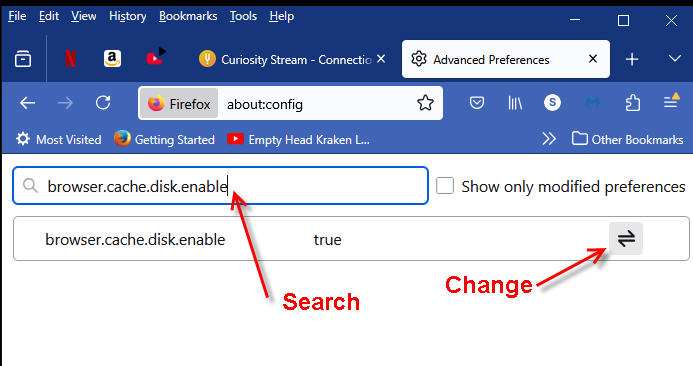
Only Firefox can permanently disable caching:
Open Firefox
go to about:config
search for browser.cache.disk.enable
Change to false.
You saved me from a costly reinstall!!! thx
1 Like
Just saved me thank you
2 Likes