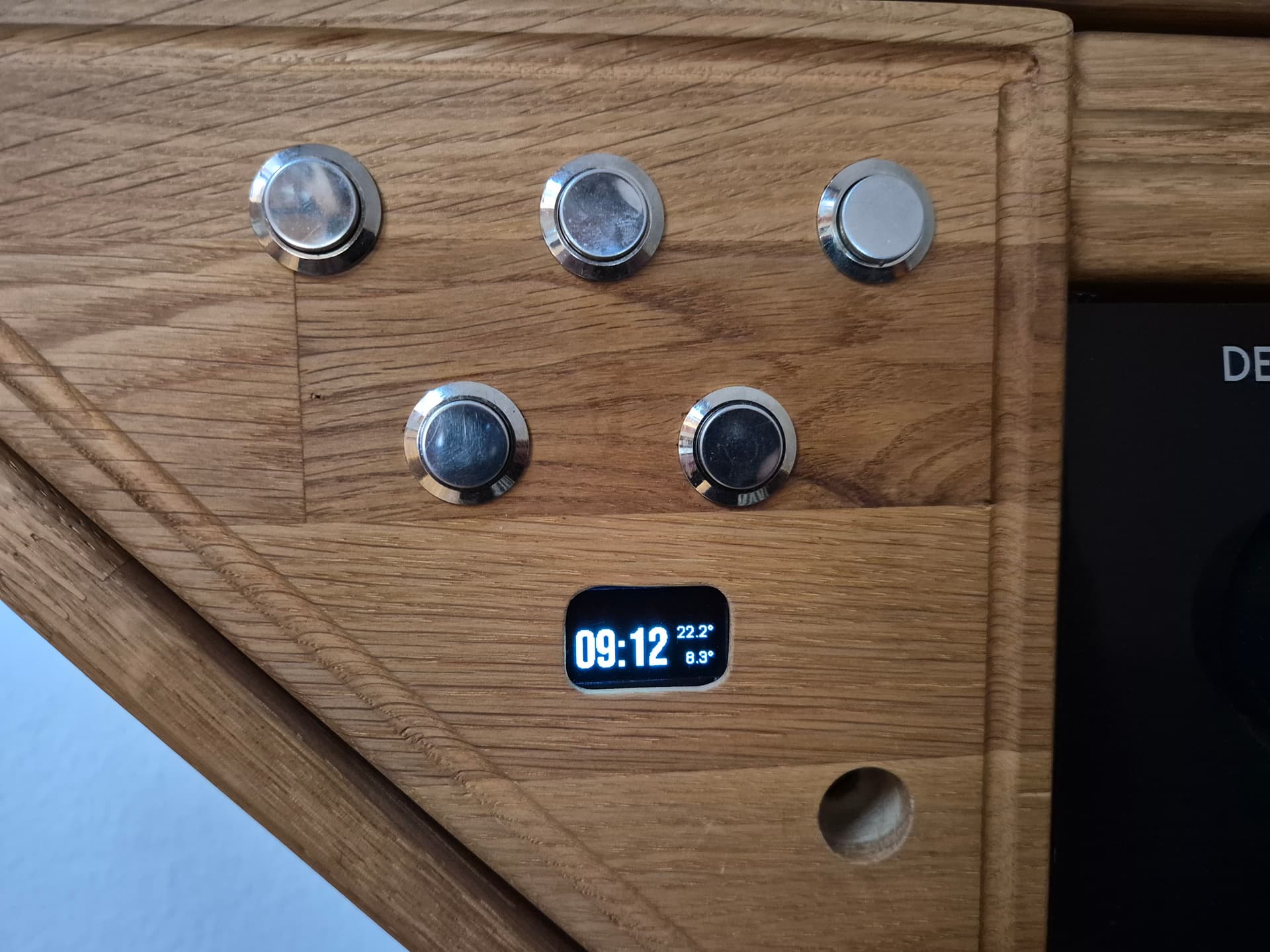
I have a 1.3" OLED display connected to an ESP8266 via I2C with 5V GND, SDA, and SCK. The display shows the current time, as well as the indoor and outdoor temperatures. My problem is that the ESP doesn’t connect to the Wi-Fi after a power outage. Only when I disconnect SDA and SCK does the ESP connect to the Wi-Fi. Then I can reconnect SDA and SCK, and everything works fine until the next power outage. Does anyone have any idea why this is happening?
esphome:
  name: "esp8266-01"
  friendly_name: ESP01 TV

esp8266:
  board: esp01_1m

# Enable logging
logger:

# Enable Home Assistant API
api:
  encryption:
    key: "cmdjGuMDjwXLdc26lFEqZWLSkCXATTjFgtpNCTuOImc="

ota:
  - platform: esphome
    password: "626a1d73a5b4f5f82efd4301e0af9ca2"

wifi:
  ssid: !secret wifi_ssid
  password: !secret wifi_password

  # Enable fallback hotspot (captive portal) in case wifi connection fails
  ap:
    ssid: "Esp8266-01 Fallback Hotspot"
    password: "VVuM1Gymp3cb"

captive_portal:

time:
  - platform: homeassistant
    id: esptime

sensor:
  - platform: homeassistant
    id: inside_temperature
    entity_id: sensor.temperatur_wohnzimmer_ds18b20
    internal: true

  - platform: homeassistant
    id: outside_temperature
    entity_id: sensor.aussen_temperatur_minimal
    internal: true

font:
  - file: 'slkscr.ttf'
    id: font1
    size: 8

  - file: 'BebasNeue-Regular.ttf'
    id: font2
    size: 48

  - file: 'Arial.ttf'
    id: font3
    size: 14

i2c:
  sda: GPIO4
  scl: GPIO5
  scan: false
  # manually setting the frequency to a higher rate may avoid long component updates
  # frequency: 300kHz

display:
  - platform: ssd1306_i2c
    model: "SH1106 128x64"
    address: 0x3C
    lambda: |-
      // Print "   " in top center.
      it.printf(64, 0, id(font1), TextAlign::TOP_CENTER, "   ");

      // Print time in HH:MM format
      it.strftime(0, 60, id(font2), TextAlign::BASELINE_LEFT, "%H:%M", id(esptime).now());

      // Print inside temperature (from homeassistant sensor)
      if (id(inside_temperature).has_state()) {
        it.printf(127, 23, id(font3), TextAlign::TOP_RIGHT , "%.1f°", id(inside_temperature).state);
      }

      // Print outside temperature (from homeassistant sensor)
      if (id(outside_temperature).has_state()) {
        it.printf(127, 60, id(font3), TextAlign::BASELINE_RIGHT , "%.1f°", id(outside_temperature).state);
      }
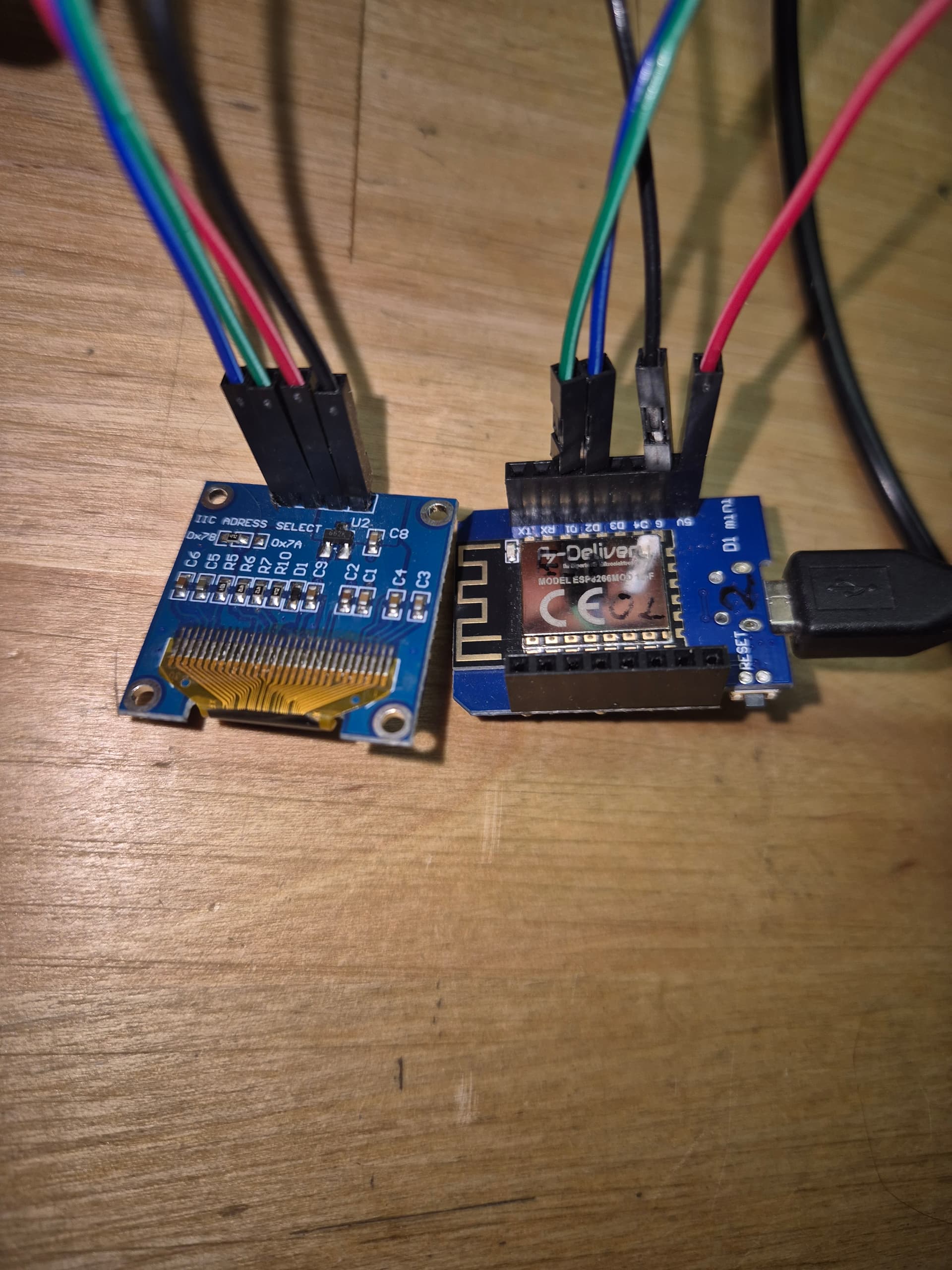
According to the picture you are using a D1Mini board and shoud use the configuration
esp8266:
  board: d1_mini
With the D1Mini setting you should have 4MB instead of 1MB flash memory avaiblable. I don’t know if this will help you in this case.
The problem with my ESP8266 projects is that these ESPs have relatively little RAM (less than 40kb available for programs). When memory gets low, my ESPs usually start having problems with the Wi-Fi (they can no longer establish a connection), and with higher memory usage, they crash completely.
The ESP8266 is perfectly suited for reading data from a few simple sensors, but when more memory is used (components with read/write buffers, long LED strips, large displays, fonts, etc.), they quickly run into problems. A 128x64 display usually still works with a D1 Mini (even with a few sensors).
Try adjusting the D1 Mini settings, and if that doesn’t work, try using one less font or a different font.
Oh (second reading) - you only have this problem after a power outage. Then I would also try the D1 Mini setting. Perhaps the ESP01-1M has different configuration pins (it has far fewer pins than the D1Mini) and therefore doesn’t like the wiring at startup.
The wiring shown in the picture isn’t really reliable either. After plugging and unplugging it a few times, these cables no longer connect reliably. If everything works, then I would solder the wires permanently.
Another problem could be the power supply. Many USB chargers and power banks shut off if a minimum power draw isn’t present. Perhaps the ESP with the display is right at the limit. Or the opposite, the power source is too weak and can’t supply the increased power consumption during startup and establishing the Wi-Fi connection.
Have you tried a different power source, perhaps also with another device connected?
Try running it with usb cable to your computer so you can see the log in esphome. That might give a clue.
I tried a different power supply, that’s not the reason. I have already replaced the display. Hardware seems to be fine. I think I have another esp I can try it with.
Now i have a WIFI connection. This is the wireless log
type or paste code hereINFO ESPHome 2025.10.4
INFO Reading configuration /config/esphome/esp8266-01.yaml...
INFO Detected timezone 'Europe/Berlin'
INFO Starting log output from 192.168.178.11 using esphome API
INFO Successfully resolved esp8266-01 @ 192.168.178.11 in 0.000s
INFO Successfully connected to esp8266-01 @ 192.168.178.11 in 0.007s
INFO Successful handshake with esp8266-01 @ 192.168.178.11 in 2.594s
[17:56:08.363][I][app:185]: ESPHome version 2025.10.4 compiled on Nov  7 2025, 16:08:17
[17:56:08.413][C][wifi:679]: WiFi:
[17:56:08.413][C][wifi:458]:   Local MAC: 08:F9:E0:6E:57:4C
[17:56:08.413][C][wifi:465]:   IP Address: 192.168.178.11
[17:56:08.413][C][wifi:469]:   SSID: 'AnniBunny'[redacted]
[17:56:08.413][C][wifi:469]:   BSSID: 1C:ED:6F:3B:F6:2D[redacted]
[17:56:08.413][C][wifi:469]:   Hostname: 'esp8266-01'
[17:56:08.413][C][wifi:469]:   Signal strength: -72 dB ▂▄▆█
[17:56:08.413][C][wifi:469]:   Channel: 6
[17:56:08.413][C][wifi:469]:   Subnet: 255.255.255.0
[17:56:08.413][C][wifi:469]:   Gateway: 192.168.178.1
[17:56:08.413][C][wifi:469]:   DNS1: 192.168.178.1
[17:56:08.413][C][wifi:469]:   DNS2: 0.0.0.0
[17:56:08.414][C][logger:261]: Logger:
[17:56:08.414][C][logger:261]:   Max Level: DEBUG
[17:56:08.414][C][logger:261]:   Initial Level: DEBUG
[17:56:08.415][C][logger:267]:   Log Baud Rate: 115200
[17:56:08.415][C][logger:267]:   Hardware UART: UART0
[17:56:08.423][C][i2c.arduino:072]: I2C Bus:
[17:56:08.423][C][i2c.arduino:073]:   SDA Pin: GPIO4
[17:56:08.423][C][i2c.arduino:073]:   SCL Pin: GPIO5
[17:56:08.423][C][i2c.arduino:073]:   Frequency: 50000 Hz
[17:56:08.429][C][i2c.arduino:089]:   Recovery: bus successfully recovered
[17:56:08.446][C][homeassistant.time:010]: Home Assistant Time:
[17:56:08.446][C][homeassistant.time:010]:   Timezone: 'CET-1CEST,M3.5.0,M10.5.0/3'
[17:56:08.457][C][ssd1306_i2c:022]: I2C SSD1306
[17:56:08.457][C][ssd1306_i2c:022]:   Rotations: 0 °
[17:56:08.457][C][ssd1306_i2c:022]:   Dimensions: 128px x 64px
[17:56:08.457][C][ssd1306_i2c:023]:   Address: 0x3C
[17:56:08.469][C][ssd1306_i2c:024]:   Model: SH1106 128x64
[17:56:08.482][C][ssd1306_i2c:026]:   External VCC: NO
[17:56:08.482][C][ssd1306_i2c:026]:   Flip X: YES
[17:56:08.482][C][ssd1306_i2c:026]:   Flip Y: YES
[17:56:08.482][C][ssd1306_i2c:026]:   Offset X: 0
[17:56:08.482][C][ssd1306_i2c:026]:   Offset Y: 0
[17:56:08.482][C][ssd1306_i2c:026]:   Inverted Color: NO
[17:56:08.483][C][ssd1306_i2c:362]:   Update Interval: 1.0s
[17:56:08.489][E][ssd1306_i2c:038]: Communication failed
[17:56:08.489][E][component:154]:   display is marked FAILED: unspecified
[17:56:08.509][C][captive_portal:116]: Captive Portal:
[17:56:08.515][C][esphome.ota:093]: Over-The-Air updates:
[17:56:08.515][C][esphome.ota:093]:   Address: esp8266-01.local:8266
[17:56:08.515][C][esphome.ota:093]:   Version: 2
[17:56:08.515][C][esphome.ota:100]:   Password configured
[17:56:08.528][C][safe_mode:018]: Safe Mode:
[17:56:08.528][C][safe_mode:018]:   Successful after: 60s
[17:56:08.528][C][safe_mode:018]:   Invoke after: 10 attempts
[17:56:08.528][C][safe_mode:018]:   Duration: 300s
[17:56:08.534][C][web_server.ota:241]: Web Server OTA
[17:56:08.549][C][api:222]: Server:
[17:56:08.549][C][api:222]:   Address: esp8266-01.local:6053
[17:56:08.549][C][api:222]:   Listen backlog: 1
[17:56:08.549][C][api:222]:   Max connections: 4
[17:56:08.555][C][api:229]:   Noise encryption: YES
[17:56:08.556][C][mdns:179]: mDNS:
[17:56:08.556][C][mdns:179]:   Hostname: esp8266-01
[17:56:08.579][C][homeassistant.sensor:015]: Homeassistant Sensor 'inside_temperature'
[17:56:08.579][C][homeassistant.sensor:015]:   State Class: ''
[17:56:08.579][C][homeassistant.sensor:015]:   Unit of Measurement: ''
[17:56:08.579][C][homeassistant.sensor:015]:   Accuracy Decimals: 1
[17:56:08.593][C][homeassistant.sensor:031]:   Entity ID: 'sensor.temperatur_wohnzimmer_ds18b20'
[17:56:08.601][C][homeassistant.sensor:015]: Homeassistant Sensor 'outside_temperature'
[17:56:08.601][C][homeassistant.sensor:015]:   State Class: ''
[17:56:08.601][C][homeassistant.sensor:015]:   Unit of Measurement: ''
[17:56:08.601][C][homeassistant.sensor:015]:   Accuracy Decimals: 1
[17:56:08.601][C][homeassistant.sensor:031]:   Entity ID: 'sensor.aussen_temperatur_minimal'
The display are not working
Not sure I’m following that. so if it is all working but there is a power out and power is restored the device comes on (you can see readings on the small screen) but it doesn’t connect to wifi until you disconnect the display and reconnect the display. But if you power it by USB connected to your PC the wifi does work but the display doesn’t.
That’s very odd behaviour.
I was thinking with power out then back on the wifi on the router came up so late the ESP device had timed out waiting for it. The device would go into Access point mode then. Then disconnecting the display and reconnecting it was causing the ESP to reboot but by that time the wifi was available to connect to.
  ap:
    ap_timeout: 55min
I would have suggested for that to set ap timeout to much longer time to allow the wifi on router to come up.
Not quite right. In order for the ESP to connect to Wi-Fi, the i2c bus must be disconnected briefly. Only when the esp is on the wlan can I clamp the i2c again and the display works. The log does not come from the PC. Comes from ESP with WLAN without display connection. I’ll try your tip on the PC later and post the log.
OK that makes more sense. I was hoping to see what the log was showing from esphome via the USB when the Wifi wasn’t connecting as that may be throwing up an error.
Now I have an interesting log, connected to the PC via USB. The ESP is trying unsuccessfully to log into the Wi-Fi network. It even connected briefly once. Can you read more information from it?
[09:53:18] 6V-  F f  9    R  [W][wifi_esp8266:513]: Disconnected ssid='AnniBunny' bssid=1C:ED:6F:3B:F6:2D[redacted] reason='Auth Expired'
[09:53:18][W][wifi:734]: Connecting to network failed
[09:53:18][D][wifi:789]: Retrying with hidden networks
[09:53:18][I][wifi:351]: Connecting to 'AnniBunny'
[09:53:18][W][wifi_esp8266:513]: Disconnected ssid='AnniBunny' bssid=1C:ED:6F:3B:F6:2D[redacted] reason='Auth Expired'
[09:53:18][W][wifi:734]: Connecting to network failed
[09:53:18][D][wifi:789]: Retrying with hidden networks
[09:53:18][I][wifi:351]: Connecting to 'AnniBunny'
[09:53:18][W][wifi_esp8266:513]: Disconnected ssid='AnniBunny' bssid=1C:ED:6F:3B:F6:2D[redacted] reason='Auth Expired'
[09:53:18][W][wifi:734]: Connecting to network failed
[09:53:18][D][wifi:789]: Retrying with hidden networks
[09:53:23][I][wifi:351]: Connecting to 'AnniBunny'
[09:53:26][W][wifi_esp8266:513]: Disconnected ssid='AnniBunny' bssid=1C:ED:6F:3B:F6:2D[redacted] reason='Auth Expired'
[09:53:26][W][wifi:734]: Connecting to network failed
[09:53:26][D][wifi:789]: Retrying with hidden networks
[09:53:26][I][wifi:351]: Connecting to 'AnniBunny'
[09:53:29][W][wifi_esp8266:513]: Disconnected ssid='AnniBunny' bssid=1C:ED:6F:3B:F6:2D[redacted] reason='Auth Expired'
[09:53:29][W][wifi:734]: Connecting to network failed
[09:53:29][D][wifi:789]: Retrying with hidden networks
[09:53:34][I][wifi:351]: Connecting to 'AnniBunny'
[09:53:36][W][wifi_esp8266:513]: Disconnected ssid='AnniBunny' bssid=1C:ED:6F:3B:F6:2D[redacted] reason='Auth Expired'
[09:53:36][W][wifi:734]: Connecting to network failed
[09:53:36][W][wifi:146]: Restarting adapter
[09:53:36][I][wifi:351]: Connecting to 'AnniBunny'
[09:53:39][W][wifi_esp8266:513]: Disconnected ssid='AnniBunny' bssid=1C:ED:6F:3B:F6:2D[redacted] reason='Auth Expired'
[09:53:39][W][wifi:734]: Connecting to network failed
[09:53:39][D][wifi:789]: Retrying with hidden networks
[09:53:44][I][wifi:351]: Connecting to 'AnniBunny'
[09:53:46][W][wifi_esp8266:513]: Disconnected ssid='AnniBunny' bssid=1C:ED:6F:3B:F6:2D[redacted] reason='Auth Expired'
[09:53:47][W][wifi:734]: Connecting to network failed
[09:53:47][D][wifi:789]: Retrying with hidden networks
[09:53:47][I][wifi:351]: Connecting to 'AnniBunny'
[09:53:49][W][wifi_esp8266:513]: Disconnected ssid='AnniBunny' bssid=1C:ED:6F:3B:F6:2D[redacted] reason='Auth Expired'
[09:53:49][W][wifi:734]: Connecting to network failed
[09:53:49][D][wifi:789]: Retrying with hidden networks
[09:53:54][I][wifi:351]: Connecting to 'AnniBunny'
[09:53:57][W][wifi_esp8266:513]: Disconnected ssid='AnniBunny' bssid=1C:ED:6F:3B:F6:2D[redacted] reason='Auth Expired'
[09:53:57][W][wifi:734]: Connecting to network failed
[09:53:57][D][wifi:789]: Retrying with hidden networks
[09:53:57][I][wifi:351]: Connecting to 'AnniBunny'
[09:53:59][W][wifi_esp8266:513]: Disconnected ssid='AnniBunny' bssid=1C:ED:6F:3B:F6:2D[redacted] reason='Auth Expired'
[09:53:59][W][wifi:734]: Connecting to network failed
[09:53:59][D][wifi:789]: Retrying with hidden networks
[09:54:04][I][wifi:351]: Connecting to 'AnniBunny'
[09:54:07][W][wifi_esp8266:513]: Disconnected ssid='AnniBunny' bssid=1C:ED:6F:3B:F6:2D[redacted] reason='Auth Expired'
[09:54:07][W][wifi:734]: Connecting to network failed
[09:54:07][D][wifi:789]: Retrying with hidden networks
[09:54:07][I][wifi:351]: Connecting to 'AnniBunny'
[09:54:09][W][wifi_esp8266:513]: Disconnected ssid='AnniBunny' bssid=1C:ED:6F:3B:F6:2D[redacted] reason='Auth Expired'
[09:54:10][W][wifi:734]: Connecting to network failed
[09:54:10][W][wifi:146]: Restarting adapter
[09:54:15][D][wifi:519]: Starting scan
[09:54:22][D][wifi:608]: Found networks:
[09:54:22][I][wifi:579]: - 'AnniBunny' (1C:ED:6F:3B:F6:2D) [redacted]▂▄▆█
[09:54:22][D][wifi:582]:     Channel: 6
[09:54:22][D][wifi:582]:    RSSI: -58 dB
[09:54:22][D][wifi:587]: - 'RE_3997668054'[redacted] (40:2A:8F:3D:36:98) [redacted]▂▄▆█
[09:54:22][D][wifi:587]: - 'Esp8266-02 Fallback Hotspot'[redacted] (0A:F9:E0:6C:18:9A) [redacted]▂▄▆█
[09:54:22][D][wifi:587]: - 'AP_3991175899'[redacted] (44:2A:8F:38:1C:92) [redacted]▂▄▆█
[09:54:22][D][wifi:587]: - 'FritBunny'[redacted] (1E:ED:6F:3B:F6:2D) [redacted]▂▄▆█
[09:54:22][D][wifi:587]: - 'home_wlan'[redacted] (34:E1:A9:E2:55:00) [redacted]▂▄▆█
[09:54:22][D][wifi:587]: - 'FRITZ!Box 7690 SC'[redacted] (08:B6:57:E8:48:A0) [redacted]▂▄▆█
[09:54:22][D][wifi:587]: - 'NTGR_N'[redacted] (00:1F:33:38:FF:23) [redacted]▂▄▆█
[09:54:22][D][wifi:587]: - 'BV7200'[redacted] (DE:A6:1D:A5:B3:D5) [redacted]▂▄▆█
[09:54:22][D][wifi:587]: - 'Vodafone Hotspot'[redacted] (04:53:7C:6C:EF:EE) [redacted]▂▄▆█
[09:54:22][D][wifi:587]: - 'Vodafone Homespot'[redacted] (06:53:7C:6C:EF:EF) [redacted]▂▄▆█
[09:54:22][I][wifi:351]: Connecting to 'AnniBunny'
[09:54:24][W][wifi_esp8266:513]: Disconnected ssid='AnniBunny' bssid=1C:ED:6F:3B:F6:2D[redacted] reason='Auth Expired'
[09:54:24][W][wifi:734]: Connecting to network failed
[09:54:24][D][wifi:789]: Retrying with hidden networks
[09:54:24][I][wifi:351]: Connecting to 'AnniBunny'
[09:54:27][W][wifi_esp8266:513]: Disconnected ssid='AnniBunny' bssid=1C:ED:6F:3B:F6:2D[redacted] reason='Auth Expired'
[09:54:27][W][wifi:734]: Connecting to network failed
[09:54:27][D][wifi:789]: Retrying with hidden networks
[09:54:32][I][wifi:351]: Connecting to 'AnniBunny'
I changed the board name to d1_mini, but its the same problem.
I also tried other GPIOs without success.
See if this posts code above sorts your problem. It may just be the update interval default is too low.
1 Like
Some info about your display?
You power it at 5V, if it has pullups to VCC, you get in troubles with Esp.
I changed the update_interval to 2 seconds and it works as it should. Thank you so much for that. The display was my first microcontroller projekt, long before I started homeassistant. The i2c bus also worked with a 20m cable and amplifier to the Raspberry. Mostley…
Does that mean the display was trying to query data every second and probably using a lot of power, and the ESP couldn’t connect to the router in that time? With 2 seconds, the ESP should be able to do that, right?
I also tried setting the frequency of the i2c to 800khz. This also works with the preset interval of 1 second. I’ll stick to the 2s variant though.