Hello. I have white LED strip (WS2811, 24V, 60 LEDs) and I try to make my own driver on ESP32. I use example and works fine, but…
I want to make effect on turn_on and turn_off. Effect is running light 1->60 on turn on and 60->1 when turn off. Turn on case is easy and works fine, but how to make effect before turn off the light? I tried to do it with chat gpt, but it is stupid like hell ;). Maybe someone has some example?
Best regards
PW
Post what you already have [properly formatted </>].
If it can count up, it can probably count down too.
My yaml:
esphome:
  name: living-room-locker
  friendly_name: Living room locker

esp32:
  board: esp32dev
  framework:
    type: esp-idf

logger:

api:
  encryption:
    key: "somekey"

ota:
  - platform: esphome
    password: "somepass"

wifi:
  ssid: "net"
  password: "net"

  ap:
    ssid: "Living-Room-Locker"
    password: "somepass"

captive_portal:

script:
  - id: power_on_effect
    mode: restart
    then:
      - light.turn_on:
          id: ws2811_white
          effect: on_sweep
      - delay: 1600ms
      - light.turn_on:
          id: ws2811_white
          effect: none

light:
  - platform: esp32_rmt_led_strip
    rgb_order: GRB
    id: ws2811_white
    chipset: WS2811
    pin: GPIO4
    num_leds: 60
    name: "Hall LED Strip"
    restore_mode: ALWAYS_OFF

    on_turn_on:
      then:
        - script.execute: power_on_effect

    # on_turn_off:
    #   then:
    #     - script.execute: power_off_effect

    effects:
      - addressable_lambda:
          name: on_sweep
          update_interval: 25ms
          lambda: |-
            static int pos = 0;
            if (initial_run) {
              pos = 0;
              it.all() = Color::BLACK;
            }
            if (pos < it.size()) {
              it[pos] = Color::WHITE; //(40,40,40);
              pos++;
            }

      - addressable_lambda:
          name: off_sweep
          update_interval: 25ms
          lambda: |-
            static int pos = 0;
            if (initial_run) {
              pos = it.size() - 1;
            }
            if (pos >= 0) {
              it[pos] = Color::BLACK;
              pos--;
            }

switch:
  - platform: gpio
    pin: GPIO13
    inverted: True
    name: "Locker Power"
    restore_mode: RESTORE_DEFAULT_OFF
Your code is missing power_off script
script:
  - id: power_on_effect
    mode: restart
    then:
      - light.turn_on:
          id: ws2811_white
          effect: on_sweep
      - delay: 1600ms
      - light.turn_on:
          id: ws2811_white
          effect: none

  - id: power_off_effect
    mode: restart
    then:
      - light.turn_on:
          id: ws2811_white
          effect: off_sweep
      - delay: 1600ms
      - light.turn_off:
          id: ws2811_white
And that the reason I’m here. This simple solution doesn’t work. I also tried many others with chat gpt, but it doesn’t know what to do at all  Maybe someone here has a right solution?
“Doesn’t work” is not any helpful here.
You wrote your turn on code works. So what’s the exact misbehavior with turn off ??
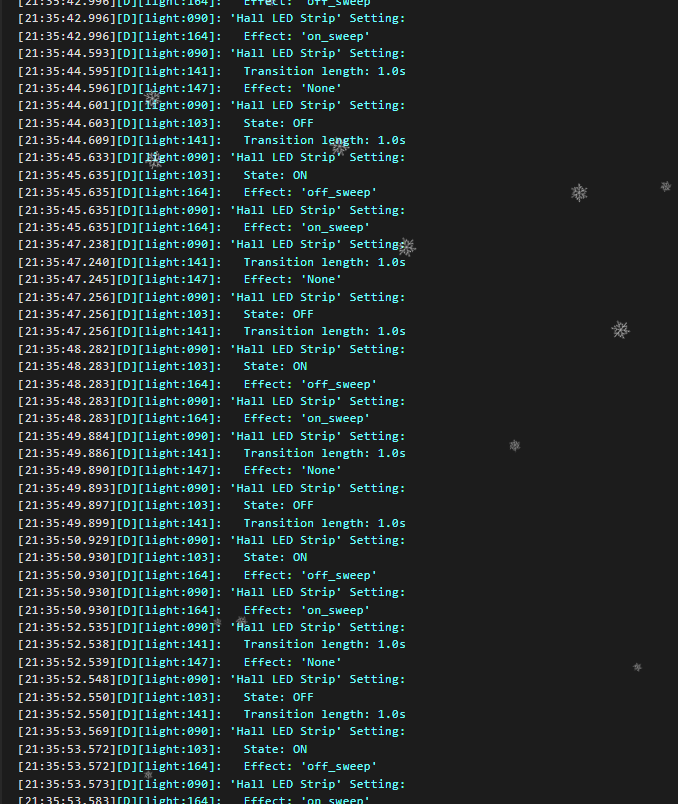
If you have used the code that you have posted yourself where you quoted Karosm their post, it’s normal that this happens.
In the same ‘then’, you have turn_on and turn_off…
There’s 1.6s delay between…
1 Like
Explain the behavior, post always logs with code tags (not screenshots) and set all transition lengths to 0.
It doesn’t help or it is not properly transition. Key word transition_length is invalid for light.esp32_rmt_led_strip]
light:
  - platform: esp32_rmt_led_strip
    rgb_order: GRB
    id: ws2811_white
    chipset: WS2811
    pin: GPIO4
    num_leds: 60
    default_transition_length: 0s
    name: "Hall LED Strip"
    restore_mode: ALWAYS_OFF

    on_turn_on:
      then:
        - script.execute: power_on_effect

    on_turn_off:
      then:
        - script.execute: power_off_effect
22:16:32.498][D][script:090]: Script 'power_off_effect' restarting (mode: restart)
[22:16:32.516][D][light:090]: 'Hall LED Strip' Setting:
[22:16:32.516][D][light:103]:   State: ON
[22:16:32.516][D][light:164]:   Effect: 'off_sweep'
[22:16:34.110][D][light:090]: 'Hall LED Strip' Setting:
[22:16:34.120][D][light:103]:   State: OFF
[22:16:34.121][D][light:164]:   Effect: 'None'
[22:16:34.121][D][script:090]: Script 'power_off_effect' restarting (mode: restart)
[22:16:34.121][D][light:090]: 'Hall LED Strip' Setting:
[22:16:34.121][D][light:103]:   State: ON
[22:16:34.121][D][light:164]:   Effect: 'off_sweep'
[22:16:35.732][D][light:090]: 'Hall LED Strip' Setting:
[22:16:35.734][D][light:103]:   State: OFF
[22:16:35.734][D][light:164]:   Effect: 'None'
[22:16:35.734][D][script:090]: Script 'power_off_effect' restarting (mode: restart)
[22:16:35.735][D][light:090]: 'Hall LED Strip' Setting:
[22:16:35.735][D][light:103]:   State: ON
[22:16:35.735][D][light:164]:   Effect: 'off_sweep'
[22:16:37.354][D][light:090]: 'Hall LED Strip' Setting:
[22:16:37.354][D][light:103]:   State: OFF
[22:16:37.354][D][light:164]:   Effect: 'None'
[22:16:37.354][D][script:090]: Script 'power_off_effect' restarting (mode: restart)
[22:16:37.354][D][light:090]: 'Hall LED Strip' Setting:
[22:16:37.355][D][light:103]:   State: ON
[22:16:37.355][D][light:164]:   Effect: 'off_sweep'
[22:16:38.973][D][light:090]: 'Hall LED Strip' Setting:
[22:16:38.974][D][light:103]:   State: OFF
[22:16:38.975][D][light:164]:   Effect: 'None'
[22:16:38.975][D][script:090]: Script 'power_off_effect' restarting (mode: restart)
[22:16:38.975][D][light:090]: 'Hall LED Strip' Setting:
[22:16:38.975][D][light:103]:   State: ON
[22:16:38.975][D][light:164]:   Effect: 'off_sweep'
[22:16:40.566][D][light:090]: 'Hall LED Strip' Setting:
[22:16:40.576][D][light:103]:   State: OFF
[22:16:40.579][D][light:164]:   Effect: 'None'
[22:16:40.579][D][script:090]: Script 'power_off_effect' restarting (mode: restart)
[22:16:40.579][D][light:090]: 'Hall LED Strip' Setting:
[22:16:40.579][D][light:103]:   State: ON
[22:16:40.583][D][light:164]:   Effect: 'off_sweep'
[22:16:42.197][D][light:090]: 'Hall LED Strip' Setting:
[22:16:42.198][D][light:103]:   State: OFF
[22:16:42.198][D][light:164]:   Effect: 'None'
[22:16:42.198][D][script:090]: Script 'power_off_effect' restarting (mode: restart)
[22:16:42.198][D][light:090]: 'Hall LED Strip' Setting:
[22:16:42.198][D][light:103]:   State: ON
[22:16:42.198][D][light:164]:   Effect: 'off_sweep'
[22:16:43.805][D][light:090]: 'Hall LED Strip' Setting:
[22:16:43.809][D][light:103]:   State: OFF
[22:16:43.809][D][light:164]:   Effect: 'None'
[22:16:43.811][D][script:090]: Script 'power_off_effect' restarting (mode: restart)
[22:16:43.811][D][light:090]: 'Hall LED Strip' Setting:
[22:16:43.815][D][light:103]:   State: ON
[22:16:43.819][D][light:164]:   Effect: 'off_sweep'
[22:16:45.424][D][light:090]: 'Hall LED Strip' Setting:
[22:16:45.426][D][light:103]:   State: OFF
[22:16:45.426][D][light:164]:   Effect: 'None'
[22:16:45.437][D][script:090]: Script 'power_off_effect' restarting (mode: restart)
[22:16:45.441][D][light:090]: 'Hall LED Strip' Setting:
[22:16:45.441][D][light:103]:   State: ON
[22:16:45.441][D][light:164]:   Effect: 'off_sweep'
Why don’t you finally tell what happens, what doesn’t and what you expect.
Your log prints correct sequence with correct time frame:
[22:16:35.734][D][script:090]: Script 'power_off_effect' restarting (mode: restart)
[22:16:35.735][D][light:090]: 'Hall LED Strip' Setting:
[22:16:35.735][D][light:103]:   State: ON
[22:16:35.735][D][light:164]:   Effect: 'off_sweep'
[22:16:37.354][D][light:090]: 'Hall LED Strip' Setting:
[22:16:37.354][D][light:103]:   State: OFF
[22:16:37.354][D][light:164]:   Effect: 'None'
Why it’s repeated several times, only you know.
That’s harder to debug, syntax is on documentation and should be valid…
It seems to be logical to make some effect before turning off the light but it isn’t in real life. I think, it’s not possible to do it in ESP Home and esp32_rmt_led_strip.