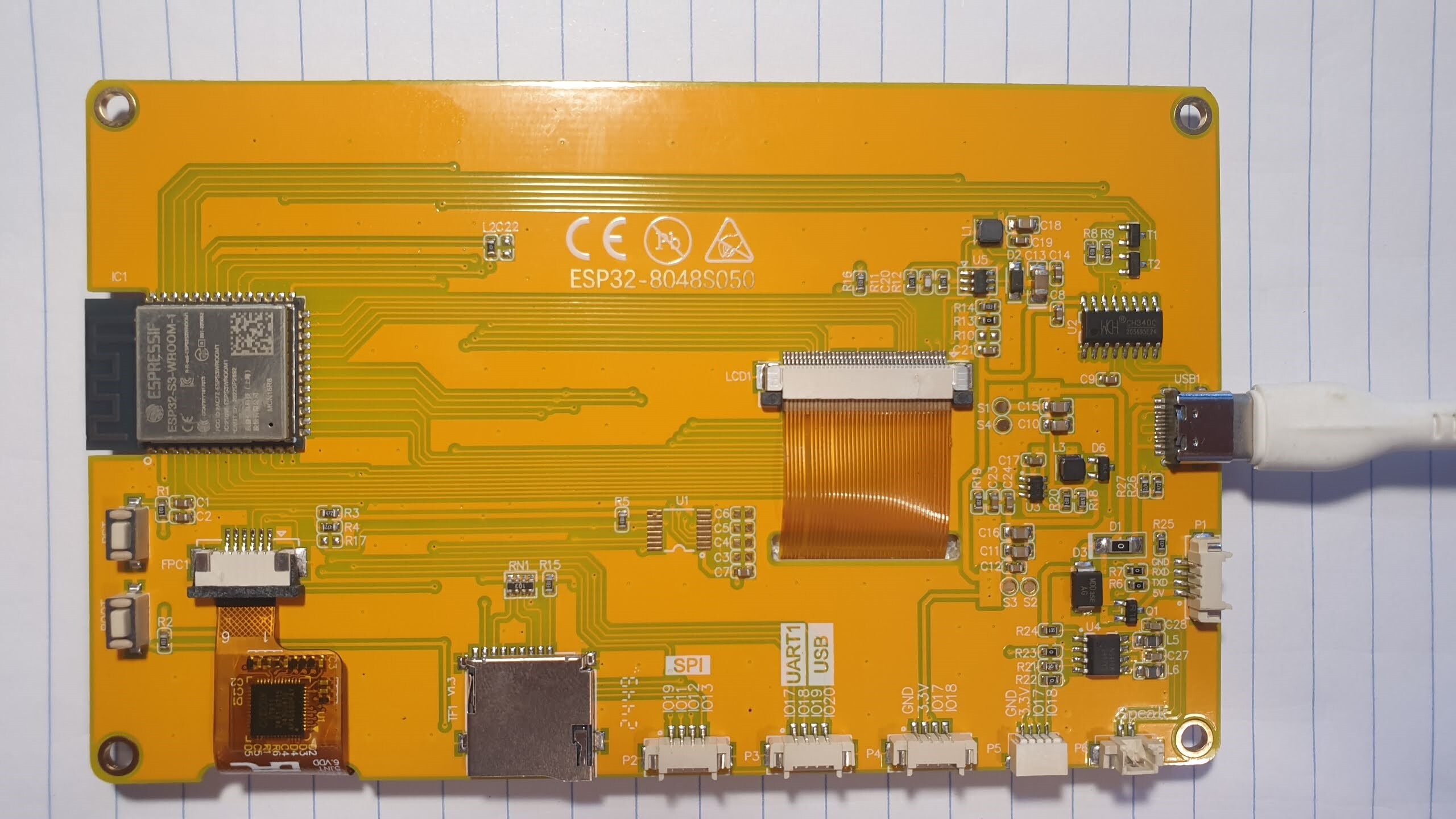
ESP32-8048S050 (Sunton 5.0” / CYD) Config

Just wanted to share a basic working config for this device (ESP32-8048S050) :slight_smile:

Heads-up: I try to keep the configs in these posts updated but sometimes the configs in my repo are more up-to-date!

Here are the device-specific bits of the config separated out from everything else:

esphome:
  platformio_options:
    build_flags: "-DBOARD_HAS_PSRAM"
    board_build.esp-idf.memory_type: qio_opi
    board_build.flash_mode: dio
    board_upload.maximum_ram_size: 524288

esp32:
  board: esp32-s3-devkitc-1
  variant: esp32s3
  flash_size: 16MB
  framework:
    type: esp-idf
    # these versions prevent artifacting
    version: 5.1.2
    platform_version: 6.5.0
    # Required to achieve sufficient PSRAM bandwidth
    sdkconfig_options:
      COMPILER_OPTIMIZATION_SIZE: y
      CONFIG_ESP32S3_DEFAULT_CPU_FREQ_240: y
      CONFIG_ESP32S3_DATA_CACHE_64KB: y
      CONFIG_ESP32S3_DATA_CACHE_LINE_64B: y
      CONFIG_SPIRAM_FETCH_INSTRUCTIONS: y
      CONFIG_SPIRAM_RODATA: y
      CONFIG_ESPTOOLPY_FLASHSIZE_16MB: y # fix warning about 2mb found

psram:
  mode: octal
  speed: 80MHz

output:
  - id: gpio_backlight_pwm
    platform: ledc
    pin: 2
    frequency: 1220

light:
  - id: backlight
    name: Backlight
    platform: monochromatic
    output: gpio_backlight_pwm
    restore_mode: ALWAYS_ON

display:
  - platform: rpi_dpi_rgb
    update_interval: never
    auto_clear_enabled: false
    color_order: RGB
    rotation: 270
    dimensions:
      width: 800
      height: 480
    de_pin: 40
    hsync_pin: 39
    vsync_pin: 41
    pclk_pin: 42
    pclk_inverted: true
    pclk_frequency: 14MHz # unsure about this
    hsync_front_porch: 8
    hsync_pulse_width: 4
    hsync_back_porch: 8
    vsync_front_porch: 8
    vsync_pulse_width: 4
    vsync_back_porch: 8
    data_pins:
      red: [45, 48, 47, 21, 14]
      green: [5, 6, 7, 15, 16, 4]
      blue: [8, 3, 46, 9, 1]

i2c:
  sda: 19
  scl: 20
  scan: true

touchscreen:
  platform: gt911
  address: 0x5D
  update_interval: 16ms

I like to keep device-specific code like that its own file separate from everything else so that I can use the Packages component to import it into multiple relevant projects, rather than duplicate the whole thing into each one. In my case I save it into a file called templates/ESP32-8048S050.yaml.

In the spirit of not duplicating code into multiple projects, I create another file that is not device-specific but is common/repetitive among all my projects. In my case I chose to call it templates/common.yaml and it has code like so:

esphome:
  name: "${device_name}"
  friendly_name: "${friendly_name}"

logger:
  level: INFO

wifi:
  ssid: !secret wifi_ssid
  password: !secret wifi_password

web_server:
  port: 80

ota:
  - platform: esphome

api:

Finally, this is how I use both of the above files together in a project.:

substitutions:
  device_name: sunton-50-test-device
  friendly_name: Sunton 5.0 Test Device

packages:
  common: !include templates/common.yaml
  device: !include templates/ESP32-8048S050.yaml
  # dashboard: !include templates/dashboard_800x480.yaml

#sensor: ...

Note: The contents of the dashboard package referenced above aren’t in this post but I have it in the example to illustrate the power of setting up a config this way. In my case templates/dashboard_800x480.yaml is a file that I’ve created with HA sensors and LVGL pages in it, and it can be reused on any of my devices that support the same resolution as this one.

If someone wants to help get this device listed on devices.esphome.io then be my guest! I was too lazy to dig into that but hopefully posting here is just as helpful.

Concerns / Potential Improvements

  • I suspect the framerate could be improved but I am not sure if that’s related to this config or not, and it’s only noticeable if you have animations or widgets that requrie scrolling.

More in my GitHub repo

Thanks for posting these. Do you have a git repo someplace with all this stuff in it?

You’re very welcome!

I’m planning to create a Git repo with all of the configs I use and some simple LVGL examples that work with them, as well as a few other neat things I’ve been doing thanks to the Packages feature.

I’m currently trying to get the 3.5" Elecrow CrowPanel working and once that’s good to go I think I’ll start the Git repo.

I don’t know how many more of these ESP devices I’ll end up with but I found it difficult to find working configs for most of them so I wanted to make sure it was easier for others than it was for me. I also felt that it was important to separate out the bits of the config that are actually for the device vs all the other things that people tend to share in theirs which muddy the waters and make things seem more daunting than they need to be.

I uploaded my project on GitHub :slightly_smiling_face:

Hope it helps in some way or another!

Nice I like your setup a lot. I have been working to build a modular code base that would be easy to use for setting up info and control screens.

This is what I have so far.

It’s not nearly as clean as your code but it has a few more features. I also have support for two screens that you don’t have.

Very cool, thanks for sharing. Definitely some things I can learn in there. I haven’t played with many widgets beyond buttons in my setup yet. I had a lot going on when I was on OpenHASP but since switching to ESPHome it’s been more about optimizing the yaml than actually making widgets.

How do you like the Guition ESP32-S3-4848S040 square screen? I have something similar (https://www.aliexpress.com/item/1005007582119640.html) in my AliExpress cart. I really think I would love the square format. Just not sure which one of the few I’ve found to take a chance on.

Edit: Just realized I’ve seen your thread on it (and probably your repo) before! hah

I really like that 480x480 screen. It has a back plate with 3 relays in it you can use to control lights. Also I like that fact that the case is already done. You can mount it’s backplate in the wall then pop on the screen. Very clean for lighting control. You can see more about it here.

I’m struggling to get my 8048S050 working. I tried Tasmota and OpenHasp with no joy, so now I’m trying the this approach with ESPHome.

When I do the Install I get the following errors.

INFO Reading configuration /config/esphome/sunton-8048s050-display.yaml...
WARNING The selected ESP-IDF framework version is not the recommended one. If there are connectivity or build issues please remove the manual version.
WARNING GPIO35 is used by the PSRAM interface on ESP32-S3R8 / ESP32-S3R8V and should be avoided on these models
INFO Detected timezone 'Europe/London'
INFO Generating C++ source...
INFO Updating https://github.com/espressif/[email protected]
INFO Compiling app...
Processing sunton-8048s050-display (board: esp32-s3-devkitc-1; framework: espidf; platform: platformio/[email protected])
--------------------------------------------------------------------------------
HARDWARE: ESP32S3 240MHz, 512KB RAM, 8MB Flash
 - framework-espidf @ 3.50102.240122 (5.1.2) 
 - tool-cmake @ 3.16.4 
 - tool-ninja @ 1.7.1 
 - tool-riscv32-esp-elf-gdb @ 12.1.0+20221002 
 - tool-xtensa-esp-elf-gdb @ 12.1.0+20221002 
 - toolchain-esp32ulp @ 2.35.0-20220830 
 - toolchain-riscv32-esp @ 12.2.0+20230208 
 - toolchain-xtensa-esp32s3 @ 12.2.0+20230208
ModuleNotFoundError: No module named 'pkg_resources':
  File "/usr/local/lib/python3.12/site-packages/platformio/builder/main.py", line 173:
    env.SConscript("$BUILD_SCRIPT")
  File "/data/cache/platformio/packages/tool-scons/scons-local-4.8.1/SCons/Script/SConscript.py", line 620:
    return _SConscript(self.fs, *files, **subst_kw)
  File "/data/cache/platformio/packages/tool-scons/scons-local-4.8.1/SCons/Script/SConscript.py", line 280:
    exec(compile(scriptdata, scriptname, 'exec'), call_stack[-1].globals)
  File "/data/cache/platformio/platforms/espressif32/builder/main.py", line 346:
    target_elf = env.BuildProgram()
  File "/data/cache/platformio/packages/tool-scons/scons-local-4.8.1/SCons/Util/envs.py", line 252:
    return self.method(*nargs, **kwargs)
  File "/usr/local/lib/python3.12/site-packages/platformio/builder/tools/piobuild.py", line 62:
    env.ProcessProgramDeps()
  File "/data/cache/platformio/packages/tool-scons/scons-local-4.8.1/SCons/Util/envs.py", line 252:
    return self.method(*nargs, **kwargs)
  File "/usr/local/lib/python3.12/site-packages/platformio/builder/tools/piobuild.py", line 142:
    env.BuildFrameworks(env.get("PIOFRAMEWORK"))
  File "/data/cache/platformio/packages/tool-scons/scons-local-4.8.1/SCons/Util/envs.py", line 252:
    return self.method(*nargs, **kwargs)
  File "/usr/local/lib/python3.12/site-packages/platformio/builder/tools/piobuild.py", line 352:
    SConscript(env.GetFrameworkScript(name), exports="env")
  File "/data/cache/platformio/packages/tool-scons/scons-local-4.8.1/SCons/Script/SConscript.py", line 684:
    return method(*args, **kw)
  File "/data/cache/platformio/packages/tool-scons/scons-local-4.8.1/SCons/Script/SConscript.py", line 620:
    return _SConscript(self.fs, *files, **subst_kw)
  File "/data/cache/platformio/packages/tool-scons/scons-local-4.8.1/SCons/Script/SConscript.py", line 280:
    exec(compile(scriptdata, scriptname, 'exec'), call_stack[-1].globals)
  File "/data/cache/platformio/platforms/espressif32/builder/frameworks/espidf.py", line 29:
    import pkg_resources
========================== [FAILED] Took 1.56 seconds ==========================

Any ideas?

Try this one

You will need to change the name of the hardware file from 70 to 50. It on line 83

Thanks, I gave it a try and got it to compile and flash the device.

Unfortunately, the symptoms are the same as when I try with OpenHasp and Tasmota. I just get an illuminated screen with nothing on it and it doesn’t do anything.

However, navigating to its web interface, I do get the option to turn the backlight on/off and that works. Progress I guess, but clearly something is wrong with the display settings.

When I got it, the device showed the pre-installed demo screens fine.

I don’t know what to try next.

This sounds more like an issue with your computer than with the device.

Try pip install --upgrade setuptools if you’re running esphome natively (as opposed to Docker, etc).

Also try the latest files from my repo I’m the OP. The code in the OP is likely outdated.

I tried your initially but it wouldn’t compile. I’ll give it another go tomorrow and try to sort out the errors.
Here’s a picture of my board in case people can see something is different. - there’s a V1.3 next to the card reader.

Based on the error you posted it’s nothing to do with the board. ESPhome requires a package that is not installed on your machine and can’t build as a result.

I went back to Tasmota and after changing the Pixel Clock Speed in MHz from 14 (the “usual”) to 15 it started to work!