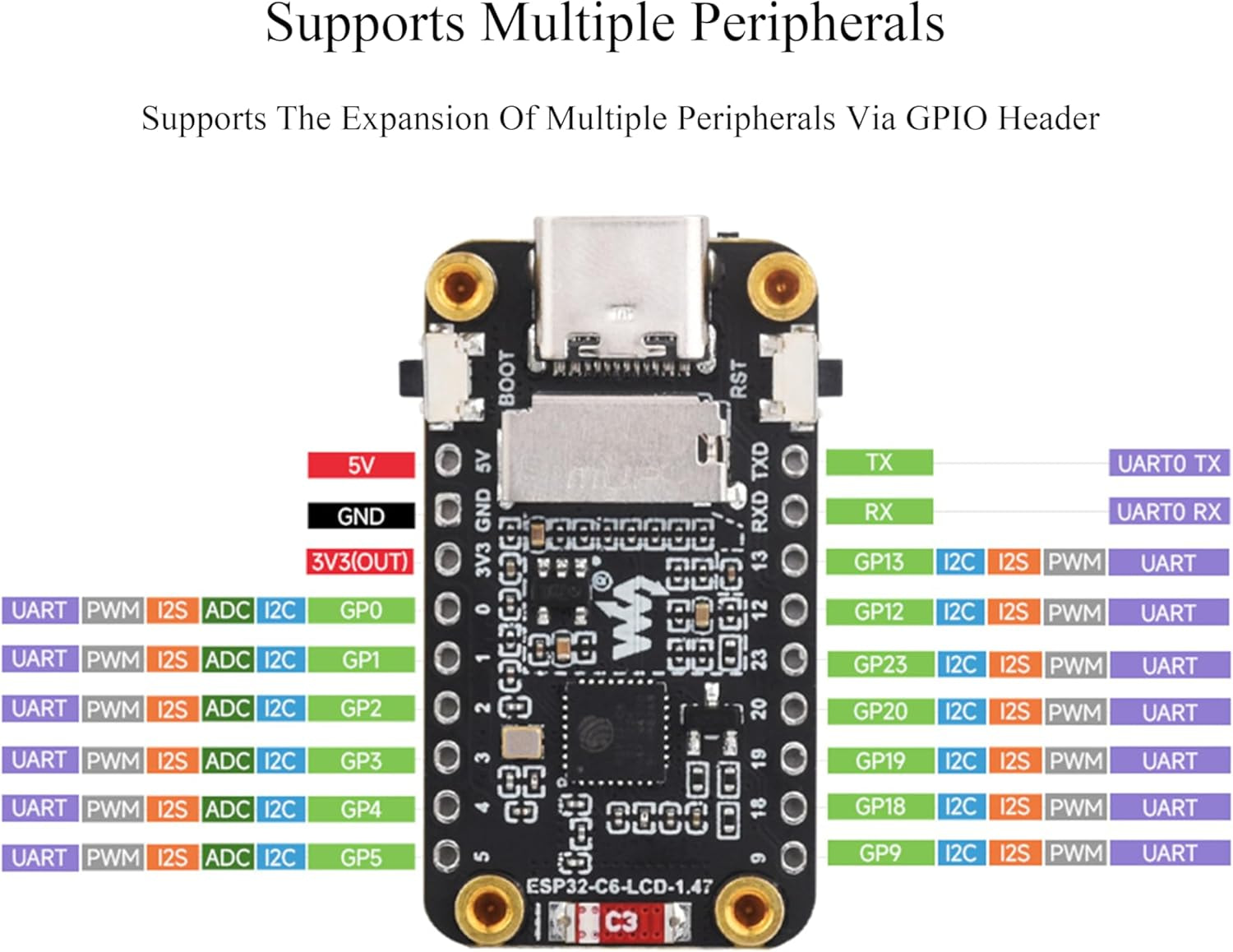
ESP32-C6 with 1,47" touch - I lost track

Hi,

I bought an ESP32-C6 with the 172*320 pixels touchscreen and I thought, it would be easy to get it working, but I failed. Actually, I am trying yaml codes randomly because I lost track and I can not longer work on a solution in a structured manner, because I lost track.

I added it in ESPHome Builder. The device is online.
In the esphome setings, I cheked this two boxes:
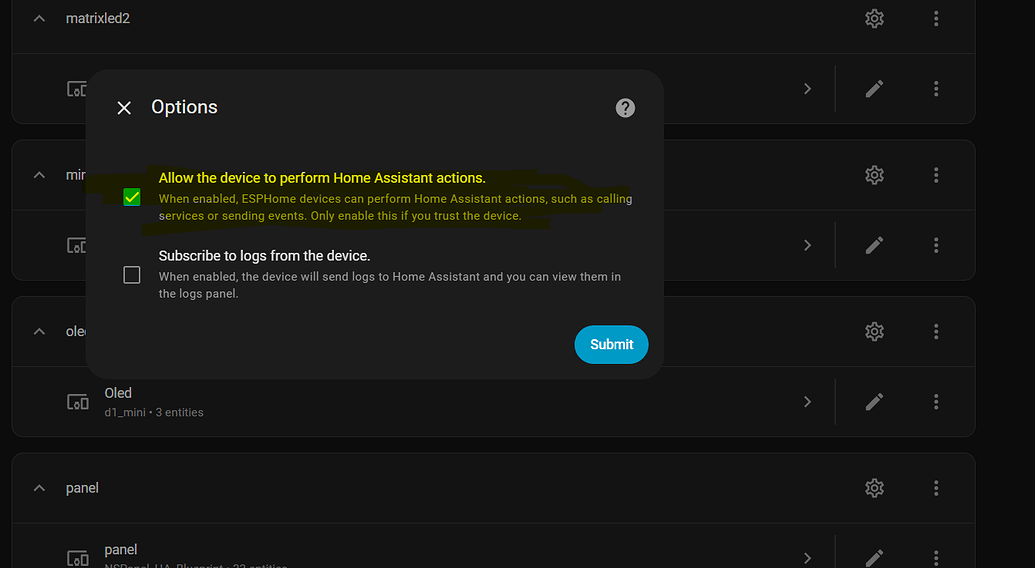
I got an working entity (backlight on/off) but thats all. I dont get any response/text.

I am absolutely frustrated and have spent a lot more than 10 hours from saturday until now.
Can somebody please check/correct my code?
Please response with the full working code, not just parts. I dont want to make any stupid mistakes.

I found some help here, with zugbee/matter. I am fine with wifi for the beginning.

esphome:
  name: esp32-c6-147inch
  friendly_name: "Mini Display"
  on_boot:
    then:
      - switch.turn_on: screen_switch

esp32:
  board: esp32-c6-devkitc-1
  framework:
    type: esp-idf

# --- NETZWERK & API ---
wifi:
  ssid: "qwertz"
  password: "12345678"

  ap:
    ssid: "Mini Display Fallback Hotspot"
    password: "87654321"

captive_portal:

logger:

api:
  encryption:
    key: "fweiommndfreinegiurniuoenr"

ota:
  - platform: esphome
    password: "ffpssfrwefwromowem"

spi:
  clk_pin: GPIO7
  mosi_pin: GPIO6

output:
  - platform: gpio
    id: backlight_output
    pin: GPIO22

font:
  - file: "gfonts://Roboto"
    id: buero_font
    size: 20

switch:
  - platform: template
    name: "Display ON/OFF"
    id: screen_switch
    icon: mdi:screen-rotation
    optimistic: true
    turn_on_action:
      - output.turn_on: backlight_output
    turn_off_action:
      - output.turn_off: backlight_output

  - platform: template
    name: "Antiburn Modus"
    id: switch_antiburn
    icon: mdi:television-shimmer
    optimistic: true
    entity_category: "config"
    turn_on_action:
      - logger.log: "Start Pixel-cleaning"
    turn_off_action:
      - logger.log: "end Pixel-cleaning"

time:
  - platform: homeassistant
    on_time:
      - hours: 2,3,4,5
        minutes: 5
        seconds: 0
        then:
          - switch.turn_on: switch_antiburn
      - hours: 2,3,4,5
        minutes: 35
        seconds: 0
        then:
          - switch.turn_off: switch_antiburn

number:
  - platform: template
    name: "Screen Timeout"
    optimistic: true
    id: display_timeout
    unit_of_measurement: "s"
    initial_value: 45
    restore_value: true
    min_value: 10
    max_value: 180
    step: 5
    mode: box

display:
  - platform: st7789v
    id: mein_display
    model: CUSTOM
    height: 320
    width: 172
    offset_height: 34
    offset_width: 0
    cs_pin: GPIO14
    dc_pin: GPIO15
    reset_pin: GPIO21
    spi_mode: 3
    data_rate: 4MHz
    pages:
      - id: seite_1
        lambda: |-
          it.fill(Color(0, 0, 0));
          
          // (x=11, y=110, breite=150, höhe=100)
          it.filled_rectangle(11, 110, 150, 100, Color(0, 0.4, 0.8));

          it.printf(86, 160, id(buero_font), Color(1, 1, 1), TextAlign::CENTER, "Licht Büro");

Your wiring is fine, the working backlight proves the pins and SPI are right. It's two bugs in the drawing config, and both produce a completely blank screen on their own:

1. Your colours are almost-black. In ESPHome Color() takes values 0 to 255, not 0.0 to 1.0. So Color(1, 1, 1) is RGB (1,1,1), i.e. nearly black, your white text was being drawn in near-black on a black background, invisible. And Color(0, 0.4, 0.8) truncates the decimals to Color(0, 0, 0), a black box on black. That alone is why you see nothing. White is Color(255, 255, 255); your blue is about Color(0, 102, 204).

2. Your offset is on the wrong axis. The 172x320 panel's 172-wide side sits centred inside the ST7789's 240-wide controller, so the offset belongs on width, not height. You had offset_height: 34, offset_width: 0, which pushed your drawing off the visible area. It should be offset_width: 34, offset_height: 0 (34 is the documented column offset for this board).

Fix those two and it comes up. Here's your full file with only those corrections:

esphome:
  name: esp32-c6-147inch
  friendly_name: "Mini Display"
  on_boot:
    then:
      - switch.turn_on: screen_switch

esp32:
  board: esp32-c6-devkitc-1
  framework:
    type: esp-idf

# wifi / api / ota left as-is, keep your real values here
wifi:
  ssid: "qwertz"
  password: "12345678"
  ap:
    ssid: "Mini Display Fallback Hotspot"
    password: "87654321"

captive_portal:

logger:

api:
  encryption:
    key: "fweiommndfreinegiurniuoenr"

ota:
  - platform: esphome
    password: "ffpssfrwefwromowem"

spi:
  clk_pin: GPIO7
  mosi_pin: GPIO6

output:
  - platform: gpio
    id: backlight_output
    pin: GPIO22

font:
  - file: "gfonts://Roboto"
    id: buero_font
    size: 20

switch:
  - platform: template
    name: "Display ON/OFF"
    id: screen_switch
    icon: mdi:screen-rotation
    optimistic: true
    turn_on_action:
      - output.turn_on: backlight_output
    turn_off_action:
      - output.turn_off: backlight_output

  - platform: template
    name: "Antiburn Modus"
    id: switch_antiburn
    icon: mdi:television-shimmer
    optimistic: true
    entity_category: "config"
    turn_on_action:
      - logger.log: "Start Pixel-cleaning"
    turn_off_action:
      - logger.log: "End Pixel-cleaning"

time:
  - platform: homeassistant
    on_time:
      - hours: 2,3,4,5
        minutes: 5
        seconds: 0
        then:
          - switch.turn_on: switch_antiburn
      - hours: 2,3,4,5
        minutes: 35
        seconds: 0
        then:
          - switch.turn_off: switch_antiburn

number:
  - platform: template
    name: "Screen Timeout"
    optimistic: true
    id: display_timeout
    unit_of_measurement: "s"
    initial_value: 45
    restore_value: true
    min_value: 10
    max_value: 180
    step: 5
    mode: box

display:
  - platform: st7789v
    id: mein_display
    model: CUSTOM
    height: 320
    width: 172
    offset_width: 34
    offset_height: 0
    cs_pin: GPIO14
    dc_pin: GPIO15
    reset_pin: GPIO21
    spi_mode: 3
    data_rate: 4MHz
    update_interval: 1s
    pages:
      - id: seite_1
        lambda: |-
          it.fill(Color(0, 0, 0));
          // blue box (x=11, y=110, width=150, height=100)
          it.filled_rectangle(11, 110, 150, 100, Color(0, 102, 204));
          it.printf(86, 160, id(buero_font), Color(255, 255, 255), TextAlign::CENTER, "Licht Büro");
If the colours come out inverted (a "negative" look), add invert_colors: true under the display. If your ESPHome version rejects it on st7789v, switch the platform to ili9xxx with model: ST7789V, which definitely supports it. But try it as-is first. Once you see "Licht Büro" in the blue box, you're past the hard part and can build the rest of the page out.

Thank you very much.
I got this parts from other examples and never asked myself if they are wrong.

I have understood the mistakes - and inserted your code with my individual SSID/PW and keys.

The Display shows nothing.
Backlight is off and shows no effect when switching the entity.

[W][font:311]: Codepoint 0x000000fc not found in font

I think it is because of "ü" in Licht Büro.
I can change it to Licht Buro. Thats ok for me as well.

Two quick things, then the real fix.

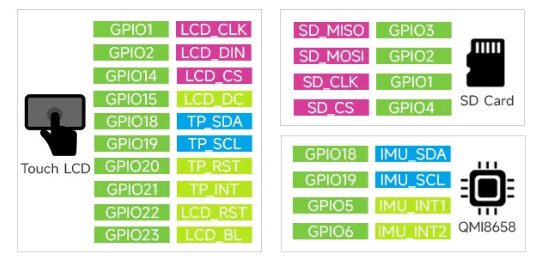
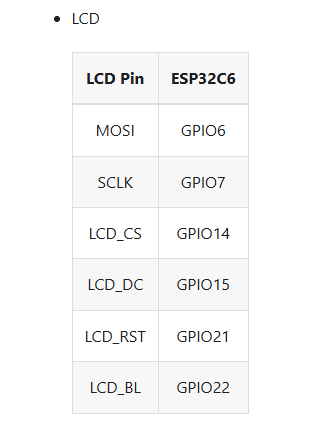
Your pins are correct for this (touch) board: Waveshare wires it SCL=GPIO7, SDA/MOSI=GPIO6, RST=GPIO21, DC=GPIO15, CS=GPIO14, BLK=GPIO22. So scratch any "wrong pins" worry.

The ü warning is harmless — it just skips that one character, it is not why the screen is blank.

The actual problem: this touch board's display controller is a JD9853, not a true ST7789, and ESPHome has no native JD9853 driver. The st7789v platform drives it inconsistently, which is most likely why you get nothing. The approach that works for this board is the ili9xxx platform with model: ST7789V. Swap your display: block for this (same pins):

display:
  - platform: ili9xxx
    model: ST7789V
    cs_pin: GPIO14
    dc_pin: GPIO15
    reset_pin: GPIO21
    invert_colors: true
    dimensions:
      width: 172
      height: 320
      offset_width: 34
      offset_height: 0
    update_interval: 1s
    pages:
      - id: seite_1
        lambda: |-
          it.fill(Color(0, 0, 0));
          it.filled_rectangle(11, 110, 150, 100, Color(0, 102, 204));
          it.printf(86, 160, id(buero_font), Color(255, 255, 255), TextAlign::CENTER, "Licht Buro");

(ili9xxx supports invert_colors, which these IPS panels usually need.)

For the backlight, isolate it from everything else. Temporarily drive GPIO22 high directly at boot:

esphome:
  on_boot:
    priority: 600
    then:
      - output.turn_on: backlight_output

If the screen lights (even blank), the backlight is fine and it was a switch/timing thing. If it stays dark, GPIO22 on this board is a direct backlight enable, so high should light it, double-check the output pin number in that case.

If the ili9xxx swap still shows nothing, the fastest win is the dedicated thread for this exact board (JD9853 + AXS5106L), someone there has a full working display config. JD9853 init is board-specific enough that copying a known-good block beats fighting it. And don't beat yourself up, this is genuinely one of the more awkward boards to bring up in ESPHome.

update forgot to link the post :smiley:

My code looks like this:

esphome:
  name: "esp32-c6-147inch"
  friendly_name: "Mini Display"
  on_boot:
    priority: 600
    then:
      - output.turn_on: backlight_output
esp32:
  board: esp32-c6-devkitc-1
  framework:
    type: esp-idf
    sdkconfig_options:
      CONFIG_ESPTOOLPY_FLASHSIZE_8MB: "y"

wifi:
  ssid: "qwertz"
  password: "12345678""

# API & OTA:
api:
  encryption:
    key: "fweiommndfreinegiurniuoenr"

ota:
  - platform: esphome
    password: "ffpssfrwefwromowem"

logger:
  level: ERROR

# --- HARDWARE ---
spi:
  clk_pin: GPIO7
  mosi_pin: GPIO6

# --- DISPLAY ---
display:
  - platform: ili9xxx
    model: ST7789V
    cs_pin: GPIO14
    dc_pin: GPIO15
    reset_pin: GPIO21
    invert_colors: true
    dimensions:
      width: 172
      height: 320
      offset_width: 34
      offset_height: 0
    update_interval: 1s
    pages:
      - id: seite_1
        lambda: |-
          it.fill(Color(0, 0, 0));
          it.filled_rectangle(11, 110, 150, 100, Color(0, 102, 204));
          it.printf(86, 160, id(buero_font), Color(255, 255, 255), TextAlign::CENTER, "Licht Buro");

# --- TOUCH ---
i2c:
  sda: GPIO18
  scl: GPIO19
  scan: false

touchscreen:
  platform: axs5106
  interrupt_pin: GPIO21
  reset_pin: GPIO20

When installing, it says:

INFO Unable to import component axs5106.touchscreen: No module named 'esphome.components.axs5106'
Failed config

Platform not found: 'touchscreen.axs5106'

I will look in your link and try the codes.
EDIT: I have been using this code some days ago. It doesnt work at my device.

Current code - the display is still fully black (with/without backlight)

esphome:
  name: "esp32-c6-147inch"
  friendly_name: "Mini Display"
  on_boot:
    priority: 600.0
    then:
      - output.turn_on: lcd_backlight
      - switch.turn_on: screen_switch

esp32:
  board: esp32-c6-devkitc-1
  framework:
    type: esp-idf

logger:
  level: INFO

api:
  encryption:
    key: "123"

ota:
  - platform: esphome
    password: "456"

wifi:
  ssid: "789"
  password: "012"
  ap:
    ssid: "Mini Fallback Hotspot"
    password: "345"

captive_portal:

i2c:
  sda: GPIO18
  scl: GPIO19
  frequency: 400kHz
  scan: true
  id: bus_a

spi:
  id: mein_spi_bus
  clk_pin: GPIO7
  mosi_pin: GPIO6

display:
  - platform: ili9xxx
    id: mini_disp
    model: ST7789V
    cs_pin: GPIO14
    dc_pin: GPIO15
    reset_pin: GPIO21
    invert_colors: true
    dimensions:
      width: 320
      height: 172
      offset_height: 34
      offset_width: 0
    transform:
      swap_xy: true
      mirror_x: false
      mirror_y: false
    update_interval: 1s

font:
  - file: "gfonts://Roboto"
    id: roboto70
    size: 32
    bpp: 4
  - file: "https://github.com/Templarian/MaterialDesign-Webfont/blob/57b567a448bd579892174cd47c47f9e187ea56c6/fonts/materialdesignicons-webfont.ttf?raw=true"
    id: mdi_42
    size: 40
    bpp: 4
    glyphs:
      - "\U000F1793"

# Backlight
output:
  - platform: ledc    
    id: lcd_backlight
    pin: GPIO23

light:
  - platform: monochromatic
    output: lcd_backlight
    name: "Display Backlight"
    id: back_light
    restore_mode: ALWAYS_ON

switch:
  - platform: template
    name: "Ekran ON OFF"
    id: screen_switch
    turn_on_action:
      - light.turn_on: back_light
    turn_off_action:
      - light.turn_off: back_light
    optimistic: true

# --- LVGL GRAFIK INTERFACE ---
lvgl:
  displays:
    - mini_disp
  on_idle:
    timeout: 45s
    then:
      - logger.log: "LVGL is idle"
      - switch.turn_off: screen_switch
  pages:
    - id: main_page
      width: 100%
      bg_color: 0x000000
      bg_opa: cover
      widgets:
        - button:
            id: SALON_AVIZE
            x: 110
            y: 46
            width: 100
            height: 80
            widgets:
              - label:
                  id: avize_label
                  align: CENTER
                  text_font: mdi_42
                  text: "\U000F1793"
            on_click:
              then:
                - homeassistant.service:
                    service: light.toggle
                    data:
                      entity_id: light.dimmer_buero

# --- HOME ASSISTANT SYNCHRONISATION ---
binary_sensor:
  - platform: homeassistant
    id: avize_switch
    entity_id: light.dimmer_buero
    on_state:
      then:
        - if:
            condition:
              lambda: 'return id(avize_switch).state;'
            then:
              - lvgl.label.update:
                  id: avize_label
                  text_color: 0xFFFF00
            else:
              - lvgl.label.update:
                  id: avize_label
                  text_color: 0xFFFFFF

Your backlight is on the wrong pin. On the ESP32-C6-LCD-1.47, BLK (backlight) is GPIO22, but your ledc output is on GPIO23. So every output.turn_on / backlight toggle you do is driving a pin that isn't connected to the LED, the panel may actually be rendering your LVGL page fine, you just can't see it because the backlight never comes on.

One-line fix:

output:
  - platform: ledc
    id: lcd_backlight
    pin: GPIO22   # was GPIO23

Everything else lines up with the Waveshare pinout, so leave it alone: CLK GPIO7, MOSI GPIO6, CS GPIO14, DC GPIO15, RST GPIO21. Once the backlight is on GPIO22 you should see the page.

Quick sanity check if you want to prove it's just the backlight: Waveshare's own note says you can tie BLK straight to 3.3V for full brightness. If it lights up that way, GPIO22 in the config is the proper fix (since you're using ledc for dimming).

If it's somehow still black after that, the panel pins are all correct, so it'd be a content/init issue rather than wiring, but I'd put money on the GPIO22 swap.

That's what chatGpt might offer, but Waveshare docs don't agree with that.

@Karosm The first post said back light was working and in that yaml it was using GPIO22.. The latest script it changed to GPIO23

On second post with same pin it wasn't working. Op didn't even confirm it's Waveshare board though...

or a clone ya.. Just found this one on amazon


This image isn't even from the waveshare docs btw, this is the pinouts of: ESP32 Cheap Yellow Display Board (ESP32-2432S028R) | Random Nerd Tutorials

that one also has a 2+ " touch screen, not 1.47..

What you meant with "this image" ? Which one?

weird, dropped on reply somehow thought I quoted.. this image

That image is from Waveshare ESP32-C6-Touch-LCD-1.47 page...

doh, I see what happened now. I was using the non touch doc, yours is the touch link doc (the correct one).

Correct on maybe not.
I don't know what board OP really has. And I don't have this board on my desk. And Waveshare documentation is far from perfect, especially schematics suck.
So I don't blindly post that OP's BL code is wrong (or correct).

1 Like