ESP32 Deep Sleep and massive power drain

Hello, I recently purchased the board shown in the photo.
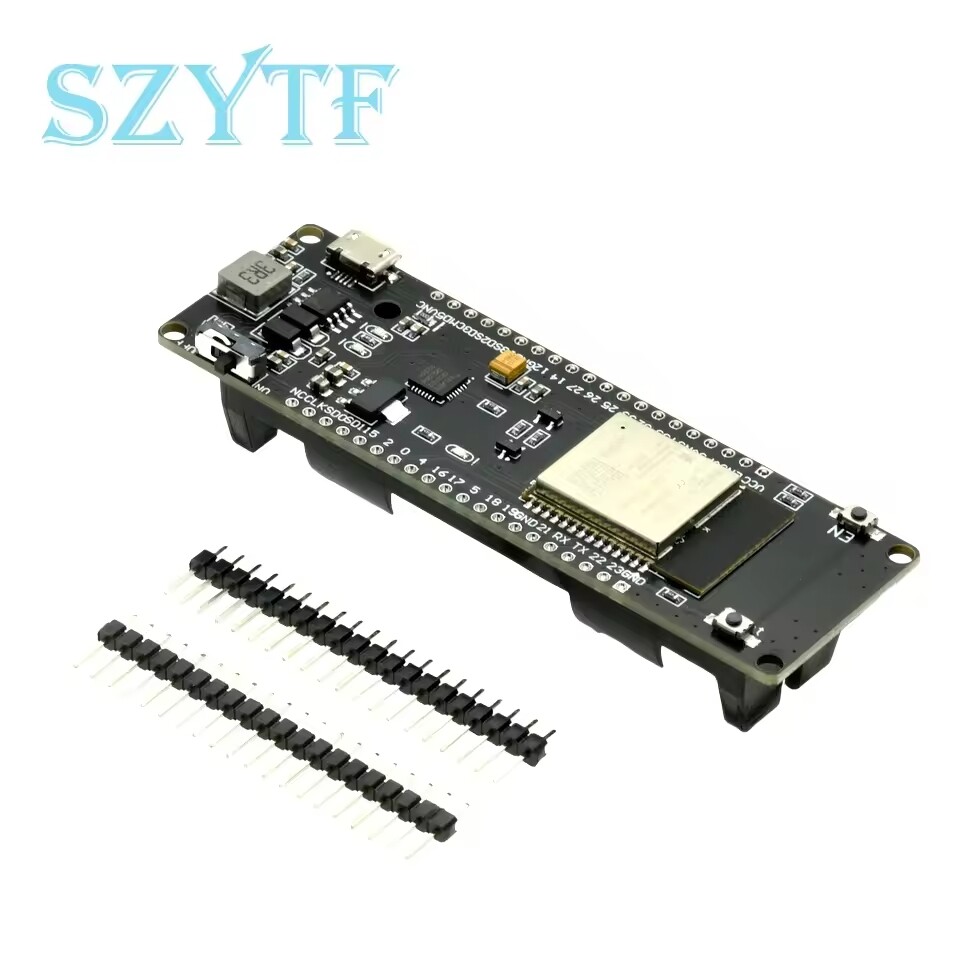
It is equipped with an ESP32 designed to use a 18650 battery. I want to use the board to monitor my mailbox with two cylindrical magnetic reed sensors (one for detecting the opening to insert mail and another for detecting the door opening to retrieve mail).

Before installing the board, I wanted to test its functionality, and after just 5 days of simulating an opening, the board failed to start, and I noticed that the battery was drained. I recharged the battery and observed that in just 3 days, the voltage dropped from 4.10V to 3.75V, indicating that it consumes a significant amount of power even in Deep Sleep mode.

The board is always in deep_sleep mode, and it wakes up only when one of the 2 sensors goes up.

Here my configuration:

substitutions:
  board_type: esp32dev
  api_reboot_timeout: 0s
  device_name: "mailbox-monitor"
  friendly_name: "Monitor Cassetta della Posta"
  board_type_name: "ESP32 Battery Powered"
  api_encryption_key: "****"
  ota_password: "****"
  ip_address: 0.0.0.0
  ip_subnet: 0.0.0.0
  ip_gateway: 0.0.0.0
  ip_dns1: 0.0.0.0
  ip_ota: ${ip_address}
  logger_level: DEBUG
  # GPIO to monitor
  wakeup_pin_insert: "25"
  wakeup_pin_withdraw: "26"
  
    
esphome:
  name: ${device_name}
  friendly_name: ${friendly_name}
  comment: "${board_type_name}"
  compile_process_limit: 1
  on_boot:
    # Execute before WiFi and API connection
    - priority: 300
      then:
        - script.execute: reset_sensors
        - script.execute: recover_wakeup_info
        - script.execute: validate_wakeup

esp32:
  board: ${board_type}

logger:
  level: ${logger_level}

globals:
  - id: wakeup_cause
    type: esp_sleep_wakeup_cause_t
    initial_value: ESP_SLEEP_WAKEUP_UNDEFINED

api:
  reboot_timeout: ${api_reboot_timeout}
  encryption:
    key: ${api_encryption_key}
  on_client_connected:
    then:
      - script.execute: report_data
  
ota:
  - platform: esphome
    password: ${ota_password}

wifi:
  ssid: !secret wifi_ssid
  password: !secret wifi_password
  fast_connect: true
  manual_ip: 
    static_ip: ${ip_address}
    subnet: ${ip_subnet}
    gateway: ${ip_gateway}
    dns1: ${ip_dns1}
  use_address: ${ip_ota}

sensor:
  - platform: wifi_signal
    name: "WiFi Signal"
    update_interval: 300s

deep_sleep:
  id: dp
  wakeup_pin_mode: KEEP_AWAKE
  esp32_ext1_wakeup: 
    mode: ANY_HIGH
    pins:
      - number: ${wakeup_pin_insert}
        mode: INPUT
      - number: ${wakeup_pin_withdraw}
        mode: INPUT
          
binary_sensor:
  - platform: template
    id: door_insert
    name: "Porta Inserimento"
    device_class: door
  - platform: template
    id: door_withdraw
    name: "Porta Ritiro"
    device_class: door

output:
  - platform: gpio
    id: notification
    pin: GPIO16

script:
  - id: reset_sensors
    then:
      - lambda: |-
          // Reset all sensor template to OFF
          id(door_insert).publish_state(false);
          id(door_withdraw).publish_state(false);

  - id: recover_wakeup_info
    then:
      - lambda: |-
          id(wakeup_cause) = esp_sleep_get_wakeup_cause();
          uint64_t GPIO_reason = 0;

          switch(id(wakeup_cause)) {
            case ESP_SLEEP_WAKEUP_EXT0: ESP_LOGW("wakeup", "Wakeup caused by external signal using RTC_IO"); break;
            case ESP_SLEEP_WAKEUP_EXT1: ESP_LOGI("wakeup", "Wakeup caused by external signal using RTC_CNTL"); break;
            case ESP_SLEEP_WAKEUP_TIMER: ESP_LOGW("wakeup", "Wakeup caused by timer"); break;
            case ESP_SLEEP_WAKEUP_TOUCHPAD: ESP_LOGW("wakeup", "Wakeup caused by touchpad"); break;
            case ESP_SLEEP_WAKEUP_ULP: ESP_LOGW("wakeup", "Wakeup caused by ULP program"); break;
            default: ESP_LOGW("wakeup", "Wakeup was not caused by deep sleep: %d", id(wakeup_cause)); break;
          }

  - id: validate_wakeup
    then:
      - lambda: |-
          // If the wakeup was not triggered by a monitored pin this was a first boot/reset
          // we can go in deep sleep mode
          if (id(wakeup_cause) != ESP_SLEEP_WAKEUP_EXT1) {
              id(dp).begin_sleep(true);
          }
          
  - id: report_data
    then:
      - logger.log:
          level: DEBUG
          format: "Reporting data to HA . . ."
      - lambda: |-
          uint64_t GPIO_reason = 0;

          // If we are here, this condition should be always TRUE
          if (id(wakeup_cause) == ESP_SLEEP_WAKEUP_EXT1) {
              GPIO_reason = esp_sleep_get_ext1_wakeup_status();

              if (GPIO_reason & (1ULL << ${wakeup_pin_insert})) {
                  ESP_LOGI("wakeup", "Wakeup INSERT (GPIO%d)", ${wakeup_pin_insert});
                  id(door_insert).publish_state(true);
              }
              else if (GPIO_reason & (1ULL << ${wakeup_pin_withdraw})) {
                  ESP_LOGI("wakeup", "Wakeup WITHDRAW (GPIO%d)", ${wakeup_pin_withdraw});
                  id(door_withdraw).publish_state(true);
              }
              else {
                  ESP_LOGE("wakeup", "Wakeup caused by unknown pin");
                  ESP_LOGE("wakeup", "Wakeup Bitmask: %lld", GPIO_reason);
                  // In this case we can interrupt the script and go into deep spleep mode again
                  id(dp).begin_sleep(true);
                  return;
              }
          }
          else {
              // We should never arrive here
              ESP_LOGE("wakeup", "Reporting data requested but wakeup cause is wrong: %d", id(wakeup_cause));
              id(dp).begin_sleep(true);
              return;
          }
      - output.turn_on: notification
      - delay: 1s
      - output.turn_off: notification
      - logger.log:
          level: INFO
          format: "Data reported, waiting 5sec . . ."
      - delay: 5s
      - script.execute: reset_sensors
      - logger.log:
          level: INFO
          format: "Reverted all to OFF, waiting 60sec . . ."
      # Add a long delay permetting multiple insertions/long withdraw without continous deep sleep and wakeup
      - delay: 60s    
      - logger.log:
          level: INFO
          format: "Entering Deep Sleep. Bye!"
      - deep_sleep.enter

Any suggestion? It’s and HW problem (as I suspect) or something wrong in my configuration?

Hi, two things to do - one is to attach directly to the serial and ensure that the ESP is sleeping as per how you coded it - you never know, maybe noise is causing wake-ups or something similar. Second you should either install a multimeter in series with the battery or supply 4.0v DC and a multimeter in series into the battery connector (with the battery detached); then measure the current draw during sleep.
What I suspect you find is that the DC-DC converter is running constantly at a high current and isn’t able to sleep and is just very inefficient when operating at low power. You should be able to identify the DC converter by looking at the board too, this would allow you to obtain the datasheet and understand whether it’s really suitable to be run off battery permanently or whether the battery should just be used as a backup to a 5v supply.

I’m pretty sure the board did not wake up because a blue LED go on once it happen and I had never seen it.

I’ll try with the multimeter in series with the battery in order to understand the power usage during deep sleep.

Thank you.

Does anyone have some suggestions on a similar board that works well in deep sleep mode?

My multimeter do not allow to monitor a so low current, so I have checked for the DC-DC step-down IC and should be this:

AMS1117-3.3
https://www.digikey.com/en/products/detail/umw/ams1117-3-3/22482148

Looking into the datasheet I have found this value:

Quiescent Current (Iq): 10mA

I have limited electronics knowledge but I think that the problem is this. With a constant power drain of at least 10mA (I have to sum ESP in deep sleep and other components) and a battery of about 3000mAh, I have a lifetime of about 10 days.

Unuseful board!

There are high changes you find also a boost converter onboard.
Do you have 5V on that pin when powered from battery.
Also be aware that 1117 has 1V dropout voltage and that battery management chip turns off at X voltage, so your battery might have still plenty of juice when board turns off. And 3000mAh battery from AE might be 2000mAh…

1 Like

Checked, no pin at 5V

Ok, so this board has a lot of problems :frowning:

I have just ordered a different model, seems more robust, I hope :slight_smile:

i got pretty much the same board from DIY-more and have similar issues.

The main problem is that is has coilwhine… a high whistle when entering certain power states. Kinda annoying.

Also the DeepSleep is software bugged in ESPhome.

Uses 1.8mA when entered wrongly.

and 60MicroAmps when entered correctly.

Sadly until now i haven’t found out when it happens.

Edit: Got it… WiFi!

    on_state:
      then:
        if:
          condition:
            binary_sensor.is_off: door
          then:
            - delay: 2s
            - wifi.disable:
            - deep_sleep.enter:
                id: deep_sleep_1
                sleep_duration: 12h

by manually disabling WiFi before entering DeepSleep it works!

You can see the difference between first and second time DeepSleep?

1 Like

Not the main issue for you; but I would suggest that your wifi: parameters are not helping.

Wi-fi is re-established every time your ESP32 wakes up, and you have specified fast_connect and a manual_ip address to save your ESP32 having to look up DNS etc :+1:
… but 0.0.0.0 isn’t a real address, and instead of reducing the amount of work, you have increased it to decide what actual physical IP address parameters to use.

Assuming you are only using this device on one network, I recommend putting in the actual static manual_ip parameters.

FWIW on my home network I am specifying manual_ip in my ESPHome devices; and also have the same devices with the same IP addresses manually assigned in my routers DHCP list - belt and braces, but also good for documentation.

Hi All,

I’m having a similar issue with what looks like the same board - using it for a moisture sensor. Deep sleep appears to be working, but I’m only getting a week of battery life. So I’ve added code to disable wifi before deep sleep, but now the device will always show unavailable except the for the moment of update. I’d like it to continue to show the last recorded value but it seems like HA recognizes that the wifi goes offline and responds accordingly.

Has anyone found a way to either address this in the ESPhome YAML or in HA?

Device looks like this: EGBO WEMOS WiFi & Bluetooth Battery ESP32 development tool ESP32 battery esp8266 ESP WROOM 32 ESP32 good - AliExpress

YAML:

 substitutions:
  name: esphome-web-f1f17c
  friendly_name: ESPHome Battery Moisture Sensor 1

esphome:
  name: ${name}
  friendly_name: ${friendly_name}
  min_version: 2024.6.0
  name_add_mac_suffix: false
  project:
    name: esphome.web
    version: dev
  on_boot:
    priority: 600
    then:
    - delay: 1s  # Wait for stability
#    - logger.log: "Awake"
    - script.execute: stop_sleep
    - wait_until:
        wifi.connected:
    - component.update: soil1  # Read soil moisture
    - delay: 5s  # Allow sensor read to complete
    - wifi.disable:
    - delay: 2s  # Allow sensor read to complete
    - deep_sleep.enter: deep_sleep_1  # Enter deep sleep

esp32:
  board: esp32dev
  framework:
    type: arduino

# Enable logging
logger:
  level: NONE

# Enable Home Assistant API
api:
  encryption:
    key: "xxxxx"

ota:
  - platform: esphome
    password: "xxxxx"

#esp32_ble:
#  enable_on_boot: false

wifi:
  power_save_mode: LIGHT  # Reduces Wi-Fi power consumption
  output_power: 8.5db
  manual_ip:
    static_ip: 192.168.1.xxx
    gateway: 192.168.1.xxx
    subnet: 255.255.255.0
  ssid: !secret wifi_ssid
  password: !secret wifi_password
#  fast_connect: true
  ap: null

# In combination with the `ap` this allows the user
# to provision wifi credentials to the device via WiFi AP.
captive_portal:

dashboard_import:
  package_import_url: github://esphome/example-configs/esphome-web/esp32.yaml@main
  import_full_config: true

# Sets up Bluetooth LE (Only on ESP32) to allow the user
# to provision wifi credentials to the device.
#esp32_improv:
#  authorizer: none

# To have a "next url" for improv serial
#web_server:

binary_sensor:
  - platform: status
    name: "Status"
  - platform: homeassistant
    name: "PreventSleep"
    id: stopSleep
    entity_id: input_boolean.esp_prevent_sleep

sensor:
  - platform: adc
    pin: GPIO35
    name: "Soil moisture 1"
    id: soil1
    attenuation: auto
    update_interval: never
    unit_of_measurement: "%"
    icon: "mdi:water-percent"
    filters:
    - calibrate_linear:
      - 1.00 -> 100
      - 1.32 -> 100
      - 2.725 -> 0
      - 3.000 -> 0

deep_sleep:
  id: deep_sleep_1
  run_duration: 40s
  sleep_duration: 240min

button:
  - platform: restart
    name: "Restart"

script:
  - id: stop_sleep
    mode: queued
    then:
      - if:
          condition:
            binary_sensor.is_on: stopSleep
          then:
            - deep_sleep.prevent: deep_sleep_1
      - delay: 1s
      - script.execute: stop_sleep    

'''

I don’t have any direct experience with battery powered esp devices yet. I am in the gathering information and requirements to determine feasibility stage of a project where battery powered might be useful. So, feel free to disregard what I say.

I have NEVER seen anyone say, “wow that was easy, I am so glad I used esphome to do this battery powered project.” I have read MANY posts from people who are having great difficulty and rarely have I seen someone get to a great resolution (they might have, but they never reported back if they did). I have heard of people having success (by their definition).

Here is an example:
https://www.reddit.com/r/esp8266/comments/d4mevz/esphome_any_best_practices_for_using_deep_sleep/

So, your problem is HA showing not available. This appears to be by design for HA. You need to use MQTT, so you can fool it into thinking differently. I use MQTT. I do not like that it uses retained messages, but I understand why it does. It generally works okay for my needs, so I haven’t changed it to do something different.

Use MQTT for your battery operated project and you will likely have a better result.

1 Like