ESP32-S3 7inch Capacitive Touch Display Adjust brightness

Hello @pkscout and all,
Thank you very much for this post, as it’s the only one where I’ve found useful information about the Waveshare ESP32 display.

I personally have a Waveshare ESP32-S3 5-inch 1024x600 display (Link).

I tried toggling the backlighting on and off using only the CH422G, but without complete success. In other words, I can turn the backlighting off and on (without the ability to adjust it), but when I turn it back on, unfortunately, a ring appears around the display near the edges. This disappears after a few hours, but it becomes more pronounced and persists longer the longer the backlighting is off. I contacted support, but they said this is normal because the CH422G not only turns off the backlighting, but also removes the RGB signal, and the ringing when I turn it back on is due to that.

I’ve analyzed the datasheets and would like your opinion to see if my reasoning is correct.

Physically, I need to connect the PWM solder point to the RS485-A pin (I’m attaching two images, one of the actual board and one of the logic).
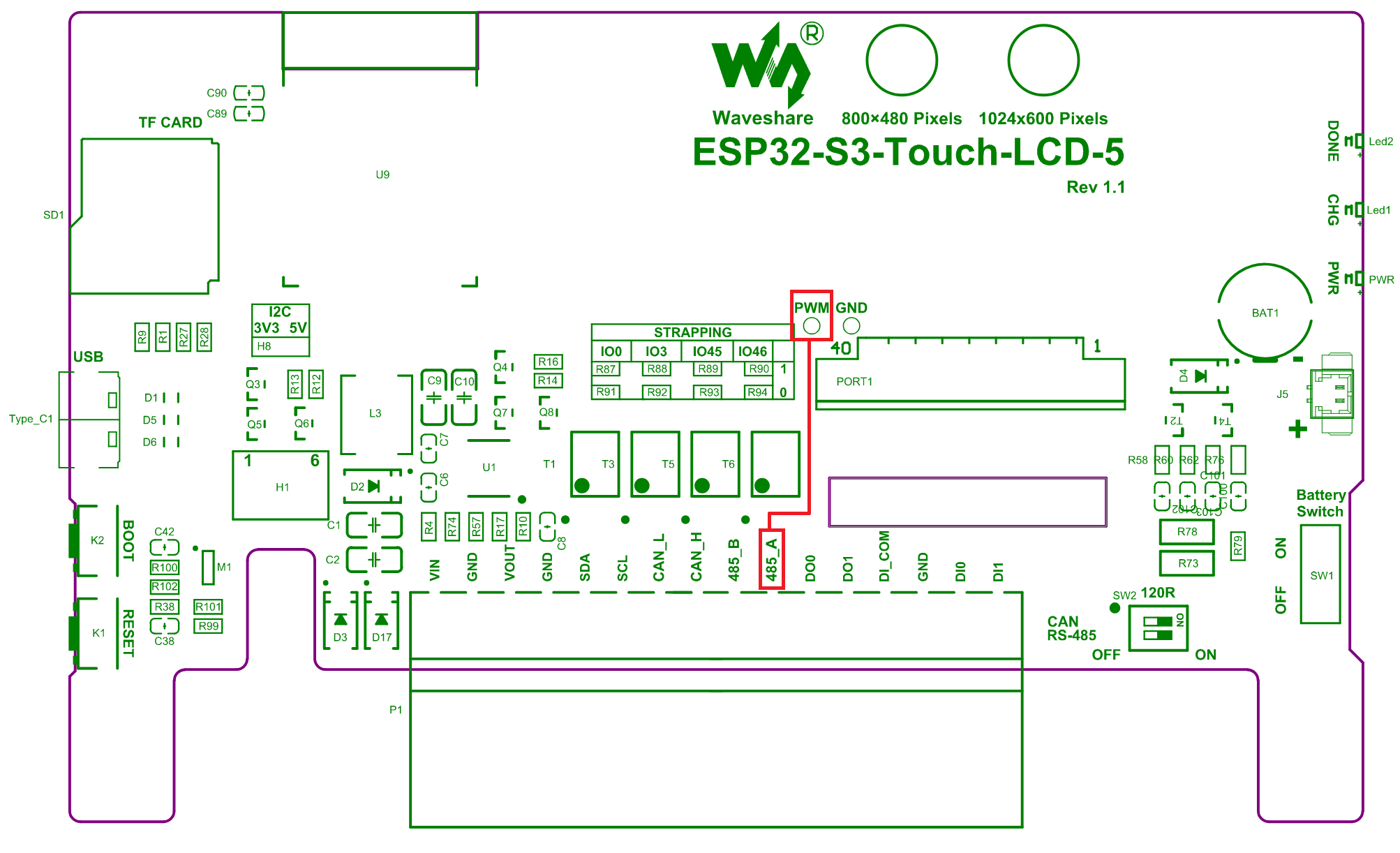
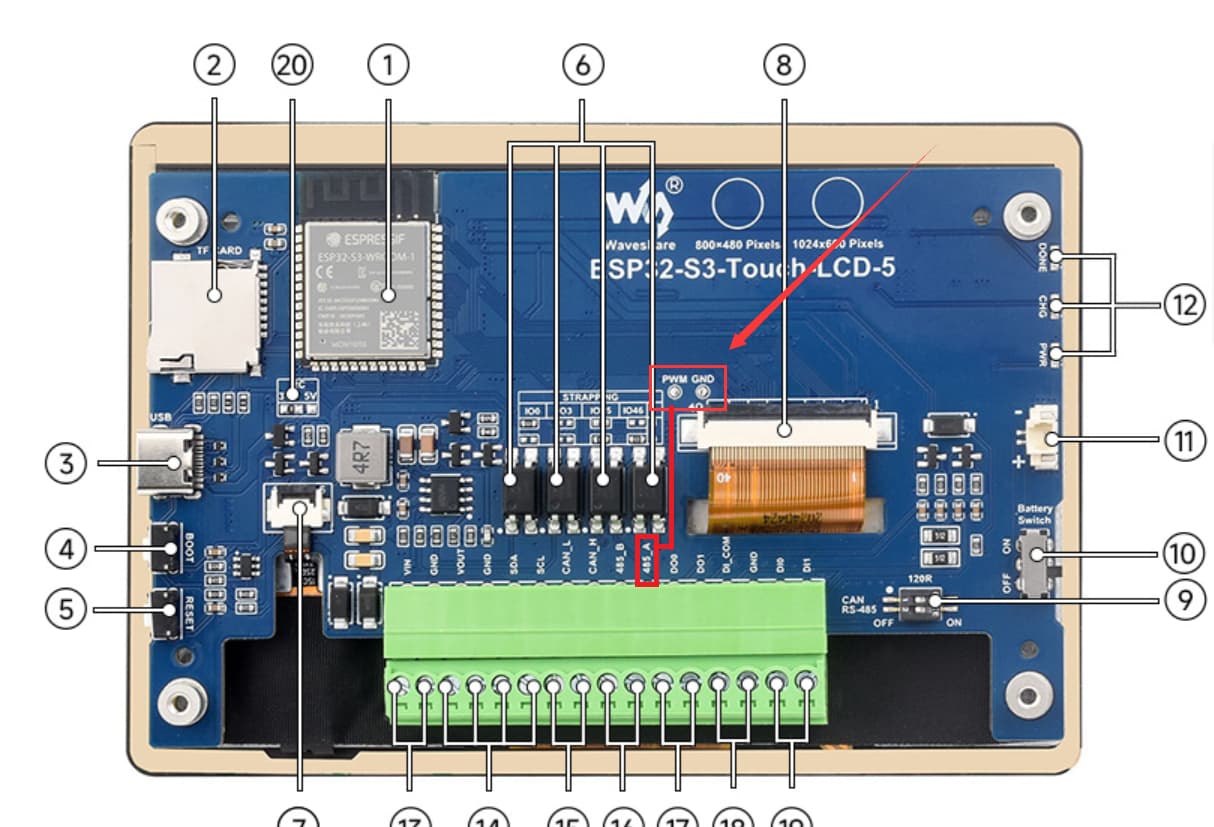
Logically, I need to use a code very similar to yours, except that the GPIO must be 43 (not 16). This is based on the attached diagram, where GPIO 43 corresponds to RS485 RXD (aka “A”). I checked, and on your display (7" 480x800, it corresponds to GPIO16).
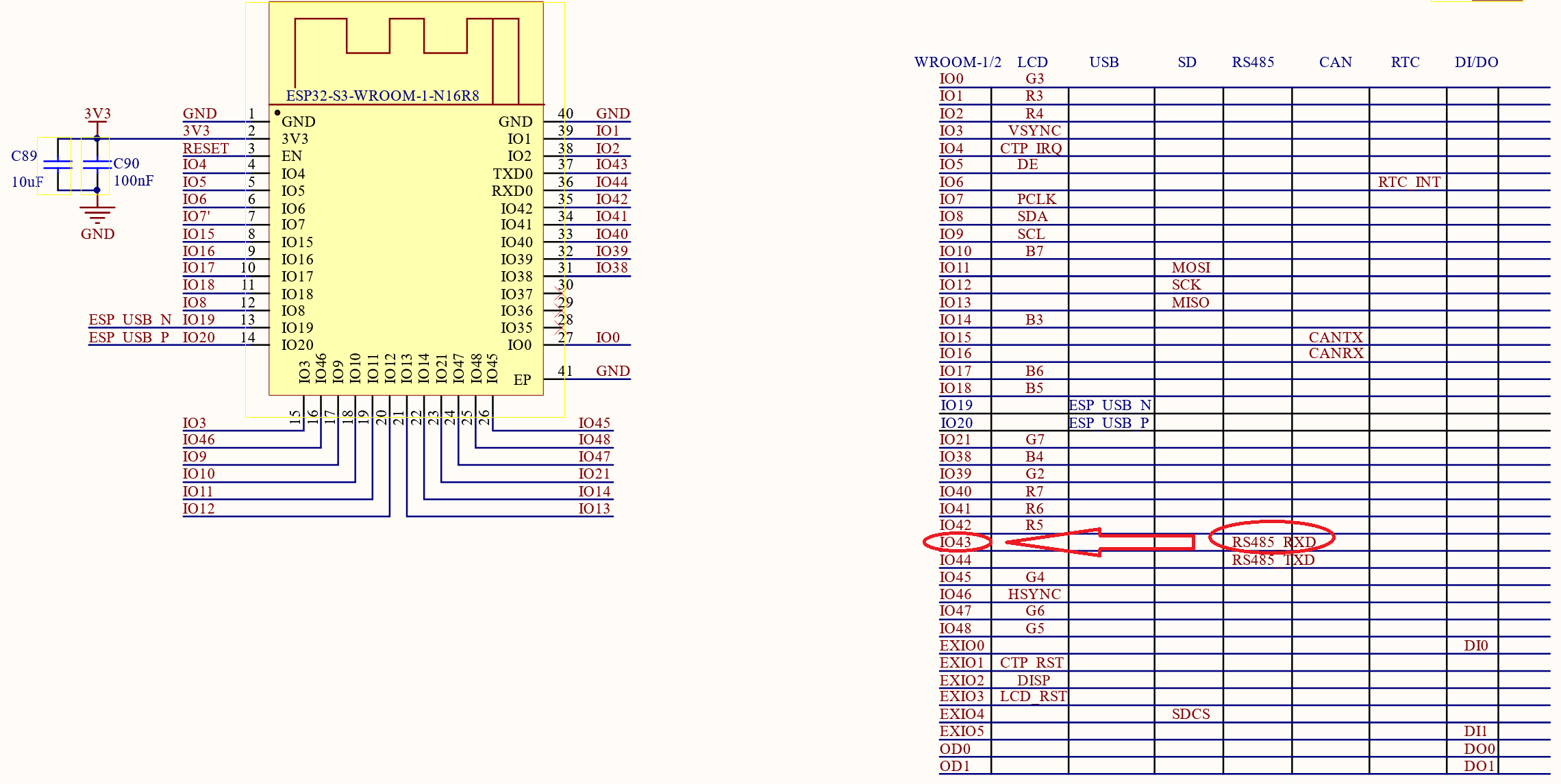
So, the code should be as follows:

# Backlight
output:
  - platform: ledc
    pin: GPIO43
    id: backlight

light:
  - platform: monochromatic
    output: backlight
    name: backlight
    restore_mode: ALWAYS_ON

switch:
  - platform: template
    name: antiburn
    icon: mdi:television-shimmer
    optimistic: true
    entity_category: "config"
    turn_on_action:
      - logger.log: "Starting Antiburn"
      - if:
          condition: lvgl.is_paused
          then:
            - lvgl.resume:
            - lvgl.widget.redraw:
      - lvgl.pause:
          show_snow: true
    turn_off_action:
      - logger.log: "Stopping Antiburn"
      - if:
          condition: lvgl.is_paused
          then:
            - lvgl.resume:
            - lvgl.widget.redraw:

  - platform: gpio
    name: backlight switch
    pin: 
      ch422g: io_ex
      number: 2
    restore_mode: ALWAYS_ON
    internal: true

Could you please support me and confirm if what I wrote is correct?

I look forward to your kind feedback before proceeding with the physical and logical operations.

Just one last question: to disable the backlight, if I can implement the above configuration, you set the brightness value of the monochrome light to zero, right?

Thank you very much in advance.

Best regards,
Matteo

Just for the records and whoever will have the same display: I give it a try right now and everything works great!

Hi All,

I have three of these displays currently in service with the back-light now controllable,
As well as two Elecrows. and able to be Dimmed from both a Slider on the Display & from within Home Assistant.

There are two issues remaining that I would like to resolve, but search example seem to be providing me with out of date syntax, using invalid commands.

First, To be able to Set the Default Brightness.
Around the 50% mark is comfortable where 2 of the Screens are Located.
I usually drop them to this manually, but often find they have reverted to full brightness,
Possibly after an API Re-connection.

I have seen examples like this,

light:
  - platform: monochromatic
    output: backlight_pwm
    name: "Display Backlight"
    id: lcd_backlight
    restore_mode: ALWAYS_ON  # or RESTORE_DEFAULT_OFF
    initial_brightness: 50%  # Set default brightness (0-100% or 0.0-1.0)

But that fails to Compile, Reporting that:-

[initial_brightness] is an invalid option for [light.monochromatic]. 
Please check the indentation.
initial_brightness: 0.5

Indentation doesn't seem to be the issue.

Second is setting Minimum Brightness, as below 50% the display is unreadble & hard to adjust again.

I have worked around this on the Display Slider by fudging the LVGL, but that leaves the Web Interface & Home Assistant controls able to get out of Sync.

Basic Control from one is,

output:
  - platform: ledc
    pin: 2
    frequency: 1220
    id: gpio_backlight_pwm
light:
  - platform: monochromatic
    output: gpio_backlight_pwm
    name: ${devicename} Display Backlight
    id: back_light
    restore_mode: ALWAYS_ON
    #initial_brightness: 0.5 # Won't Compile.

With this for the LVGL Slider.

lvgl:
  pages:
    - id: right_page
      bg_color: 0x000000
      scrollable: "OFF"
      widgets:
        - label: 
            x: 160
            y: 180
            text: "Right Page"
            text_color: WHITE
            text_align: CENTER
#----- Brightness control Slider -------------------------------------------------------------------
        - slider:
            id: dimmer_slider
            x: 10
            y: 50
            width: 50
            height: 400
            pad_all: 0
            min_value: 127
            max_value: 255
            value: 128  # Default slider value (50% brightness)
            knob:
              bg_opa: "0%"  # Hides the knob entirely
              radius: 0
            on_value:
              - light.turn_on:
                  id: back_light
                  brightness: !lambda 'return x / 255;'  # Convert 0-255 to 0.0-1.0 for light dimming
              - lvgl.label.update:
                  id: brightness_label
                  text: !lambda |-
                    char buf[32];
                    sprintf(buf, "Brightness: %.0f%%", ((x-127) / 128) * 100);
                    return std::string(buf);

        - label:
            id: brightness_label
            x: 70
            y: 50
            text: "Brightness: 50%"  # Default text
            text_color: WHITE
            text_align: LEFT
            text_font: roboto_icons_36

Has Anyone Addressed these two aspects of controlling the Back-lighting on these displays?

Thanks.

Ok,

I have resolved the Minimum Brightness Issue within the output: Section with min_power.

output:
  - platform: ledc
    pin: GPIO12
#    frequency: 1220
    id: backlight_gpio
    min_power: 0.2 # New Change for stop blacking out at low settings

The 0.2 still leaves the display readable if the Slider is pulled down to 1%

Still hoping someone can offer a suggestion for setting the default brightness to say 70%.

I tried this setup on my waveshare s3 but the board started humming after uploading the configs. Is this normal? The humming pitch changes each time I increase the lowest brightness limit and increase the frequency

That is most definitely not normal. Either you have a bad board, or when you soldered the jumper you accidentally made a connection to something else on the board (it is pretty tight).