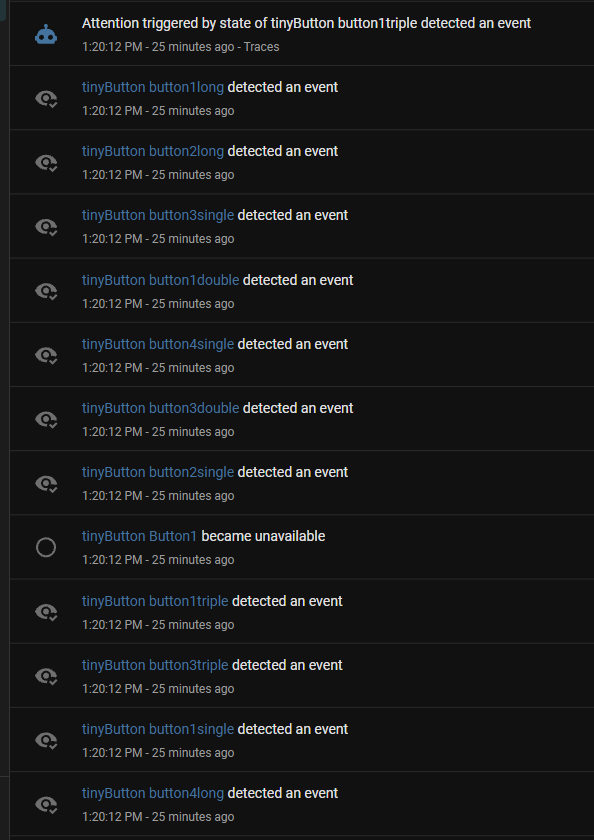
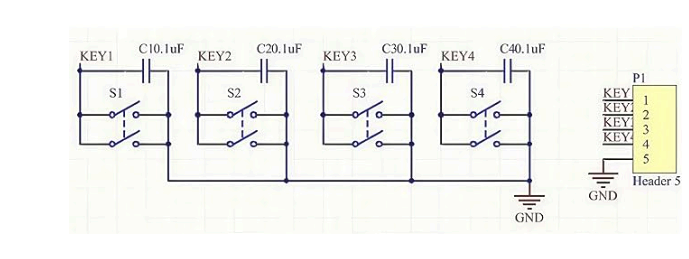
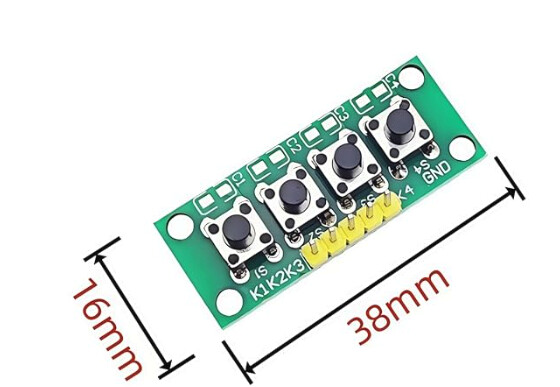
I am trying to enable a few multi-purpose buttons around the house. 4 buttons per device, 4 actions per button. I have finally gotten the inputs and events to work as intended, but my automations/events are triggered on boot. I have enabled the debounce filters (delay_on_off: 100ms), but all attempts have failed to stop boot triggers. Considering these devices can be tied to up to 16 HA actions if all actions are triggered every time power is removed and restored or every time ESPhome pushes an update, it will be a chaotic mess if I can’t mitigate this issue. Any help is appreciated.
TYIA
esphome:
  name: tinybutton
  friendly_name: tinyButton

esp32:
  board: esp32-c3-devkitm-1
  framework:
    type: arduino

logger:
api:
  encryption:
    key: *******

ota:
  - platform: esphome
    password: $$$$$$$$$

wifi:
  ssid: !secret wifi_ssid
  password: !secret wifi_password
  ap:
    ssid: "Esptiny Fallback Hotspot"
    password: "1y684PhLkg6W"
# The "Brain" that sends events to Home Assistant

event:
  - platform: template
    name: "button1triple"
    id: triple1
    event_types:
      - "triple1pressed"
  - platform: template
    name: "button1double"
    id: double1
    event_types:
      - "double1pressed"
  - platform: template
    name: "button1single"
    id: single1
    event_types:
      - "single1"
  - platform: template
    name: "button1long"
    id: long1
    event_types:
      - "long1"
  - platform: template
    name: "button2triple"
    id: triple2
    event_types:
      - "triple2pressed"
  - platform: template
    name: "button2double"
    id: double2
    event_types:
      - "double2pressed"
  - platform: template
    name: "button2single"
    id: single2
    event_types:
      - "single2"
  - platform: template
    name: "button2long"
    id: long2
    event_types:
      - "long2"
  - platform: template
    name: "button3triple"
    id: triple3
    event_types:
      - "triple3pressed"
  - platform: template
    name: "button3double"
    id: double3
    event_types:
      - "double3pressed"
  - platform: template
    name: "button3single"
    id: single3
    event_types:
      - "single3"
  - platform: template
    name: "button3long"
    id: long3
    event_types:
      - "long3"
  - platform: template
    name: "button4triple"
    id: triple4
    event_types:
      - "triple4pressed"
  - platform: template
    name: "button4double"
    id: double4
    event_types:
      - "double4pressed"
  - platform: template
    name: "button4single"
    id: single4
    event_types:
      - "single4"
  - platform: template
    name: "button4long"
    id: long4
    event_types:
      - "long4"

binary_sensor:
  - platform: gpio
    name: "Button1"
    id: button_input1
    pin:
      number: 4
      inverted: true
      mode: INPUT_PULLUP
    filters:
      - delayed_on_off: 50ms
    on_multi_click:

  # --- TRIPLE CLICK ---
    - timing:
      - OFF for at most 0.3s
      - ON for at most 0.5s
      - OFF for at most 0.3s
      - ON for at most 0.5s
      - OFF for at least 0.2s
      then:
        - event.trigger:
            id: triple1
            event_type: "triple1pressed"

  # --- DOUBLE CLICK ---
    - timing:
      - ON for at most 0.5s
      - OFF for at most 0.3s
      - ON for at most 0.5s
      - OFF for at least 0.2s
      then:
        - event.trigger:
            id: double1
            event_type: "double1pressed"

    # --- SINGLE CLICK ---
    - timing:
      - ON for at most 0.5s
      - OFF for at least 0.2s
      then:
        - event.trigger:
            id: single1
            event_type: "single1"

    # --- LONG PRESS ---
    - timing:
      - ON for at least 1.5s
      then:
        - event.trigger:
            id: long1
            event_type: "long1"

  - platform: gpio
    name: "Button2"
    id: button_input2
    pin:
      number: 3
      inverted: true
      mode: INPUT_PULLUP
    filters:
      - delayed_on_off: 50ms
    on_multi_click:
  # --- TRIPLE CLICK ---
    - timing:
      - OFF for at most 0.3s
      - ON for at most 0.5s
      - OFF for at most 0.3s
      - ON for at most 0.5s
      - OFF for at least 0.2s
      then:
        - event.trigger:
            id: triple2
            event_type: "triple2pressed"

  # --- DOUBLE CLICK ---
    - timing:
      - ON for at most 0.5s
      - OFF for at most 0.3s
      - ON for at most 0.5s
      - OFF for at least 0.2s
      then:
        - event.trigger:
            id: double2
            event_type: "double2pressed"

    # --- SINGLE CLICK ---
    - timing:
      - ON for at most 0.5s
      - OFF for at least 0.2s
      then:
        - event.trigger:
            id: single2
            event_type: "single2"

    # --- LONG PRESS ---
    - timing:
      - ON for at least 1.5s
      then:
        - event.trigger:
            id: long2
            event_type: "long2"

  - platform: gpio
    name: "Button3"
    id: button_input3
    pin:
      number: 5
      inverted: true
      mode: INPUT_PULLUP
    filters:
      - delayed_on_off: 50ms
    on_multi_click:
  # --- TRIPLE CLICK ---
    - timing:
      - OFF for at most 0.3s
      - ON for at most 0.5s
      - OFF for at most 0.3s
      - ON for at most 0.5s
      - OFF for at least 0.2s
      then:
        - event.trigger:
            id: triple3
            event_type: "triple3pressed"

  # --- DOUBLE CLICK ---
    - timing:
      - ON for at most 0.5s
      - OFF for at most 0.3s
      - ON for at most 0.5s
      - OFF for at least 0.2s
      then:
        - event.trigger:
            id: double3
            event_type: "double3pressed"

    # --- SINGLE CLICK ---
    - timing:
      - ON for at most 0.5s
      - OFF for at least 0.2s
      then:
        - event.trigger:
            id: single3
            event_type: "single3"

    # --- LONG PRESS ---
    - timing:
      - ON for at least 1.5s
      then:
        - event.trigger:
            id: long3
            event_type: "long3"

  - platform: gpio
    name: "Button4"
    id: button_input4
    pin:
      number: 6
      inverted: true
      mode: INPUT_PULLUP
    filters:
      - delayed_on_off: 50ms
    on_multi_click:
  # --- TRIPLE CLICK ---
    - timing:
      - OFF for at most 0.3s
      - ON for at most 0.5s
      - OFF for at most 0.3s
      - ON for at most 0.5s
      - OFF for at least 0.2s
      then:
        - event.trigger:
            id: triple4
            event_type: "triple4pressed"

  # --- DOUBLE CLICK ---
    - timing:
      - ON for at most 0.5s
      - OFF for at most 0.3s
      - ON for at most 0.5s
      - OFF for at least 0.2s
      then:
        - event.trigger:
            id: double4
            event_type: "double4pressed"

    # --- SINGLE CLICK ---
    - timing:
      - ON for at most 0.5s
      - OFF for at least 0.2s
      then:
        - event.trigger:
            id: single4
            event_type: "single4"

    # --- LONG PRESS ---
    - timing:
      - ON for at least 1.5s
      then:
        - event.trigger:
            id: long4
            event_type: "long4"
Pardon my ignorance, but what is allowed a conditional operation, I know .yaml does not support 'if(x == y then()). Is the condition of boot_done = true the event gate or the event.trigger gate?
globals:
- id: boot_done
type: bool
restore_value: no
initial_value: 'false'
So the on_boot sets the boolean and your binary sensor checks it
on_multi_click:
- timing:
- ON for at most 0.5s
- OFF for at least 0.2s
then:
- if:
condition:
lambda: 'return id(boot_done);'
then:
- event.trigger:
...
The event is still being triggered. I installed it again to be sure that it wasn’t triggering during the shutdown. I added my new code in case I misunderstood or mistyped something.
esphome:
name: tinybutton
friendly_name: tinyButton
 on_boot:
    priority: -100
    then:
      - delay: 1s
      - lambda: |-
          id(boot_done) = true;
globals:
  - id: boot_done
    type: bool
    restore_value: no
    initial_value: 'false'
esp32:
board: esp32-c3-devkitm-1
framework:
type: arduino
logger:
api:
encryption:
key: blah
ota:
- platform: esphome
password: boo
wifi:
ssid: !secret wifi_ssid
password: !secret wifi_password
ap:
ssid: "Esptiny Fallback Hotspot"
password: "1y684PhLkg6W"
# The "Brain" that sends events to Home Assistant
event:
- platform: template
name: "button1triple"
id: triple1
event_types:
- "triple1pressed"
- platform: template
name: "button1double"
id: double1
event_types:
- "double1pressed"
- platform: template
name: "button1single"
id: single1
event_types:
- "single1"
- platform: template
name: "button1long"
id: long1
event_types:
- "long1"
- platform: template
name: "button2triple"
id: triple2
event_types:
- "triple2pressed"
- platform: template
name: "button2double"
id: double2
event_types:
- "double2pressed"
- platform: template
name: "button2single"
id: single2
event_types:
- "single2"
- platform: template
name: "button2long"
id: long2
event_types:
- "long2"
- platform: template
name: "button3triple"
id: triple3
event_types:
- "triple3pressed"
- platform: template
name: "button3double"
id: double3
event_types:
- "double3pressed"
- platform: template
name: "button3single"
id: single3
event_types:
- "single3"
- platform: template
name: "button3long"
id: long3
event_types:
- "long3"
- platform: template
name: "button4triple"
id: triple4
event_types:
- "triple4pressed"
- platform: template
name: "button4double"
id: double4
event_types:
- "double4pressed"
- platform: template
name: "button4single"
id: single4
event_types:
- "single4"
- platform: template
name: "button4long"
id: long4
event_types:
- "long4"
binary_sensor:
- platform: gpio
name: "Button1"
id: button_input1
pin:
number: 4
inverted: true
mode: INPUT_PULLUP
filters:
- delayed_on_off: 50ms
on_multi_click:
# --- TRIPLE CLICK ---
- timing:
- OFF for at most 0.3s
- ON for at most 0.5s
- OFF for at most 0.3s
- ON for at most 0.5s
- OFF for at least 0.2s
then:
- if:
condition:
lambda: 'return id(boot_done);'
then:
- event.trigger:
id: triple1
event_type: "triple1pressed"
# --- DOUBLE CLICK ---
- timing:
- ON for at most 0.5s
- OFF for at most 0.3s
- ON for at most 0.5s
- OFF for at least 0.2s
then:
- if:
condition:
lambda: 'return id(boot_done);'
then:
- event.trigger:
id: double1
event_type: "double1pressed"
# --- SINGLE CLICK ---
- timing:
- ON for at most 0.5s
- OFF for at least 0.2s
then:
- if:
condition:
lambda: 'return id(boot_done);'
then:
- event.trigger:
id: single1
event_type: "single1"
# --- LONG PRESS ---
- timing:
- ON for at least 1.5s
then:
- if:
condition:
lambda: 'return id(boot_done);'
then:
- event.trigger:
id: long1
event_type: "long1"
- platform: gpio
name: "Button2"
id: button_input2
pin:
number: 3
inverted: true
mode: INPUT_PULLUP
filters:
- delayed_on_off: 50ms
on_multi_click:
# --- TRIPLE CLICK ---
- timing:
- OFF for at most 0.3s
- ON for at most 0.5s
- OFF for at most 0.3s
- ON for at most 0.5s
- OFF for at least 0.2s
then:
- if:
condition:
lambda: 'return id(boot_done);'
then:
- event.trigger:
id: triple2
event_type: "triple2pressed"
# --- DOUBLE CLICK ---
- timing:
- ON for at most 0.5s
- OFF for at most 0.3s
- ON for at most 0.5s
- OFF for at least 0.2s
then:
- if:
condition:
lambda: 'return id(boot_done);'
then:
- event.trigger:
id: double2
event_type: "double2pressed"
# --- SINGLE CLICK ---
- timing:
- ON for at most 0.5s
- OFF for at least 0.2s
then:
- if:
condition:
lambda: 'return id(boot_done);'
then:
- event.trigger:
id: single2
event_type: "single2"
# --- LONG PRESS ---
- timing:
- ON for at least 1.5s
then:
- if:
condition:
lambda: 'return id(boot_done);'
then:
- event.trigger:
id: long2
event_type: "long2"
- platform: gpio
name: "Button3"
id: button_input3
pin:
number: 5
inverted: true
mode: INPUT_PULLUP
filters:
- delayed_on_off: 50ms
on_multi_click:
# --- TRIPLE CLICK ---
- timing:
- OFF for at most 0.3s
- ON for at most 0.5s
- OFF for at most 0.3s
- ON for at most 0.5s
- OFF for at least 0.2s
then:
- if:
condition:
lambda: 'return id(boot_done);'
then:
- event.trigger:
id: triple3
event_type: "triple3pressed"
# --- DOUBLE CLICK ---
- timing:
- ON for at most 0.5s
- OFF for at most 0.3s
- ON for at most 0.5s
- OFF for at least 0.2s
then:
- if:
condition:
lambda: 'return id(boot_done);'
then:
- event.trigger:
id: double3
event_type: "double3pressed"
# --- SINGLE CLICK ---
- timing:
- ON for at most 0.5s
- OFF for at least 0.2s
then:
- if:
condition:
lambda: 'return id(boot_done);'
then:
- event.trigger:
id: single3
event_type: "single3"
# --- LONG PRESS ---
- timing:
- ON for at least 1.5s
then:
- if:
condition:
lambda: 'return id(boot_done);'
then:
- event.trigger:
id: long3
event_type: "long3"
- platform: gpio
name: "Button4"
id: button_input4
pin:
number: 6
inverted: true
mode: INPUT_PULLUP
filters:
- delayed_on_off: 50ms
on_multi_click:
# --- TRIPLE CLICK ---
- timing:
- OFF for at most 0.3s
- ON for at most 0.5s
- OFF for at most 0.3s
- ON for at most 0.5s
- OFF for at least 0.2s
then:
- if:
condition:
lambda: 'return id(boot_done);'
then:
- event.trigger:
id: triple4
event_type: "triple4pressed"
# --- DOUBLE CLICK ---
- timing:
- ON for at most 0.5s
- OFF for at most 0.3s
- ON for at most 0.5s
- OFF for at least 0.2s
then:
- if:
condition:
lambda: 'return id(boot_done);'
then:
- event.trigger:
id: double4
event_type: "double4pressed"
# --- SINGLE CLICK ---
- timing:
- ON for at most 0.5s
- OFF for at least 0.2s
then:
- if:
condition:
lambda: 'return id(boot_done);'
then:
- event.trigger:
id: single4
event_type: "single4"
# --- LONG PRESS ---
- timing:
- ON for at least 1.5s
then:
- if:
condition:
lambda: 'return id(boot_done);'
then:
- event.trigger:
id: long4
event_type: "long4"
I also added more time to the delay. should the delay priority be higher?
No, just log that shows the lines from boot until the flag is set, binary sensor triggers and your problem occurs.
Log you posted above shows just the beginning of boot.
We need to see logs beyond that.
The one you posted doesn’t present anything related to your problem.
There’s no on_boot setting the global variable.
There’s no binary sensor triggered.
There’s no event triggered.
[08:56:48.825][C][mdns:177]:   Hostname: tinybutton
[08:57:42.335][I][safe_mode:066]: Boot seems successful; resetting boot loop counter
[08:57:43.245][D][esp32.preferences:155]: Writing 1 items: 0 cached, 1 written, 0 failed
[08:58:17.215][D][binary_sensor:047]: 'Button3' >> ON
[08:58:17.353][D][binary_sensor:047]: 'Button3' >> OFF
[08:58:19.015][D][binary_sensor:047]: 'Button4' >> ON
[08:58:19.132][D][binary_sensor:047]: 'Button4' >> OFF
[08:58:20.987][D][binary_sensor:047]: 'Button1' >> ON
[08:58:21.169][D][binary_sensor:047]: 'Button1' >> OFF
[08:58:22.728][D][binary_sensor:047]: 'Button2' >> ON
[08:58:22.832][D][binary_sensor:047]: 'Button2' >> OFF
[08:58:24.967][D][binary_sensor:047]: 'Button3' >> ON
[08:58:25.139][D][binary_sensor:047]: 'Button3' >> OFF
[08:58:26.446][D][binary_sensor:047]: 'Button1' >> ON
[08:58:26.696][D][binary_sensor:047]: 'Button1' >> OFF
[08:58:30.586][D][binary_sensor:047]: 'Button2' >> ON
[08:58:30.844][D][binary_sensor:047]: 'Button2' >> OFF
[08:58:31.654][D][binary_sensor:047]: 'Button3' >> ON
[08:58:31.898][D][binary_sensor:047]: 'Button3' >> OFF
[08:58:32.363][D][binary_sensor:047]: 'Button4' >> ON
[08:58:32.539][D][binary_sensor:047]: 'Button4' >> OFF
[08:58:33.331][D][binary_sensor:047]: 'Button1' >> ON
[08:58:33.470][D][binary_sensor:047]: 'Button1' >> OFF
[08:58:34.360][D][binary_sensor:047]: 'Button2' >> ON
[08:58:34.519][D][binary_sensor:047]: 'Button2' >> OFF
[08:58:34.980][D][binary_sensor:047]: 'Button3' >> ON
[08:58:35.136][D][binary_sensor:047]: 'Button3' >> OFF
[08:58:36.463][D][binary_sensor:047]: 'Button4' >> ON
[08:58:36.570][D][binary_sensor:047]: 'Button4' >> OFF
[08:58:39.099][D][binary_sensor:047]: 'Button4' >> ON
[08:58:39.509][D][binary_sensor:047]: 'Button4' >> OFF
[08:58:40.301][D][binary_sensor:047]: 'Button4' >> ON
[08:58:43.893][D][binary_sensor:047]: 'Button4' >> OFF
[08:58:47.072][D][binary_sensor:047]: 'Button4' >> ON
[08:58:47.205][D][binary_sensor:047]: 'Button4' >> OFF
[08:58:47.268][D][binary_sensor:047]: 'Button4' >> ON
[08:58:47.393][D][binary_sensor:047]: 'Button4' >> OFF
[08:58:48.662][D][binary_sensor:047]: 'Button3' >> ON
[08:58:50.033][D][binary_sensor:047]: 'Button3' >> OFF
[08:58:50.871][D][binary_sensor:047]: 'Button2' >> ON
[08:58:52.696][D][binary_sensor:047]: 'Button2' >> OFF
[08:58:53.584][D][binary_sensor:047]: 'Button1' >> ON
[08:58:55.294][D][binary_sensor:047]: 'Button1' >> OFF
[08:58:56.350][D][binary_sensor:047]: 'Button1' >> ON
[08:58:56.479][D][binary_sensor:047]: 'Button1' >> OFF
[08:58:56.537][D][binary_sensor:047]: 'Button1' >> ON
[08:58:56.639][D][binary_sensor:047]: 'Button1' >> OFF
I am pushing the button in this case.
I am trying to connect a stronger pull up resistor to aviod the low on reboot but it isn’t cutting it either. when I load updated code I get the event trigger twice, when I power up the board I get the event twice as well.