[ESPHome Component] Cloud-Free Midea / Inventor / Comfee Dehumidifier (based on Hypfer’s project)

Hey everyone :wave:

I’m excited to share something that I’ve been working on (with a lot of help from ChatGPT :sweat_smile:):
a native ESPHome component for Midea-based dehumidifiers — no cloud, no MQTT, just pure local control through ESPHome and Home Assistant!

Please follow the project in github to get all the latest changes

:bulb: Background

This project is a port and evolution of the amazing open-source work by @Hypfer and his esp8266-midea-dehumidifier project.

His firmware originally ran on ESP8266 with MQTT and made it possible to “free” Midea-made dehumidifiers from their cloud dongles by communicating directly with the unit’s UART interface.

My ESPHome port builds on that foundation and brings full native Home Assistant integration — no MQTT, no setup complexity.


:wrench: What It Does

This ESPHome component talks directly to your dehumidifier’s internal UART port (where the original WiFi dongle used to connect).
Once flashed, it appears in Home Assistant automatically with all entities ready to use.

Supported Entities:

  • climate → controls power, mode, fan speed, and humidity setpoint
  • binary_sensor → “Bucket Full” indicator
  • switch → optional Ionizer, Swing, Beep, Sleep, Pump toggle
  • sensor → optional Error Code output
  • text → optional Device Capabilities info

:toolbox: Hardware

You can reuse the existing Midea WiFi dongle port!
Typical connections for ESP32 or ESP8266 are:

Dongle Pin Function ESP Pin
1 5V VIN
2 TX GPIO17
3 RX GPIO16
4 GND GND

That’s all it takes — no cloud, no encryption, just UART.


:jigsaw: Example YAML


esphome:
  name: midea-dehumidifier

esp32:
  board: esp32dev
  framework:
    type: esp-idf

external_components:
  - source:
      type: git
      url: https://github.com/Chreece/ESPHome-Dehumidifier
      ref: main
    components: [midea_dehum]
    refresh: 0min

uart:
  id: uart_midea
  tx_pin: GPIO16
  rx_pin: GPIO17
  baud_rate: 9600

midea_dehum:
  id: midea_dehum_comp
  uart_id: uart_midea

  status_poll_interval: 30000 # Optional, how often should ESP ask the device for a status update in ms (1000ms=1sec). Default: 30000ms

  # 🆕 Optional: Rename display modes to match your device’s front panel.
  # For example, your unit may label these as “Cont”, “Dry”, or “Smart”.
  # These names only affect how the presets appear in Home Assistant — 
  # the internal logic and protocol remain the same.

  # 💡 Tip:
  # If any of the modes below are set to "UNUSED" (case-insensitive),
  # that preset will NOT appear in the Home Assistant UI.
  # Use this if your device doesn’t support or respond to a specific mode.
  # For instance, if pressing “SMART”, your unit doesn't change any mode,
  # set display_mode_smart: "UNUSED" to hide it from the UI.

  display_mode_setpoint: 'UNUSED'      # Hidden in Home Assistant (disabled)
  display_mode_continuous: 'Cont'      # Shown as "Cont"
  display_mode_smart: 'Smart'          # Shown as "Smart"
  display_mode_clothes_drying: 'Dry'   # Shown as "Dry"

climate:
  - platform: midea_dehum
    midea_dehum_id: midea_dehum_comp
    name: "Inventor Dehumidifier"

binary_sensor:
  - platform: midea_dehum
    midea_dehum_id: midea_dehum_comp
    bucket_full:
      name: "Bucket Full"

# Optional error sensor remove this block if not needed
sensor:
  - platform: midea_dehum
    midea_dehum_id: midea_dehum_comp
    error:
      name: "Error Code"

switch:
  - platform: midea_dehum
    midea_dehum_id: midea_dehum_comp
# Optional ionizer control, add this block only if your device has Ionizer
    ionizer:
      name: "Ionizer"
# Optional swing control (if supported)
    swing:
      name: "Swing"
# Optional control the device pump (if supported)
    pump:
      name: 'Defrost pump'
# Optional sleep mode toggle (not all models support this)
# Enables or disables “Sleep” mode if available on your device (not tested!).
    sleep:
      name: "Sleep Mode"
# Optional beep control
# When enabled, the device will emit a beep sound when it receives
# commands (e.g. from Home Assistant or OTA updates).
    beep:
      name: "Beep on Command"

# Optional timer number entity for the internal device timer
# When device off -> timer to turn on
# When device on -> timer to turn off
# Toggling the device on/off resets the timer
# 0.5h increments, max: 24h
number:
  - platform: midea_dehum
    midea_dehum_id: midea_dehum_comp
    timer:
      name: "Internal Device Timer"

# Optional text sensor to show discovered device capabilities
# Useful for diagnostics — helps confirm which features your model supports.
# (Note: Not all capabilities are necessarily showed.)
text_sensor:
  - platform: midea_dehum
    midea_dehum_id: midea_dehum_comp
    capabilities:
      name: "Device Capabilities"

:white_check_mark: Supported Models

Should work with all Midea-based dehumidifiers, including:

  • Midea MAD22S1WWT
  • Comfee MDDF-16DEN7-WF / MDDF-20DEN7-WF
  • Inventor Eva II PRO Wi-Fi / EVA ION PRO Wi-Fi 20L
  • Midea Cube 20 / 35 / 50

And likely many other rebadged variants.


:speech_balloon: About the Port

I’m not a professional developer — just a Home Assistant enthusiast who wanted full ESPHome control.
This project was developed collaboratively with AI help (ChatGPT) and a lot of trial and error.

It’s open source here:
:point_right: GitHub – Chreece/ESPHome-Dehumidifier


:warning: Disclaimer

This project interacts directly with hardware inside a mains-powered appliance that may use R290 (propane) refrigerant.
Modifying or opening such devices can be dangerous and may cause electric shock, fire, or injury if not done safely.

By using this project, you agree that:

  • You perform all modifications at your own risk
  • The author(s) and contributors are not responsible for any damage or injury
  • Always disconnect power before working on the device
  • Never operate the unit open or modified near flammable materials

If you’re not confident working with electrical components, please don’t attempt this modification.


:pray: Credits

Massive thanks to:

Without their work, none of this would exist.


:heart: Final Thoughts

If you’re using Home Assistant and have one of these Midea-based dehumidifiers, this ESPHome version keeps everything 100 % local and integrates seamlessly.
It’s been rock solid in my setup — and finally, the bucket full light just works! :smile:

Feedback, bug reports, and ideas are all welcome!
Chreece

4 Likes

Hello. I have an Inventor Eva II E2-ION20L, without WiFi. Should I open it and check if it has an unused WiFi port?

Please share your findings

My untrained eye can’t spot any WiFi labels… Oh well, at least I cleaned all the mold
Edit: I meant on my board. Can’t upload pics for some reason

The yaml shown here is just minimal, a full example you can find in github repo

:new: Update — New Customizable Mode Labels for Midea Dehumidifier Component

Hey everyone :wave:
I’ve just pushed a new update to the ESPHome Midea Dehumidifier component on GitHub!

:sparkles: What’s New

You can now customize the displayed mode labels directly from your ESPHome YAML.
This makes it easier to match the modes from your physical dehumidifier device or to rename the modes to your preference.

:gear: YAML Options

In your YAML configuration, you can now set:

midea_dehum:
  uart_id: uart_midea
  display_mode_setpoint: "Target Humidity"
  display_mode_continuous: "Continuous Dry"
  display_mode_smart: "Smart Mode"
  display_mode_clothes_drying: "Laundry"

:jigsaw: Default Mode Labels

Internal Name Default Label Description
setpoint Setpoint Target humidity mode
continuous Continuous Continuous drying
smart Smart Auto / adaptive mode
clothesDrying ClothesDrying Dedicated clothes-drying mode

:bug: Other Fixes

  • Fixed a critical logging bug that could cause the ESP to freeze (no logs / no API).
  • Removed all blocking delays and improved UART loop safety for ESP-IDF builds.
  • Minor code cleanup and improved mode handling.

:arrows_counterclockwise: How to Update

Simply re-pull the latest version of the component:

external_components:
  - source:
      type: git
      url: https://github.com/Chreece/ESPHome-Dehumidifier
      ref: main

Recompile and upload, and you’re good to go! :rocket:

What you mean by “WiFi labels”

hello,
thanks for component,
what the reason there is no wifi settings in yaml ?

i have Inventor Eva II PRO Wi-Fi + ESP01
then yaml need to be update, also i added wifi settings :

esphome:
  name: midea-dehumidifier

esp8266:
  board: esp01_1m
  framework:
    version: recommended

api:
  encryption:
    key: !secret display_key

ota:
  - platform: esphome
    password: !secret display_ota

wifi:
  networks:
    - ssid: !secret wifi_ssid
      password: !secret wifi_password
  # Enable fallback hotspot in case wifi connection fails
  ap:
    ssid: "Midea-Dehumidifier"
    password: "12345678"

logger:
  baud_rate: 0  # Disable UART logging since we're using it for Midea

external_components:
  - source:
      type: git
      url: https://github.com/Chreece/ESPHome-Dehumidifier
      ref: main
    components: [midea_dehum]

uart:
  id: uart_midea
  tx_pin: GPIO1  # TX pin on ESP01
  rx_pin: GPIO3  # RX pin on ESP01
  baud_rate: 9600

midea_dehum:
  id: midea_dehum_comp
  uart_id: uart_midea
  display_mode_setpoint: 'Unused'
  display_mode_continuous: 'Cont'
  display_mode_smart: 'Smart'
  display_mode_clothes_drying: 'Dry'

climate:
  - platform: midea_dehum
    midea_dehum_id: midea_dehum_comp
    name: "Inventor Dehumidifier"

binary_sensor:
  - platform: midea_dehum
    midea_dehum_id: midea_dehum_comp
    bucket_full:
      name: "Bucket Full"

sensor:
  - platform: midea_dehum
    midea_dehum_id: midea_dehum_comp
    error:
      name: "Error Code"

OTA works as excepted,
only downside currently is unit_of_measurement of target and current humidity is °,
best is to define to %

I already wrote above that the yaml here is minimal. The WiFi settings etc. are not the same for every configuration.
A full example is also included in the GitHub repo.
Also on the original post you will find info about why °C is shown in UI but this will be resolved on a next update.
Please read the full info provided before use any component.

:new: Update — Swing Control & Native Humidity Support!

Quick update for everyone following this project :wave:

The ESPHome Midea Dehumidifier component now includes:
:white_check_mark: Swing Control — toggle the air outlet swing directly from Home Assistant (if supported by the device)
:droplet: Native Humidity Support — shows both current humidity and target humidity using the proper climate interface
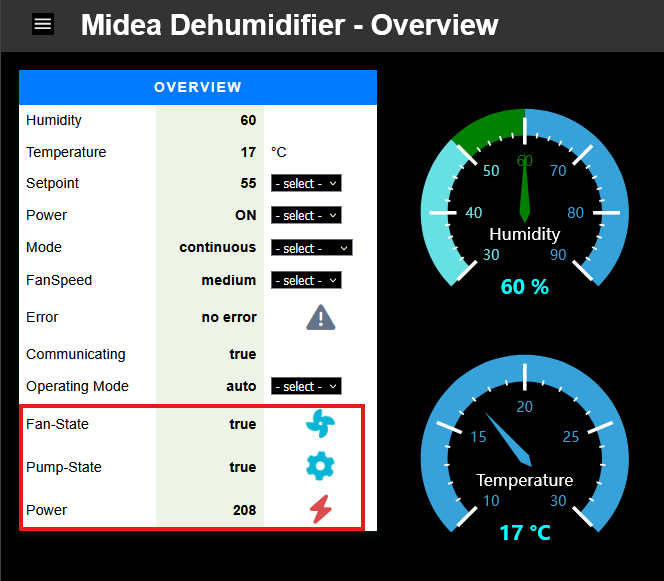
Thanks to the hard work of @CDank

Everything remains 100% local and ESPHome-native — no MQTT or cloud required.

Full details and updated YAML example are in the main post above.
— Chreece

Thank you for providing your solution.

I’ve been working on the same issue for a few weeks now.

My skills for integrating it into Esphome aren’t yet sufficient.

Therefore, I started my project with Tasmota with Berry

I wanted to point out that the dehumidifier also provides temperature in addition to relative humidity.

An excerpt from my code

humidity = buffer[26]
temperature = (buffer[27] - 50) / 2.0

John

1 Like

Nice, thank you, I will try it on my device.

I started using Tasmota for my tuya devices but I switched to esphome and migrated everything.

But your approach is still useful for the Tasmota fans

Edit: I wouldn’t use the temperature / humidity values from the device for anything. They are very unreliable.

Temperature is also included now. The device reports only integer number.
Have you also found the byte to silence the beep sounds on the device?

No, unfortunately not. But I had the problem that the wireless LED went out after a few minutes.

Should the LED stay on? Mine hasn’t any wifi led

There is a message that you can send to the device which includes info about connection, have implemented that?

void MideaDehumComponent::updateAndSendNetworkStatus() {
  memset(networkStatus, 0, sizeof(networkStatus));

  auto *wifi = wifi::global_wifi_component;
  bool connected = wifi->is_connected();

  // Byte 0: module type (Wi-Fi)
  networkStatus[0] = 0x01;

  // Byte 1: Wi-Fi mode
  networkStatus[1] = connected ? 0x01 : 0x02;  // 0x01 = Client, 0x02 = Config

  // Byte 2: Wi-Fi signal strength
  float rssi = wifi->wifi_rssi();
  if (std::isnan(rssi)) {
    networkStatus[2] = 0xFF;
  } else if (rssi > -50) {
    networkStatus[2] = 0x04;  // Strong
  } else if (rssi > -60) {
    networkStatus[2] = 0x03;  // Medium
  } else if (rssi > -70) {
    networkStatus[2] = 0x02;  // Low
  } else if (rssi > -80) {
    networkStatus[2] = 0x01;  // Weak
  } else {
    networkStatus[2] = 0x00;  // No signal
  }

  if (connected) {
    networkStatus[3] = 1;
    networkStatus[4] = 0;
    networkStatus[5] = 0;
    networkStatus[6] = 127;
  } else {
    networkStatus[3] = networkStatus[4] = networkStatus[5] = networkStatus[6] = 0;
  }

  // Byte 7: RF signal (not used)
  networkStatus[7] = 0xFF;

  // Byte 8: router status
  networkStatus[8] = connected ? 0x00 : 0x01;

  // Byte 9: cloud
  networkStatus[9] = connected ? 0x00 : 0x01;

  // Byte 10: Direct LAN connection (not applicable)
  networkStatus[10] = 0x00;

  // Byte 11: TCP connection count (not used)
  networkStatus[11] = 0x00;

  this->sendMessage(0x0D, 0x03, 20, networkStatus);
}

this informs the device about the connectivity and status

Thanks for the tip. I also use updateAndSendNetworkStatus().
I call the method every minute.
Since then, the Wi-Fi LED has been stable.

Furthermore I use also a Power-Plug to detect the state of the compressor and fan.


Power > 10 && Power < 100 ==> Fan is running
Power > 100    ==> Fan and compressor are running

The disadvantage of adding the temperature is that if you use the thermostat card you also see this value, which complicates using this card with a dehumidifier. Because you see the temperature first instead of humidity. You can not manipulate the value anyway.

Perhaps this should be a separate sensor in the component and not in the climate part.

Great work by the way, i converted my midea cube 20 effortlessly.

Using a power plug is great idea for monitoring but I wouldn’t include to the firmware because it’s not part of the device. I think I saw somewhere that the compressor power is also included in the Rx packet. I must investigate that

I think removing an element from the firmware because of visual issues in ha, isn’t the best option.
I’m sure you can exclude the entity from thermostat card

I happy that your firmware enabled me to take truly ownership of my device. Now it’s mine why not make it even better? I disagree that it’s ‘just’ a visual issue. The thermostat card is ment to manipulate the temperature and the humidity. I cannot adjust the temperature in my dehumidfier so it is a functional issue. It would be great if temerature would be optional just like the Ion- and swing switch. If that is not posible, technicaly, so be it. Did you choose the climate domain instead of humidifier for that reason?

1 Like