ESPHome component for WaterFurnace Aurora geothermal heat pumps

I have a WaterFurnace 7-Series geothermal heat pump. Like most WaterFurnace owners who want integration with Home Assistant, my options were either the Symphony cloud add-on (with the existing HA cloud integration) or Cody Cutrer’s excellent waterfurnace_aurora Ruby gem, which bridges the heat pump’s maintenance port to MQTT via a Raspberry Pi.

I didn’t want a cloud dependency, and while the Ruby bridge works well, I wanted something that could run on an ESP32 and speak the ESPHome native API directly - no Pi, no MQTT broker in the middle. So I ported the protocol to C++ as an ESPHome custom component.

How it works

WaterFurnace Aurora heat pumps have an RJ45 “AID Tool” port on the ABC board that exposes an RS-485 interface. The protocol is Modbus RTU with some proprietary function codes that allow reading large batches of non-contiguous registers in a single transaction. Cody Cutrer did the hard work of reverse-engineering all of this for the Ruby gem; I just translated it into something an ESP32 can run.

The hardware is straightforward: an ESP32, a MAX485 transceiver module (the kind with exposed DE/RE pins - avoid the “automatic flow control” modules), and a standard Ethernet cable with one end cut off and wired to the transceiver. The repo has wiring diagrams. One thing to be careful of: pins 5-8 on the RJ45 port carry 24VAC - only connect pins 1-4.

What you get

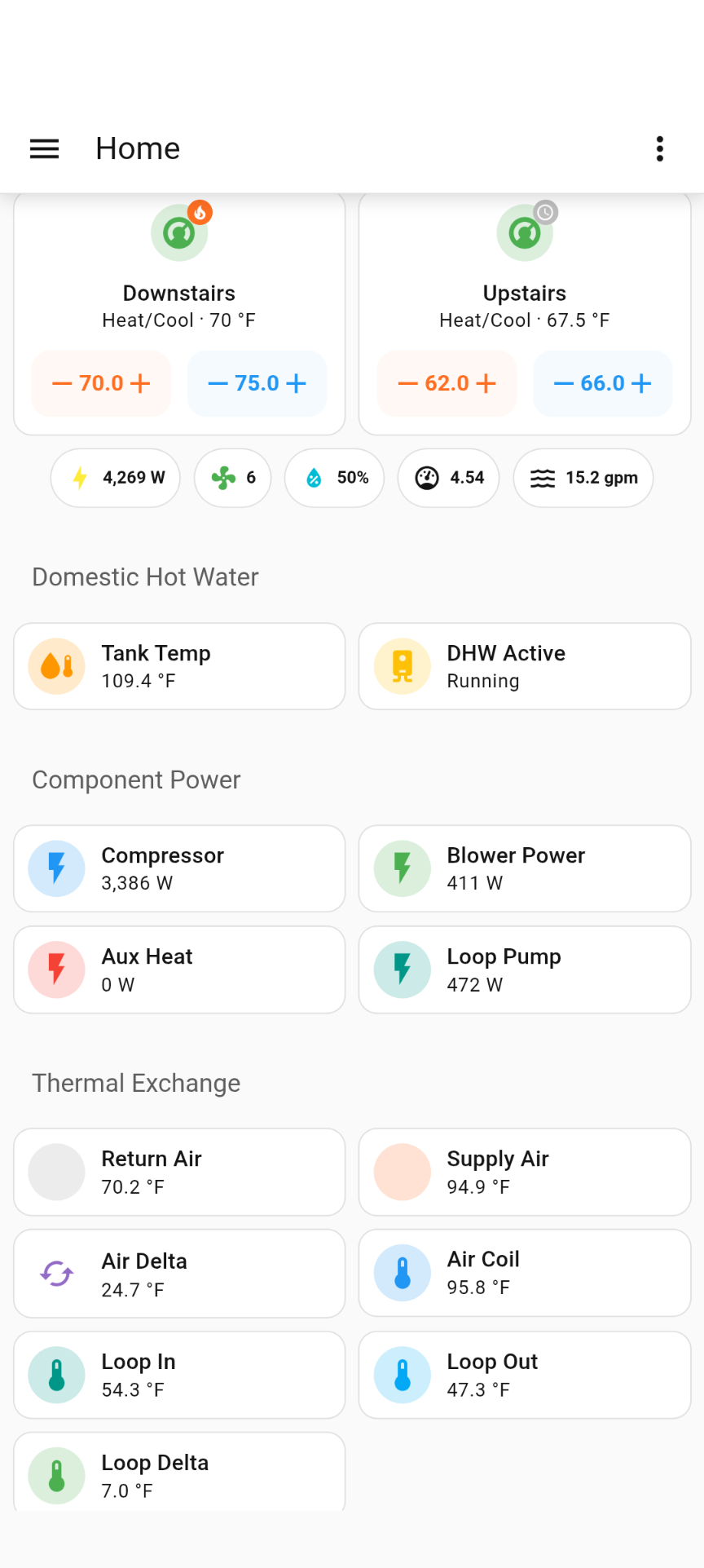
The component gives you a climate entity with full thermostat control (heat, cool, auto, emergency heat, dual setpoints, fan modes). On IntelliZone 2 systems, each zone gets its own climate entity.

Beyond the thermostat, it exposes the wealth of sensor data the heat pump reports - air and water temperatures, compressor speed, power consumption broken down by component (compressor, blower, aux heat, loop pump), refrigeration pressures, water flow rate, COP, and more. There are around 55 sensors, 15 binary sensors, and various controls for things like DHW setpoints, blower speeds, and humidity targets. The full entity list is in the repo docs.

The component auto-detects your hardware configuration at startup - AXB accessory board, variable speed drive, IZ2 zones, blower type, energy monitor level - so the YAML configuration is minimal. Basically just your GPIO pins.

Firmware requirement

Your thermostat firmware needs to be AWL version 3.0 or above for full control access. Older versions will report some sensor data but won’t let you change setpoints or modes. You can check the version in the thermostat’s settings screen; your WaterFurnace dealer can update it if needed.

Energy tracking

The total power usage sensor can be fed into HA’s Riemann Sum Integral helper (kilo prefix, hours for time unit) to get kWh values for the Energy Dashboard. This is useful if you want to evaluate whether your HVAC automations are actually saving energy or just moving consumption around.

Installation

substitutions:
  name: waterfurnace-aurora
  friendly_name: "WaterFurnace"
  uart_tx_pin: GPIO17
  uart_rx_pin: GPIO16
  flow_control_pin: GPIO4
packages:
  waterfurnace.aurora: github://daemonp/esphome_waterfurnace_aurora/waterfurnace_aurora.yaml@master
esphome:
  name: ${name}
  friendly_name: ${friendly_name}
esp32:
  board: esp32dev
  framework:
    type: arduino
logger:
api:
ota:
wifi:
  ssid: !secret wifi_ssid
  password: !secret wifi_password

Help wanted

I’ve been running this on my 7-Series and it’s been stable, but WaterFurnace ships a lot of different configurations and I can only test against what I have. If you have a 3-Series, 5-Series, IZ2 multi-zone setup, or anything else I haven’t been able to test against, I’d genuinely like to hear whether it works correctly - or doesn’t. Issues and pull requests are welcome.

There’s also a 3D-printable project box by @benpeart if you want a tidy enclosure for the hardware.

Documentation and source: github.com/daemonp/esphome_waterfurnace_aurora
1 Like

Nice advancement. I’ve been running Cody Cutrer’s code for multiple years. They say if it ain’t broke don’t fix it, but I might have to give this a try.

The timing on this is ironic — two weeks ago I was looking for an existing ESPHome GitHub project to do exactly this and couldn’t find one, so I ended up building my own solution: GitHub - espforge/esphome-waterfurnace

I’m using the Waveshare ESP32 hardware with built-in RS485, which made the wiring side of things pretty clean. I’m currently in the process of deploying it across 20+ WaterFurnace units, some of which have the iZ2 zoning system. I haven’t had a chance to do a detailed comparison of our two implementations yet, but I plan to. It might be worth combining efforts if there’s significant overlap — I’ll report back once I’ve had a chance to dig in!

I just tried to build this and when I attempt the install on an esp32 I get the error:

INFO ESPHome 2025.12.4
INFO Reading configuration /config/esphome/waterfurance-esp.yaml…
INFO Unable to import component water_heater: No module named ‘esphome.components.water_heater’
Failed config

water_heater: [source /data/packages/83f71a22/waterfurnace_aurora.yaml:123]

  Component not found: water_heater.
  - platform: waterfurnace_aurora
    id: aurora_dhw
    name: Domestic Hot Water
    aurora_id: aurora

Configuration

substitutions:
  name: waterfurance-esp
  friendly_name: "Geothermal Heat Pump"
  # Adjust pins to match your wiring
  uart_tx_pin: GPIO17
  uart_rx_pin: GPIO16
  flow_control_pin: GPIO4

packages:
  waterfurnace.aurora: github://daemonp/esphome_waterfurnace_aurora/waterfurnace_aurora.yaml@master

esphome:
  name: ${name}
  friendly_name: ${friendly_name}

esp32:
  board: esp32dev
  framework:
    type: arduino


# Enable logging
logger:

# Enable Home Assistant API
api:
  encryption:
    key: !secret api_key

ota:
  - platform: esphome
    password: !secret ota_password

wifi:
  ssid: !secret wifi_ssid
  password: !secret wifi_password
  manual_ip:
    static_ip: 192.168.10.202
    gateway: 192.168.10.2
    subnet: 255.255.255.0
    dns1: 192.168.10.2
  # Enable fallback hotspot (captive portal) in case wifi connection fails
  ap:
    ssid: "WaterFurance Wifi Fallback Hotspot"
    password: "Use2Config"

captive_portal:

# Enable Web server.
web_server:
  port: 80

In the ESPHome editor it also shows the error

Component not found: water_heater.

Water heater component was added in ESPHome 2026.1.0 release

Thanks, that fixed it.

Thanks to everyone who’s been testing and providing feedback, it’s been incredibly helpful.

A few things to share:

As @psyko_chewbacca pointed out (and @bkprath confirmed), the water_heater component requires ESPHome 2026.1.0+. If you’re on ESPHome 2025.12.x, you’ll get the Component not found: water_heater error. Upgrading to 2026.1.0 or later resolves this. I’ve also added version-detection code so the component handles the API changes between 2026.1.x and 2026.2+ automatically (no user intervention needed). If you need to stay on an older ESPHome version, you can comment out the water_heater: section in the package and use the legacy switch: + number: entities for DHW control instead.

What’s Landed on master Recently

  • Water Heater entity for DHW: Domestic Hot Water now shows up as a proper Water Heater card in HA with current temp, target setpoint, and mode (Off / Heat Pump), replacing the old separate switch + number approach.
  • Full Climate entity with humidity support: The climate entity now reports current humidity, supports a target humidity slider (mode-aware: humidification in heat modes, dehumidification in cool), dual setpoints in auto mode, and shows Drying as an action during active dehumidification. Emergency Heat is available via the Boost preset.
  • IZ2 multi-zone support: Up to 6 IntelliZone 2 zones, each as its own climate entity with individual temps, setpoints, modes, and fan modes. Zone 1 auto-detects whether it’s running as a standalone thermostat or through IZ2.
  • Hardware auto-detection: AXB accessory board, VS Drive (5/7-Series), IZ2 controller, blower type, energy monitor level, and pump type are all detected automatically at startup. Manual YAML overrides available if needed.
  • Adaptive 3-tier polling: Fast (5s) for temperatures and compressor state, medium (~30s) for equipment config and blower speeds, slow (~5min) for fault history. Keeps RS-485 bus load reasonable.
  • Non-blocking async Modbus: Replaced the original blocking I/O with an async state machine (IDLE → WAITING_RESPONSE → ERROR_BACKOFF), so the ESP32 never stalls waiting for a reply.
  • Humidifier/Dehumidifier mode selects: Auto or Manual for each so climate humidistat controls are seamless

I just stumbled upon this thread as I was search information on troubleshooting my newly configured aurora_mqtt_bridge solution.

I very recently replaced my dead E-Series Geothermal unit with a spanking new GeoSmart PremiumG unit (model S5AV036BD1A12CTR5B00), which is not on the list of supported unit for the “waterfurnace_aurora” project although it’s essentially a WF Series 5. I am able to retreive some sensor data.
But I have missing sensors values:

  • Compressor Heating Liquid Line Temperature
  • Compressor Saturated Condensor Discharge Temperature
  • Heat Pump Entering Water Temperature
  • Heat Pump Leaving Air Temperature
  • Heat Pump Leaving Water Temperatures

All 5 sensors report a value of -999.9 (°F, which converts roughly to -573,3 °C).

I feel there are missing data points as well as when the technician came by and plugged in is AID tool, he could see a list of thermostat signal wires states. I’m running on a Ecobee so I’m using standard HVAC/Furnace wiring. In his AID tool, he could see which signal wire was at what state. He also had a couple of other temperature values not currently reported by ‘waterfunace_aurora’.

My question is the following: Does the ESPHome solution would provide better support for my unit than the ruby-based solution?
Are there there benefits (other than power consumption) to using the ESPHome-based solution over Ccutrer’s ruby-based one?

Thanks.

To answer your direct question first: both solutions read the same Modbus registers from the Aurora ABC board, so the ESPHome component wouldn’t automagically fix the missing sensor values. The -999.9 sentinel values you’re seeing mean the ABC board itself is returning “no data” for those register addresses. That’s the same whether you’re using ccutrer’s Ruby bridge or the WaterFurnace Aurora ESPHome component.

The motivation behind the ESPHome port is more about the platform than the protocol. If you’ve already got a Pi running the Ruby bridge and it’s doing what you need, there’s nothing wrong with sticking with it. It’s really personal preference. For me, where I can, I’d rather have a $5 ESP32 on the wall than another full Linux install I have to maintain, patch, and keep an eye on. And practically speaking, I find SD cards tend to wear out over some number of years, whereas the ESP devices just tick along in the background indefinitely.

So the benefits are down to smaller footprint, zero OS maintenance, native ESPHome/HA integration (entities just appear), and long-term reliability. But if your Pi setup works for you, no pressure to switch.

Now, the more interesting problem: your missing sensors. The registers returning -999.9 are:

  • Heating Liquid Line Temp (register 1109) - AXB board
  • Saturated Condenser Discharge Temp (register 1134) - AXB board
  • Entering Water Temp (register 1111) - AXB board
  • Leaving Water Temp (register 1110) - AXB board
  • Leaving Air Temp (register 900) - main ABC board

Most of these are AXB (accessory board) registers. The -999.9 sentinel means the board is reporting “I don’t have this data” at those addresses. It’s possible the GeoSmart PremiumG maps some of these to different register addresses, or that your unit has a slightly different AXB configuration.

Since your technician’s AID tool can see those temperatures, the data is definitely on the bus. It’s just likely at different addresses than what the standard WaterFurnace register map uses.
I’m happy to add GeoSmart register support if we can figure out the register map for your unit. To do that, we’d need to capture the actual Modbus traffic. Here are a couple of approaches:

  1. Sniff the AID tool traffic - If you can get the technician to come back (or you have access to an AID tool), you could tap the RS-485 bus with a USB-to-RS485 adapter (FTDI or CH340-based, ~$5-10) while the AID tool is connected. Run a Modbus sniffer/logger (something like mbpoll in listen mode, or even just a serial terminal logging raw hex at 19200 baud, 8N1) to capture the requests the AID tool sends and the responses it gets back. That’ll tell us exactly which register addresses hold the data your unit reports.

  2. Register scan/dump - Alternatively, you could do a brute-force scan of register ranges using a simple script over RS-485. Read registers in blocks across the known address ranges (0-1200, 3000-4000) and look for values that aren’t 0x0000 or the -999.9 sentinel (0xD8F1). Comparing those against the known register map would reveal any GeoSmart-specific addresses. I can help put together a script for this if you’re interested.

If you can capture either a traffic dump or a register scan, open an issue on the GitHub repo and we can work through it together. The component is designed to be model-agnostic (it detects hardware features like VS drive, AXB, IZ2 automatically), so adding support for different register mappings is straightforward once we know what they are.